Key Features in Sweet Home 3D 3.4
Released on December 20, 2011, Sweet Home 3D 3.4 introduced significant enhancements to the software. The most notable feature is the ability to manage multiple levels, allowing users to design multi-story homes with ease. Each level can be added via the Plan > Add level menu, and users can switch between levels using tabs displayed at the top of the home plan. This feature also supports intermediate levels, false ceilings, and layers, providing greater flexibility in design.
Another major addition is the automatic creation of staircase cutouts. When a staircase is placed between floors, Sweet Home 3D automatically creates a corresponding hole in the ceiling or floor, accurately reflecting the staircase’s shape. This enhancement simplifies the process of designing realistic multi-level homes.
Additional improvements include enhanced magnetism for walls, easier selection of overlapping objects, and the ability to fine-tune the orientation of imported models. These updates collectively contribute to a more intuitive and efficient home design experience.
This optimization highlights the key features introduced in Sweet Home 3D version 3.4, focusing on multiple level management and staircase cutouts to enhance 3D home design capabilities.
Multiple levels management
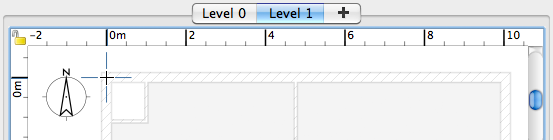
Sweet Home 3D is now able to manage multiple levels, either above the ground, or underground. To create a new level, choose the Plan > Add level menu item. As soon as the home contains more than one level, tabs with their name are displayed at the top of the home plan to let you select the level where items will be drawn. To help you draw the rooms of the upper floor, the walls and ceilings of the lower floor are drawn with a light color and magnetism was greatly improved.
If you want to change the default name or dimensions of a level, you can double click on its tab to edit its attributes with the new level dialog box. This pane presents also the list of existing levels to help you compare home levels to each other.
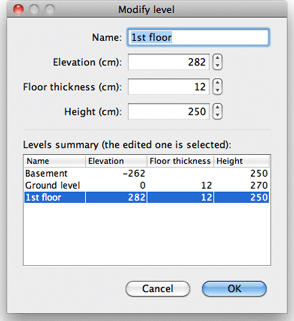
Levels can be used to manage levels on top of each other, but also intermediate levels, false ceilings, false floors or even layers, the list of level tabs being always maintained in the elevation order.

A new house example showing these new capabilities was added to the gallery.
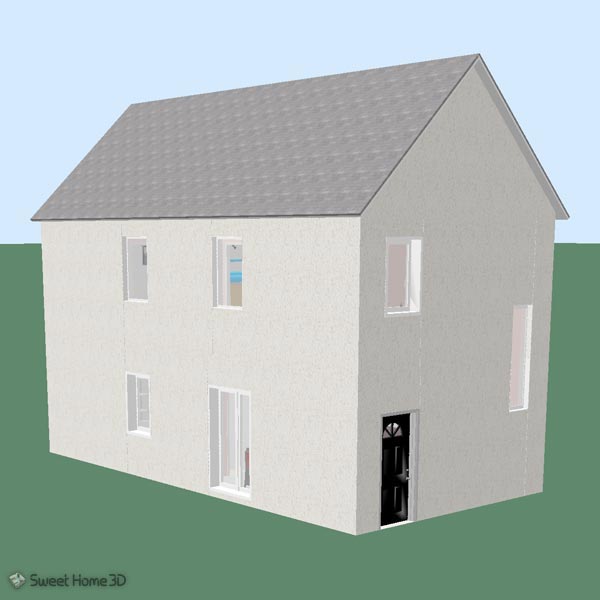
Staircases and levels
Similarly to the ability of windows and doors to automatically compute a hole at their intersection with a wall, staircases are able to make a hole in the ceilings and floors of the upper floors they intersect. For example, the following plan shows a staircase going from the ground floor to the first floor,
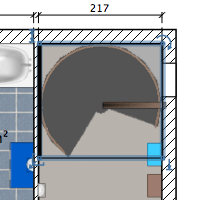
and as the cut out shape of this staircase is round, you’ll get automatically a round cut out in the 1st floor.
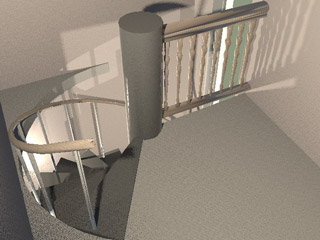
This cut out shape was computed on the 3 staircases of the default catalog and will be updated on an upcoming update of the furniture libraries available for download. When importing a 3D model, you can also select the new Staircase check box in the Furniture import wizard and in the updated Furniture Library Editor.
Sweet Home 3D 3.4. Other features
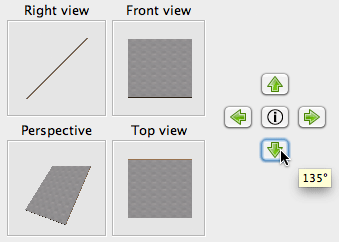
You can now fine tune the orientation of a model in the second step of the Furniture import wizard, if you keep pressed the shift key when you click on the orientation buttons. The I button in the middle resets the orientation.
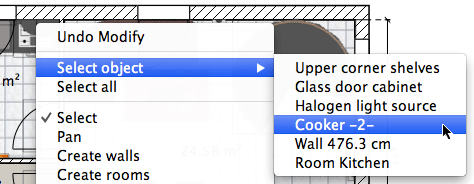
It’s now easier to select an object displayed under other objects in the plan: just right click in the plan at the location of this object and choose it in the Select object contextual menu that appears.
To change quickly the visibility of a piece of furniture, you can also directly click on its check box in the furniture list, and auto completion support was added to Name text fields to help you type faster repetitive names, suggested words coming from previously entered texts.
Different bugs happening in multiple screens environment were corrected, and dragging catalog furniture onto the plan was fixed in the online version when run under Mac OS X or Linux.
Finally, I’d like to thank Westaflex who accepted to finance the multiple levels feature and share it with the community. Many thanks also to Jonas, Anders, Ivica and Göran, a team of Swedish students who tested the new features, as well as to the other contributors of Sweet Home 3D.
Merry Christmas and happy new year 2012 to you all 🙂