|
Sweet Home 3D Forum » List all forums » » Forum: New versions » » » Thread: Sweet Home 3D 3.0 |
||
| Print at Dec 24, 2025, 8:41:35 AM |
|
|
| Posted by whippetsleek at Oct 13, 2010, 11:09:53 PM |
|
Re: Sweet Home 3D 3.0 Pitnounours : I've found out with Sketch models, (and you might have learned this already, so sorry if I am repeating) that if a surface is not a component, all surfaces in Sketch are considered two sided. So when you make a model, you should select the faces not in a component, and reverse the faces, and reapply your texture to avoid losing the texture when exported. Sketch models when exported to dae files have a known bug called xyz battles. It means that if two faces are on the same plane, the program decides which face is the viewable face, and it might not be the face that you want showing. So always try to have either a dominant component, or two faces textured the same if you have to have two faces on the same plane. Puybaret: Thanks for your time and reply, and I found out while discussing this with another modeler, that my latitude and longitude were not correctly assigned in my settings, and that is what was throwing off my sun's position at the time I thought should have been dark. So please forgive any confusion. ![]() ---------------------------------------- ![]() |

| Posted by Puybaret at Oct 17, 2010, 1:32:42 AM |
|
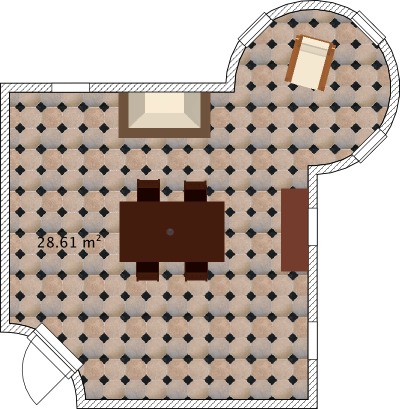
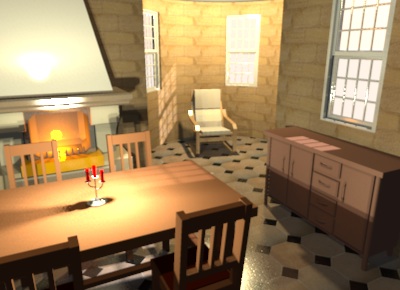
Re: Sweet Home 3D 3.0 It was tough, but I succeeded to add support for round walls in the Beta 13, another long awaited feature... ![]() ![]() In this Beta version, round walls can be drawn only with Wall creation tool, by pressing Ctrl key (Alt key under Mac OS X) during the second click that points out the end of a wall (you can also press Enter + Ctrl or Alt to edit the arc angle with the keyboard). I'll add a Arc extent spinner in the Wall modification dialog later, to let users create round walls afterwards. Meanwhile, please tell me your opinion about this gesture. It's possible to place windows or doors in the round walls but at this moment, you'll have to adjust manually the angle and the depth of the window to make it make a hole in the wall. I suggest you to use first an invisible box to make a hole in the round wall then place the window in that part, like in the example file attached to this message. Try it and you'll understand why, it's not so easy to place automatically... ![]() Phew, I'm tired of trigonometric computing, 2 PI modulos and y inverted axis for a while!!! ![]() ---------------------------------------- ---------------------------------------- Emmanuel Puybaret, Sweet Home 3D creator |
| Posted by Puybaret at Oct 17, 2010, 12:31:35 PM |
|
Re: Sweet Home 3D 3.0 @PtiNounours I found the regression bug. It's fixed in Beta 14. Please confirm it's ok for you. ---------------------------------------- Emmanuel Puybaret, Sweet Home 3D creator |
| Posted by PtiNounours at Oct 17, 2010, 1:13:04 PM |
|
Re: Sweet Home 3D 3.0 Thank you for correcting the texture of the walls. The result is ok. Congratulations to the renderer which is really fast and beautifully rendered. For the round walls, good function. Maybe add the ability to simultaneously shift key and ctrl key? (To remove the magnetism while a wall round) Anyway, good Job Emmanuel |
| Posted by PtiNounours at Oct 17, 2010, 1:23:37 PM |
|
Re: Sweet Home 3D 3.0 Edit: The simultaneous ctrl and shift working. |
| Posted by hansmex at Oct 17, 2010, 1:32:09 PM |
|
Re: Sweet Home 3D 3.0 Emmanuel, Do you mean the bug of the wall that doesn't render correctly, mentioned in this post? The screen shot I posted here still applies. On opening the file provided by PtitNounours, I did a series of renders: Q0-Q3. As before, Q2 gave a white wall. I then did a Q3 which was OK. When I did another Q2 it was okay and both walls were textured. When I then did another Q3 it had a white wall. Etc... etc... To be sure, I closed SH3D and started it again (v3-b14) and the same sequence happened. It seems something is wrong, but it's not very consistent. Hans ---------------------------------------- Hans new website - under constuction hansdirkse.info |
| Posted by PtiNounours at Oct 17, 2010, 2:01:25 PM |
|
Re: Sweet Home 3D 3.0 For the bug that was resolved, it is rendering in 3D view Sweethome not the renderer. For the renderer, I tested a new export SketchUp wall, but this time in version 8. Dae export parameters: Triangulate the faces-active Export-veneer textures active - Other inactive option. I also took care to orient the faces in the right direction. After import in Sweethome 3D renderer in: Q0 all white Q1 all white Q2 sketchup old white wall. new wall to wall SH3D textured sketchup ok Q3 old sketchup white wall. new wall to wall SH3D textured sketchup ok I do not know if this is the beta 14, which fixes this, or version 8 of SketchUp or having put the faces in the right direction, but the result of the renderer is ok in Q2 and Q3. For my part I never use Q0 and Q1; bug lesser extent in my case. I can send the new test file SH3D wall and the wall dae if necessary. |
| Posted by PtiNounours at Oct 17, 2010, 3:40:43 PM |
|
Re: Sweet Home 3D 3.0 Up file test wall: http://www.mediafire.com/file/oazbrk5m1dffckr/test_wall.zip I just saw that render the soil of the last photo with the wall round was brilliant. very nice effect. |
| Posted by hansmex at Oct 17, 2010, 4:52:55 PM |
|
Re: Sweet Home 3D 3.0 And here are the results of the big render lottery: First run: Q0 = 3x correct Q1 = 3x correct Q2 = left is white Q3 = 3x correct Second run Q0 = 3x correct Q1 = 3x correct Q2 = left is white Q3 = left is white Third run = see: first run Fourth run Q0 = 3x correct Q1 = 3x correct Q2 = 3x correct Q3 = left is white Fifth run Q0 = 3x correct Q1 = 3x correct Q2 = 3x correct Q3 = 3x correct Sixth run = see: fifth run Seventh run = see fourth run Have fun!! Hans ---------------------------------------- Hans new website - under constuction hansdirkse.info |
| Posted by PtiNounours at Oct 17, 2010, 5:19:52 PM |
|
Re: Sweet Home 3D 3.0 I think the problem probably comes from the left wall of the right orientation of faces sketchup. it's really strange, but I would be careful about that now. Hans, I see you've textures of the 3 walls Q0 and Q1, I have rarely textures displayed in these two qualities, either in photo or video. Only the colors and not textures are displayed in my home at Q0 and Q1 ![]() |
|
|
|
Current timezone is GMT Dec 24, 2025, 8:41:35 AM |