|
Sweet Home 3D Forum » List all forums » » Forum: New versions » » » Thread: Sweet Home 3D 3.0 |
||
| Print at Dec 24, 2025, 8:51:02 AM |
|
|
| Posted by Puybaret at Oct 13, 2010, 1:25:28 AM |
|
Re: Sweet Home 3D 3.0 Setting walls rendering to shiny has some effect in the 3D view too (turn the wall or the camera and you should see it). If ever you can send me your SH3D file or at least a part of it showing the problem, it will help me to find the bug or the reason of the behavior change. ---------------------------------------- Emmanuel Puybaret, Sweet Home 3D creator |
| Posted by PtiNounours at Oct 13, 2010, 2:15:53 PM |
|
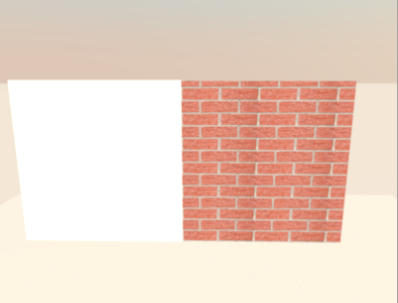
Re: Sweet Home 3D 3.0 I send you a test of a wall with texture. Not knowing how to deposit the file on the forum, I send you by easy-share link: http://www.easy-share.com/1912613178/eTeks_test_texture_wall.zip comprenant: - File-SH3D - Dae files and sketchup - Texture0-(wall) - photos I created with the same texture as a wall and then imported into sketchup SH3D and create a wall directly under SH3D. Results for rendering 3D View of SH3D: v2.6 no difference in staining v3 beta11 SH3D wall (the right) is more clear This difference also comes with copying objects with the plugin 'copy as new furniture', since version 2.6 and open with the version 3 beta 11. Results for rendering Sunflow ok in V3 beta11. |
| Posted by hansmex at Oct 13, 2010, 2:48:03 PM |
|
Re: Sweet Home 3D 3.0 Sebastien, EasyShare? First I have to wait for a button, then I have to wait even longer, than a Captcha... Then it didn't work and now I have to wait at least 15 minutes longer... In my book that's DifficultShare! Why don't you try www.mediafire.com ? Fast, no waiting, you can link pictures directly to the forum, nice interface. THAT is easy share! Hans ---------------------------------------- Hans new website - under constuction hansdirkse.info |
| Posted by PtiNounours at Oct 13, 2010, 6:06:36 PM |
|
Re: Sweet Home 3D 3.0 Up mediafire: http://www.mediafire.com/file/aqj9sbkm3fbjyka/eTeks_test_texture_wall.zip 'DifficultShare' I really laughed; excellent Mediafire |
| Posted by hansmex at Oct 13, 2010, 6:57:10 PM |
|
Re: Sweet Home 3D 3.0 @Sebastien, This is the result your file gives me using v3.0 b12 in quality setting 2 and 3. ![]() @Emmanuel The left part is the imported model; the right part is a wall. Blackmann-Harris = Q2 and Q3 same results as picture above Catmull-Rom = Q2 and Q3 both parts textured; no difference in shading between wall and model Mitchell = Q2 as picture, Q3 both parts textured; no difference in shading Hans ---------------------------------------- Hans new website - under constuction hansdirkse.info |
| Posted by PtiNounours at Oct 13, 2010, 8:13:01 PM |
|
Re: Sweet Home 3D 3.0 When I run repeatedly Q3 and Q4, the object (left)is sometimes with or without texture. _ I conducted another test to see if the renderer does not reverse the faces of the object created in SketchUp. So I textured the 2 sides (face hidden and visible). The result is ok in Q3 and Q4 which displays textures. Q1 and Q2 without texture. _ I also tested with sketchup export (1 side only and not two-sided); same problem. Need texture the 2 sides for renderer. In the 3D view (not renderer), there remains a difference in color between the object and the wall that have the same texture. This difference in color is not present in version 2.6 and has appeared on the latest beta. _ Last test, insert a cabinet and stained with the same texture as the wall. the cabinet is the same color as the object Sketchup. The textures of the walls in the 3D view is clearer that these two objects. The walls therefore have a small problem. In hope that you've understood my bad English ![]() |
| Posted by hansmex at Oct 13, 2010, 8:55:46 PM |
|
Re: Sweet Home 3D 3.0 Sebastien, I checked again, this time with a different texture. What do you think? NO PROBLEMS! So, my conclusion is that there is some problem with your texture. I've read somewhere that it's best to use textures that have a pixel count that's a power of 2. Examples: 128x256 pixels, 256x256 pixels, 256x512, 512x512, etc. There previously has been a problem with very large textures (larger than 2048x2048) but that should have been solved some time ago. Hans ---------------------------------------- Hans new website - under constuction hansdirkse.info |
| Posted by pencilart at Oct 13, 2010, 9:04:48 PM |
|
Re: Sweet Home 3D 3.0 The renderer is looking super nice. It renders fast, like you said, and my new windows (which have 2 different types of glass (frosted and transparent) render beautifully too (you can tell the frosted glass is there). I'm happy with that. |
| Posted by PtiNounours at Oct 13, 2010, 10:49:10 PM |
|
Re: Sweet Home 3D 3.0 I used a texture SH3D and the box furniture. Result: see the 3D view, the texture applied on the walls are brighter than the box. |
| Posted by PtiNounours at Oct 13, 2010, 10:49:38 PM |
|
Re: Sweet Home 3D 3.0 http://www.mediafire.com/i/?c4vo6d75cc6ad31 |
|
|
|
Current timezone is GMT Dec 24, 2025, 8:51:02 AM |