|
Sweet Home 3D Forum » List all forums » » Forum: New versions » » » Thread: Sweet Home 3D 6.0 |
||
| Print at Jan 31, 2026, 8:00:13 AM |
|
|
| Posted by bdfd at Oct 13, 2018, 1:19:07 PM |
Re: Sweet Home 3D 6.0None problem in the 3D view in virtual visitors mode while "walking around", whatever the project. It seems that each PC has own problem. . ---------------------------------------- Evil progresses when good people do nothing! --- SH3D 7.1 and nothing else - W11 64b in 4K |
| Posted by okh at Oct 13, 2018, 7:15:30 PM |
|
Re: Sweet Home 3D 6.0 Congratulations on the release of 6.0. Quite remarkable. Still working my way through all the new features in different settings. Only significant problem is that I have to redesign my sky textures and models completely... . So, THANKS!As for processor usage: Except when testing with giant sky textures, I have not noticed any slowdown with 6.0 under Windows. Compared to previous versions, it seems pretty similar to me. I (mostly) run SH3D on a slow computer with no extra headroom, but as long as I stay away from too big models and to much creative use of light, 6.0 seems pretty quick to me. In fact, I am pleasantly surprised that the richness in features work without noticeable slowdown. But yes, in certain circumstances, SH3D will grab every resource available. Just like other software when doing certain tasks. ok |
| Posted by Mike53 at Oct 14, 2018, 1:56:38 PM |
|
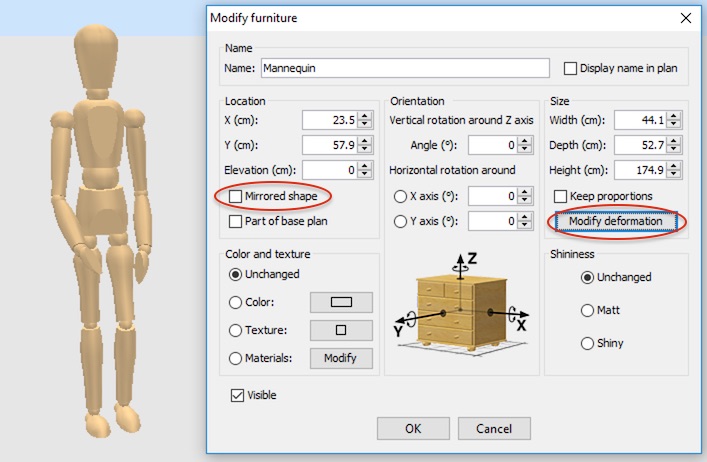
Re: Sweet Home 3D 6.0 Hi As usual i am missing something, i dont see how to make an object that can be deformed, the window obj's i have made recently do not have this :- ![]() All help welcome Mike |
| Posted by Puybaret at Oct 14, 2018, 4:57:48 PM |
|
Re: Sweet Home 3D 6.0 Thank you all for your feedback. It’s possible that the GPU has more work in this version because of the lighter management of the frustum front and back distances, but this should also lead to more fluid moves in the 3D view. Mike, your own 3D models can’t be deformed without modification. Please read this post for more information. ---------------------------------------- Emmanuel Puybaret, Sweet Home 3D creator |
| Posted by Mike53 at Oct 14, 2018, 8:46:19 PM |
|
Re: Sweet Home 3D 6.0 Hi Emmanuel Thx for the response, i did see the topic but the pictures did not fully explain it and unfortunately its all written in greek, as is the topic about showing the sash openings, so i guess i'll just use groups. Mike |
| Posted by UbuntuBirdy at Oct 15, 2018, 11:46:30 PM |
|
Re: Sweet Home 3D 6.0 ... but this should also lead to more fluid moves in the 3D view. I compared this in 5.7 and 6.0 and I have to say yes, in 6.0 there is way less stumbling while walking around with the virtual visitor! I rarely use the virtual visitor, but that could change now... ---------------------------------------- Pascal SH3D 6.6 / Ubuntu 22.04 (Mainline-Kernel) / Radeon RX580 / Ryzen 7 5800x |
| Posted by alaX at Oct 16, 2018, 10:06:16 PM |
|
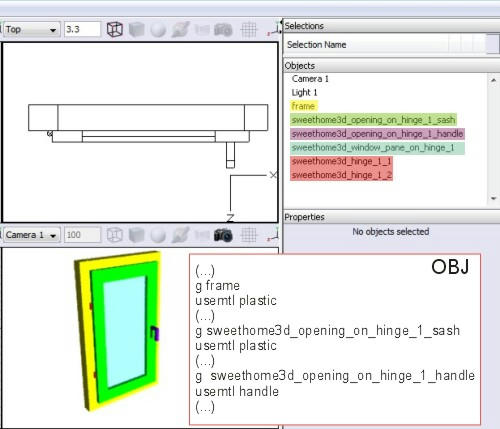
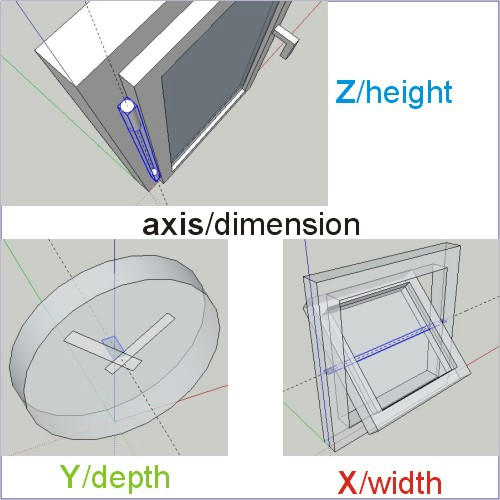
Re: Sweet Home 3D 6.0 @Mike53 I'm not sure what sort of pictures or description you expect... ![]() Why some groups share "sweethome3d_opening_on_hinge_1_" and differ in last phrase? That's because all of them are supposed to rotate around the same hinge at the same time but each one has different material aplied (they can't make one group) "Sweethome3d_window_pane_on_hinge_1" is special prefix - combination of "sweethome3d_window_pane" and "sweethome3d_opening_on_hinge_1" Why hinges with the same color are not in one group? Because they are not connected and probably would be exported as separate groups anyway - it depends on modeling software you use. They could make one group as well. Hinges (visible or hidden) should be centered on axis of rotation parallel to height, width or depth of your model (assuming it's oriented properly to axes X,Y and Z). The largest dimension of all selcted/grouped objects making one hinge should be oriented along that axis/dimension. ![]() |
| Posted by dorin at Oct 22, 2018, 8:31:35 PM |
|
Re: Sweet Home 3D 6.0 @Mike53 ... i don't see how to make an object that can be deformed, the window obj's i have made recently do not have this Your personal objects will be "deformed" after You've add the specific prefixes like Emmanuel and alaX explained. I've do this also with my doors and I try to do for most of the furniture from Contribution furniture. For more help I'am available for You on mail. ---------------------------------------- A computer program does what you tell it to do, not what you want it to do. Murphy's Law When all else fails, read the instructions. Murphy's Law If you don't like "AS IS", DIY. Dorin's law |
| Posted by Mike53 at Oct 28, 2018, 10:20:35 PM |
|
Re: Sweet Home 3D 6.0 Thank you Dorin i may take you up on the offer. I still don't know if "modify deformation" gets added during the process of making the object or if it needs to be a library item 1st .... is the "modification" made in the mtl or object file ... is it made with the library editor or similar.. lots of don't knows. Thanks for the offer, it is much appreciated. Mike |
| Posted by dorin at Oct 29, 2018, 9:18:26 AM |
|
Re: Sweet Home 3D 6.0 You must modify the obj file. (with Notepad++/ ArtOfIllusion/ Blender). Rename the moving part with new prefixes. e.g. You have a door and hinge objects name; rename hinge to hinge_1 and door to sweethome3d_opening_on_hinge_1_door Save and import. I will tray to do this directly from SH3D when I'll have some time to test. At that moment I don't know other way. ---------------------------------------- A computer program does what you tell it to do, not what you want it to do. Murphy's Law When all else fails, read the instructions. Murphy's Law If you don't like "AS IS", DIY. Dorin's law |
|
|
|
Current timezone is GMT Jan 31, 2026, 8:00:13 AM |