|
Sweet Home 3D Forum » List all forums » » Forum: New versions » » » Thread: Sweet Home 3D 6.0 |
||
| Print at Jan 31, 2026, 4:43:12 AM |
|
|
| Posted by enkonyito at Sep 23, 2018, 9:30:49 PM |
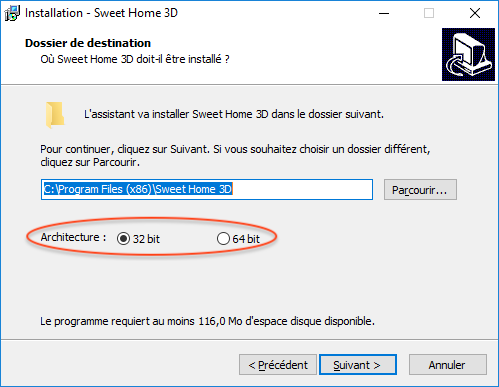
Re: Sweet Home 3D 6.0 Under Windows 10 64 bit, the 32 bit option is selected by default in the hope it will solve the problems of people who can't run Sweet Home 3D. So, pay attention to this option if you want to run Sweet Home 3D 64 bit under Windows 10. Under my Windows 10 64 bit, Sweet Home 3D version 6.0 (x64) is installed directly in the directory "C:\Program Files (x86)" without possibility to choose the architecture if Sweet Home 3D version 5.7 (x64) is already present in the "C:\Program Files" or "C:\Program Files (x86)" directory. ---------------------------------------- EnkoNyito |
| Posted by YGYL at Sep 23, 2018, 10:08:24 PM |
|
Re: Sweet Home 3D 6.0 Tonight, the Beta 11 If there is an old version, there will be no 32BIT/64BIT option. |
| Posted by Puybaret at Sep 24, 2018, 3:03:46 AM |
|
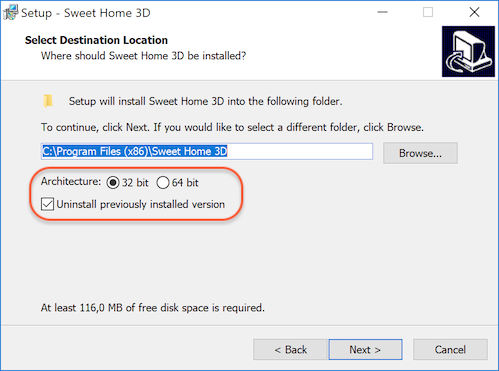
Re: Sweet Home 3D 6.0 Thanks for your tests. I updated Windows installer to always display the installation folder screen with an additional option to uninstall the previously installed version. Download it from SweetHome3D-6.0.beta12-windows.exe (51 MB) ![]() ---------------------------------------- Emmanuel Puybaret, Sweet Home 3D creator |
| Posted by bdfd at Sep 24, 2018, 7:49:56 AM |
Re: Sweet Home 3D 6.0Good idea for newbies ! None problem for me with this beta 12 ! . ---------------------------------------- Evil progresses when good people do nothing! --- SH3D 7.1 and nothing else - W11 64b in 4K |
| Posted by YGYL at Sep 24, 2018, 12:30:23 PM |
|
Re: Sweet Home 3D 6.0 I think of an important thing In the software setup interface or software installation interface, add a memory size setting option. just like SweetHome3D.l4j.ini The default use of 0.9G in software 32 is very small, and the 64 bit 4G is too small.Slightly more complicated rendering requires 10G's memory usage. |
| Posted by Ceciliabr at Sep 24, 2018, 12:56:34 PM |
|
Re: Sweet Home 3D 6.0 Great! I love this version. Just one question: Is max mem 14.2 Gb? Cec |
| Posted by Puybaret at Sep 24, 2018, 1:37:17 PM |
|
Re: Sweet Home 3D 6.0 In the software setup interface or software installation interface, add a memory size setting option. Maybe in a future version...just like SweetHome3D.l4j.ini The default use of 0.9G in software 32 is very small, and the 64 bit 4G is too small. In 32 bit, a higher value won't work. In 64 bit, the default max is half of the available RAM.Is max mem 14.2 Gb? When run in 64 bit, the working limit must be the RAM size available on your computer when Sweet Home 3D runs.---------------------------------------- Emmanuel Puybaret, Sweet Home 3D creator |
| Posted by hansmex at Sep 24, 2018, 1:50:19 PM |
|
Re: Sweet Home 3D 6.0 To all <?> Ubuntu users who have problems running the beta version. Thanks to the help of UbuntuBirdy I now can try the beta version 6. Here are the program lines you need: [Desktop Entry]Note the following: - you can change the Name and GenericName to whatever you like - you can leave out the Comment lines - you can change [de] and [de-CH] to your own language - in the path names change "hans" to your own user name - make sure that the path name /SweetHome3D-beta611/ points correctly to your file (name and location) - open a Text Editor and copy the above text - save and name the file xxx.desktop where xxx is the name you want - then copy the script to /home/hans/.local/share/applications/ - this is a hidden file, so you need to do CTRL-H to show the file - under the start button, type SW and SH3D should show up Thank you very much Birdy!!! H ---------------------------------------- Hans new website - under constuction hansdirkse.info |
| Posted by alaX at Sep 24, 2018, 6:55:15 PM |
|
Re: Sweet Home 3D 6.0 So many new great features - oh, Emmanuel, please don't stop Due to "3d error" I had to install 6.0 beta 11 with "j3d.version=1.5.2" (Win 7, 32bit) and now it works nice. |
| Posted by UbuntuBirdy at Sep 25, 2018, 12:07:15 AM |
|
Re: Sweet Home 3D 6.0 Thank you very much Birdy!!! H Glad I could help you, Hans. There are two great programming highlights since time immemorial: once Linux and of course SweetHome3D! The result is a law of the universe: who's able to use SweetHome3D on a Linux-System, will be happy! And of course I will try to make as many people happy as possible by showing them how to use SweetHome3D on Linux. A humble servant of the universe Pascal ---------------------------------------- Pascal SH3D 6.6 / Ubuntu 22.04 (Mainline-Kernel) / Radeon RX580 / Ryzen 7 5800x |
|
|
|
Current timezone is GMT Jan 31, 2026, 4:43:12 AM |