Thank you all, the dark background will be chosen.

Here is the preview of the png file in an image editor.

Enko
----------------------------------------
EnkoNyito
|
Sweet Home 3D Forum » List all forums » » Forum: Sweet Home 3D bar » » » Thread: Photo rendering test |
||
| Print at Sep 20, 2026, 2:42:56 AM |
|
|
| Posted by hansmex at Aug 22, 2019, 9:43:44 AM |
|
Re: Photo rendering test I prefer the darker background. ---------------------------------------- Hans Ryzen 7-9700X, 32 GB RAM, 500 GB SSD, 2x 2 TB SSD, Geforce GTX 1060 3 GB |
| Posted by ndorigatti at Aug 22, 2019, 10:15:31 AM |
|
Re: Photo rendering test Dark One! |
| Posted by UbuntuBirdy at Aug 22, 2019, 6:12:51 PM |
|
Re: Photo rendering test For me the dark one is the one to go with. ---------------------------------------- Pascal SH3D 6.6 / Ubuntu 22.04 (Mainline-Kernel) / Radeon RX580 / Ryzen 7 5800x |
| Posted by enkonyito at Aug 23, 2019, 4:52:32 AM |
|
Re: Photo rendering test Thank you all, the dark background will be chosen. Here is the preview of the png file in an image editor. Enko ---------------------------------------- EnkoNyito |
| Posted by maureenowaters at Oct 16, 2019, 10:31:58 AM |
|
Re: Photo rendering test Here is another image I made of my friend's new bathroom I create in style of 50's. There is no trick here. It's a combination of IPR and indirect light... I am happy that it is really possible to create very photorealistic pictures here with 1.3.1 renderer... settings here... GI path DB 1 algorythm IPR picture size 6000x4000px then resized to 1000x667px time rendering 13 hours 30 minutes 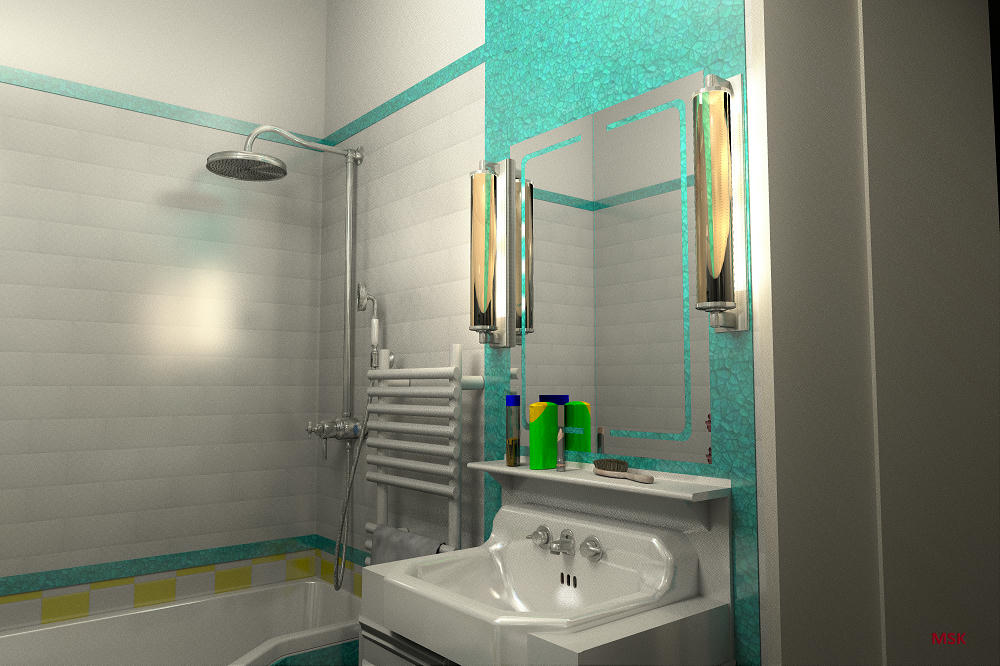 So beautiful design guys. Thanks for sharing. |
| Posted by maureenowaters at Nov 2, 2019, 5:11:53 AM |
|
Re: Photo rendering test I think first one is better than the others. |
| Posted by AliAhsan at Dec 20, 2019, 8:15:08 AM |
|
Re: Photo rendering test I like the first image. It clearly shows the different effects of light near the bottle and the glass. It looks pretty much realistic. However, the colour of the door looks much better in the 3rd image. |
| Posted by enkonyito at Mar 28, 2020, 8:56:40 PM |
|
Re: Photo rendering test This test concerns YafaRay transparent materials and shadow depth.     With a shadow depth of 16, the shadow of transparent objects appears less dark in places. (good) For the rough_glass material, the shadow remains transparent instead of being translucent and the rendering is longer. (not good) Enko ---------------------------------------- EnkoNyito |
| Posted by enkonyito at Apr 26, 2020, 9:28:17 PM |
|
Re: Photo rendering test There is a link between anti-aliasing and sampling. In SunFlow, the anti-aliasing values range from 0 to 5, which corresponds to sampling values from 1 to 1024. In YafaRay, the sampling values corresponding to anti-aliasing are also a multiplication factor. Examples of YafaRay renderings with their anti-aliasing samples mulitplied to those of the sun, ambient occlusion, path tracing, ibl or skylight. AAminSamples 16, sunSamples 8, AOsamples 1, pathSamples 8    AAminSamples 16, iblSamples 16, pathSamples 2   AAminSamples 16, skylightSamples 32, pathSamples 2   ---------------------------------------- EnkoNyito |
|

|
Current timezone is GMT Sep 20, 2026, 2:42:56 AM |