Print at Feb 3, 2026, 6:47:17 AM
Posts: 69   Pages: 7   [ Previous Page | 1 2 3 4 5 6 7 | Next Page ]
View all posts in this thread on one page
Posted by Ceciliabr at Jun 26, 2018, 3:02:04 PM
Re: Photo rendering test
@ enkonyito

I think this is a very good solution!


Cec

Posted by enkonyito at Jun 26, 2018, 9:28:01 PM
Re: Photo rendering test
@Ceciliabr

Unfortunately, the plug-in can not be at the same time compatible with the standard version of SH3D and take into account this feature (adjustable ceiling light power) in the derived version. sad

PS: The plug-in and the derived version of SH3D will be able to use a light panel as ceiling light.
----------------------------------------
EnkoNyito

Posted by Mike53 at Jun 26, 2018, 11:27:29 PM
Re: Photo rendering test
Love these lights Enkonyito, like Hans, i have them pointing up at low power, and, as if by magic, white ceilings, thank for that. Still no idea about all the version numbers and abbreviations mean, but then, i have never even changed anything in the advanced settings for the rendering tools, so its not an issue. i look forward to your final versions, if there can be such a thing.
thank you again
Mike

Posted by enkonyito at Mar 15, 2019, 12:06:04 AM
Re: Photo rendering test
Hi all !

I propose you to test a feature that automatically adds ambient lighting instead of a room's ceiling light.

With silk shader


With glossy shader


Don't hesitate to say what you think.
----------------------------------------
Attachment PVR-1.7betaTest2.sh3p (326785 bytes) (Download count: 172896) ((automatically adds ambient lighting))

----------------------------------------
Attachment PVR-1.7betaTest2.sh3p (326545 bytes) (Download count: 172496)

----------------------------------------
EnkoNyito

Posted by ndorigatti at Mar 15, 2019, 9:23:35 AM
Re: Photo rendering test
May I vote about 10 times?
In any case, YES!!!
I've never used ceiling lights, but I will for sure use this option!

Posted by hansmex at Mar 15, 2019, 10:06:28 AM
Re: Photo rendering test
Hello Enko,

After playing a bit with this beta version, I have a few questions:
1 - The amount of light is quite low. Is there a way to increase it?
2 - Where is the light source placed? Where do the shadows originate?
3 - What is the difference with a (large) light source placed in the (middle of) the room?

Thanks for your efforts!

H
----------------------------------------
Hans

new website - under constuction
hansdirkse.info

Posted by UbuntuBirdy at Mar 15, 2019, 12:48:23 PM
Re: Photo rendering test
I often use ceiling lights, but I'm never really happy with the result...
And now you give us ambient light - and I'm happy!

But as Hans mentioned, the amount of light is quite low. Would be great if we could adjust that value.
----------------------------------------
Pascal

SH3D 6.6 / Ubuntu 22.04 (Mainline-Kernel) / Radeon RX580 / Ryzen 7 5800x

Posted by Mike53 at Mar 15, 2019, 7:01:07 PM
Re: Photo rendering test
This sounds excellent, agree with Hans's points, the brightness is down to personal opinion, but, i do wonder if it's possible, at the level you have shown, could it be linked to the time of day, eg, your example = 8AM, probably means a lot of work, i have no idea, may work though.

Mike

Posted by enkonyito at Mar 15, 2019, 7:35:14 PM
Re: Photo rendering test
Glad to see the interest you all have for this option!


...could it be linked to the time of day...
Like the light panel - daylight? Yes, but the interest of ambient lighting is that it works day and night.


1 - The amount of light is quite low. Is there a way to increase it?
2 - Where is the light source placed? Where do the shadows originate?
3 - What is the difference with a (large) light source placed in the (middle of) the room?

In the part of the source code managing the ceiling light of the rooms, I replaced this treatment using a light sphere
float power = (float)Math.sqrt(room.getArea()) / 3;
this.sunflow.parameter("radiance", null,
power * (ceillingLightColor >> 16) / 0xD0 * (this.homeLightColor >> 16) / 255,
power * ((ceillingLightColor >> 8) & 0xFF) / 0xD0 * ((this.homeLightColor >> 8) & 0xFF) / 255,
power * (ceillingLightColor & 0xFF) / 0xD0 * (this.homeLightColor & 0xFF) / 255);
this.sunflow.parameter("center", new Point3(xCenter, roomHeight - 25, yCenter));
this.sunflow.parameter("radius", 20f);
this.sunflow.parameter("samples", 4);
this.sunflow.light(UUID.randomUUID().toString(), "sphere");
by this one using 2 light panels
float roomAreaInSquareMeter = room.getArea() / 10000;
float power = (float) Math.sqrt(roomAreaInSquareMeter) / 4; // TEST
float panelSize = (float) Math.sqrt(room.getArea()) / 4; // dimension in cm
// face-down panel
float illuminatingFaceElevation = roomHeight;
float[] verticesCoordinates1 = {xCenter - (panelSize / 2), illuminatingFaceElevation, yCenter - (panelSize / 2),
xCenter + (panelSize / 2), illuminatingFaceElevation, yCenter - (panelSize / 2),
xCenter + (panelSize / 2), illuminatingFaceElevation, yCenter + (panelSize / 2),
xCenter - (panelSize / 2), illuminatingFaceElevation, yCenter + (panelSize / 2)};
addLightPanelsToSunflow(power, ceillingLightColor, verticesCoordinates1);
// face-up panel
power = power / 4;
panelSize = (float) Math.sqrt(room.getArea()) / 2; // dimension in cm
illuminatingFaceElevation = roomElevation;
float[] verticesCoordinates2 = {xCenter - (panelSize / 2), illuminatingFaceElevation, yCenter + (panelSize / 2),
xCenter + (panelSize / 2), illuminatingFaceElevation, yCenter + (panelSize / 2),
xCenter + (panelSize / 2), illuminatingFaceElevation, yCenter - (panelSize / 2),
xCenter - (panelSize / 2), illuminatingFaceElevation, yCenter - (panelSize / 2)};
addLightPanelsToSunflow(power, ceillingLightColor, verticesCoordinates2);

In both cases, the power is based on the area of ​​the room.

The main difference between a large light sphere and light panels is that they can be placed very close to an object and project much softer shadows.
That's why I chose the solution of a medium panel on the ceiling and a panel 4 times bigger on the floor with a power 4 times smaller. This gives the impression that light comes from all sides.

I updated the download link with a version using the "maximum" power.

It would be possible to manually change the power of the ambient lighting with radio buttons or a slider but it would be necessary to see the impact that it could have on the interface of photo rendering.

Enko
----------------------------------------
EnkoNyito

Posted by hansmex at Mar 16, 2019, 9:21:41 AM
Re: Photo rendering test


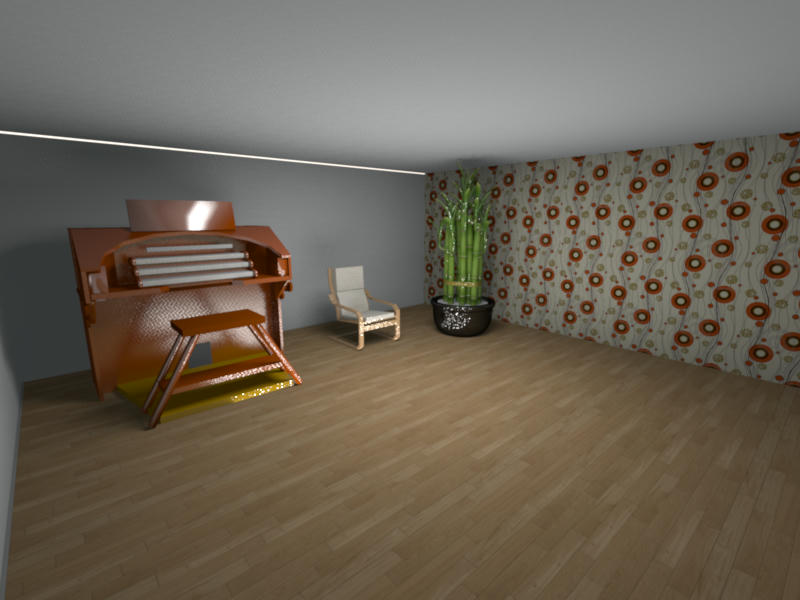
This is the result of a quick test of version 2. The level of illumination is now very usable as a kind of basic lighting.
Unfortunately there is a white line along the ceiling.
I think a way to set the lighting level is needed, preferably numerical (1-100?).

H
----------------------------------------
Hans

new website - under constuction
hansdirkse.info

Posts: 69   Pages: 7   [ Previous Page | 1 2 3 4 5 6 7 | Next Page ]