|
Sweet Home 3D Forum » List all forums » » Forum: New versions » » » Thread: Sweet Home 3D 4.2 |
|
| Print at Feb 5, 2026, 3:44:49 PM | |
| Posted by Puybaret at Oct 6, 2013, 2:19:28 AM |
|
Sweet Home 3D 4.2 Hi, I'm happy to present you the first public beta version of Sweet Home 3D 4.2 that you can test with Java Web Start. This Java Web Start version works under Windows, under Ubuntu with IcedTea Java, but still not under Mac OS X (but I have god hopes that it will work for final release). Even if it probably won't bring any change in the user interface, I will still add some long awaited internal features. The first one is the support for non rectangular doors and windows: ![]() As the previous image shows, this includes support for various shapes (even the most weird ones), superimposed windows, slopping walls and textures. By default, the shape of doors and windows is guessed from the contour of the 3D model of the door or window, but it can be also any shape described with the new doorOrWindowCutOutShape furniture catalog property. The default catalog counts 4 new items: a round door frame, a round window, an half round window and a triangle window. This new feature will work only when the door or window is parallel to the wall and thus, won't work for round walls. In that case, the surface around it will remain empty as in previous versions. Note also that the surrounding rectangle of such doors and windows shouldn't overlap an other one as shown in the following image: But even in that case, there's a workaround which consists of exporting the two windows as one shape at OBJ format and reimporting the OBJ file as one window: ![]() This first beta fixes also a few bugs like rendering issues for mirrored windows and staircase missing in the plan when its height is equal to level elevation. [Note from developer: Sweet Home 3D 4.2 was released on October 30, 2013] ---------------------------------------- Emmanuel Puybaret, Sweet Home 3D creator |

| Posted by hansmex at Oct 6, 2013, 2:33:06 AM |
|
Re: Sweet Home 3D 4.2 Well, well... you've been busy! Sounds really nice! Thanks a lot. EDIT I've done some quick testing and I found one, maybe two problems. In the attached file you can see three rounded doors that I found in the Sketchup Warehouse. Two have the correct opening, the third has a square opening. It may be a problem with the model, and not with SH3D. The second (and real) problem is the invisible box (see furniture list). It doesn't show at all. I use it quite often to make a hole in wall, but it's completely absent now. Hans ---------------------------------------- Hans new website - under constuction hansdirkse.info |
| Posted by Puybaret at Oct 6, 2013, 12:30:54 PM |
|
Re: Sweet Home 3D 4.2 Hans, many thanks for your feedback and your tests. ![]() The 3D model that causes some problems in the file you posted contains a lot of vertices, and to avoid killing performances, I chose to stop the search of the window surrounding shape if its model have more than 10000 vertices. Maybe I should increase that number if this is the case of many models available on the web, but I would prefer that users describe the shape of the door with the new doorOrWindowCutOutShape property in a SH3F file. I know that the SVG path syntax isn't so easy but it's very handy and short, as shown in these examples. About the invisible box, please update to the beta 2 version. ---------------------------------------- Emmanuel Puybaret, Sweet Home 3D creator |
| Posted by hansmex at Oct 6, 2013, 3:09:12 PM |
|
Re: Sweet Home 3D 4.2 Emmanuel, To do some further testing, I downloaded a few models from the Sketchup Warehouse. Some large, some small; some had to be converted from SKP to DAE. You can see the results in the attached file. Doors #1 and #5 (from left) don't insert properly. I noticed this behaviour also in one of the doors in my first test file. All in all, 5 out of 9 doors/windows do not create the correct opening. I noticed that #8 initially inserted correctly, but on re-opening the file also showed a square wall opening. You have always tried to keep the user interface as simpel and intuitive as possible. Several features that users asked for have not been implemented because you feared the program would become too complex for the average user. Asking users to define an SVG path, in my opinion, is far beyond the capabilities of most users. It certainly is beyond my capabilities. In that light, you may want to reconsider increasing the maximum number of vertices. If you can make a "private update", I would be happy to time the speed difference between, say, 10K, 25K and 50K vertices. Hans ---------------------------------------- Hans new website - under constuction hansdirkse.info |
| Posted by hal9000 at Oct 7, 2013, 11:11:57 AM |
|
Re: Sweet Home 3D 4.2 Good! New things coming. I have a suggestion for the problem with the number of vertices. What if that contour calculation is done just once, when the shape is imported into the library or inserted inside the house, and stored then as cached additional data for the model? Or is this being done that way already? ---------------------------------------- If a long walk every day were healthy, mailmen would be immortal. ![]() |
| Posted by Sajmmon at Oct 8, 2013, 11:04:04 AM |
|
Re: Sweet Home 3D 4.2 Q: SVG editing has to be performed prior to importing a model? I need to create a library with the model and add its shape in FurnitureProperties, am I right? |
| Posted by Puybaret at Oct 8, 2013, 9:10:31 PM |
|
Re: Sweet Home 3D 4.2 You have always tried to keep the user interface as simple and intuitive as possible. [...] Asking users to define an SVG path, in my opinion, is far beyond the capabilities of most users. I perfectly agree and that's why I propose two ways to get the cut out shape of a door: automatic from the 3D model or with a SVG path. Miserably, the automatic way has some limits that you may have not discovered and that the SVG path can fix. For example, if you try to import the Round door frame, you'll see that it won't work correctly because the frame is not closed at its bottom. [...]I would be happy to time the speed difference between, say, 10K, 25K and 50K vertices. Thanks for your nice proposal, but measuring this directly in the program is easier and more accurate. ![]() In the example you provided, the time necessary to compute the contour of the 3D models it contains was the following: t = 2 ms for 2604 vertices t = 3 ms for 3429 vertices t = 61 ms for 5984 vertices t = 73 ms for 3873 vertices t = 116 ms for 211656 vertices t = 153 ms for 59268 vertices t = 198 ms for 66311 vertices t = 605 ms for 13080 vertices t = 625 ms for 114630 vertices As you can see, the more vertices a 3D model counts, the more time is necessary to compute its contour. But the 3D model with the largest vertices count is not the one that took the most time! Anyway, I increased the max vertices count to 1 million in the current beta, but keep in mind that if you want to reduce this contour computing to 0 second, you can still specify the doorOrWindowCutOutShape property. I noted that there are still some problems with some round doors too, that I'll fix soon. What if that contour calculation is done just once, when the shape is imported into the library or inserted inside the house, and stored then as cached additional data for the model? I already introduced some kind of cache for cut out shapes. It's initialized at the first use of a model in a project or when the file is reopened. It could be improved by saving the cut out shape in files too, but I prefer not to have to program a SVG exporter for this at this moment.Sajmmon, defining the SVG path for the cut out shape has to be specified with the new doorOrWindowCutOutShape# property that you can add for any door or window in the PluginFurnitureCatalog.properties file of a SH3F file. I might add the matching text field in the next version of the Furniture Library Editor if necessary. By the way, the Beta 5 fixes also a bug that prevented to export to SVG under Java 7 / Linux. And thanks to JogAmp team, the beta can work with Java 7u40 under Mac OS X. Many thanks to Sven Gothel for the bugs he fixed recently. At the opposite, I removed support of Java Web Start under Java 6 / Mac OS X, because there's too many bugs that I fear Apple will never fix. Fortunately, these bugs don't happen with Java 6 when Sweet Home 3D is run from its .app bundle or its Jar executable file. ---------------------------------------- Emmanuel Puybaret, Sweet Home 3D creator |
| Posted by hansmex at Oct 8, 2013, 9:44:20 PM |
|
Re: Sweet Home 3D 4.2 Emmanuel, Thanks for your testing and update 5. I revisited the test models I used before, and they perform much better now. However, I noted a difference between a model inserted at floor level, and a model inserted above floor level. At floor level, several models still show a square opening at top. But, as soon as I give the model a slight elevation, the gaps are closed. Strangely enough, when inserting the same model again, SH3D seems to "know" the correct shape of the gap, and now inserts it correctly. Well, if that's all, I can easily live with it. It's a perfect feature that many people will appreciate. Hans ---------------------------------------- Hans new website - under constuction hansdirkse.info |
| Posted by okh at Oct 9, 2013, 12:23:30 PM |
|
Re: Sweet Home 3D 4.2 Fantastic. I notice some oddities (win8) that appear not to be functional (javastart issue?): - undo / redo, - drag-drop furniture (file or catalogue) in plan As for the auto_guess cut_out shape, I am impressed. Preliminary testing shows even strange shapes ( http://advokatredet.no/design/xxxxx.zip ) are cut out correctly. So playing with SVG paths is not really a required skill (but it is not impossible, even if it requires some frustrating trying and failing - mostly failing - to begin with... :-) ). ok |
| Posted by okh at Oct 9, 2013, 2:22:11 PM |
|
Re: Sweet Home 3D 4.2 I might add the matching text field in the next version of the Furniture Library Editor if necessary. Yes, please. Necessary I don't know, but it would be very nice. The more property fields that can be edited from Furniture Library Editor, the better, methinks. (However, I also appreciate the counter argument that it could make the Furniture Library Editor a bit overwhelming.) ok |
| Posted by okh at Oct 9, 2013, 5:53:35 PM |
|
Re: Sweet Home 3D 4.2 Fantastic. I notice some oddities (win8) that appear not to be functional (javastart issue?): - undo / redo, - drag-drop furniture (file or catalogue) in plan Also, I cannot get copy/cut/paste to work (Ctrl - move works, though). ok PS (these may be silly and obvious issues, but I note them, just in case). |
| Posted by Puybaret at Oct 9, 2013, 6:38:07 PM |
|
Re: Sweet Home 3D 4.2 okh, I just tried on my copy of Windows 8 and didn't notice all the issues you reported. ![]() What version of Java do you use? ---------------------------------------- Emmanuel Puybaret, Sweet Home 3D creator |
| Posted by okh at Oct 10, 2013, 11:16:30 AM |
|
Re: Sweet Home 3D 4.2 4.2 Beta 5 Java 1.7.0_25 (win8, i3 @1,8): the Edit menu functions DON'T WORK (including Ctrl-C, Ctrl-P, Ctrl-Z etc). I also tested another machine: Java 1.7.0_07 (win7, celron @1,3) they DO WORK. ok |
| Posted by okh at Oct 10, 2013, 11:48:55 AM |
|
Re: Sweet Home 3D 4.2 Upgraded Java to 1.7.0_40 (on win8, sh3d 42 beta 5) - it WORKS. Cut, Copy, Paste, Drag-Drop files, Drag-Drop catalogue furniture. :-) ok |
| Posted by okh at Oct 10, 2013, 12:29:46 PM |
|
Re: Sweet Home 3D 4.2 This first beta fixes also a few bugs like rendering issues for mirrored windows and staircase missing in the plan when its height is equal to level elevation. IF you're looking at transparency issues - a just want to note a recurring problem (not new to 4.2b): The enclosed home looks ok in the 3d window initially. But - the translucent glass of the window is visible through the tree. - and if I move the tree, the roof behind starts showing through (in front of) the tree. (un-check, check roof visibility and the roof moves to the back). demohouse_okh_models_transluc.sh3d It renders well in photo. Same effect in 4.2b5 as it was under 4.0. NOT a big deal, but I have noticed the same issue several times. I think it happens only when two objects with transparent elements overlap. ok |
| Posted by okh at Oct 10, 2013, 3:43:47 PM |
|
Re: Sweet Home 3D 4.2 ...stop the search of the window surrounding shape if its model have more than 10000 vertices. Just to add to the confusion (my own probably). I put my pretty simple models into 4.2.b5. And got this result. I certainly cannot make heads or tails of it (perfectly normal for a lawyer). sh3d_4_2_b5_cutouts.sh3d The cutouts did not appear to be retained initially in the compressed file, but corrected itself once I moved any door. ok ![]() |
| Posted by hansmex at Oct 10, 2013, 6:44:48 PM |
|
Re: Sweet Home 3D 4.2 The file demohouse displays correctly on my computer with Ubuntu 12.04. Only problem is the ceiling of level 2. Once you change the room on level 2, so that it has no ceiling, I can't see any problem with this file. Windows are normally tranparent, no overlapping blocks or other strange effects. The file cutouts shows: - two arches with wall segments at the top which are not closed at the bottom. So, the program makes the correct cutout and fills the space inside the arch. If you want the inside space open, then you will need to use an arch that is closed at the bottom. - two arches without wall segments. One is open at the bottom, the other is closed at the bottom. Both are correctly cut out. - two round windows with wall segments. These are correctly cut out. - one irregularly shaped window. This correctly cut out. Two of the arches have a problem: the wall partially fills in the cutout. I noticed that one of the arches with wall segments has no sides. Hans ---------------------------------------- Hans new website - under constuction hansdirkse.info |
| Posted by okh at Oct 10, 2013, 7:49:26 PM |
|
Re: Sweet Home 3D 4.2 Thanks for taking the trouble to look at this. For the demohouse, the problem is not with the ceiling, but the roof jumping out in front of the tree in the 3d window when the tree is moved. But again, absolutely no big deal, and it could be an issue with my graphics too. For the cutouts: - The two doors to the left with wall and without threshold cut differently (as the image shows). Both models work well with sh3d 4.0/4.1, therefore it is interesting to see how 4.2+ will deal with legacy files: whether earlier openings are filled (unintentionally). - The two doors to the right on the N to S wall: - The North door is without threshold, so what you say makes sense and that can be adjusted with SVG. But it cuts differently from the "Round door frame" in the new library, no threshold, but still cuts correctly (SVG added manually?), and it also cuts differently from the rectangular door, also without threshold (and no SVG path added). - For the South door I added the threshold to see whether that was indeed the solution. But I don't understand why it is slashed diagonally across the arch. BTW, I did try several alternatives, with and without sides (and with protruding frame). As far as I could tell, that did not make a difference. I still got slashed... :-) I certainly appreciate the challenges involved here, and don't mind suffering some SVG paths. But it is interesting to know the cutout logic when making new models. And don't get me wrong. I am awed by the power of sh3d and I certainly have absolutely no complaints... ok |
| Posted by Puybaret at Oct 10, 2013, 9:19:28 PM |
|
Re: Sweet Home 3D 4.2 Thanks for all your feedback. It's very useful for me. I hope the Beta 6 fixes the issues you reported. At floor level, several models still show a square opening at top. But, as soon as I give the model a slight elevation, the gaps are closed. That bug is fixed. The empty space around round doors and windows are filled correctly as soon as they are used (the first time and when a sh3d file is reopened).okh, first I'm glad your copy / paste / undo / redo issues were fixed with a Java upgrade. Always good to know if an other user encounters the same issue. Second, do not worry about reporting issues here. If I publish Beta versions, it's to show new features, but also to let you test them and report bugs and bad/missing ideas I could have. About transparency issues, I think it's due to the graphics card. I noticed this kind of bug myself many times, and I'm not sure it can be fixed. So, don't abuse of transparency, whether it comes from window panes or transparent textures. it is interesting to see how 4.2+ will deal with legacy files Legacy sh3d files will be maintained. It's the only warranty I chose to give for this feature. So, adding the same round door in Sweet Home 3D 4.1 and Sweet Home 3D 4.2 will give different results, unless you set the correct cut out shape in its sh3f file. But opening with Sweet Home 3D 4.2 a sh3d file designed with Sweet Home 3D 4.1 will render the same as it was designed at first. So no surprise for users who will upgrade. I don't understand why it is slashed diagonally across the arch. This bug should be fixed in the Beta 6.By the way, if you really feel bad about SVG path handling, you can also play with transparent parts of a door or window because they are taken into account in the automatic cutout shape detection. Thus, okh, if you add a transparent box at the bottom of your North arch, it will give a correct result. The Beta 6 improves also the management of non-maximized and maximized sizes of windows when a sh3d file is reopened. This should fix some issues that were visible mostly under Mac OS X. It improves also the management of hidden panes when you resize the main window. For example, if you move a divider to hide the 3D view, the 3D view won't reappear when you enlarge the window. This improvement fixes also a bug that made an empty zone appear under the plan after a window enlargement, when the 3D view is displayed in a separate window. ---------------------------------------- Emmanuel Puybaret, Sweet Home 3D creator |
| Posted by Puybaret at Oct 10, 2013, 9:47:47 PM |
|
Re: Sweet Home 3D 4.2 okh, I think I found why the round door at the left of your capture is weird. It's because its sides have a null thickness. Thus only the half round upper part is taken into account, and once scaled along the total height of the door, it gives the shape seen in the image. Not sure I'll try to fix that bug because if that door was filled "as expected", it still wouldn't be very interesting, right? ---------------------------------------- Emmanuel Puybaret, Sweet Home 3D creator |
| Posted by okh at Oct 10, 2013, 10:10:58 PM |
|
Re: Sweet Home 3D 4.2 Thanks for all your feedback. It's very useful for me. I hope the Beta 6 fixes the issues you reported. Yes, looks good. I notice, as Hansmex pointed out, that the model without a threshold fills entirely. Logically that makes sense, but that must mean that you've added SVG cutout for the "Round door frame" in the new library (?). Also the old arched doors with wall elements still cut differently, but no matter, they aren't needed any more. About transparency issues, I think it's due to the graphics card. I suspected as much. Not a problem. And transparency (especially png alpha channel) is unpredictable, but also quite convenient for a <9KB autum tree. And cool: Made a swimming pool based simply on a model transparent water surface (GIMP), just constructed with tiled walls and underwater lightsources; renders really well :-) Legacy sh3d files ...opening with Sweet Home 3D 4.2 a sh3d file designed with Sweet Home 3D 4.1 will render the same as it was designed at first. Now, this impresses. By the way, if you really feel bad about SVG path handling, you can also play with transparent parts .. Serves me well. I figured out staircases, even if it took me a little while, I admit. So if you offer the properties, I had better figure out the SVG. As long as we're talking rectangle and an arch... Anyway, thanks again for all the efforts. ok |
| Posted by Puybaret at Oct 10, 2013, 11:29:18 PM |
|
Re: Sweet Home 3D 4.2 that must mean that you've added SVG cutout for the "Round door frame" in the new library (?). Yes, I even added the SVG cutout for the 3 other non-rectangular windows, because it runs faster.---------------------------------------- Emmanuel Puybaret, Sweet Home 3D creator |
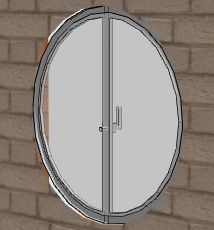
| Posted by okh at Oct 11, 2013, 12:11:07 AM |
|
Re: Sweet Home 3D 4.2 It's because its sides have a null thickness. Thus only the half round upper part is taken into account, and once scaled along the total height of the door, it gives the shape seen in the image. Not sure I'll try to fix that bug because if that door was filled "as expected", it still wouldn't be very interesting, right? Ah, yes, that would make sense. Thanks, I wondered about that. And quite right, as the models with wall elements are now superfluous, protrution can be set with doorOrWindow......# etc properties and proper cutout can be adjusted, it is certainly no longer interesting to save these old workarounds. :-) Yes, I even added the SVG cutout for the 3 other non-rectangular windows, because it runs faster. Good to know (for puritans). And examples even better... But then, rectangular models are still cut correctly even if they are not closed (like the doorframe without threshold)? And have no need for a default (M0,0 v1 h1 v-1 z or something) cutout? Thanks again. ok |
| Posted by Puybaret at Oct 11, 2013, 12:31:55 AM |
|
Re: Sweet Home 3D 4.2 rectangular models are still cut correctly even if they are not closed (like the doorframe without threshold)? No, there's no exception at this time, and the models without a threshold need a doorOrWindowCutOutShape# property set to M0,0 v1 h1 v-1 z. Anyway, for best performances, I set the doorOrWindowCutOutShape# property to this value for all existing doors and windows in Sweet Home 3D and its furniture libraries. No value would mean "compute the cut out shape from the 3D model", which would be a useless loss of computing time. ---------------------------------------- Emmanuel Puybaret, Sweet Home 3D creator |
| Posted by Puybaret at Oct 11, 2013, 12:37:35 AM |
|
Re: Sweet Home 3D 4.2 By the way, thanks okh for the round doors and windows you designed recently, and forgive me if this new feature made them obsolete so fast! I really wanted to program this feature long time before you proposed your library. ---------------------------------------- Emmanuel Puybaret, Sweet Home 3D creator |
| Posted by okh at Oct 11, 2013, 12:55:59 AM |
|
Re: Sweet Home 3D 4.2 No, there's no exception at this time, and the models without a threshold need a doorOrWindowCutOutShape# property set to M0,0 v1 h1 v-1 z. Good, the logic is better that way. I shall add doorOrWindowCutOutShape# for my own collection too. ..new feature made them obsolete so fast... Being made obsolete by improvements is an honour :-) ok |
| Posted by Puybaret at Oct 12, 2013, 2:14:34 AM |
|
Re: Sweet Home 3D 4.2 The Beta 7 brings other fixes for some bugs I encountered with some round doors. It tries also to fix the 3D display of complex rooms that overlap each other. I still encountered some buggy files in the past months, and hope this time this bug will definitively belong to the past. ---------------------------------------- Emmanuel Puybaret, Sweet Home 3D creator |
| Posted by okh at Oct 13, 2013, 1:01:17 PM |
|
Re: Sweet Home 3D 4.2 Spent an hour doing different things with beta7 and beta8 - so far everything works perfectly (under 1.7.0_40, win 8). Out of curiosity Are you planning to add the same automatic cut-out shape for staircases too? Not that it really matters as I guess adding the SVG cutout path is better anyway. ok |
| Posted by Puybaret at Oct 13, 2013, 1:11:07 PM |
|
Re: Sweet Home 3D 4.2 Thanks for your tests and feedback. Are you planning to add the same automatic cut-out shape for staircases too? I don't think I will, because in many cases the cut out shape in the upper level doesn't match the contour of the staircase seen from top.---------------------------------------- Emmanuel Puybaret, Sweet Home 3D creator |
| Posted by okh at Oct 13, 2013, 1:19:28 PM |
|
Re: Sweet Home 3D 4.2 True enough. And why I needed to look at SVG cutouts in the first place - not cut more than needed, yet keep the legal hight definition staircaste step to ceiling (200cm here). Thanks. As you were busy late, I wish you a good, restful lunch. ok |
| Posted by okh at Oct 14, 2013, 5:48:20 PM |
|
Re: Sweet Home 3D 4.2 Beta 8: Time / Date in Create Photo has changed from European to US format (dd/mm/yyyy hh:mm ---> mm/dd/yyyy hh/mm AM/PM). ok |
| Posted by Puybaret at Oct 14, 2013, 6:24:31 PM |
|
Re: Sweet Home 3D 4.2 - Date format should be mm/dd/yyyy if English is selected in preferences whatever your country is. - Time format is a little different and depends on your country: it's AM/PM notation for 17 identified countries (among which USA of course) and 24h notation for the other countries. ---------------------------------------- Emmanuel Puybaret, Sweet Home 3D creator |
| Posted by okh at Oct 14, 2013, 6:58:52 PM |
|
Re: Sweet Home 3D 4.2 Thanks. And, yes, however, the time format is 24h in 4.0 but am/pm in 4.2.b8, but that, I suppose, could have to do with the Javastart. Anyway, minor detail. ok PS I think there is a EU standard for date and time formats - but the Brits probably have an exception - or just ignore the standard. Guess I should change to French interface... :-) |
| Posted by okh at Oct 15, 2013, 11:51:44 AM |
|
Re: Sweet Home 3D 4.2 ... for best performances, I set the doorOrWindowCutOutShape# property to this value for all existing doors and windows in Sweet Home 3D and its furniture libraries. No value would mean "compute the cut out shape from the 3D model", which would be a useless loss of computing time. Good, just a word of warning should anyone else want to play with doorOrWindowCutOutShape#: It seems current FurnitureLibraryEditor will delete the new doorOrWindowCutOutShape# from models when a library is saved. So for now, I guess it is manual property editing in libraries :-) ok |
| Posted by Puybaret at Oct 15, 2013, 12:51:40 PM |
|
Re: Sweet Home 3D 4.2 The bug in the Furniture Library Editor is more subtle than that: the staircase cut out shape is reset to its default value when multiple models with a different shape are modified. When you edit only one model, it's ok. But anyway, it's fixed now (like many other small bugs I found in the Furniture Library Editor). I can send you a beta version if you want. [Edit: Sorry, I should have read your message better since it spoke about the doorOrWindowCutOutShape# property, and not about staircaseCutOutShape# property. I was troubled by the fact I fixed a bug about the later one recently. As the doorOrWindowCutOutShape# property is new, it's not managed by the Furniture Library Editor, but the current beta version of the Editor does manage it] ---------------------------------------- Emmanuel Puybaret, Sweet Home 3D creator |
| Posted by okh at Oct 15, 2013, 1:02:51 PM |
|
Re: Sweet Home 3D 4.2 Yes, please. Thanks. |
| Posted by Puybaret at Oct 15, 2013, 8:42:16 PM |
|
Re: Sweet Home 3D 4.2 Tonight, the Beta 9 improves the way walls are cut by a non rectangular door or window: a 3D shape is also added in the thickness of the wall around the cut out shape. The following images show you the difference between beta 8 and beta 9: ![]() This will make a difference only on a few 3D models, but will also let you export correct cut walls to OBJ format. I also programmed an additional check on images when they are used as textures, to ensure that the images which contain a transparent color in their colors table, won't be misinterpreted as transparent textures when they actually don't use this transparent color. This should help to fight against transparency Z-buffer bug that we can see from time to time, and avoid reediting these falsely transparent images. ---------------------------------------- Emmanuel Puybaret, Sweet Home 3D creator |
| Posted by okh at Oct 15, 2013, 9:27:28 PM |
|
Re: Sweet Home 3D 4.2 Good, by the time you've finished betatesting 4.2, you'll have 5.0 ready :-) One additional problem (just tried with beta 9 too) "Créer une video" hangs. Same files, lowest format and quality, works with 4.0 but creation just doesn't get started with 4.2b. Direct playback works, though. (Win8, Java 1.7.0_40, I3 processor). ok |
| Posted by okh at Oct 15, 2013, 9:45:58 PM |
|
Re: Sweet Home 3D 4.2 "Créer une video" hangs. Same files, lowest format and quality, works with 4.0 but creation just doesn't get started with 4.2b. Direct playback works, though. (Win8, Java 1.7.0_40, I3 processor). ![]() |
| Posted by Puybaret at Oct 16, 2013, 1:57:38 AM |
|
Re: Sweet Home 3D 4.2 Thanks, I could reproduce this issue. Strangely, it doesn't seem to happens out of Java Web Start. ---------------------------------------- Emmanuel Puybaret, Sweet Home 3D creator |
| Posted by okh at Oct 16, 2013, 4:32:33 PM |
|
Re: Sweet Home 3D 4.2 As the doorOrWindowCutOutShape# property is new, it's not managed by the Furniture Library Editor, but the current beta version of the Editor does manage it] So far so good and sh3d_4.2_b9 works well. Tested a window that needs SVG path. Result: this urban window works as intended in 4.0_b9 (auto cutout cannot work because it is different from window shape). Model with properties in this library - library edited and works well with the beta version of the Editor - albeit with cut-out and window ledges added manually... (and example .sh3d file for 4.2 +, obviously the cut-out makes it useless in earlier versions < 4.2.) ok PS I am sure you know the cutout does not work on arched walls (but I guess it would be near impossible to make it work...) |
| Posted by Puybaret at Oct 16, 2013, 8:56:03 PM |
|
Re: Sweet Home 3D 4.2 Congratulations, you found a very nice way to use the doorOrWindowCutOutShape# property! I am sure you know the cutout does not work on arched walls If you mean round walls, yes, it doesn't wok on round walls. Maybe one day, but I don't think it will be in this version.---------------------------------------- Emmanuel Puybaret, Sweet Home 3D creator |
| Posted by okh at Oct 17, 2013, 12:47:18 AM |
|
Re: Sweet Home 3D 4.2 Congratulations, you found a very nice way to use the doorOrWindowCutOutShape# property! [:) Thanks, but yours is the implementation of the cut-out. I just tested it :-). Slightly modified the models above, when I realised the real window looked a bit different (walls not visible around the window ledge). ![]() ![]() Note that making it more elaborate is not difficult, but the point is making a generic, simple model that gives the general impression of the façade with the illusion of an old-style window. And, of course, to test the cut-out of 4.2.beta. ok |
| Posted by Puybaret at Oct 17, 2013, 11:45:03 PM |
|
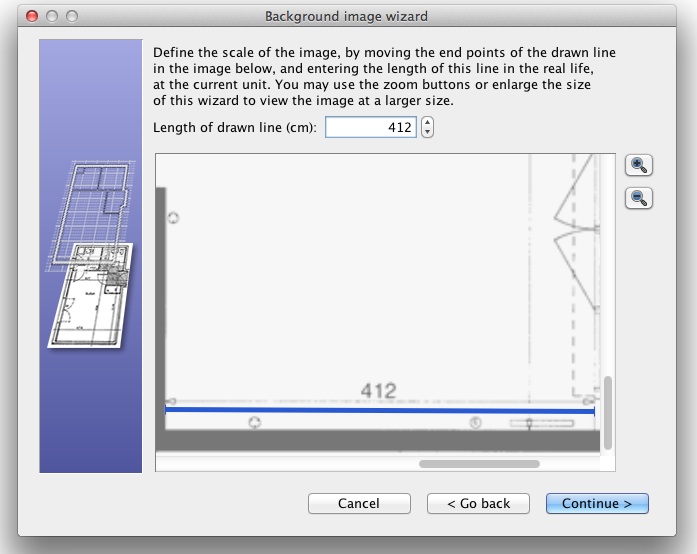
Re: Sweet Home 3D 4.2 The Beta 10 brings the ability to zoom in and out in the scale and origin steps of the background image import wizard. This should users to help them enter the scale of their background image with more precision. ![]() ---------------------------------------- Emmanuel Puybaret, Sweet Home 3D creator |
| Posted by hansmex at Oct 18, 2013, 12:41:55 AM |
|
Re: Sweet Home 3D 4.2 Emmanuel, That works great! Very useful! Could you maybe add another small feature? Constrain the scaling line to horizontal by holding the SHFT or CTRL key? Maybe add 15 degree increments? Hans ---------------------------------------- Hans new website - under constuction hansdirkse.info |
| Posted by okh at Oct 18, 2013, 10:43:43 AM |
|
Re: Sweet Home 3D 4.2 Perfect, this is useful. This example shows just how useful. I tried to do this building on a laptop, near impossible before. (It is probably not a bug, but FYI: on a WinPC CTRL-ScrollWheel does not zoom in this window. And in the 2d window, CTRL-ScrollWheel also does not work when drawing walls or rooms. But this is not new to sh3d 4.2) ok |
| Posted by okh at Oct 18, 2013, 11:03:41 AM |
|
Re: Sweet Home 3D 4.2 Otherwise - nothing to report from b10 (well, create video still does not work, but I haven't updated Java as the download now requests - I am on a slow and unreliable gsm connection). Your new cutout function raises a small question, though. With the possibility to create advanced windows and doors, it is very tempting to add lightsource to a door window (or in wall aquarium ). But I didn't manage on a door/window (lightsource properties disappears). Clearly not a big issue as the workaround is so easy, but it raises the general question of how you want to deal with complex furniture properties (and the editing interface) in the future. ok ('the more accessible properties the better' user, who realises not confusing the user may be more important :-) ) |
| Posted by Puybaret at Oct 18, 2013, 12:37:46 PM |
|
Re: Sweet Home 3D 4.2 Thanks for your feedbacks. Constrain the scaling line to horizontal by holding the SHFT or CTRL key? I added an horizontal/vertical constraint when SHIFT key is pressed in the Beta 11, but won't go further at this time.on a WinPC CTRL-ScrollWheel does not zoom in this window. Maybe it will in a future version, but not in 4.2.And in the 2d window, CTRL-ScrollWheel also does not work when drawing walls or rooms. But this is not new to sh3d 4.2) Yes, it's on purpose, otherwise there are some cases where the current point of the drawn wall/room would jump weirdly.With the possibility to create advanced windows and doors, it is very tempting to add lightsource to a door window (or in wall aquarium ). But I didn't manage on a door/window (lightsource properties disappears). Interesting case... Never thought about this! But doors and windows are treated differently from lights at the moment, and lights specified for a door will be simply ignored. ---------------------------------------- Emmanuel Puybaret, Sweet Home 3D creator |
| Posted by okh at Oct 18, 2013, 1:58:02 PM |
|
Re: Sweet Home 3D 4.2 But doors and windows are treated differently from lights at the moment, and lights specified for a door will be simply ignored. Yes, and by all means, this is certainly not a problem. Of course, I did not expect the combined window/lightsource to work, but I just had to try...But the more clever features you add for furniture, the more users may want to do with the furniture interface. So you may want to keep it in the back of your mind if you work at the furniture properties interface (also FurnitureLibraryEditor). But again, very nice features - and nothing that cannot be solved. ok |
| Posted by Puybaret at Oct 19, 2013, 8:01:26 PM |
|
Re: Sweet Home 3D 4.2 The Beta 12 fixes a bug reported by Hans about a wrong empty 3D view and an older one reported by okh about video creation issue. The video creation bug doesn't happen only in the Beta version, it also happens in the Online version and with the current version of Sweet Home 3D run with Java Web Start, when a version of Java equal to 7u25 or greater is used. Actually, it's due to a regression in Java itself but I found a workaround to avoid it (quite dirty from my developer's point of view, but I didn't find an other way to circumvent this bug). ---------------------------------------- Emmanuel Puybaret, Sweet Home 3D creator |
| Posted by okh at Oct 19, 2013, 8:15:48 PM |
|
Re: Sweet Home 3D 4.2 In a way it is good to hear that even you need to succumb to dirty workarounds. I am sure that you (or Sun) will make it obsolete soon. Know that your normal stringency is appreciated. Thanks. ok |
| Posted by okh at Oct 19, 2013, 9:46:57 PM |
|
Re: Sweet Home 3D 4.2 Is there anything you would like to have tested on the different platforms? I am running out of ideas, in the sense that from all I can tell, beta 12 is ready. Bugs and dirty workarounds, possibly for all I know, but it seems very robust as far as I can see. Which makes me think; good work, even for a perfectionist. ok |
| Posted by okh at Oct 20, 2013, 11:21:11 AM |
|
Re: Sweet Home 3D 4.2 Wrong columns and wrong file sorting happens both in 4.0 and 4.2 b12, when and only when I open this directory via a shortcut. May be an OS (Win8) or Java (still 1.7.0_40) issue, but does not appear to happen with other software (Java or not). Just for your information. ![]() |
| Posted by Puybaret at Oct 21, 2013, 1:27:16 PM |
|
Re: Sweet Home 3D 4.2 Thanks okh for your proposal to help. ![]() I have no special tests in mind. Reporting issues like the one about file dialog is already nice. This bug is a Java one that I can't fix directly. If you have the patience to do it, it would be great to report it. For your information, there's still a few technical 3D issues under Mac OS X that need to be fixed before releasing version 4.2, and I have to request the translation of the new non rectangular doors and windows. ---------------------------------------- Emmanuel Puybaret, Sweet Home 3D creator |
| Posted by Puybaret at Oct 22, 2013, 9:11:11 PM |
|
Re: Sweet Home 3D 4.2 The Beta 14 fixes a mixup in textures under Mac OS X after the importation of a textured 3D model. If another mac user is tempted to test it, I'll be happy to read his report. ![]() ---------------------------------------- Emmanuel Puybaret, Sweet Home 3D creator |
| Posted by m@ at Oct 24, 2013, 12:43:20 AM |
|
Re: Sweet Home 3D 4.2 Hi Emmanuel Since I am a Mac user, I wanted to help out and tried to test the Beta 14 mentioned above. After launching the app, the error "java.lang.reflect.InvocationTargetException" pops up. I am still running OS 10.6. My SH3D 4.1 Installer-Version (downloaded from your Website, not from the App Store) still works fine and tells me that I am running Java Version 1.6.0_65. (Should be the latest for my system, as far as I know) If I have to change some Java-Settings to test-drive your Beta 14, I would need some advice first, I never used these Web Start Versions before... But a .dmg would also be fine. |
| Posted by Puybaret at Oct 24, 2013, 1:45:33 AM |
|
Re: Sweet Home 3D 4.2 Thanks m@ for your willing to test the beta version, but the Java Web Start link won't work under Mac OS X 10.6. ![]() ---------------------------------------- Emmanuel Puybaret, Sweet Home 3D creator |
| Posted by okh at Oct 25, 2013, 10:59:59 AM |
|
Re: Sweet Home 3D 4.2 4.2 b 14 - java 1.7.0_45 - win8 1) Material colour: I cannot change transparency / alpha (stays at opaque, whether obj/mtl is transparent or not). 2) Recent files are not really the most recent files (related to previously reported file-sorting Java issue?) ok |
| Posted by hansmex at Oct 25, 2013, 2:10:48 PM |
|
Re: Sweet Home 3D 4.2 In this screenshot you can see a man standing behind a wall. The wall has a transparent GIF on both sides. In the preview window the wall is black. In the photo the wall is invisible. Transparency works only when taking a photo in Q3 or Q4. It doesn´t work in the preview window, or with Q1 and Q2 when making a photo. It has never been possible to set or change transparency within SH3D. Sorry, no photo here, please follow this link. Hans ![]() ---------------------------------------- Hans new website - under constuction hansdirkse.info |
| Posted by okh at Oct 26, 2013, 12:00:34 PM |
|
Re: Sweet Home 3D 4.2 Morning Hans, I hope you got your new machine Linux graphics under control. They can be a true pain, but screen-shot looks promising (?) As to transparency - either we are talking about different things, or I have (as usual) been expressing myself clumsily. So I try again. Transparency set in png/gif or mtl files works beautifully as usual (albeit with some strange effects discussed elsewhere - most related to my lousy hardware graphics). What I did not get to work in 4.2 b14 was the _new_ alpha/transparency settings in the Material Colour Editor (inside SH3D): I was assuming that the material colour editor now is meant to address even more ".mtl" properties. Which would be wonderful news. However, the value settings are stuck at Transparency 0 / Alpha 255 - regardless of the original value taken from the .mtl file (the colour in the screen-shot is set to around 50% in the .mtl file imported). ok |
| Posted by Puybaret at Oct 26, 2013, 12:13:19 PM |
|
Re: Sweet Home 3D 4.2 The transparency that you can set in the color choice dialog box isn't used at the moment. Maybe I'll change that for final version 4.2, if it's not too complicated. ---------------------------------------- Emmanuel Puybaret, Sweet Home 3D creator |
| Posted by okh at Oct 26, 2013, 12:15:34 PM |
|
Re: Sweet Home 3D 4.2 There I go again, to quick. Of course the COLOUR is not set to 50% - the TRANSPARENCY is. But the value in sh3d shows 0 and cannot be changed (slide jumps back / value resets). Or to be more accurate, the .mtl original look like this: newmtl glass illum 1 Ka 0.2 0.2 0.2 Kd 0.7058824 0.98039216 0.98039216 Ks 0.0 0.0 0.0 Ns 1.0 Ni 1.0 d 0.50196075 ok |
| Posted by okh at Oct 26, 2013, 12:20:38 PM |
|
Re: Sweet Home 3D 4.2 Thanks. Crossing posts. I guessed that alpha was still "under construction" but just wanted to let you know. Good luck with alpha (would be very cool, but not really a priority, I guess). ok |
| Posted by hansmex at Oct 26, 2013, 1:54:09 PM |
|
Re: Sweet Home 3D 4.2 OKH, Emmanuel, In my beta 14 there is NO transparency slider. There is still the ´old´ Shininess slider, which goes from Matt 0 to Shiny 128. Maybe the program behaves differently under Ubuntu? Hans ---------------------------------------- Hans new website - under constuction hansdirkse.info |
| Posted by Puybaret at Oct 26, 2013, 5:50:47 PM |
|
Re: Sweet Home 3D 4.2 The transparency slider shown in okh´s screen captures are part of the standard color choice dialog in Java 7 under Windows and Mac OS X, but not under Ubuntu as far as I know. I'll try to disable it if it's possible to avoid some confusion. ---------------------------------------- Emmanuel Puybaret, Sweet Home 3D creator |
| Posted by hansmex at Oct 26, 2013, 6:09:11 PM |
|
Re: Sweet Home 3D 4.2 Emmanuel, I´ll write Ubuntu and ask if they can implement it. Let´s see if they are as quick as you are ;-) Hans ---------------------------------------- Hans new website - under constuction hansdirkse.info |
| Posted by Puybaret at Oct 28, 2013, 11:20:09 PM |
|
Re: Sweet Home 3D 4.2 To avoid any confusion about the use of Alpha/Transparency sliders in the color choice dialog, I removed them in the Beta 15. ---------------------------------------- Emmanuel Puybaret, Sweet Home 3D creator |
| Posted by okh at Oct 29, 2013, 10:29:42 AM |
|
Re: Sweet Home 3D 4.2 Oh well... :-) -- the new colour choice dialogue in Java 7 really is very nice, though, even without the alpha. ok |
| Posted by oxygen at Oct 29, 2013, 3:47:03 PM |
|
Re: Sweet Home 3D 4.2 Puybaret, thank you for the work on the new version)) Could I ask you about transparency option? As far as I understood from a previous conversation, you are now discussing the possibility of changing the transparency of the materials. Do you plan to continue the development of this option for the next version of SH3D? I think it's a very important option for a number of materials, such as plastic or glass for interior objects (vases, figurines, glass shower screens, etc.) or fruit and drinks. Presently available options do not allow to work accurately with a transparency of objects, .png-files do not work very well as a transparent textures. |
| Posted by okh at Oct 29, 2013, 4:01:05 PM |
|
Re: Sweet Home 3D 4.2 While moving a non-straight wall, with an SVG cutout door, the 3d window suddenly stopped showing the move in the 2d window (however, the focus of the 3d window kept shifting, and the door moved further than the cutout). When I closed the file, and reopened, the 3d window was correct. Probably a random glitch, but it never happened before. And this you probably know. I (accidentally) opened a URL to the online version on a server and got this: ![]() ok |
| Posted by okh at Oct 29, 2013, 4:36:48 PM |
|
Re: Sweet Home 3D 4.2 ...the possibility of changing the transparency of the materials. ... .png-files do not work very well as a transparent textures. Agree it would be cool (but not highest on my priority list). Also note that if you really want to, you can export furniture to OBJ file and change the transparency in the MTL file manually to achieve the same. ok |
| Posted by okh at Oct 29, 2013, 9:24:35 PM |
|
Re: Sweet Home 3D 4.2 .. moving a non-straight wall, with an SVG cutout door, the 3d window suddenly stopped showing the move in the 2d window (however, the focus of the 3d window kept shifting, and the door moved further than the cutout). ... It just happened again. This time moving a rectangular window with no pre-specified cutout (but doorOrWindowWallThickness and doorOrWindowWallDistance). Window stuck in one place in 3d window while being moved in 2d window (yet the focus of the 3d window changes and can be manipulated as usual). In fact, the window is stuck regardless of Aerial view or virtual visit or changing between them. |
| Posted by Puybaret at Oct 30, 2013, 1:00:30 AM |
|
Re: Sweet Home 3D 4.2 oxygen, I hope I'll add a transparency slider in Materials dialog box in version 4.3. But don't hope too much from it, and don't be astonished if you get some Z buffer transparency issues like the ones okh reported earlier in this thread. okh, when the kind of error you report happens, there must be some helpful trace that appears in the Java console. Could you enable it and report it the trace that appears in the console (some text starting by "Exception in thread...")? And this you probably know. I (accidentally) opened a URL to the online version on a server and got this: I'm aware about this message, it should be handled in the final release of version 4.2.---------------------------------------- Emmanuel Puybaret, Sweet Home 3D creator |
| Posted by okh at Oct 30, 2013, 9:31:04 AM |
|
Re: Sweet Home 3D 4.2 ... some helpful trace that appears in the Java console. Trace sent by e-mail with offending model. ok |
| Posted by Puybaret at Oct 30, 2013, 3:27:35 PM |
|
Re: Sweet Home 3D 4.2 Thanks okh for the information you sent, I fixed the bug you reported in the Beta 16. ---------------------------------------- Emmanuel Puybaret, Sweet Home 3D creator |
| Posted by okh at Oct 30, 2013, 5:38:30 PM |
|
Re: Sweet Home 3D 4.2 Thank you! A quick check and I was not able to recreate the issue (which I could under b15). ok PS - I still get error messages in the Java Console though - anything I should look for? |
| Posted by Puybaret at Oct 31, 2013, 1:11:25 AM |
|
Re: Sweet Home 3D 4.2 Sweet Home 3D 4.2 is out. Thank you all for your support. ![]() ---------------------------------------- Emmanuel Puybaret, Sweet Home 3D creator |
| Posted by hansmex at Oct 31, 2013, 6:04:16 AM |
|
Re: Sweet Home 3D 4.2 Emmanuel, Thank you for version 4.2. I´m afraid I found a problem using Ubuntu 12.04 and Oracle Java 7. The program starts normally and allows me to open files created with the beta 4.2. However, when I try to open files created with an earlier version (I tried files created with 4.1 and 4.0) there´s strange behaviour: 1 - When I open a file created in v4.1 or v4.0, the program seems to close. Strangely enough the tab that indicates a program is running stays active, and when I use System Monitor, the program is shown as active as well. However, there is no way to make the program display anything. I have to use End or KIll to terminate the program. 2 - When I first open a file created with a beta of v4.2, and then open a file created with an older version, the program instance showing the v4.2 file stays active and accessible, but the program instance of the v4.1 or v4.0 file doesn´t come up and is not accessible. Again, the only way to terminate those instances is to use the End or Kill command, which of course also ends the correctly running v4.2 instance of the program. Hans ---------------------------------------- Hans new website - under constuction hansdirkse.info |
| Posted by okh at Oct 31, 2013, 9:38:02 AM |
|
Re: Sweet Home 3D 4.2 Sweet Home 3D 4.2 is out. Thank you all for your support. ![]() Thank you, and congratulations. |
| Posted by Puybaret at Oct 31, 2013, 10:11:04 AM |
|
Re: Sweet Home 3D 4.2 Hans, how do you run Sweet Home 3D? With Java Web Start or the Jar executable? ---------------------------------------- Emmanuel Puybaret, Sweet Home 3D creator |
| Posted by hansmex at Oct 31, 2013, 11:01:35 AM |
|
Re: Sweet Home 3D 4.2 Emmanuel, I always use the installed version, that´s the 881 byte file. Hans ---------------------------------------- Hans new website - under constuction hansdirkse.info |
| Posted by Puybaret at Oct 31, 2013, 11:12:25 AM |
|
Re: Sweet Home 3D 4.2 The installers versions still use Java 6 (information shown in About dialog), but it would be astonishing that it could provoke a bad interaction with Java 7 installed in the system. I'll check... ---------------------------------------- Emmanuel Puybaret, Sweet Home 3D creator |
| Posted by hansmex at Oct 31, 2013, 12:05:49 PM |
|
Re: Sweet Home 3D 4.2 Emmanuel, The webstart version opens every file I try without problems. Haans ---------------------------------------- Hans new website - under constuction hansdirkse.info |
| Posted by m@ at Oct 31, 2013, 11:10:59 PM |
|
Re: Sweet Home 3D 4.2 Thanks for the new version! Although the checkbox "check for updates" was enabled in my 4.1.-Version, the software did not inform me about the new release. Even hitting the "check now" button did not help. Maybe this was a bug in 4.1. ? |
| Posted by hal9000 at Nov 1, 2013, 12:47:36 AM |
|
Re: Sweet Home 3D 4.2 m@, if you re-read a few posts above you'll see that version 4.2 is currently on beta stage. ---------------------------------------- If a long walk every day were healthy, mailmen would be immortal. ![]() |
| Posted by Puybaret at Nov 1, 2013, 1:13:17 AM |
|
Re: Sweet Home 3D 4.2 hal900, version 4.2 is out since yesterday evening (I posted a message in this thread, updated the main page, the History page and published an article in the blog today). m@, the updates check feature displays a message coming from the web server. As there's always a risk to miss a last big issue, I prefer not to rush to inform every users when I release a new version, and updated this update message only tonight (thanks for recalling me anyway). It should work now. ![]() ---------------------------------------- Emmanuel Puybaret, Sweet Home 3D creator |
| Posted by hal9000 at Nov 1, 2013, 1:57:46 AM |
|
Re: Sweet Home 3D 4.2 Oops. So it was me who missed the important post. And when I say "the post" I mean just the post, because I read the later post by Hansmex about the problem with the files from previous versions, but the last post I read about a release was beta 16.Well, good to know it's out, anyway. m@... I said nothing. ![]() ---------------------------------------- If a long walk every day were healthy, mailmen would be immortal. ![]() |
| Posted by Puybaret at Nov 1, 2013, 5:16:39 PM |
|
Re: Sweet Home 3D 4.2 Hans, About the crash you reported in version 4.2, could you check whether it happens with the installer version 4.1? I suspect you didn't encounter this bug before the release of version 4.2, because you were running the Beta with Java 7 and not with Java 6 as does the installer version. ---------------------------------------- Emmanuel Puybaret, Sweet Home 3D creator |
| Posted by m@ at Nov 2, 2013, 12:11:05 AM |
|
Re: Sweet Home 3D 4.2 Hi Emmanuel I encounter a strange problem with the .dmg-version 4.2.: the render process stops after a few minutes and the "save" Button turns from inactive to active. It is even possible to save the uncompleted photo. But no error message appears. What could be wrong? |
| Posted by Puybaret at Nov 2, 2013, 12:34:44 AM |
|
Re: Sweet Home 3D 4.2 m@ Do you think it's a regression? Could you reproduce this issue more than once? If yes, could you send me the faulty file? ---------------------------------------- Emmanuel Puybaret, Sweet Home 3D creator |
| Posted by Puybaret at Nov 2, 2013, 12:35:16 AM |
|
Re: Sweet Home 3D 4.2 For your information, I just released Linux installers tagged as version 4.2a which replace the ones of version 4.2 on SourceForge.net. It fixes an annoying regression that didn't restore correctly maximized windows under that system. Windows and Mac OS X installers are unchanged. ---------------------------------------- Emmanuel Puybaret, Sweet Home 3D creator |
| Posted by hansmex at Nov 2, 2013, 9:35:46 AM |
|
Re: Sweet Home 3D 4.2 Emmanuel, Thank you for your efforts. The new v4.2 allows me to open older files. I haven´t tested it very much, but THAT problem is solved. Hans ---------------------------------------- Hans new website - under constuction hansdirkse.info |
| Posted by Puybaret at Nov 2, 2013, 3:01:22 PM |
|
Re: Sweet Home 3D 4.2 Thanks Hans for your report. At a moment, I feared an other issue on your side, but I'm happy to know that finally, it was the same issue as the one Denis reported. ![]() ---------------------------------------- Emmanuel Puybaret, Sweet Home 3D creator |
| Posted by hansmex at Nov 2, 2013, 3:43:16 PM |
|
Re: Sweet Home 3D 4.2 Emmanuel, The staircase problem mentioned in another thread applies to all stairs. I tried several stairs that come with the program, but they too do NOT make a hole in the ceiling. Do you want pictures? The sh3d file? Something else? Hans ---------------------------------------- Hans new website - under constuction hansdirkse.info |
| Posted by Puybaret at Nov 2, 2013, 5:22:39 PM |
|
Re: Sweet Home 3D 4.2 The problem is that I can't reproduce the staircase issue you reported. But send me a sh3d file, I'll check its internal data. ---------------------------------------- Emmanuel Puybaret, Sweet Home 3D creator |
| Posted by m@ at Nov 3, 2013, 12:38:39 AM |
|
Re: Sweet Home 3D 4.2 Hi Emmanuel Yes , I can reproduce the problem with the render process, even after restarts. If I go back to 4.1, the same file renders just fine. I am not at my computer now, I'll send you the file tomorrow. Good night :-) |
| Posted by Puybaret at Nov 3, 2013, 6:20:36 PM |
|
Re: Sweet Home 3D 4.2 m@, thanks for your file. It's a memory issue. You should increase the max memory the program can use by following instructions in the FAQ. ---------------------------------------- Emmanuel Puybaret, Sweet Home 3D creator |
| Posted by m@ at Nov 3, 2013, 8:06:21 PM |
|
Re: Sweet Home 3D 4.2 Hi Emmanuel Thanks for the tip, I forgot that the max memory has to be set for each new version separately. That's why the rendering worked in 4.1.; there, the memory was already increased. |
| Posted by Puybaret at Nov 3, 2013, 8:41:58 PM |
|
Re: Sweet Home 3D 4.2 Maybe I should increase the default max memory under Mac OS X. I'll try to test if a higher value won't prevent the program to run on small configurations. ---------------------------------------- Emmanuel Puybaret, Sweet Home 3D creator |
|
|
Current timezone is GMT Feb 5, 2026, 3:44:49 PM |