Romania
Joined: Apr 24, 2014
Post Count: 832
Status:
Offline
Regular room plugin
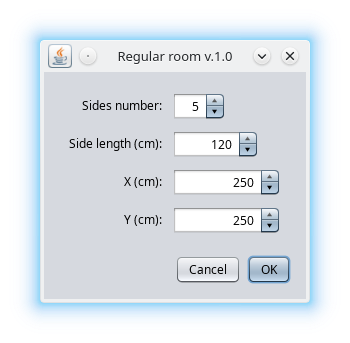
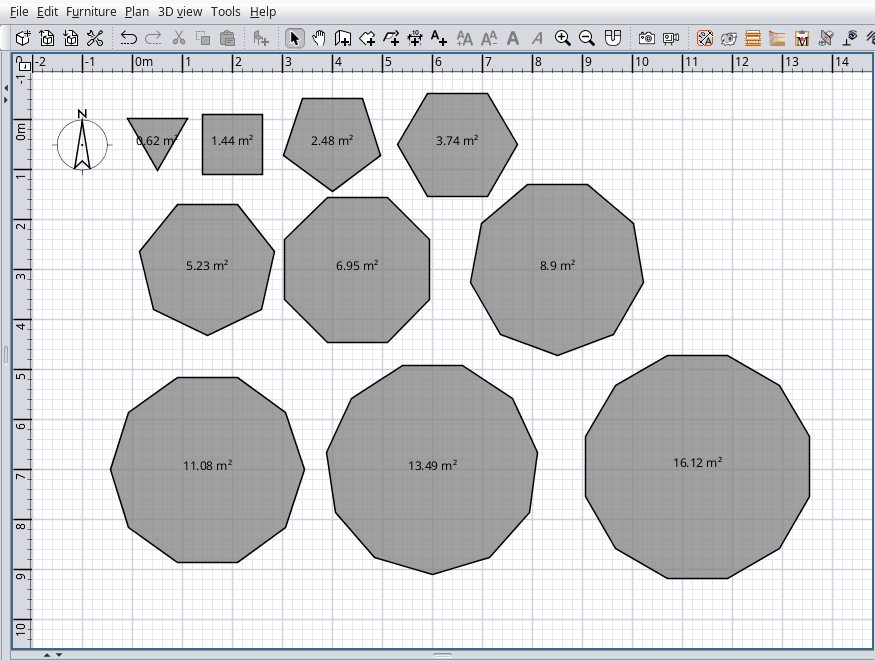
Regular room version 1.0 In the series of YAUP another useless plugin under a motto: "Sometimes even simple things are hard to do." With a little CAD could be more easy. It could be found under Tools and on tool bar as a pentagon icon. This plugin generate a regular room between 3 to 30 sides. You have to input the sides number, the length of the side and the room center position. It look like this:
Also on Source Forge.
---------------------------------------- A computer program does what you tell it to do, not what you want it to do. Murphy's Law When all else fails, read the instructions. Murphy's Law If you don't like "AS IS", DIY. Dorin's law
Netherlands
Joined: Apr 8, 2022
Post Count: 1818
Status:
Offline
Re: Regular room plugin
This will make creating my dodecagon shapes a lot easier. Until now I used dodecagon shapes created in Blender as parts for furniture or buildings. In Blender you can set the number of sides for a cylinder similar to your room plugin. This especially makes it easier for me when I need walls/rooms with a specific lenght. YAUsefulP. Thank you Dorin.
---------------------------------------- Dodecagon.nl 1300+ 3D models, manuals, and projects
France
Joined: Feb 24, 2022
Post Count: 74
Status:
Offline
Re: Regular room plugin
Thanks a lot Dorin, one more step to the realization of furniture and objects with SH3D... I'm using Sketchup less and less and I'm now making a lot of things directly in SH3D!
Romania
Joined: Apr 24, 2014
Post Count: 832
Status:
Offline
Re: Regular room plugin
News in version 1.1 -add Chinese translation thanks to YGYL -increase sides max number to 300 (hope it is enough even for Keet ).
Also on Source Forge .
---------------------------------------- A computer program does what you tell it to do, not what you want it to do. Murphy's Law When all else fails, read the instructions. Murphy's Law If you don't like "AS IS", DIY. Dorin's law
Netherlands
Joined: Apr 8, 2022
Post Count: 1818
Status:
Offline
Re: Regular room plugin
Thank you, I think that is enough With 300 sides it might even be smoother than a cylinder.
(The plugin manager seems to have a little bug regression: the "Plugin installed ...Ok" close window hides behind the main window again.)
---------------------------------------- Dodecagon.nl 1300+ 3D models, manuals, and projects
Joined: Mar 23, 2020
Post Count: 141
Status:
Offline
Re: Regular room plugin
Hello community! I'm glad to share a major update v1.4
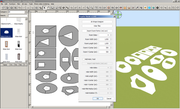
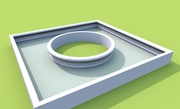
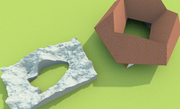
If you’ve ever struggled to create a room with a hole in the middle—like a central courtyard, a complex architectural void, or custom-shaped flooring, this tool is designed to automate and simplify that process
Instead of manually fighting with overlapping room points, this plugin uses a smart stitching algorithm to generate a single "keyhole" polygon containing an inner void.
*** Key Features**
Parametric Geometric Generation: Quickly generate rooms and holes using basic geometric parameters. You can define the number of sides, width, height, X/Y coordinates, and even rotation for both the outer room boundary and the inner cutout directly from the plugin UI. Custom Coordinate Import: Need a highly specific shape? You can import custom X,Y point coordinates via .txt or .csv files for both the room and the hole. Smart Polygon Stitching: The plugin features a custom routing algorithm that automatically handles the complex math. It calculates winding directions using the Shoelace formula to ensure the hole is cut correctly, and it dynamically connects the outer room to the inner hole at the absolute closest points to create the cleanest possible geometry. 2D Shape Designer Integration: The plugin includes a launch button for an integrated 2D Shape Designer, allowing you to visually draft your custom cuts before generating the room. Here is a summary and description of each user interface command and input available in the plugin, based on the provided source files:
*** Global Controls**
2D Shape Designer* : A button that opens a separate window/dialog to visually draft 2D shapes for the room and hole. Clear files* : A button that removes any currently selected .txt or .csv files for the room or hole points and resets the import buttons to their default text. OK* : A standard dialog confirmation button that executes the room generation process based on either the imported files or the geometric settings. Cancel* : A standard dialog button to close the menu without generating a room.
*** Room Settings**
Import Room Points (.txt/.csv)* : A button that opens a file browser, allowing the user to select a text or csv file containing custom X and Y coordinates for the room's outer perimeter. Room Sides* : A number spinner to define the amount of sides for the main room geometry, allowing values between 3 and 360. Room Width / Room Height* : Length spinners that define the overall bounding dimensions of the outer room. Room X Center / Room Y Center* : Length spinners that set the central coordinate position of the outer room on the grid.
*** Hole/Void Settings**
Import Hole Points (.txt/.csv)* : A button that opens a file browser, allowing the user to select a text or csv file containing custom X and Y coordinates for the inner void/cutout. Hole Sides* : A number spinner to define the amount of sides for the inner hole's geometry, allowing values between 3 and 360. Hole Width / Hole Height* : Length spinners that define the overall bounding dimensions of the cutout hole. Hole X Center / Hole Y Center* : Length spinners that set the central coordinate position of the cutout hole on the grid. Hole Rotation (°)* : A number spinner that sets the rotation angle of the inner cutout hole, allowing values between -360 and 360 degrees.









 ).
). With 300 sides it might even be smoother than a cylinder.