Hello community!
I'm glad to share a major update v1.4
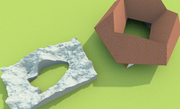
If you’ve ever struggled to create a room with a hole in the middle—like a central courtyard, a complex architectural void, or custom-shaped flooring, this tool is designed to automate and simplify that process
Instead of manually fighting with overlapping room points, this plugin uses a smart stitching algorithm to generate a single "keyhole" polygon containing an inner void.
*** Key Features**
Parametric Geometric Generation: Quickly generate rooms and holes using basic geometric parameters. You can define the number of sides, width, height, X/Y coordinates, and even rotation for both the outer room boundary and the inner cutout directly from the plugin UI.
Custom Coordinate Import: Need a highly specific shape? You can import custom X,Y point coordinates via .txt or .csv files for both the room and the hole.
Smart Polygon Stitching: The plugin features a custom routing algorithm that automatically handles the complex math. It calculates winding directions using the Shoelace formula to ensure the hole is cut correctly, and it dynamically connects the outer room to the inner hole at the absolute closest points to create the cleanest possible geometry.
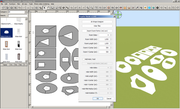
2D Shape Designer Integration: The plugin includes a launch button for an integrated 2D Shape Designer, allowing you to visually draft your custom cuts before generating the room.
Here is a summary and description of each user interface command and input available in the plugin, based on the provided source files:
*** Global Controls**
2D Shape Designer* : A button that opens a separate window/dialog to visually draft 2D shapes for the room and hole.
Clear files* : A button that removes any currently selected .txt or .csv files for the room or hole points and resets the import buttons to their default text.
OK* : A standard dialog confirmation button that executes the room generation process based on either the imported files or the geometric settings.
Cancel* : A standard dialog button to close the menu without generating a room.
*** Room Settings**
Import Room Points (.txt/.csv)* : A button that opens a file browser, allowing the user to select a text or csv file containing custom X and Y coordinates for the room's outer perimeter.
Room Sides* : A number spinner to define the amount of sides for the main room geometry, allowing values between 3 and 360.
Room Width / Room Height* : Length spinners that define the overall bounding dimensions of the outer room.
Room X Center / Room Y Center* : Length spinners that set the central coordinate position of the outer room on the grid.
*** Hole/Void Settings**
Import Hole Points (.txt/.csv)* : A button that opens a file browser, allowing the user to select a text or csv file containing custom X and Y coordinates for the inner void/cutout.
Hole Sides* : A number spinner to define the amount of sides for the inner hole's geometry, allowing values between 3 and 360.
Hole Width / Hole Height* : Length spinners that define the overall bounding dimensions of the cutout hole.
Hole X Center / Hole Y Center* : Length spinners that set the central coordinate position of the cutout hole on the grid.
Hole Rotation (°)* : A number spinner that sets the rotation angle of the inner cutout hole, allowing values between -360 and 360 degrees.
https://sourceforge.net/p/sweethome3d/plug-ins/48/#c482

----------------------------------------
Windows 64bit | Intel i7 | SH3D 8.0 + Plugins
