Et avec les murs et les fenêtres, c'est mieux.
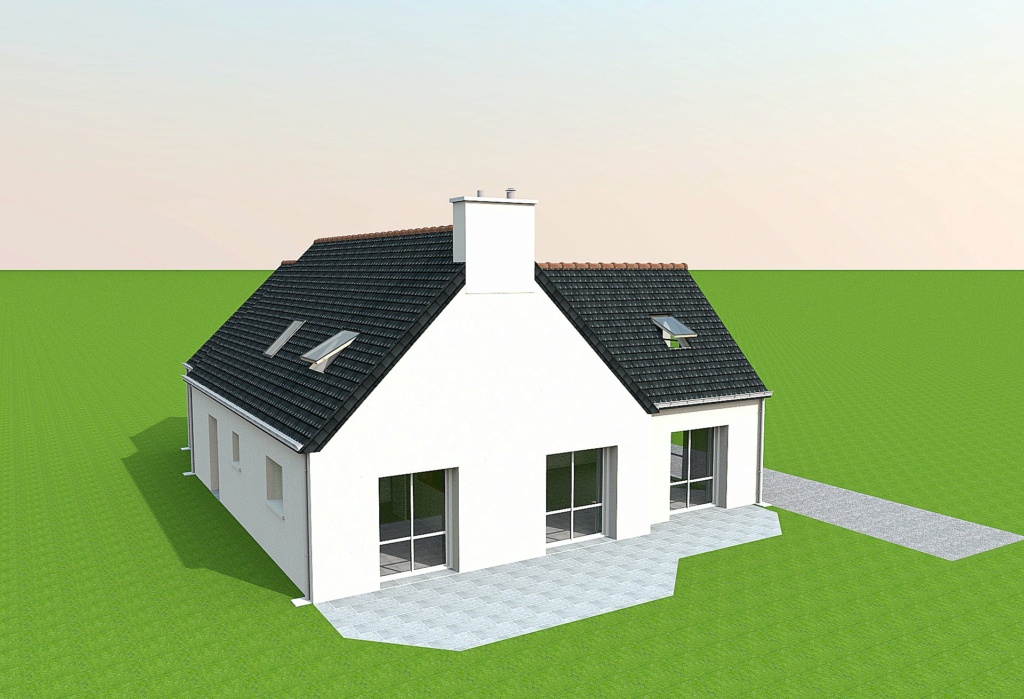
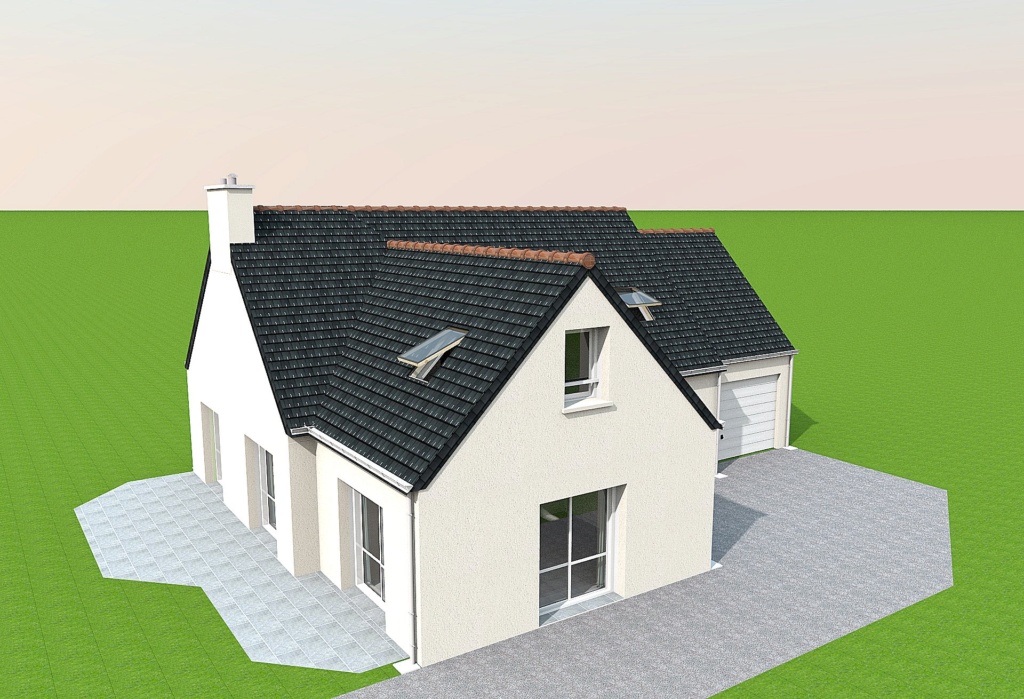
Encore merci et bon week-end à vous, Dorin.
|
Sweet Home 3D Forum » List all forums » » Forum: Developers » » » Thread: Generate roof plugin |
||
| Print at Sep 10, 2026, 10:14:40 PM |
|
|
| Posted by captaincook at Apr 25, 2025, 4:50:06 PM |
|
Re: Generate roof plugin Et avec les murs et les fenêtres, c'est mieux. Encore merci et bon week-end à vous, Dorin. |
| Posted by dorin at Apr 30, 2025, 10:58:52 PM |
|
Re: Generate roof plugin New version 4.7.1 (Francis) News: -improves the roof windows library (version 0.2) --correct the previous and add a new one which could be used for holes on the roof face --it could be used to do dormers more easy -adapt the plugin code to use it I'm not fully satisfied, so TODO: improving the holes in the roof to be more accurate in all situations Also on Source Forge Suggestion: remove the previously versions. @captaincook Thanks for the inspiration.  @Keet 1. The mean of roof_window_deep I've explained at the last part of V.4.5 tutorial 2. If I wanted to create a roof window, how do I determine what the roof_window_deep value should be? Or is it always 11.0? It mean how much of the window height you decide should be inside the roof.3. I need you to help me to improve (to be functional) and simplify (reduce number of) roof windows. ---------------------------------------- A computer program does what you tell it to do, not what you want it to do. Murphy's Law When all else fails, read the instructions. Murphy's Law If you don't like "AS IS", DIY. Dorin's law |
| Posted by AceLemos at May 14, 2025, 2:17:48 PM |
|
Re: Generate roof plugin Hi @dorin, amazing plugin and great work to everyone! I just discovered it as I was struggling to create a roof for my house. However, I found an issue I can't see to be able to fix. My house has gables on each side and one side juts out with big windows. The roof generator doesn't seem to understand that so I tried messing around with it, but I have been at it for about 2 days now with no success. This is the architect's render of the elevations:  When I draw a floor to render the roof, I do this:  So when I generate the roof, this is what I get (even after adjusting for the gables):  I can't seem to get the left side of the back to the shape the architect drew. I think it is because I don't have a part jutting out like in your tutorial. Any ideias? Thanks for any help! Cheers |
| Posted by dorin at May 16, 2025, 10:07:21 AM |
|
Re: Generate roof plugin The roof generator doesn't seem to understand that Indeed. Is not an AI.You need a trick. Something like this. Add a very tinny part at the room (1 cm or even less). You will have to test.  I've zoomed to be more visible.  The roof generator.  Final result.  Good luck! ---------------------------------------- A computer program does what you tell it to do, not what you want it to do. Murphy's Law When all else fails, read the instructions. Murphy's Law If you don't like "AS IS", DIY. Dorin's law |
| Posted by Keet at May 16, 2025, 11:36:52 AM |
|
Re: Generate roof plugin Maybe you can make it so that just adding a room point is enough without the 1cm break. I haven't tested it but that might already work. ---------------------------------------- Dodecagon.nl 1300+ 3D models, manuals, and projects |
| Posted by dorin at May 16, 2025, 7:57:38 PM |
|
Re: Generate roof plugin You need 2 points to define an edge. Need to be at least at 1 cm distance between them because the plugin clean the very close and collinear points. ---------------------------------------- A computer program does what you tell it to do, not what you want it to do. Murphy's Law When all else fails, read the instructions. Murphy's Law If you don't like "AS IS", DIY. Dorin's law |
| Posted by AceLemos at May 16, 2025, 10:35:16 PM |
|
Re: Generate roof plugin Maybe you can make it so that just adding a room point is enough without the 1cm break. I haven't tested it but that might already work. Sorry for the dumb question, but what is a room point? Do you mean drawing a room in that space separate from the rest? |
| Posted by AceLemos at May 16, 2025, 10:37:34 PM |
|
Re: Generate roof plugin The roof generator doesn't seem to understand that Indeed. Is not an AI.You need a trick. Something like this. Add a very tinny part at the room (1 cm or even less). You will have to test. I've zoomed to be more visible. The roof generator. Final result. Good luck! Thank you @dorin, this worked! I put an indent on that wall just in the room I used to generate the roof (not on the actual wall of the floor below it). Thank you. Just speculating here, would it be possible in the plugin to do reference points in the room or something like @keet said? I am not even sure what a room point is, but maybe that is something to go on for future versions? |
| Posted by dorin at May 16, 2025, 11:22:25 PM |
|
Re: Generate roof plugin I'm using a personal version (5.14) that can manipulate points and roof edges. BUT It is very difficult to use even for me. I will have to find a better approach (if I live until then). ---------------------------------------- A computer program does what you tell it to do, not what you want it to do. Murphy's Law When all else fails, read the instructions. Murphy's Law If you don't like "AS IS", DIY. Dorin's law |
| Posted by dorin at Aug 2, 2025, 9:11:04 PM |
|
Re: Generate roof plugin New version 5.0 News: *keep the name given by the user after creation and modification; *add point of view buttons *add option to modify roof points/edges coordinates (one at a time); *add features to: **add(insert) a point(+P) on selected edge (by splitting the selected edge in two); **delete a point(-P)(the end point) of selected edge (delete the selected edge); *add a local undo/redo and reset mechanism It have to look like this: 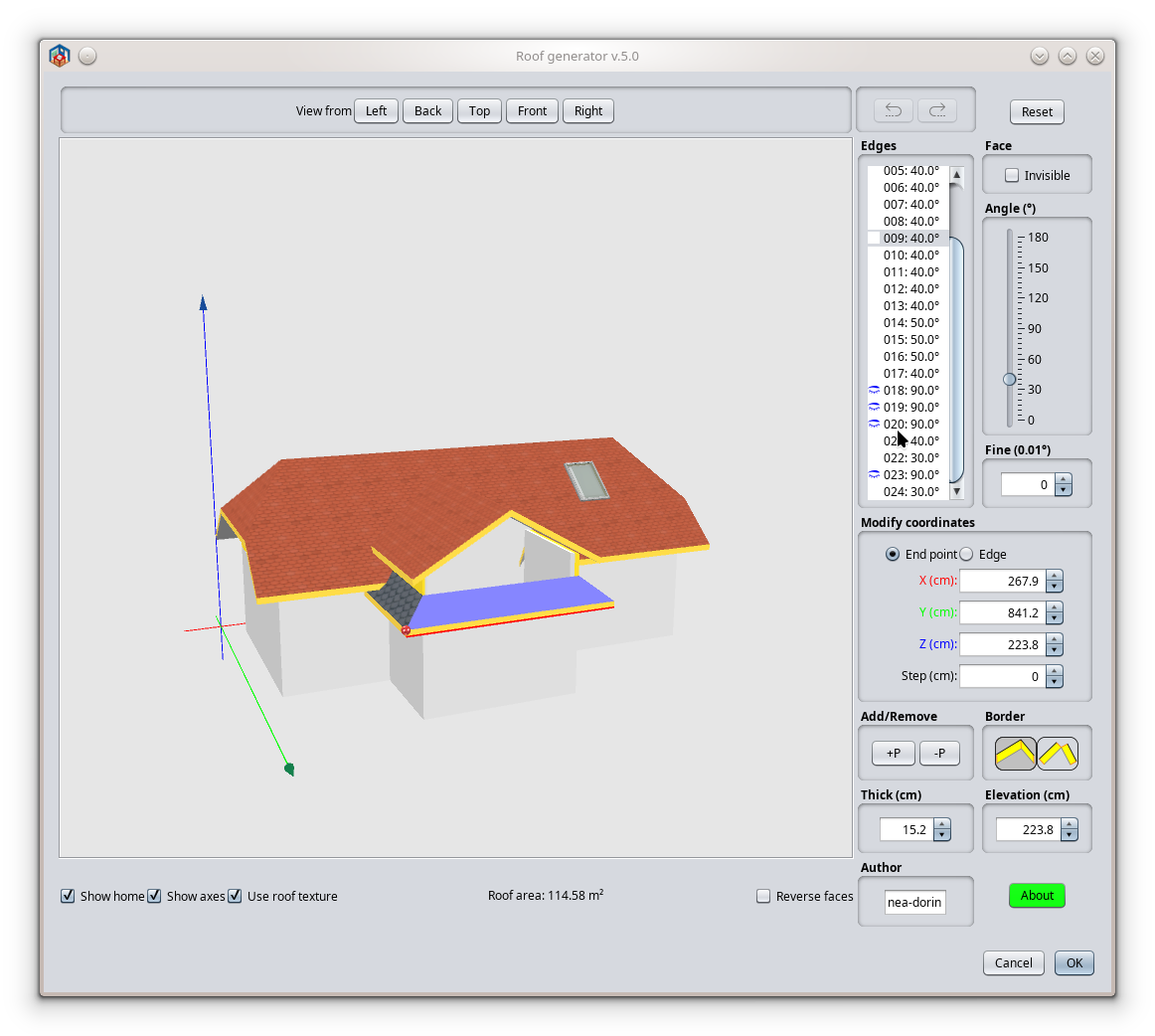 It will be available on Plugin manager when will be fixed. Probably it need an updated manual. Will be on demand. Also on Source Forge ---------------------------------------- A computer program does what you tell it to do, not what you want it to do. Murphy's Law When all else fails, read the instructions. Murphy's Law If you don't like "AS IS", DIY. Dorin's law |
|

|
Current timezone is GMT Sep 10, 2026, 10:14:40 PM |