|
Sweet Home 3D Forum » List all forums » » Forum: Developers » » » Thread: Auto Dimensioning plugin |
|
| Print at Dec 26, 2025, 1:27:12 AM | |
| Posted by dorin at Mar 14, 2021, 8:24:47 PM |
|
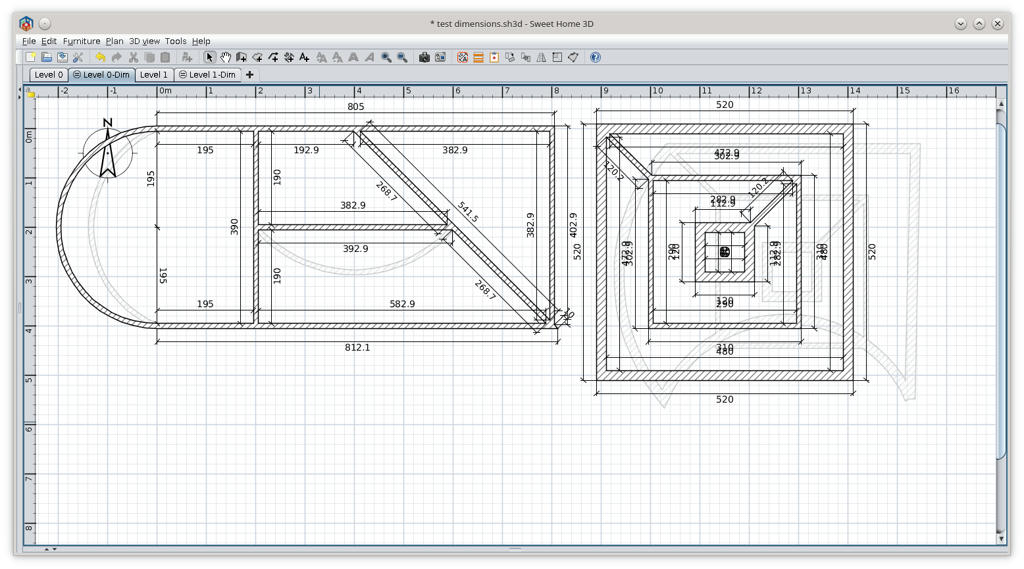
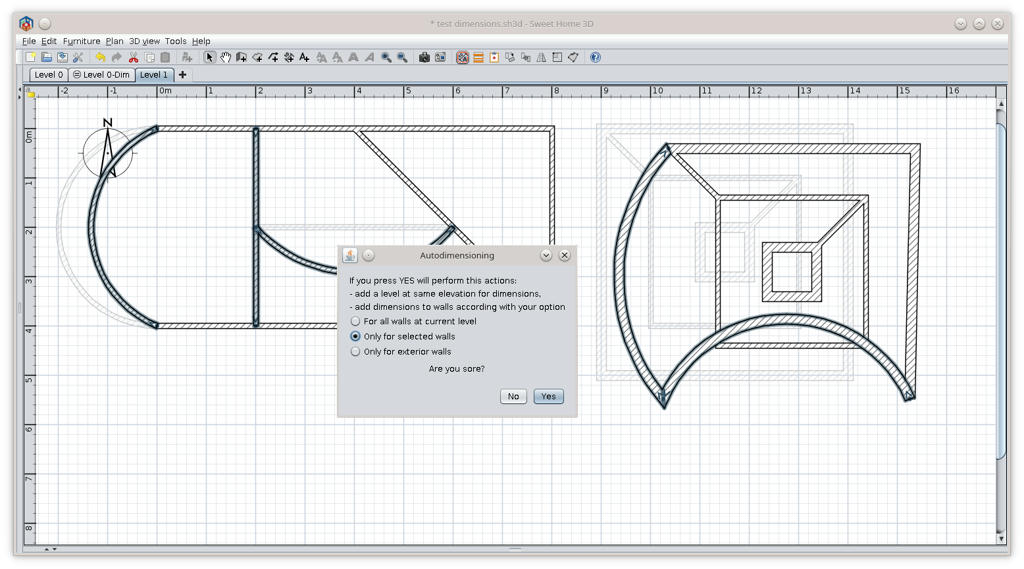
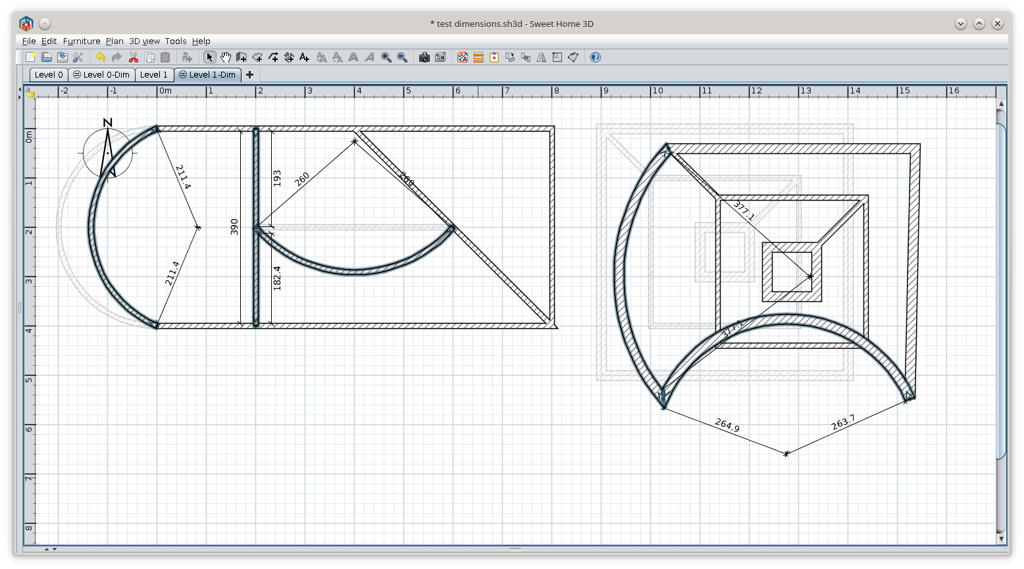
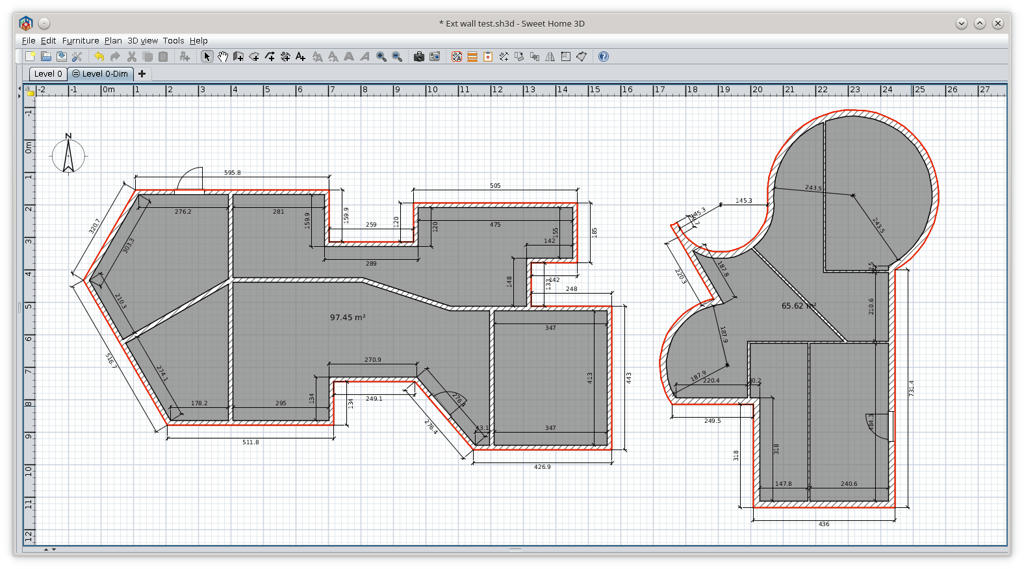
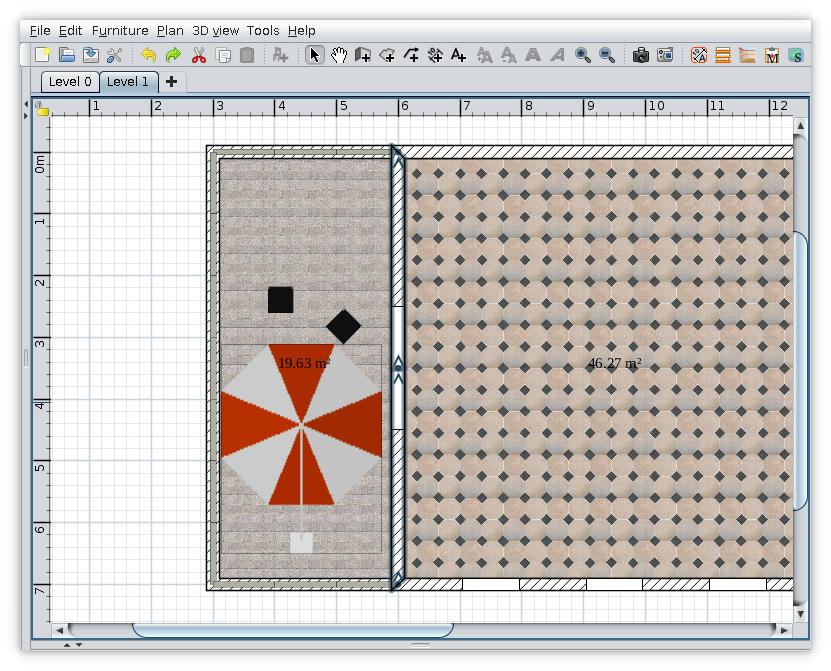
Auto Dimensioning plugin As usual, YAUP. "The Hell are paved with good intentions" This subject was on this tread but without source code. I tray to reproduce and ad inner radius for curved walls. Wile I'm not a programmer, use it with care! Could be launch from Tools->AutoDimensioning... or from icon on toolbar. The plugin with source code could be downloaded from AutoDimensioning plugin or from sourceforge Some screenshots: Good luck! ---------------------------------------- A computer program does what you tell it to do, not what you want it to do. Murphy's Law When all else fails, read the instructions. Murphy's Law If you don't like "AS IS", DIY. Dorin's law |
| Posted by SeppoV12 at Mar 14, 2021, 11:25:49 PM |
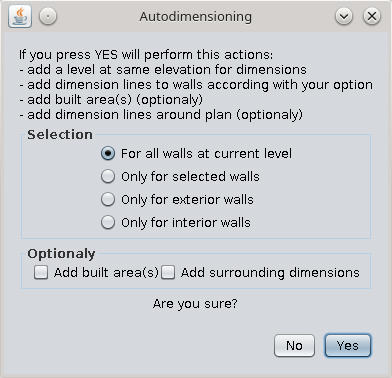
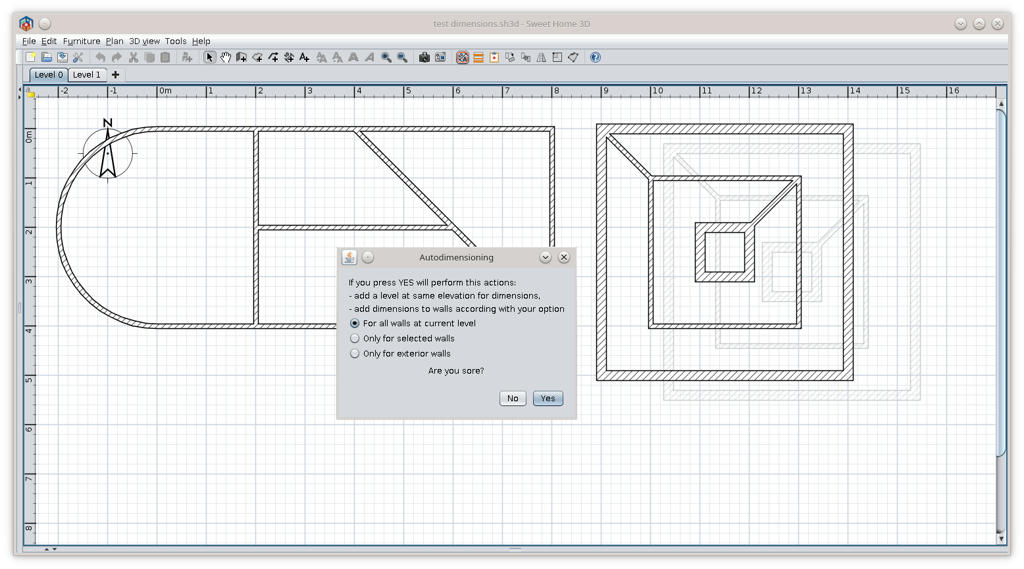
Re: Auto Dimensioning pluginAfter quick try: this works for me (and for others, I am sure)! And when we think of these days there is a gem, really nice question 'Are you sore?' ![]() Very usefull plugin, thanks again Dorin! Seppo |
| Posted by dorin at Mar 15, 2021, 8:30:55 AM |
|
Re: Auto Dimensioning plugin Thanks Seppo! really nice question 'Are you sore?' Wasn't with intention. On next version will be "Are you sure?" TODO also in next version: - implement somehow the exterior walls; - to align exterior dimensions; - to add walls thickness. At that moment, to align dimension lines, I don't see other solution than select the lines and than align them with another plug-in. I will see what I can do or maybe someone else could do this. ---------------------------------------- A computer program does what you tell it to do, not what you want it to do. Murphy's Law When all else fails, read the instructions. Murphy's Law If you don't like "AS IS", DIY. Dorin's law |
| Posted by hansmex at Mar 15, 2021, 9:49:25 AM |
|
Re: Auto Dimensioning plugin There's something to be learned everywhere. yawp (v.) (or yaup) c. 1300, yolpen, probably echoic variant of yelpen (see yelp ). Related: Yawped; yawping. The noun, in reference to speech, is recorded from 1835, now used chiefly in conscious echo of Whitman (1855). yelp (v.) Old English gielpan (West Saxon), gelpan (Anglian) "to boast, exult," from Proto-Germanic *gel- (source also of Old Saxon galpon, Old Norse gjalpa "to yelp," Old Norse gjalp "boasting," Old High German gelph "outcry"), from PIE root *ghel- (1) "to call, cry out." Meaning "utter a quick, sharp, bark or cry" is 1550s, probably from the noun. Related: Yelped; yelping. Source ---------------------------------------- Hans new website - under constuction hansdirkse.info |
| Posted by dorin at Mar 15, 2021, 2:59:26 PM |
|
Re: Auto Dimensioning plugin YAUP=Yet Another Useless Plugin ---------------------------------------- A computer program does what you tell it to do, not what you want it to do. Murphy's Law When all else fails, read the instructions. Murphy's Law If you don't like "AS IS", DIY. Dorin's law |
| Posted by hansmex at Mar 15, 2021, 4:17:10 PM |
|
Re: Auto Dimensioning plugin That's what I said: There's something to be learned everywhere. Hahahahaha - Hans ---------------------------------------- Hans new website - under constuction hansdirkse.info |
| Posted by dorin at Mar 15, 2021, 9:00:58 PM |
|
Re: Auto Dimensioning plugin @ Hans My unique neuron is a little bit lazy. I need a new test_dimensions file and I know You can do this. Maybe a screenshot with how to look Your desire dimension lines. Especially for curved walls. As You've already observe I've use one of Your file for my sample. I need one or more files to cover as many possibly situations but also not too unavailing complex. ---------------------------------------- A computer program does what you tell it to do, not what you want it to do. Murphy's Law When all else fails, read the instructions. Murphy's Law If you don't like "AS IS", DIY. Dorin's law |
| Posted by dorin at Mar 21, 2021, 12:29:57 PM |
|
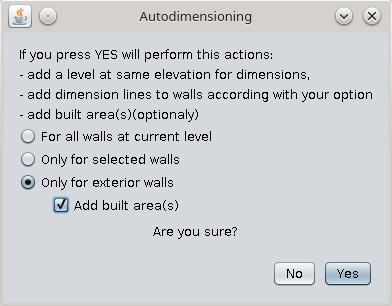
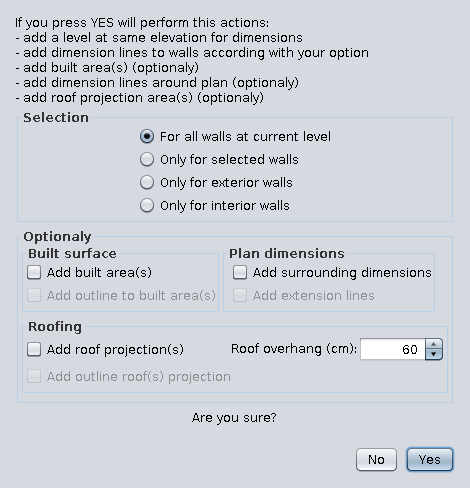
Re: Auto Dimensioning plugin New version 1.1 Download AutoDimensioning v1.1 and from SourceForge . @hansmex Many thanks for help! You have to download this version because is a little bit different. News: - fix some bug in message and translations; - implement exterior walls; - add built area(s); - all adds are in separate level at same elevation. Some explanations: Hint: To have ONLY the built area chose "Only selected walls" with NO walls selected and check the "Add built areas" The built area are composed by a room and a poly-line. I need it probably for a roof plugin. PS. Please verify my translations in English and french. I usually make a lot of mistakes. ---------------------------------------- A computer program does what you tell it to do, not what you want it to do. Murphy's Law When all else fails, read the instructions. Murphy's Law If you don't like "AS IS", DIY. Dorin's law |
| Posted by reddy.shyam at Mar 22, 2021, 1:00:18 PM |
|
Re: Auto Dimensioning plugin Hi dorin, Great plugin there! I was looking for something like this where I can see the dimensions of my entire plan. 👍🤝👌👏 May be a stupid question but is there a way where we can toggle this? I mean if dimensions visible, we should be able to turn off too. I would not want to see it on all the time but to check if anything altered. Hence checking. 🙂 |
| Posted by Puybaret at Mar 22, 2021, 1:03:37 PM |
|
Re: Auto Dimensioning plugin Just make unviewable / viewable the level where dimensions are added. ---------------------------------------- Emmanuel Puybaret, Sweet Home 3D creator |
| Posted by reddy.shyam at Mar 22, 2021, 1:18:34 PM |
|
Re: Auto Dimensioning plugin Thanks @puybaret. I didnt realise it was adding a level for dimensions until you mentioned. Works for me. 👍 Great tip and thanks for the prompt reply. 🙏🤝 A quick question again if I may, if the dimensions change on the level, will they get auto updated or do we have to fire Auto Dimensioning again? |
| Posted by reddy.shyam at Mar 22, 2021, 1:31:33 PM |
|
Re: Auto Dimensioning plugin Thanks @puybaret. I didnt realise it was adding a level for dimensions until you mentioned. Works for me. 👍 Great tip and thanks for the prompt reply. 🙏🤝 A quick question again if I may, if the dimensions change on the level, will they get auto updated or do we have to fire Auto Dimensioning again? No worries @puybaret. I checked it out myself. Looks like we have to fire it each time we need updated dimensions. |
| Posted by Mayapur at Apr 3, 2021, 12:06:25 PM |
|
Re: Auto Dimensioning plugin Finally! Thanks. While SH3D can do wonderful things, absence of auto dimensions was its weak point. This plugin will certainly help. I noted there is no option for "only interior walls". Only interior walls feature is essential especially for interior designers. Hope you can add it too. Also, it would be great if the dimensions are dynamic, meaning if we move the wall the dimension can change automatically and if the wall is deleted, the dimension is also deleted. By all means SH3D, which is better than many big names in the market, deserves a good way to work with dimensions. Hopefully one day it will have it. Thanks developers. Balaram ---------------------------------------- Inspiring Integrity - http://mayapurvoice.com |
| Posted by dorin at Apr 24, 2021, 11:59:32 AM |
|
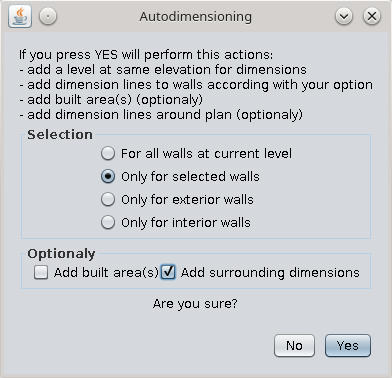
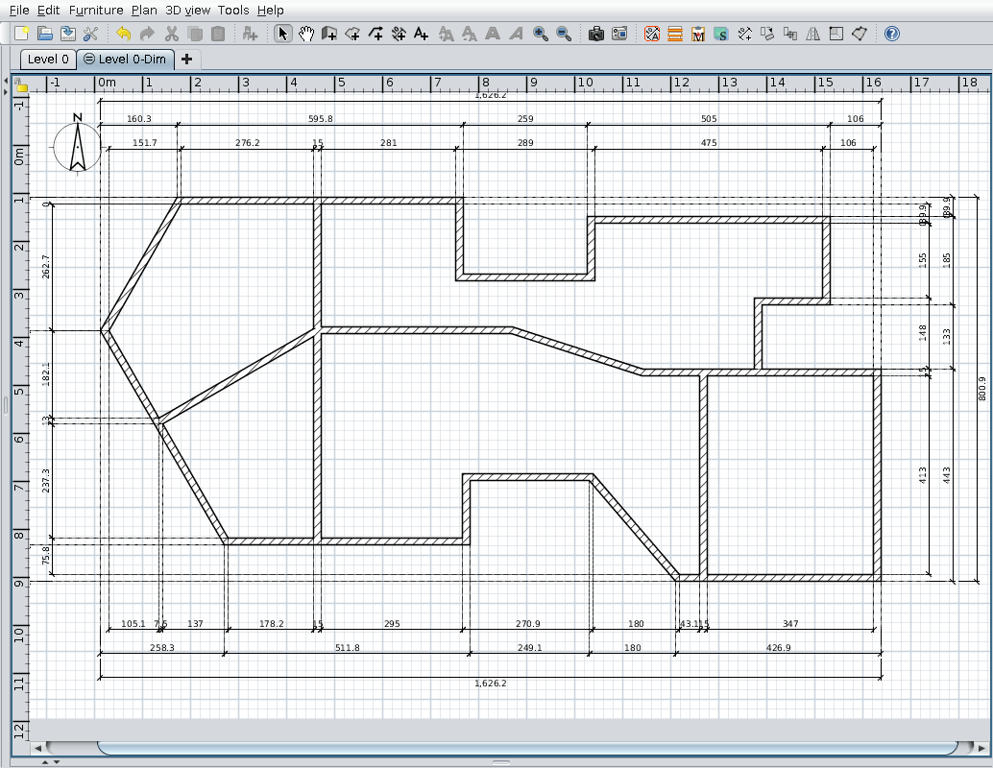
Re: Auto Dimensioning plugin New version 1.2 -add a complete undo/redo mechanism thanks to Emmanuel; Now when click "undo" will delete added level with all dimensions. -add only interior walls dimensions -add surrounding dimensions (will be improve) For this option I steel have to work because it's not exactly what I want but is a start. Also on Source Forge ---------------------------------------- A computer program does what you tell it to do, not what you want it to do. Murphy's Law When all else fails, read the instructions. Murphy's Law If you don't like "AS IS", DIY. Dorin's law |
| Posted by dorin at May 2, 2021, 12:16:39 PM |
|
Re: Auto Dimensioning plugin New version 1.3 -add complete surrounding dimensions ![]() Also on Source Forge ---------------------------------------- A computer program does what you tell it to do, not what you want it to do. Murphy's Law When all else fails, read the instructions. Murphy's Law If you don't like "AS IS", DIY. Dorin's law |
| Posted by hansmex at May 2, 2021, 1:04:08 PM |
|
Re: Auto Dimensioning plugin Wow, this looks very professional! However, I think the updating doesnt work correctly. I had to manually delete previous versions, and download from GitHub, before I got the new version to work. H ---------------------------------------- Hans new website - under constuction hansdirkse.info |
| Posted by dorin at May 2, 2021, 5:09:42 PM |
|
Re: Auto Dimensioning plugin Thanks Hans but to don't exaggerate. Is full of bugs so do not expect to much. Few of knowing ones: -in some cases appear double lines and 0 dimensions -the round walls are not measured -the doors and windows are not measured also That being said is far to be professional. While I'm not a programmer maybe there is someone to make it batter. Now I want to focus on another useless plugin. ---------------------------------------- A computer program does what you tell it to do, not what you want it to do. Murphy's Law When all else fails, read the instructions. Murphy's Law If you don't like "AS IS", DIY. Dorin's law |
| Posted by Puybaret at May 2, 2021, 6:36:22 PM |
|
Re: Auto Dimensioning plugin Thanks for the update ![]() in some cases appear double lines and 0 dimensions You could get less 0 dimensions if you copy the changes I made in getAreaPaths for version 6.5.2.---------------------------------------- Emmanuel Puybaret, Sweet Home 3D creator |
| Posted by dorin at May 19, 2021, 11:00:28 AM |
|
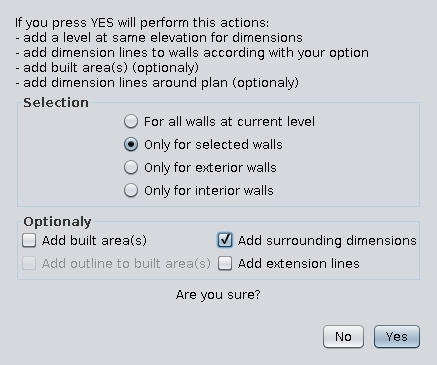
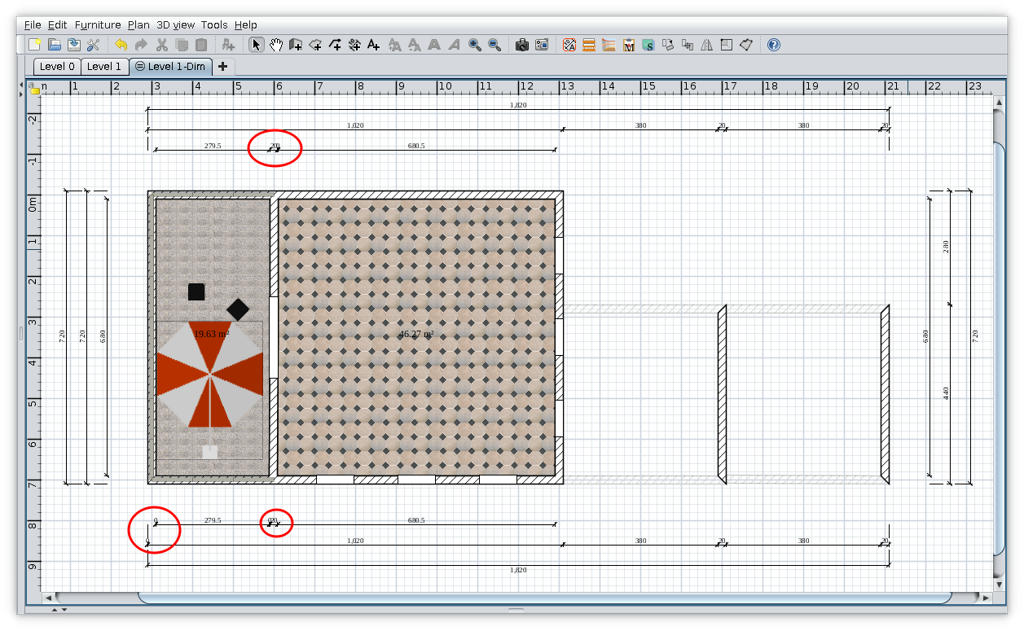
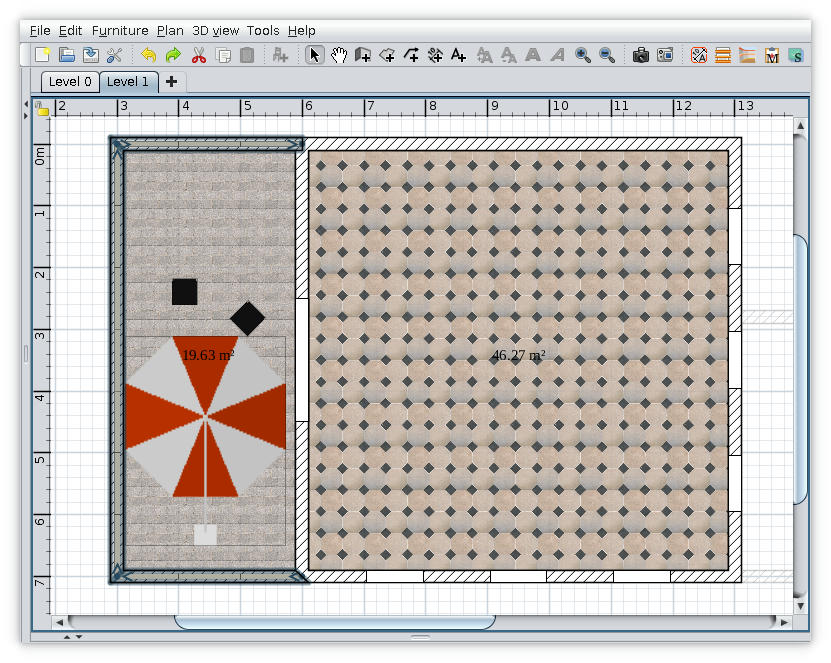
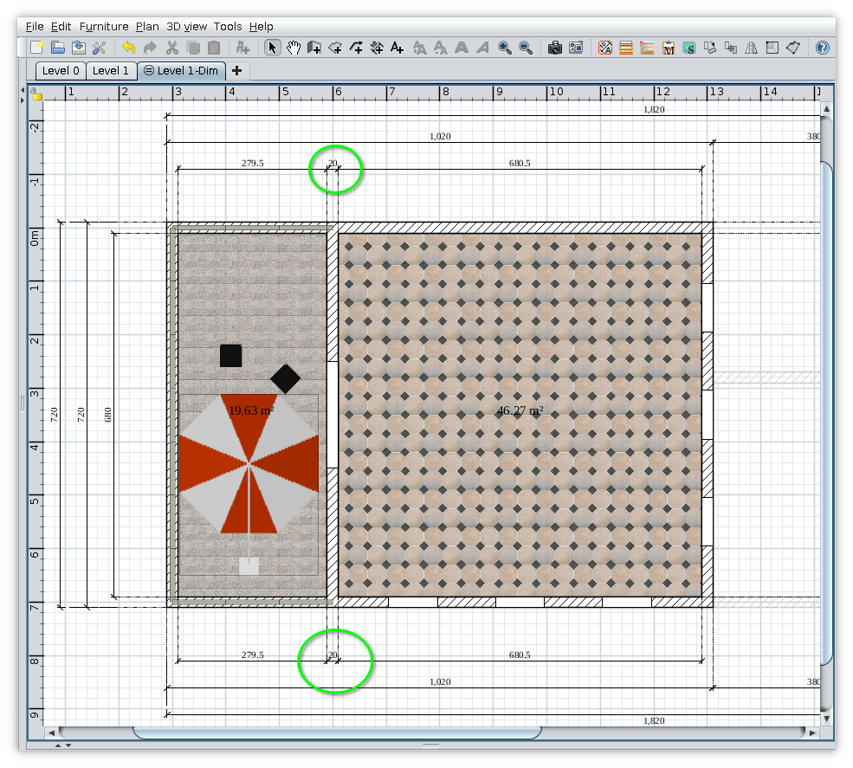
Re: Auto Dimensioning plugin New version 1.4 -add option to draw outline around built area -add option to draw extension lines for surrounding dimensions (An coworker, architect, have told me is not allowed the extension lines in our official plans. I'm not totally agree with that so I make it optionally) 1. The plugin ![]() 2. Some observations Sometime on some plans appear zero dimensions (like what I mark with red in above image). I've try to avoid this without success unless I reduce drastically the precision. My conclusion was that zero dimensions appear when a wall(s) are not perfect horizontal or vertical especially when are splinted. My workaround is this: - identify the walls and click undo to delete the Dim level; - correct the walls by clicking on their end points (magnetism enabled) - try again to add surrounding dimensions Maybe will not succeed from first attempt and you have to try again. ![]() ![]() Also on Source Forge ---------------------------------------- A computer program does what you tell it to do, not what you want it to do. Murphy's Law When all else fails, read the instructions. Murphy's Law If you don't like "AS IS", DIY. Dorin's law |
| Posted by Puybaret at May 19, 2021, 12:30:46 PM |
|
Re: Auto Dimensioning plugin Thanks for this update. There's still something I don't understand: using the 1st demo of Sweet Home 3D, I tried to generate dimensions with the default option "For all walls at current level", but just got an empty level. Wondering if you took into account the existing dimension lines, I deleted the existing ones in the demo, but didn't get a better result. Do I miss something? It would be nice if the default option would generate something, wouldn't it? ---------------------------------------- Emmanuel Puybaret, Sweet Home 3D creator |
| Posted by dorin at May 19, 2021, 1:20:02 PM |
|
Re: Auto Dimensioning plugin Indeed this is another issue which happen also with some old files. I don't get no error message but insert the new level. If exist some round walls it draw the radius and nothing more. I don't know why!! My workaround: -save the file with new level (eventually under new name) -reopen the file -delete new level -try again. Usually work in this way. ---------------------------------------- A computer program does what you tell it to do, not what you want it to do. Murphy's Law When all else fails, read the instructions. Murphy's Law If you don't like "AS IS", DIY. Dorin's law |
| Posted by Puybaret at May 19, 2021, 3:40:50 PM |
|
Re: Auto Dimensioning plugin Thanks for the workaround, it worked From your description, it sounds like an issue about the selected level of a home which is null as long as the home doesn't contain any level. At line 137 of AutoDimensionigPlugin.java, you create a new level in that case but then you don't update selectedLevel field which makes getWallsAtLevel fail line 143 when it tries to update wallsAtLevel list. Did you try to use Eclipse debugger (explained in the Debugging the plug-in section of the Plug-in developer's guide)? ---------------------------------------- Emmanuel Puybaret, Sweet Home 3D creator |
| Posted by dorin at May 19, 2021, 9:19:01 PM |
|
Re: Auto Dimensioning plugin @Emmanuel Thanks you test it and especially you have read the script. Did you try to use Eclipse debugger (explained in the Debugging the plug-in section of the Plug-in developer's guide)? Believe me or not but every time when I start to make a new plugin I read again and again your tutorial + I try to understand how you and others do this. Without Eclipse debugger and assistance I can't do nothing. About the bug: I investigate a little and I compare few simple files created under different SH3D versions. When I create and test a plugin I've made some test files with the current version of SH3D. Rarely I've test on old files and this is my fault. Now, after comparing the xml file created with 5.4, 6.2 and 6.5.2 I've observe on last it exist level0 even it is the only one. Maybe this induce me in error and Eclipse debugger don't say nothing. That's prove I'm not a programmer. I will see if I can improve it without mess other functions. Until there I recommend for users who have old files with unique level to update their file by adding a level, save file, reopen and delete the added level. In this way you will have an updated file. If you only open and save the file will don't work. ---------------------------------------- A computer program does what you tell it to do, not what you want it to do. Murphy's Law When all else fails, read the instructions. Murphy's Law If you don't like "AS IS", DIY. Dorin's law |
| Posted by dorin at May 20, 2021, 8:34:48 AM |
|
Re: Auto Dimensioning plugin Forget what I've say! I'm totally wrong and is only my fault! I've made a simple file with 6.5.2 and is not what I suppose. Maybe when I try to clean the code I delete even some necessary lines. I'll try to fix it as soon as possible and I'll post an other update. Now back to work. I'm sorry for the inconvenient ![]() ---------------------------------------- A computer program does what you tell it to do, not what you want it to do. Murphy's Law When all else fails, read the instructions. Murphy's Law If you don't like "AS IS", DIY. Dorin's law |
| Posted by Puybaret at May 20, 2021, 12:01:09 PM |
|
Re: Auto Dimensioning plugin No problem. From the context, the quick fix should be to add selectedLevel = getHome().getSelectedLevel();---------------------------------------- Emmanuel Puybaret, Sweet Home 3D creator |
| Posted by dorin at May 20, 2021, 12:10:39 PM |
|
Re: Auto Dimensioning plugin New and fixed (hope) version 1.4.1 @Emmanuel You are a good teacher! Thanks! I've try to fix bug that make plugin to don't do what we expect in some circumstances. Now I hope it work with unique level file (old or new) and also with demo files. Don't ask me what I'm done because I don't know. I'm sorry for the inconvenient!! PS @ Emmanuel I've read Your reply after I make this post. I've found the same solution but after 4 hours of investigate the code by inserting spays on different stage. Thanks a lot!!! Also on Source Forge ---------------------------------------- A computer program does what you tell it to do, not what you want it to do. Murphy's Law When all else fails, read the instructions. Murphy's Law If you don't like "AS IS", DIY. Dorin's law |
| Posted by Puybaret at May 20, 2021, 12:32:00 PM |
|
Re: Auto Dimensioning plugin Thanks for the update. Sorry, I should have probably written my suggestion earlier to help you fix this issue faster. I added your plug-in to the Plug-ins and tools page. Thanks again for your contribution! ---------------------------------------- Emmanuel Puybaret, Sweet Home 3D creator |
| Posted by dorin at Aug 5, 2021, 12:12:00 PM |
|
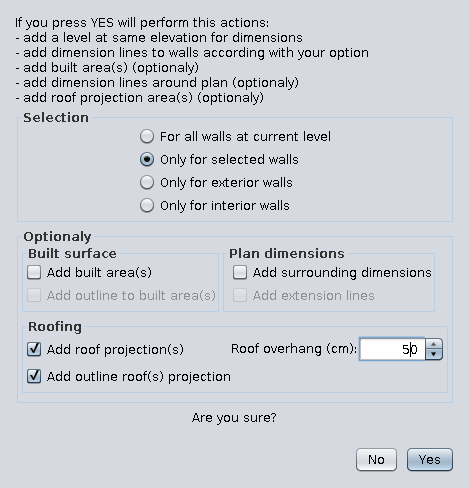
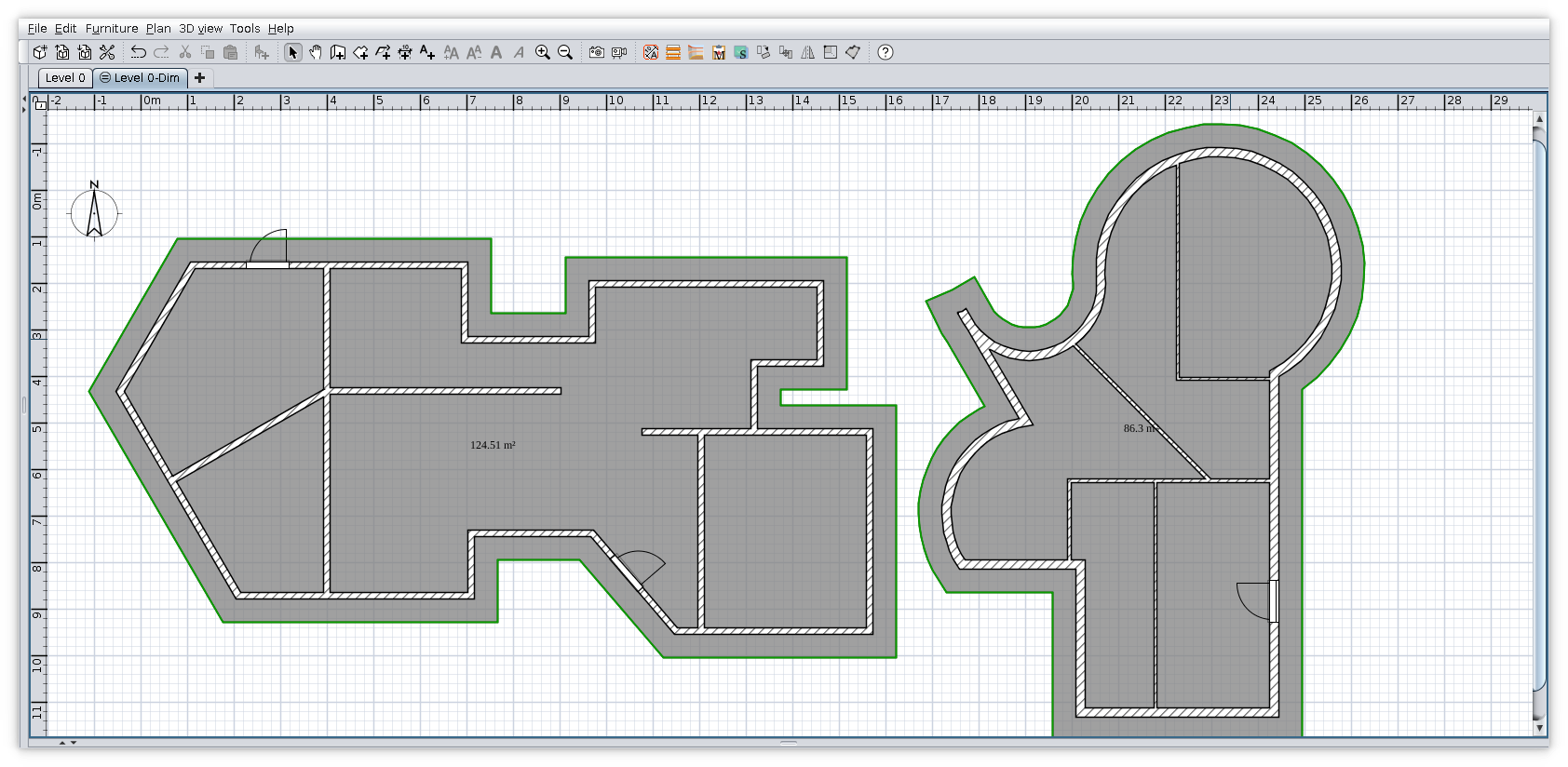
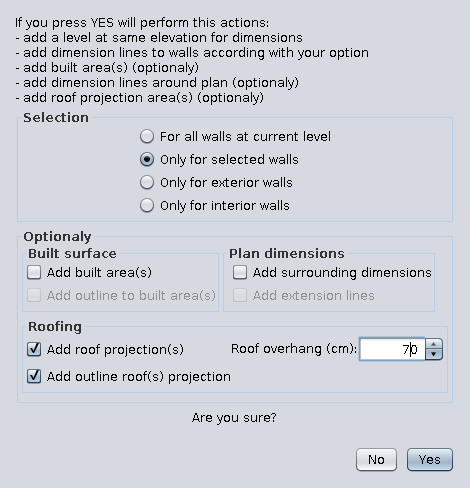
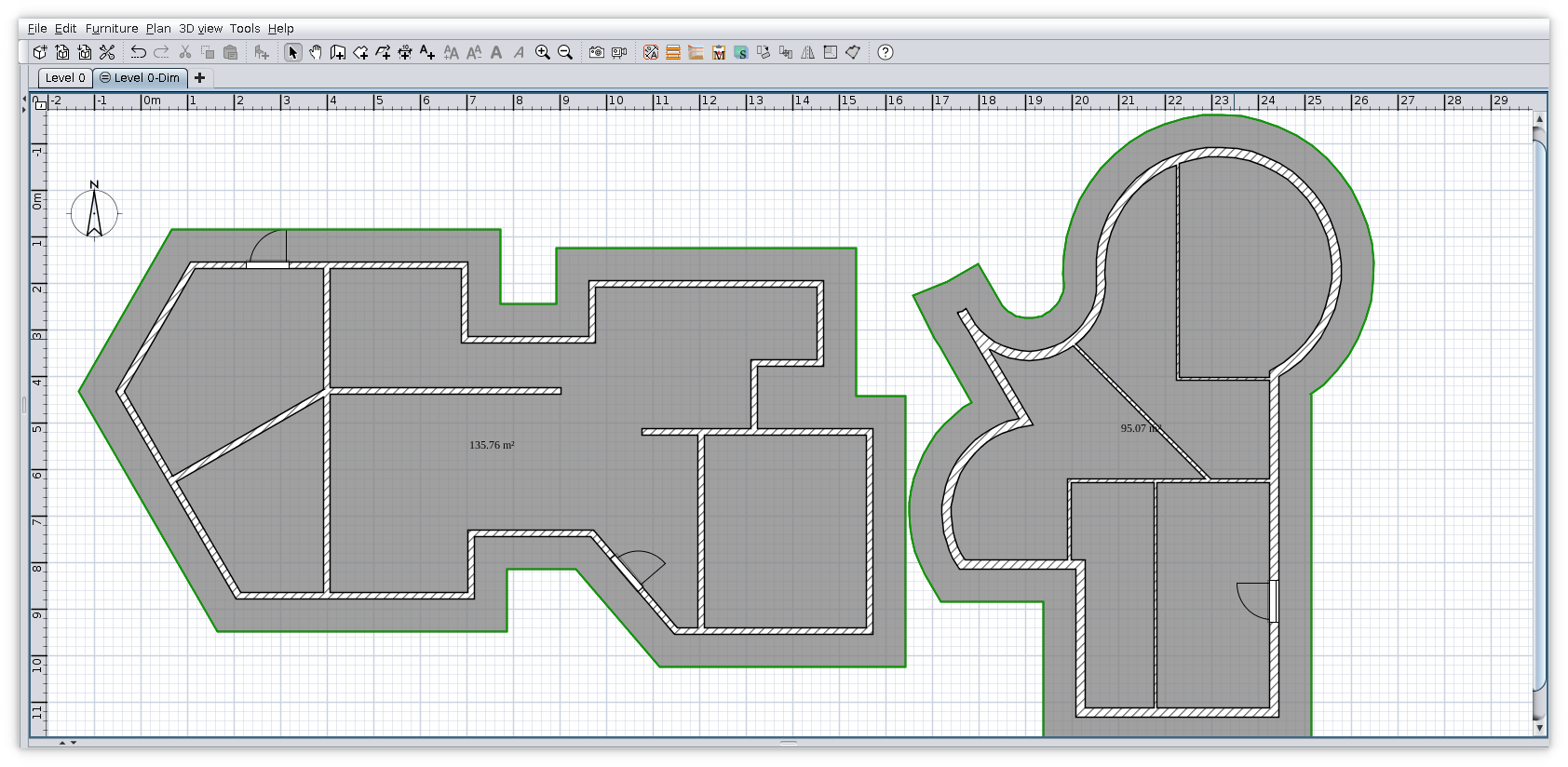
Re: Auto Dimensioning plugin New version 1.5 and on Source Forge - a better way to identify exterior walls - add roof projection - some changes in interface The result with 50 cm overhang The result with 70 cm overhang ![]() ---------------------------------------- A computer program does what you tell it to do, not what you want it to do. Murphy's Law When all else fails, read the instructions. Murphy's Law If you don't like "AS IS", DIY. Dorin's law |
| Posted by hansmex at Aug 6, 2021, 2:55:25 PM |
|
Re: Auto Dimensioning plugin I downloaded v1.5 from both links, but after installing SH3D still reports v1.3. Also, the interface doesn't match what is shown in your images. CORRECTION SH3D now correctly indicates v1.5. H ---------------------------------------- Hans new website - under constuction hansdirkse.info |
| Posted by miro_ilias at Oct 14, 2021, 9:43:54 AM |
|
Re: Auto Dimensioning plugin Hello, I added autodimensioning, saved the sh3d model and read it again. Is there a way to delete all these autodimensioning lines from the sh3d model please ? |
| Posted by reddy.shyam at Oct 14, 2021, 9:49:54 AM |
|
Re: Auto Dimensioning plugin Hello, I added autodimensioning, saved the sh3d model and read it again. Is there a way to delete all these autodimensioning lines from the sh3d model please ? Hi, Good morning. Just delete the level ("Level x-Dim") generated. That should do the trick. |
| Posted by Mayapur at Sep 5, 2022, 3:55:22 PM |
|
Re: Auto Dimensioning plugin Dear Mr Dorin, Namaste! I logged in after quite a while mainly to again say -thank you very much- for your very useful plugin Auto Dimensioning. It makes life much easier while working with SweetHome3D. I just downloaded version 1.5 (I guess that's the latest one?) and find it has number of useful features. Yes certain things may not be working perfectly as you mentioned but nonetheless it is indeed useful. One reason I keep looking for other home / building design software is SH3D's lack of dimension measuring ability but your plugin has improved it. Thanks for your hard work. Take care and stay blessed. Balaram ---------------------------------------- Inspiring Integrity - http://mayapurvoice.com |
| Posted by NIMAN at Dec 2, 2023, 1:42:04 AM |
|
Re: Auto Dimensioning plugin I have found the Autodimensioning Add roof projection(s) extremely useful to provide a new, larger, room in order to double click it in order to create a new wall at the correct location (just beyond the cavity in a double skinned wall). A big thanks to Dorin I had imagined that the resize tool (keeping the aspect ratio the same) would permit the creation of a smaller room on which to auto build the room foundation wall (supporting the double skinned cavity wall). That doesn't work as i'd expected though. Would it be possible to change this plugin to permit negative roof overhang values? Of course, maybe it's easily possible to do the smaller room another way that I just haven't imagined yet... |
| Posted by NIMAN at Dec 2, 2023, 2:18:41 AM |
|
Re: Auto Dimensioning plugin I had imagined that the resize tool (keeping the aspect ratio the same) would permit the creation of a smaller room on which to auto build the room foundation wall (supporting the double skinned cavity wall). Apologies, that should actually read as: I had imagined that the resize tool (unchecking the "keep aspect ratio of" radio button and reducing Width/Height by the same amounts) would permit the creation of a smaller room on which to auto build the room foundation wall (supporting the double skinned cavity wall). |
| Posted by NIMAN at Dec 2, 2023, 2:29:08 AM |
|
Re: Auto Dimensioning plugin Apologies again - I just realised that I can resize the width of the existing walls in order to create the smaller room ![]() Request cancelled. |
| Posted by dorin at Jul 1, 2024, 2:48:33 PM |
|
Re: Auto Dimensioning plugin New version 1.6 - made default option "Only for selected walls" - polished the UI for macOS - added a gray icon if the FlatLaf Dark theme is detected - added pre-completed translation files for all available languages Aslo on Source Forge ---------------------------------------- A computer program does what you tell it to do, not what you want it to do. Murphy's Law When all else fails, read the instructions. Murphy's Law If you don't like "AS IS", DIY. Dorin's law |
|
|
Current timezone is GMT Dec 26, 2025, 1:27:12 AM |