Print at Jan 31, 2026, 1:00:36 PM
Posted by Puybaret at Jan 29, 2021, 2:55:32 PM
Sweet Home 3D 6.5
Here are installers for the beta version of the upcoming version 6.5.

It comes with the new version 2.4.0 of JOGL which is the bridge between Java 3D and OpenGL libraries. I would be pleased to read your feedback about whether it works the same or even better for the Windows users who have some problems with Sweet Home 3D.
To be able to better follow users' configuration, the About dialog box now shows the provider of the Java and Java 3D versions used by Sweet Home 3D.
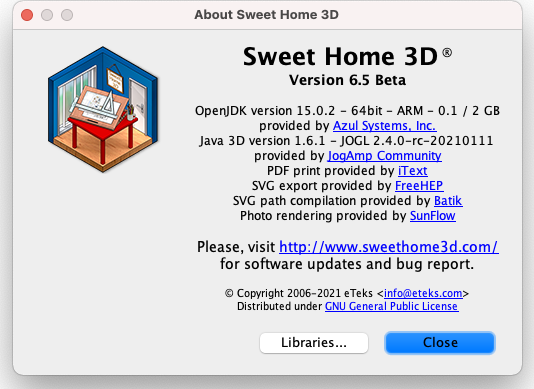


The previous screenshot also shows the Java version bundled with the macOS version was updated to Zulu OpenJDK 15 to be able to run under the new Mac ARM Silicon computers. The macOS version was also notarized to be able to launch more simply.

I wondered if I should also jump to OpenJDK 11 or 15 for Windows and Linux too, but fear that two major changes (JOGL and Java) in Sweet Home 3D might cause problems to track possible bugs. From some tests I made, moving to OpenJDK would also imply that the size of Windows installer will jump to 90 MB or even more if I want it to keep support for Windows XP.

This version also fixes some small bugs like the rendering of polylines joints (mainly in the Polyline modification pane) and some issues in the undo stack when a piece of furniture was dragged onto the plan while in creation mode.
Bigger changes in Sweet Home 3D should come later this year.

[Note from developer: Sweet Home 3D 6.5 was released on March 2, 2021]
----------------------------------------
Emmanuel Puybaret, Sweet Home 3D creator

Posted by dorin at Feb 2, 2021, 9:28:19 AM
Re: Sweet Home 3D 6.5
I've make few tests and appear to work.
Few considerations:
1. java3d 1.7.0 (last stable) in place of 1.6.1.
-I knew it's a lot of work and I'm available to help
2. If java >9 don't like last java3d You could keep java 1.8
3. About Windows XP and 32b linux could be useful an opinion pull to see who still need it.
4. About java: almost all OS have their own politics and usually don't fully work with SH3D. So to bundle proper java in the same package I think is the best solution.
5. About polyline:
5.1- I like to modify individual segments (straight or curve). Could be more simple to make furniture icons like in CAD programs.
5.2- Add name for polyline.
6. About text (all texts): I wish to have for all the same options like are already for labels (furniture & rooms name, dimensions etc.).

Anyway You've make a great job all the time.
Many Thanks and stay healthy applause .
----------------------------------------
A computer program does what you tell it to do, not what you want it to do. Murphy's Law
When all else fails, read the instructions. Murphy's Law
If you don't like "AS IS", DIY. Dorin's law

Posted by Puybaret at Feb 3, 2021, 3:21:41 PM
Re: Sweet Home 3D 6.5
Thanks Dorin for your encouraging feedback.

I'm reluctant to jump to Java 3D 1.7 because Jogamp team decided to rename all the Java packages it contains. Changing package names in Sweet Home 3D wouldn't be difficult, but it also means that all plugins should be updated too. As I don't think that Java 3D 1.7 brings anything special that doesn't exist in Java 3D 1.6.1, I prefer to wait.

There are still enough users under Windows XP and Linux 32 bits to continue delivering Sweet Home 3D updates for them too, and I'm not the kind of developer who pushes users to upgrade their system or computer.
One of the issue to provide Java 1.8 and not a more recent version with Sweet Home 3D is that you can't benefit of recent updates in Java, like a better support of HiDPI screens, even if users can still run the JAR executable version with the Java version of their choice.
To avoid the installer to grow too much under Windows, another idea could be to bundle in Sweet Home 3D installer Java 1.8 for 32 bit version and Java 11 or 15 for 64 bit version.
Under Linux, I might still bundle Sweet Home 3D 32 bit and 64 bit with Java 8 for a longer time.

Could be more simple to make furniture icons like in CAD programs.
What do you mean?
----------------------------------------
Emmanuel Puybaret, Sweet Home 3D creator

Posted by dorin at Feb 3, 2021, 7:08:40 PM
Re: Sweet Home 3D 6.5
Sorry, my fault. My English trick me.
What I want to mean are the possibility to make 2D symbols directly in SH3D, especially for bathroom furniture.
Now, when I talk to You, I realize I could make it in already specialized programs (LO Draw, Inkscape).
But the control of individual segment of polyline could be useful when You want to draw a straight one, continue with a curve one and then again a straight one ending with an arrow.
All this stupid wishes are not mandatory, so don't lose time.
About j3d and java8 is good to know how look the future.
I will start learn j3d1.6.1 for produce other useless plugins which obsesses me.
Apropos, what if You enlarge the API for Your 3D preview to control points and lines (get, count, etc).
Sorry for the vocabulary but I'm not familiar yet with specific 3D words.
----------------------------------------
A computer program does what you tell it to do, not what you want it to do. Murphy's Law
When all else fails, read the instructions. Murphy's Law
If you don't like "AS IS", DIY. Dorin's law

Posted by YGYL at Feb 7, 2021, 8:29:02 AM
Re: Sweet Home 3D 6.5
I support giving up Win XP and using newer and better engines. The advantages far outweigh the disadvantages.

Even in China, very few people use XP. And the key is that the general computer performance of WinXP is very poor. Sweet Home 3D is not enough to run medium-sized projects

No one's using XP anymore on the new computer

Posted by Puybaret at Feb 8, 2021, 6:59:02 PM
Re: Sweet Home 3D 6.5
Here's the version 6.5 Beta 2 for Windows (78.4 MB) which is bundled with Zulu OpenJDK 15.0.2 when installed under a 64 bit architecture, and bundled with Oracle JRE 1.8.0_202 when installed under a 32 bit architecture. From Zulu team, OpenJDK 15.0.2 can run from Windows Vista and Server 2008.
Keeping Oracle JRE 1.8 for 32 bit architecture will allow Sweet Home 3D to run under Windows XP and other legacy systems only able to work with old versions of Java 3D. It prevents also the Windows installer from growing too much.

Please, test this new version and give your feedback before I release the final version 6.5.

No one's using XP anymore on the new computer
Yes, but many people don't necessary change their old computer when they are not obliged to. Hope that providing OpenJDK 15 with Sweet Home 3D 64 bit will satisfy you though.
----------------------------------------
Emmanuel Puybaret, Sweet Home 3D creator

Posted by reddy.shyam at Feb 9, 2021, 6:03:42 AM
Re: Sweet Home 3D 6.5
Hi Emmanuel,

Good day! Before anything, I have congratulate you for this amazing application which helps one build their dream house virtually. :)

Coming back to the topic, Beta2 is working very smoothly, may be because of OpenJDK 15. Beta1 was very sluggish and I had to go back to v6.4

Thanks for this release.

If it helps, I am on Windows 10 Pro 64bit 20H2.

Posted by Puybaret at Feb 9, 2021, 5:38:20 PM
Re: Sweet Home 3D 6.5
The version 6.5 Beta 3 for Windows (78.4 MB) fixes a scale issue for HiDPI screens when the user right clicks in the 3D view to select the object under the mouse cursor.
----------------------------------------
Emmanuel Puybaret, Sweet Home 3D creator

Posted by reddy.shyam at Feb 9, 2021, 7:21:57 PM
Re: Sweet Home 3D 6.5
Hi Emmanuel,

For some reason generating a video (11k images, video durarion 8mins) runs for hours and hangs somewhere in the process. Also tried Photo-Video rendering (Video-Rendering 2.1) which summaries 8k images but doesnot even start, keeps calculating for 2+ hours.

Will test the same on v6.5 beta3 and let you know if any better.

Posted by reddy.shyam at Feb 10, 2021, 10:45:35 AM
Re: Sweet Home 3D 6.5
Hi Emmanuel,

Video is now generated successfully which is about 1.5gig. Happy with it but just have to make sure no other application nor another java app is running. Again quality max 1 or 2. With 3, it was showing 3000 hours to process so left it there.

Posted by Puybaret at Feb 10, 2021, 2:41:25 PM
Re: Sweet Home 3D 6.5
Thanks Shyam for your feedback. If needed you may also grant more memory to Sweet Home 3D.

The version 6.5 Beta 4 for Windows (77.1 MB) is bundled with OpenJDK 11.0.10 which might be a wiser solution because OpenJDK 11 is a LTS (Long Time Support) release. A bug like the bug #8213535 which was fixed for the upcoming Java 16 was backported to Java 11 but not to Java 15.
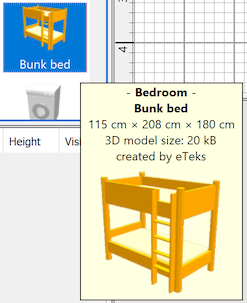
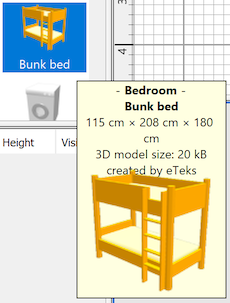
This bug computed a wrong width for tooltips in HiDPI displays and truncated their texts or spreaded it on more lines, like in the following screenshots comparing a correct tooltip with a wrong one.

    
----------------------------------------
Emmanuel Puybaret, Sweet Home 3D creator

Posted by reddy.shyam at Feb 10, 2021, 4:37:06 PM
Re: Sweet Home 3D 6.5
Thanks Emmanuel for the tip. Will surely try it out.

A quick question If I may, 'florescent strip light', 'street light' or 'fan light' do not light up at all where as light bulbs do. I see on bulb's properties 'Light Power' option but not on most of the lights. Am I missing something?

Posted by Puybaret at Feb 10, 2021, 4:59:20 PM
Re: Sweet Home 3D 6.5
There's no "fan light" in the free models. But maybe you mean this model, in which case, you're right, it has no associated light source, but it's not stored in the Lights category of its library either.
I tested again the other lights you cited and they have associated light sources in the their furniture libraries.
----------------------------------------
Emmanuel Puybaret, Sweet Home 3D creator

Posted by reddy.shyam at Feb 10, 2021, 6:11:32 PM
Re: Sweet Home 3D 6.5
Thanks again Emmanuel. Initially I imported furniture one at a time before realising there was a furniture library (1.8). I then imported the library too. This resulted in duplicate items/same name items. I just checked and few have light source option and few don't. Hence forth I will check for the light source option before adding. Thanks for the heads up.

Posted by reddy.shyam at Feb 11, 2021, 12:08:17 PM
Re: Sweet Home 3D 6.5
Hi Emmanuel, So far so good with beta4. A quick question again if I may regarding lights, I see them on even during day. I assumed time of the day option for photo or video is to control lights apart from the day/night effect. Am I wrong?

Posted by Puybaret at Feb 11, 2021, 9:49:15 PM
Re: Sweet Home 3D 6.5
Like in real life, time controls only the sun light nothing else.
----------------------------------------
Emmanuel Puybaret, Sweet Home 3D creator

Posted by reddy.shyam at Feb 12, 2021, 6:08:52 AM
Re: Sweet Home 3D 6.5
Like in real life, time controls only the sun light nothing else.


Well said. smile

Wish just like we have the option of making them invisible, if only we could have 'off' option.....

Posted by snmavronis at Feb 12, 2021, 11:45:06 PM
Re: Sweet Home 3D 6.5
You spoke about a bridge between Java 3D and OpenGL libraries. Will SH3D move towards full OpenGL implementation? I'd be interested in that someday to try out to see if 3D window performance increases in detailed levels. My (Nvidia) EVGA GTX 980 Ti Classified would work better than with Java I'd think!
----------------------------------------
Steve N Mavronis - Retired PC Tech

Posted by bdfd at Feb 15, 2021, 10:02:55 AM
Re: Sweet Home 3D 6.5
Sometimes, since 6.5 beta, the pointer of the mouse jumped !
And for you ?
The jump is always two-three centimeters at right.

None jump with another soft...

biggrin
.
----------------------------------------
Evil progresses when good people do nothing!
---
SH3D 7.1 and nothing else - W11 64b in 4K

Posted by reddy.shyam at Feb 17, 2021, 8:42:40 AM
Re: Sweet Home 3D 6.5
Sometimes, since 6.5 beta, the pointer of the mouse jumped !
And for you ?
The jump is always two-three centimeters at right.

None jump with another soft...

biggrin
.


I too noticed this. I have to click couple of mm outside to select an item. Because of this I started zooming the plan and clicking on enlarged objects with ease.

Posted by Puybaret at Feb 18, 2021, 10:26:20 AM
Re: Sweet Home 3D 6.5
Thanks for your feedback.

@bdfd and reddy.shyam: What beta version do you use? By "jumping", do you mean that the pointer moves by itself to another place?

@snmavronis Maybe one day I'll remove Java 3D bridge and use JOGL directly, but there are very little chances that Sweet Home 3D will be reprogrammed (again) in an other language.
----------------------------------------
Emmanuel Puybaret, Sweet Home 3D creator

Posted by bdfd at Feb 18, 2021, 11:01:50 AM
Re: Sweet Home 3D 6.5
Actually, 6.5 beta4

@bdfd and reddy.shyam: What beta version do you use? By "jumping", do you mean that the pointer moves by itself to another place?
YES ! especially when you want to move an object or a group.

wink
.
----------------------------------------
Evil progresses when good people do nothing!
---
SH3D 7.1 and nothing else - W11 64b in 4K

Posted by reddy.shyam at Feb 18, 2021, 11:04:33 AM
Re: Sweet Home 3D 6.5
Thanks for your feedback.

@bdfd and reddy.shyam: What beta version do you use? By "jumping", do you mean that the pointer moves by itself to another place?

@snmavronis Maybe one day I'll remove Java 3D bridge and use JOGL directly, but there are very little chances that Sweet Home 3D will be reprogrammed (again) in an other language.


Hi @Puybaret, to me I have click couple of mm away from the object to select it. I am on beta4.

Posted by Puybaret at Feb 18, 2021, 11:20:36 AM
Re: Sweet Home 3D 6.5
Could you check if you have the same problem with the version 6.5 Beta 3?
----------------------------------------
Emmanuel Puybaret, Sweet Home 3D creator

Posted by bdfd at Feb 18, 2021, 12:09:55 PM
Re: Sweet Home 3D 6.5
Could you check if you have the same problem with the version 6.5 Beta 3?
Yes for me.

wink
.
----------------------------------------
Evil progresses when good people do nothing!
---
SH3D 7.1 and nothing else - W11 64b in 4K

Posted by reddy.shyam at Feb 18, 2021, 3:22:07 PM
Re: Sweet Home 3D 6.5
Could you check if you have the same problem with the version 6.5 Beta 3?


Mee too.

Posted by Puybaret at Feb 18, 2021, 4:31:23 PM
Re: Sweet Home 3D 6.5
Could you send me a video showing the bug (ideally using a demo available from File > New from demo menu item)?
----------------------------------------
Emmanuel Puybaret, Sweet Home 3D creator

Posted by Puybaret at Feb 22, 2021, 11:21:40 AM
Re: Sweet Home 3D 6.5
@bdfd and reddy.shyam: please give more details about how to reproduce the issue you reported. I didn't experience it on my side.
----------------------------------------
Emmanuel Puybaret, Sweet Home 3D creator

Posted by reddy.shyam at Feb 22, 2021, 5:12:08 PM
Re: Sweet Home 3D 6.5
@bdfd and reddy.shyam: please give more details about how to reproduce the issue you reported. I didn't experience it on my side.


Hi Emmanuel, Apologies, totally skipped my mind. Just emailed you. Thanks for the reminder. :)

Posted by YGYL at Feb 22, 2021, 6:38:24 PM
Re: Sweet Home 3D 6.5
I used beta 4 twice and found no problem
WIN10

Posted by Puybaret at Feb 22, 2021, 8:53:26 PM
Re: Sweet Home 3D 6.5
Thanks YGYL and reddy.shyam for your reports. The video that reddy.shyam sent to me doesn't show any jump of the mouse pointer, and it was rather a story about margin tolerance when you click on objects close to each other.
----------------------------------------
Emmanuel Puybaret, Sweet Home 3D creator

Posted by reddy.shyam at Feb 23, 2021, 5:22:00 AM
Re: Sweet Home 3D 6.5
Thanks YGYL and reddy.shyam for your reports. The video that reddy.shyam sent to me doesn't show any jump of the mouse pointer, and it was rather a story about margin tolerance when you click on objects close to each other.


Yes, my issue was always about mouse offset. Sorry for the confusion. All good from my end as well. 👍

Posted by Puybaret at Feb 25, 2021, 7:19:46 PM
Re: Sweet Home 3D 6.5
No problem reddy.shyam wink

The version 6.5 Beta 5 for Windows (77.1 MB) fixes these two issues:
- The scale of the copied items in the plan is automatically ajusted to prevent out of memory errors for very large copied items
- Magnetism is correctly toggled when Alt key is released under Windows. This bug probably appeared in Sweet Home 3D 4.0 when Shift key was replaced by Alt key to toggle magnetism. I didn't realize until today that the default behavior of the Alt key transfers focus to the menu bar when released.

I don't think that the second correction will fix the "mouse pointer jump" experienced by bdfd when Alt key is pressed while moving an object, but it could worth a try.
Is it a new issue or did it happen in version 6.4.2 too? How often does it happen? Is Sweet Home 3D still workable with this bug?

Thanks for your tests smile
----------------------------------------
Emmanuel Puybaret, Sweet Home 3D creator

Posted by Gildaniel at Feb 26, 2021, 10:09:11 AM
Re: Sweet Home 3D 6.5
Hi, I have some issue in interface with fonts, icons and lines accuracy


Posted by Puybaret at Feb 26, 2021, 10:53:57 AM
Re: Sweet Home 3D 6.5
I don't see any problem in your screenshot. Please, give more details about the issue you get.
If you're using Sweet Home 3D Beta 2 to 5 under Windows 64 bit with a HiDPI screen, some items should look a little larger because it's bundled with a Java version that supports better HiDPI screens. But larger doesn't mean inaccurate, right?
----------------------------------------
Emmanuel Puybaret, Sweet Home 3D creator

Posted by Gildaniel at Feb 26, 2021, 11:07:29 AM
Re: Sweet Home 3D 6.5
Right after 6.4 interface seems less accurate:
Icons are very pixilized (1)
Lines and some numbers are not clear, but have pixilized moire (2)
Several different fonts in window, some have problems with proportions (3)


Posted by Gildaniel at Feb 26, 2021, 11:10:40 AM
Re: Sweet Home 3D 6.5
I use Sweet Home 3D Beta 5 under Windows 64 bit with 1920х1080 dpi

Posted by Puybaret at Feb 26, 2021, 11:31:28 AM
Re: Sweet Home 3D 6.5
So you're not using a HiDPI screen, and I don't experience your issue with Sweet Home 3D Russian on my side, so it must comes from something else.

Wouldn't you use a SweetHome3D.l4j.ini file a resolution scale line like
-Dcom.eteks.sweethome3d.resolutionScale=...

Or maybe you changed user interface size in Windows?

Could you also install Sweet Home 3D 32 bit to check if it renders differently?
----------------------------------------
Emmanuel Puybaret, Sweet Home 3D creator

Posted by digitaltrails at Feb 26, 2021, 9:15:48 PM
Re: Sweet Home 3D 6.5
I installed beta1 on OpenSUSE Linux Tumbleweed 20210222. It seems to work fine. I had to edit the startup script to cope with (a) HiDPI/4K monitors, and (b) Linux Nvidia proprietary drivers:

-Dcom.eteks.sweethome3d.resolutionScale=2.0
-Dcom.eteks.sweethome3d.j3d.useOffScreen3DView=true


I tried a couple of fairly complex models, everything seem to load OK, looks OK, and modifies OK. A couple of the plugins I've contributed still seem to work too.

Would it be possible to detect the useOffScreen3DView situation and automatically correct it? Or could you perhaps at least produce a message with a link to some help. On Googling, I noticed the issue seems to pop up from time to time in various Linux forums when people try SH3D, many of the postings never got answered satisfactorily.

Posted by Puybaret at Mar 3, 2021, 2:06:52 AM
Re: Sweet Home 3D 6.5
Sweet Home 3D 6.5 was released tonight. Many thanks for your help and feedback.

Would it be possible to detect the useOffScreen3DView situation and automatically correct it?
Unfortunately no, since offscreen 3D support can't be detected reliably under Linux.
----------------------------------------
Emmanuel Puybaret, Sweet Home 3D creator

Posted by reddy.shyam at Mar 3, 2021, 5:44:46 AM
Re: Sweet Home 3D 6.5
Sweet Home 3D 6.5 was released tonight. Many thanks for your help and feedback.

Would it be possible to detect the useOffScreen3DView situation and automatically correct it?
Unfortunately no, since offscreen 3D support can't be detected reliably under Linux.

Super, thanks Emmanuel. Appreciate all your hardwork. applause applause

Posted by digitaltrails at Mar 3, 2021, 8:05:06 AM
Re: Sweet Home 3D 6.5
Sweet Home 3D 6.5 was released tonight. Many thanks for your help and feedback.

Would it be possible to detect the useOffScreen3DView situation and automatically correct it?
Unfortunately no, since offscreen 3D support can't be detected reliably under Linux.

Thanks for making this new release and also thank you for the prompt response to my question.

I haven't looked at the code, but if on Linux
awtComponent com.eteks.sweethome3d.j3d.Component3DManager throws and exception at startup, could the SweetHome3D error/exit-dialog offer an option such as "Should SweetHome3d attempt a restart with the alternative useOffScreen3DView setting?".

If that's too complicated, would it be possible to add a suggestion or help-link to the exit-dialog.

I guess the Linux tar could ship with a third startup script like SweetHome3D-Java3D-1_5_2, but called SweetHome3D-useOffScreen3DView. Or maybe even a README in the install folder.

All in all, not a big issue, but addressing this issue might prevent some repeated forum posting here and elsewhere.

Posted by Puybaret at Mar 3, 2021, 4:39:57 PM
Re: Sweet Home 3D 6.5
For your information, I released again Sweet Home 3D 6.5 source code and Windows installer because upgrading to Inno Setup 6 removed support for generated installer under Windows XP and Vista. Therefore, I built again an installer using Inno Setup 5.
As this update didn't modify any other feature of Sweet Home 3D application, I just replaced the existing files hosted at SourceForge.net and updated the V_6_5 tag in source code.

Could the SweetHome3D error/exit-dialog offer an option such as "Should SweetHome3d attempt a restart with the alternative useOffScreen3DView setting?"
I don't like that much this kind of attempt, because you're never sure if you detected the right error and how easy it's possible to launch an other process.

If that's too complicated, would it be possible to add a suggestion or help-link to the exit-dialog.
I had the same idea and it could also be useful for users under Windows which have problems with the 64 bit version of Sweet Home 3D. Pointing to the FAQ could be also a good idea.

I guess the Linux tar could ship with a third startup script like SweetHome3D-Java3D-1_5_2, but called SweetHome3D-useOffScreen3DView
I keep this idea for a future version.
----------------------------------------
Emmanuel Puybaret, Sweet Home 3D creator

Posted by enkonyito at Mar 14, 2021, 2:06:24 AM
Re: Sweet Home 3D 6.5
Are there any other good surprises like this that have not been announced in the history or blog post of version 6.5?
----------------------------------------
EnkoNyito

Posted by Puybaret at Mar 14, 2021, 6:41:23 PM
Re: Sweet Home 3D 6.5
<technical answer>
Most of the properties that could be only retrieved from an instance of HomePieceOfFurniture or a subclass can now be modified too with their new setters (setModel, setPlanIcon, setInformation...). Of course, I also added some listeners in the plan and 3D view components to update them when a call to these methods is done, but there's no user interface to call them yet, even if I checked they correctly work. Some of these methods were added for modifications I had to make to EvidenceMarkerGenerator plug-in.
The easiest way to test them is probably with the JavaScript console in a browser running with a SweetHome3DJS example. For example, the following JavaScript instruction will replace the model of the piece selected in the plan by the model of the piece selected in the furniture catalog:
application.getHomes()[0].getSelectedItems()[0].setModel(
application.getHomeController(application.getHomes()[0]).
getFurnitureCatalogController().getSelectedFurniture()[0].getModel());
</technical answer>
----------------------------------------
Emmanuel Puybaret, Sweet Home 3D creator

Posted by Parnell at Mar 16, 2021, 1:22:12 PM
Re: Sweet Home 3D 6.5
After installing 6.5, photo rendering (3D view>Create photo) just hangs after a few seconds. YafaRay (latest) works but the textures are totally off, for floors mostly.

Posted by Puybaret at Mar 16, 2021, 1:50:28 PM
Re: Sweet Home 3D 6.5
Does it work with the examples available from File > New from demo menu item?
What configuration do you have (see About dialog box)?
----------------------------------------
Emmanuel Puybaret, Sweet Home 3D creator

Posted by Parnell at Mar 16, 2021, 4:19:27 PM
Re: Sweet Home 3D 6.5
Correction: The photo rendering (sort of) works! It just takes forever to start (and finish..)..In previous versions the standard renderer (3D view>Create photo) and the YafaRay have been equally fast for me. Typically my photos render in about 2 minutes. Now YafaRay takes 2 minutes to finish while the "old" method takes 2 minutes to start rendering and 20 minutes to finish.
Both methods however make a mess of the floors in the photos (when Virtual visitor view is used. Aerial view works). I'm not sure how I can explain this. Is there a way to supply screenshots in the post?

Posted by treehousenorris2 at Mar 16, 2021, 8:08:14 PM
Re: Sweet Home 3D 6.5
Notarization, great! How do you install zulu for ARM on an intel development machine?

Posted by Puybaret at Mar 16, 2021, 9:39:24 PM
Re: Sweet Home 3D 6.5
@Parnell If you want some help, please answer to the questions I asked you sad

@treehousenorris2 You can't run Zulu for ARM on an Intel Mac but nothing prevents you to download an archive to get its executable files, then build a universal Java application on an Intel Mac (see macosxBundle target in Sweet Home 3D Ant build)
----------------------------------------
Emmanuel Puybaret, Sweet Home 3D creator

Posted by enkonyito at Mar 17, 2021, 3:43:41 AM
Re: Sweet Home 3D 6.5
<technical answer>
Most of the properties that could be only retrieved from an instance of HomePieceOfFurniture or a subclass can now be modified too with their new setters (setModel, setPlanIcon, setInformation...). Of course, I also added some listeners in the plan and 3D view components to update them when a call to these methods is done, but there's no user interface to call them yet, even if I checked they correctly work. Some of these methods were added for modifications I had to make to EvidenceMarkerGenerator plug-in.
The easiest way to test them is probably with the JavaScript console in a browser running with a SweetHome3DJS example. For example, the following JavaScript instruction will replace the model of the piece selected in the plan by the model of the piece selected in the furniture catalog:
application.getHomes()[0].getSelectedItems()[0].setModel(
application.getHomeController(application.getHomes()[0]).
getFurnitureCatalogController().getSelectedFurniture()[0].getModel());
</technical answer>

If I understand correctly, these new setters currently only allow permutations as in your example or the Paste style function.
For light sources, have you also planned to add setters to modify the color for example?
----------------------------------------
EnkoNyito

Posted by Puybaret at Mar 17, 2021, 3:01:57 PM
Re: Sweet Home 3D 6.5
For light sources, have you also planned to add setters to modify the color for example?
No, even if it's not declared as final, the LightSource class like a few other model classes (BackgroundImage, HomePrint, Baseboard, HomeMaterial, HomeTexture, Sash, TextStyle...) are immutable.
If you want to change the color of a light source, create a new LightSource instance and call setLightSources on a HomeLight instance.
----------------------------------------
Emmanuel Puybaret, Sweet Home 3D creator

Posted by enkonyito at Mar 17, 2021, 5:15:05 PM
Re: Sweet Home 3D 6.5
@Puybaret

Thanks for the clarification, I will adapt my utilities to suit rather than copying the properties one by one.
----------------------------------------
EnkoNyito

Posted by creativejuice at Mar 18, 2021, 6:45:41 PM
Re: Sweet Home 3D 6.5
Hi! I discovered this program yesterday, downloaded for my Mac Big Sur 11.2.1 and successfully designed several layouts. I saved them and today, when I open the app, it just glitches and freezes with a blank light blue screen. It shows my files as "recovered" in the window tab but I can't see my designs. I already uninstalled and reinstalled the program. I'm not tech saavy. What else can I do? I really need my files printed ASAP. Thank you!

Posted by Puybaret at Mar 22, 2021, 11:39:01 AM
Re: Sweet Home 3D 6.5
What happens when you try to save the recovered files?

By the way, please no "ASAP" angry
----------------------------------------
Emmanuel Puybaret, Sweet Home 3D creator

Posted by phen at Mar 23, 2021, 11:30:36 AM
Re: Sweet Home 3D 6.5
Export to .swg is not working in version 6.5.
Has anyone encountered this problem?

Posted by Puybaret at Mar 24, 2021, 5:39:44 PM
Re: Sweet Home 3D 6.5
I tried to export to SVG again and didn't encounter any issue.
Maybe your home is quite large, or you used a very large icon size in preferences, in which case you should try with a smaller size.
----------------------------------------
Emmanuel Puybaret, Sweet Home 3D creator

Posted by phen at Mar 25, 2021, 11:47:29 AM
Re: Sweet Home 3D 6.5
I tried exporting to .sVg on two different computers. The file .sVg becomes very small in size. In version 6.3 there were no such problems.

Only the launch Sweet Home with "Java Web Start" helped me to get normall file .svg

Posted by YGYL at Apr 11, 2021, 11:21:14 AM
Re: Sweet Home 3D 6.5
Is the temp file(work directory) not automatically cleared?

Posted by Puybaret at Apr 11, 2021, 8:46:04 PM
Re: Sweet Home 3D 6.5
It should but apparently Sweet Home 3D with Java 11 doesn't perform this removal under Windows anymore sad
I'll try to check what's going on and fix it in the next version. Meanwhile, if you don't clear the work directory yourself, only subfolders of work directory older than a week will be cleared 10 minutes after program launch. Sorry for the inconvenience this regression may cause you and thanks for reporting it.
----------------------------------------
Emmanuel Puybaret, Sweet Home 3D creator

Posted by Puybaret at Apr 24, 2021, 12:01:43 AM
Re: Sweet Home 3D 6.5
Tonight, I released the version 6.5.2 which among small things, fixes the issue reported by YGYL (but won't clear completetly the old subfolders of work directory before a week).
----------------------------------------
Emmanuel Puybaret, Sweet Home 3D creator

Posted by YGYL at Apr 24, 2021, 8:56:14 AM
Re: Sweet Home 3D 6.5
Thank you. It has been tested to be useful