Print at Dec 16, 2025, 5:35:32 PM
Posts: 14   Pages: 2   [ 1 2 | Next Page ]
View all posts in this thread on one page
Posted by zymme at Jan 4, 2021, 1:26:07 AM
problem with placing / mergering objects
Hi,
Im trying to put a sink in a cabninet and the countertop.
But the sink is filled with the countertop when I do it
.
I also tried with out the countertop but its same problem.

I guess somehow its due to its different objects and I need to priortize the sink to be sunken into the cabinet/countertop?

Can any guide me how to to proceed?

thanks in advance!


See 2 examples below,


https://pasteboard.co/JI03WvS.png

https://pasteboard.co/JI073AA.png

Posted by Ceciliabr at Jan 4, 2021, 6:36:50 PM
Re: problem with placing / mergering objects
you could try checking this project file:

Counter-tut.sh3d


Create a level @88 cm ( or at whatever height your preferred counter might be) :
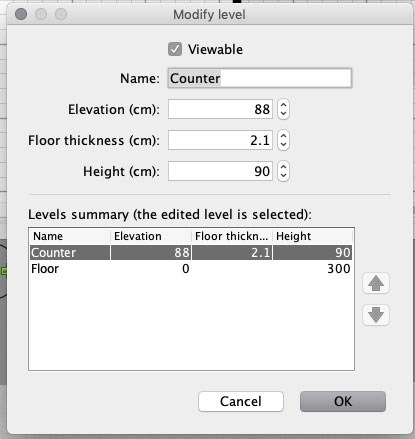


Draw your counter with the Create rooms - tool

Modify your sink:


Configuring an object as a staircase, it will always make a cut-out in any floor or ceiling.

Study the project file. There are several ways to do this.
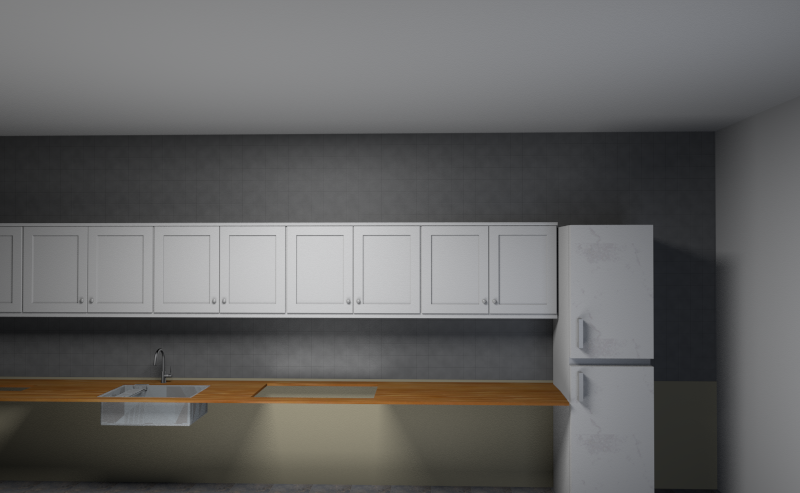


Cecilia

Posted by zymme at Jan 5, 2021, 10:27:39 PM
Re: problem with placing / mergering objects
Hej!
Thanks for you answer, its better, but still not good.
its the counter which is the problem.

any good tip? :)


Posted by hansmex at Jan 6, 2021, 12:00:21 PM
Re: problem with placing / mergering objects
If you don't explain what your problem is, you won't get many tips.
If you want your countertop thicker/thinner, just change the floor height.

H
----------------------------------------
Hans

new website - under constuction
hansdirkse.info

Posted by zymme at Jan 6, 2021, 5:53:42 PM
Re: problem with placing / mergering objects
Hej!
Thanks for you answer, its better, but still not good.
its the counter which is the problem.

any good tip? :)


sorry the image was not attached correcly I can see..
see link below to understand my problem with the filled sink :)

https://pasteboard.co/JIhKXu7.png

Posted by hansmex at Jan 6, 2021, 7:53:39 PM
Re: problem with placing / mergering objects
SH3D does not automatically remove, or make invisible, intersecting parts. Only exception are stairs inserted into floors/ceilings. So, remove the top of the cabinet before inserting the sink,eg by making topless cabinets, or making the top invisible using the Modify Furniture dialogue.

H
----------------------------------------
Hans

new website - under constuction
hansdirkse.info

Posted by zyzer at Jan 15, 2021, 7:08:18 PM
Re: problem with placing / mergering objects
Hi everyone,

New user here also. Saw this thread and this is exactly what i am looking for as well.

I opened the project that Ceciliabr posted but i simply cannot that replicate to my project. I can do the countertop as level 2, but then i add the sink as a staircase and it doesnt cut through the countertop. Tried copying and pasting invisible box to my project but it does nothing. What am i doing wrong?

And in general, how do you make kitchens in SH3D? Do you make countertop as level 2 floor and then add counters on the level 1 floor? How do i make proper kitchen?

Posted by Mike53 at Jan 16, 2021, 12:28:28 PM
Re: problem with placing / mergering objects
Hi. Take a look at THIS file, it may help.

Posted by zyzer at Jan 16, 2021, 11:09:30 PM
Re: problem with placing / mergering objects
Thanks! It helped, i finally managed to create a half decent kitchen.
But i still don't understand how can i create or modify my own countertop with a customizable hole in it.

Please, is there a detailed tutorial somwehere? Would very much appreciate it.

Posted by Mike53 at Jan 17, 2021, 10:22:48 AM
Re: problem with placing / mergering objects
From the image you posted it looks to me that the counter is ok, but the cabinet is a solid block and that it what can be seen in the sink. to check this, change the colour of the cabinet.
then look at option 3 in the file i shared

Posts: 14   Pages: 2   [ 1 2 | Next Page ]