This topic has been viewed 4309 times and has 5 replies
Thread status:
How can I do this? [img]http://www.sweethome3d.com/images/flags/en_small.gif[/img]
Ceciliabr
Advanced Member
Posts: 637 Joined: Sun Jul 07, 2013 3:41 pmCountry: Copenhagen, Denmark
Contact:
Post
by Ceciliabr Wed Jul 25, 2018 1:13 am
I have been doing some experiments with texturing (when my surroundings have allowed it), and I have found that Sunflow can do a lot with texturing that I was not aware of.
Among the
features listed for Sunflow we can find
Bump/normal mapping via surface modifiers . I have studied the
Wavefront mtl-bible and tried my best to get this to work, but I must admit that my skills are not nearly what I imagined. So I give up and ask for help:
Does anyone know how to implement bump/normal-mapping for Sunflow?
It really makes a difference.
The obj file and the bump map can be downloaded
here
Cec
enkonyito
Advanced Member
Posts: 607 Joined: Thu May 28, 2015 4:52 pm
Post
by enkonyito Wed Dec 12, 2018 3:21 am
Hi Ceciliabr,
Sunflow standalone allows the use of bump/normal mapping via modifiers. (example
bump_demo.sc )
The
.obj format also allows the use of bump mapping by adding the 'map_bump' or 'bump' keyword followed by the texture path in the
.mtl file.
Unfortunately, Sweet Home 3D only takes into account the 'map_Kd' keyword in the export/import OBJ.
Enko
EnkoNyito
nemetonia
Member
Posts: 20 Joined: Sun Feb 11, 2018 7:16 am
Post
by nemetonia Wed Dec 12, 2018 6:42 am
Hello,
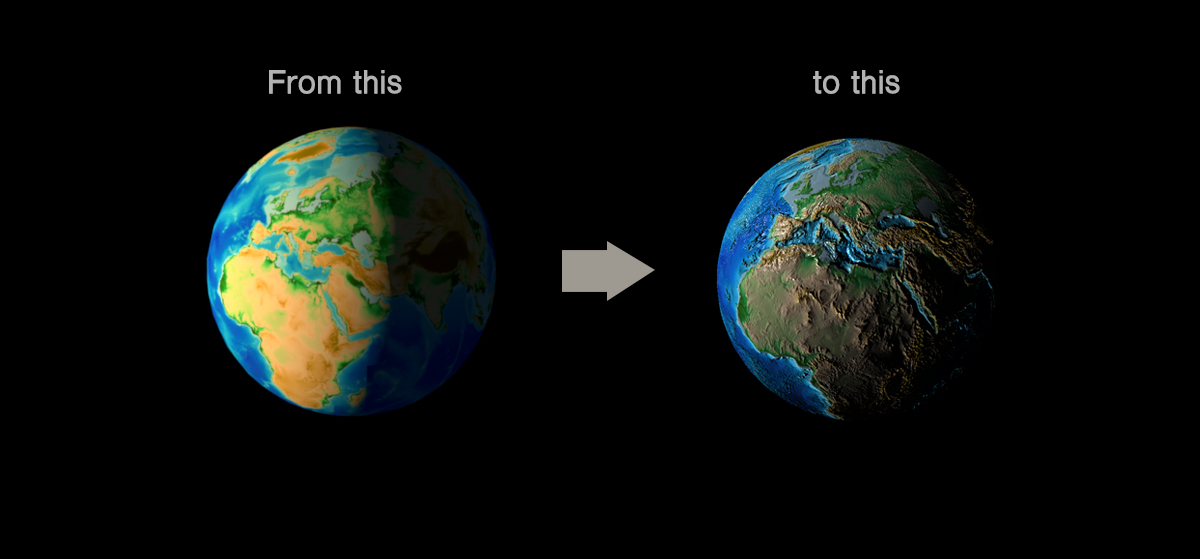
I think that this was used by bdfd for Mars since january 2017 ???
See
here :
[;)]
Puybaret
Expert
Posts: 9440 Joined: Mon Nov 07, 2005 12:00 pmCountry: Paris, France
Contact:
Post
by Puybaret Wed Dec 12, 2018 5:48 pm
nemetonia, as Sweet Home 3D doesn't support bump mapping, this can't be the case and must be a visual effect.
Emmanuel Puybaret, Sweet Home 3D creator
nemetonia
Member
Posts: 20 Joined: Sun Feb 11, 2018 7:16 am
Post
by nemetonia Thu Dec 13, 2018 6:45 am
nemetonia, as Sweet Home 3D doesn't support bump mapping, this can't be the case and must be a visual effect.
So I said 'used by' and not 'created with'... [:D]
Ceciliabr
Advanced Member
Posts: 637 Joined: Sun Jul 07, 2013 3:41 pmCountry: Copenhagen, Denmark
Contact:
Post
by Ceciliabr Thu Dec 13, 2018 6:51 am
Any chance it might be included in a future version?
Users browsing this forum: Google [Bot]