
I just downloaded FurnitureLibraryEditor 1.7 on my Windows 7 64 bit computer and I have Java 7 (32 bit) installed. Whenever I try to launch it, Windows says it can't open it and asks to search for a service that can open it, which is strange because this is just a local java file.
SweetHome3D runs fine and so does Art Of Illusion.
So, I did some looking around and I tried these (without success):
C:\Users\username>java -Dcom.eteks.sweethome3d.no3D=true -jar b:\FurnitureLibraryEditor-1.7.jar
the result:
'java' is not recognized as an internal or external command,
operable program or batch file.
Tried again:
C:\Users\username>java -jar B:\FurnitureLibraryEditor-1.7.jar
the result:
'java' is not recognized as an internal or external command,
operable program or batch file.
So, you see, Windows is not recognizing the command, java.
Can you help?
 FurnitureLibraryEditor 1.7 on Windows 7 cannot launch
This topic has been viewed 3890 times and has 4 replies

Re: FurnitureLibraryEditor 1.7 on Windows 7 cannot launch
The error says that the system can't find java.exe in the PATH.
Try to find where java is installed (probably in C:\Program Files\Java\jre7\bin), drag and drop the java.exe file in the command window to have its full path and then type -jar B:\FurnitureLibraryEditor-1.7.jar
Try to find where java is installed (probably in C:\Program Files\Java\jre7\bin), drag and drop the java.exe file in the command window to have its full path and then type -jar B:\FurnitureLibraryEditor-1.7.jar
Emmanuel Puybaret, Sweet Home 3D creator
Re: FurnitureLibraryEditor 1.7 on Windows 7 cannot launch
That's cool to be able to drag and drop the exe into the terminal window like that!
Another question:
Why are there 2 windows, one that looks like a terminal and the other being the desired FurnitureLibraryEditor?
Another question:
Why are there 2 windows, one that looks like a terminal and the other being the desired FurnitureLibraryEditor?
Re: FurnitureLibraryEditor 1.7 on Windows 7 cannot launch
I wanted to add a screenshot and I hit the wrong button, lol.
Trying again:
Trying again:
Re: FurnitureLibraryEditor 1.7 on Windows 7 cannot launch
Sorry about this,
trying the screenshot with a link:
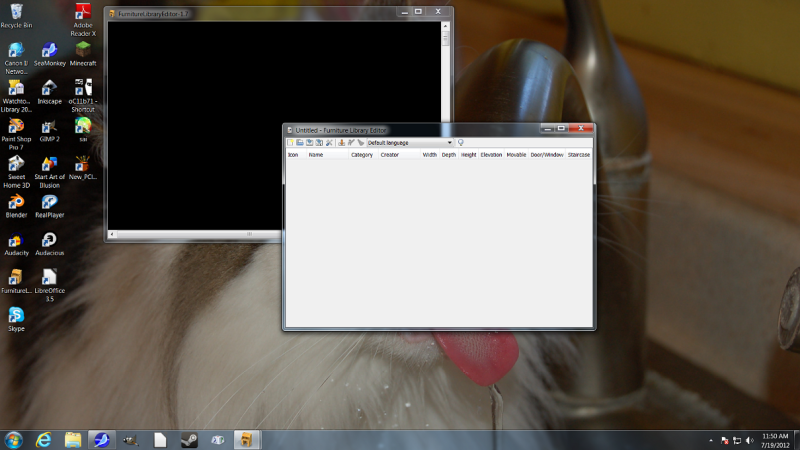
trying the screenshot with a link:
Who is online
Users browsing this forum: No registered users