
Pitnounours : I've found out with Sketch models, (and you might have learned this already, so sorry if I am repeating) that if a surface is not a component, all surfaces in Sketch are considered two sided. So when you make a model, you should select the faces not in a component, and reverse the faces, and reapply your texture to avoid losing the texture when exported.
Sketch models when exported to dae files have a known bug called xyz battles. It means that if two faces are on the same plane, the program decides which face is the viewable face, and it might not be the face that you want showing. So always try to have either a dominant component, or two faces textured the same if you have to have two faces on the same plane.
Puybaret: Thanks for your time and reply, and I found out while discussing this with another modeler, that my latitude and longitude were not correctly assigned in my settings, and that is what was throwing off my sun's position at the time I thought should have been dark. So please forgive any confusion. [:)]
Sweet Home 3D 3.0
This topic has been viewed 399798 times and has 134 replies

Re: Sweet Home 3D 3.0
It was tough, but I succeeded to add support for round walls in the Beta 13, another long awaited feature... [:)]
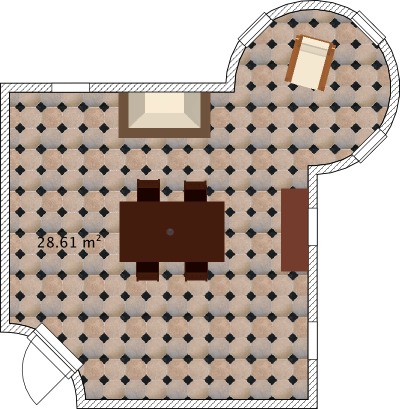
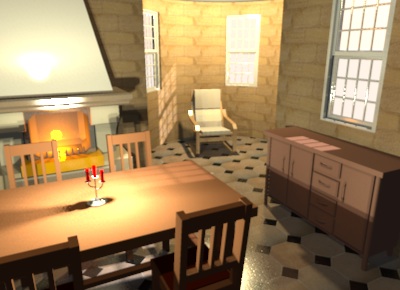
In this Beta version, round walls can be drawn only with Wall creation tool, by pressing Ctrl key (Alt key under Mac OS X) during the second click that points out the end of a wall (you can also press Enter + Ctrl or Alt to edit the arc angle with the keyboard).
I'll add a Arc extent spinner in the Wall modification dialog later, to let users create round walls afterwards.
Meanwhile, please tell me your opinion about this gesture.
It's possible to place windows or doors in the round walls but at this moment, you'll have to adjust manually the angle and the depth of the window to make it make a hole in the wall.
I suggest you to use first an invisible box to make a hole in the round wall then place the window in that part, like in the example file attached to this message. Try it and you'll understand why, it's not so easy to place automatically... [;)]
Phew, I'm tired of trigonometric computing, 2 PI modulos and y inverted axis for a while!!! [:-/]
In this Beta version, round walls can be drawn only with Wall creation tool, by pressing Ctrl key (Alt key under Mac OS X) during the second click that points out the end of a wall (you can also press Enter + Ctrl or Alt to edit the arc angle with the keyboard).
I'll add a Arc extent spinner in the Wall modification dialog later, to let users create round walls afterwards.
Meanwhile, please tell me your opinion about this gesture.
It's possible to place windows or doors in the round walls but at this moment, you'll have to adjust manually the angle and the depth of the window to make it make a hole in the wall.
I suggest you to use first an invisible box to make a hole in the round wall then place the window in that part, like in the example file attached to this message. Try it and you'll understand why, it's not so easy to place automatically... [;)]
Phew, I'm tired of trigonometric computing, 2 PI modulos and y inverted axis for a while!!! [:-/]
- Attachments
-
- RoomWithTower.sh3d
- (341.05 KiB) Downloaded 509474 times
Emmanuel Puybaret, Sweet Home 3D creator
Re: Sweet Home 3D 3.0
@PtiNounours
I found the regression bug. It's fixed in Beta 14. Please confirm it's ok for you.
I found the regression bug. It's fixed in Beta 14. Please confirm it's ok for you.
Emmanuel Puybaret, Sweet Home 3D creator
-
PtiNounours
- Posts: 42
- Joined: Thu Jul 08, 2010 4:32 pm
Re: Sweet Home 3D 3.0
Thank you for correcting the texture of the walls.
The result is ok.
Congratulations to the renderer which is really fast and beautifully rendered.
For the round walls, good function. Maybe add the ability to simultaneously shift key and ctrl key? (To remove the magnetism while a wall round)
Anyway, good Job Emmanuel
The result is ok.
Congratulations to the renderer which is really fast and beautifully rendered.
For the round walls, good function. Maybe add the ability to simultaneously shift key and ctrl key? (To remove the magnetism while a wall round)
Anyway, good Job Emmanuel
-
PtiNounours
- Posts: 42
- Joined: Thu Jul 08, 2010 4:32 pm
Re: Sweet Home 3D 3.0
Edit:
The simultaneous ctrl and shift working.
The simultaneous ctrl and shift working.

Re: Sweet Home 3D 3.0
Emmanuel,
Do you mean the bug of the wall that doesn't render correctly, mentioned in this post? The screen shot I posted here still applies.
On opening the file provided by PtitNounours, I did a series of renders: Q0-Q3. As before, Q2 gave a white wall. I then did a Q3 which was OK. When I did another Q2 it was okay and both walls were textured. When I then did another Q3 it had a white wall. Etc... etc...
To be sure, I closed SH3D and started it again (v3-b14) and the same sequence happened.
It seems something is wrong, but it's not very consistent.
Hans
Do you mean the bug of the wall that doesn't render correctly, mentioned in this post? The screen shot I posted here still applies.
On opening the file provided by PtitNounours, I did a series of renders: Q0-Q3. As before, Q2 gave a white wall. I then did a Q3 which was OK. When I did another Q2 it was okay and both walls were textured. When I then did another Q3 it had a white wall. Etc... etc...
To be sure, I closed SH3D and started it again (v3-b14) and the same sequence happened.
It seems something is wrong, but it's not very consistent.
Hans
Hans
Ryzen 7-9700X, 32 GB RAM, 500 GB SSD, 2x 2 TB SSD, Geforce GTX 1060 3 GB
Ryzen 7-9700X, 32 GB RAM, 500 GB SSD, 2x 2 TB SSD, Geforce GTX 1060 3 GB
-
PtiNounours
- Posts: 42
- Joined: Thu Jul 08, 2010 4:32 pm
Re: Sweet Home 3D 3.0
For the bug that was resolved, it is rendering in 3D view Sweethome not the renderer.
For the renderer, I tested a new export SketchUp wall, but this time in version 8.
Dae export parameters:
Triangulate the faces-active
Export-veneer textures active
- Other inactive option.
I also took care to orient the faces in the right direction.
After import in Sweethome 3D renderer in:
Q0 all white
Q1 all white
Q2 sketchup old white wall. new wall to wall SH3D textured sketchup ok
Q3 old sketchup white wall. new wall to wall SH3D textured sketchup ok
I do not know if this is the beta 14, which fixes this, or version 8 of SketchUp or having put the faces in the right direction, but the result of the renderer is ok in Q2 and Q3.
For my part I never use Q0 and Q1; bug lesser extent in my case.
I can send the new test file SH3D wall and the wall dae if necessary.
For the renderer, I tested a new export SketchUp wall, but this time in version 8.
Dae export parameters:
Triangulate the faces-active
Export-veneer textures active
- Other inactive option.
I also took care to orient the faces in the right direction.
After import in Sweethome 3D renderer in:
Q0 all white
Q1 all white
Q2 sketchup old white wall. new wall to wall SH3D textured sketchup ok
Q3 old sketchup white wall. new wall to wall SH3D textured sketchup ok
I do not know if this is the beta 14, which fixes this, or version 8 of SketchUp or having put the faces in the right direction, but the result of the renderer is ok in Q2 and Q3.
For my part I never use Q0 and Q1; bug lesser extent in my case.
I can send the new test file SH3D wall and the wall dae if necessary.
-
PtiNounours
- Posts: 42
- Joined: Thu Jul 08, 2010 4:32 pm
Re: Sweet Home 3D 3.0
Up file test wall:
http://www.mediafire.com/file/oazbrk5m1 ... t_wall.zip
I just saw that render the soil of the last photo with the wall round was brilliant. very nice effect.
http://www.mediafire.com/file/oazbrk5m1 ... t_wall.zip
I just saw that render the soil of the last photo with the wall round was brilliant. very nice effect.
Re: Sweet Home 3D 3.0
And here are the results of the big render lottery:
First run:
Q0 = 3x correct
Q1 = 3x correct
Q2 = left is white
Q3 = 3x correct
Second run
Q0 = 3x correct
Q1 = 3x correct
Q2 = left is white
Q3 = left is white
Third run = see: first run
Fourth run
Q0 = 3x correct
Q1 = 3x correct
Q2 = 3x correct
Q3 = left is white
Fifth run
Q0 = 3x correct
Q1 = 3x correct
Q2 = 3x correct
Q3 = 3x correct
Sixth run = see: fifth run
Seventh run = see fourth run
Have fun!!
Hans
First run:
Q0 = 3x correct
Q1 = 3x correct
Q2 = left is white
Q3 = 3x correct
Second run
Q0 = 3x correct
Q1 = 3x correct
Q2 = left is white
Q3 = left is white
Third run = see: first run
Fourth run
Q0 = 3x correct
Q1 = 3x correct
Q2 = 3x correct
Q3 = left is white
Fifth run
Q0 = 3x correct
Q1 = 3x correct
Q2 = 3x correct
Q3 = 3x correct
Sixth run = see: fifth run
Seventh run = see fourth run
Have fun!!
Hans
Hans
Ryzen 7-9700X, 32 GB RAM, 500 GB SSD, 2x 2 TB SSD, Geforce GTX 1060 3 GB
Ryzen 7-9700X, 32 GB RAM, 500 GB SSD, 2x 2 TB SSD, Geforce GTX 1060 3 GB
-
PtiNounours
- Posts: 42
- Joined: Thu Jul 08, 2010 4:32 pm
Re: Sweet Home 3D 3.0
I think the problem probably comes from the left wall of the right orientation of faces sketchup. it's really strange, but I would be careful about that now.
Hans, I see you've textures of the 3 walls Q0 and Q1, I have rarely textures displayed in these two qualities, either in photo or video. Only the colors and not textures are displayed in my home at Q0 and Q1 [:(]
Hans, I see you've textures of the 3 walls Q0 and Q1, I have rarely textures displayed in these two qualities, either in photo or video. Only the colors and not textures are displayed in my home at Q0 and Q1 [:(]
Who is online
Users browsing this forum: No registered users