FYI
Terrain Generator plug-in
This topic has been viewed 3083148 times and has 92 replies
Re: Terrain Generator plug-in
Hello everyone,
Terrain Generator 1.6.0
Fixed elevation points, direct object editing, multilingual support and improved navigation.
I used TerrainGenerator-1.4.4.sh3p as a starting point and added several features with the help of ChatGPT 6.1 Medium.
If you’d like to reduce the manual work involved in shaping your terrain, external tools can help too. For example, you can upload your elevation data, .sh3d project and terrain plugin to ChatGPT, then describe how you want the terrain shaped and ask it to make the changes. This approach worked very well for me!
Edit terrain objects directly
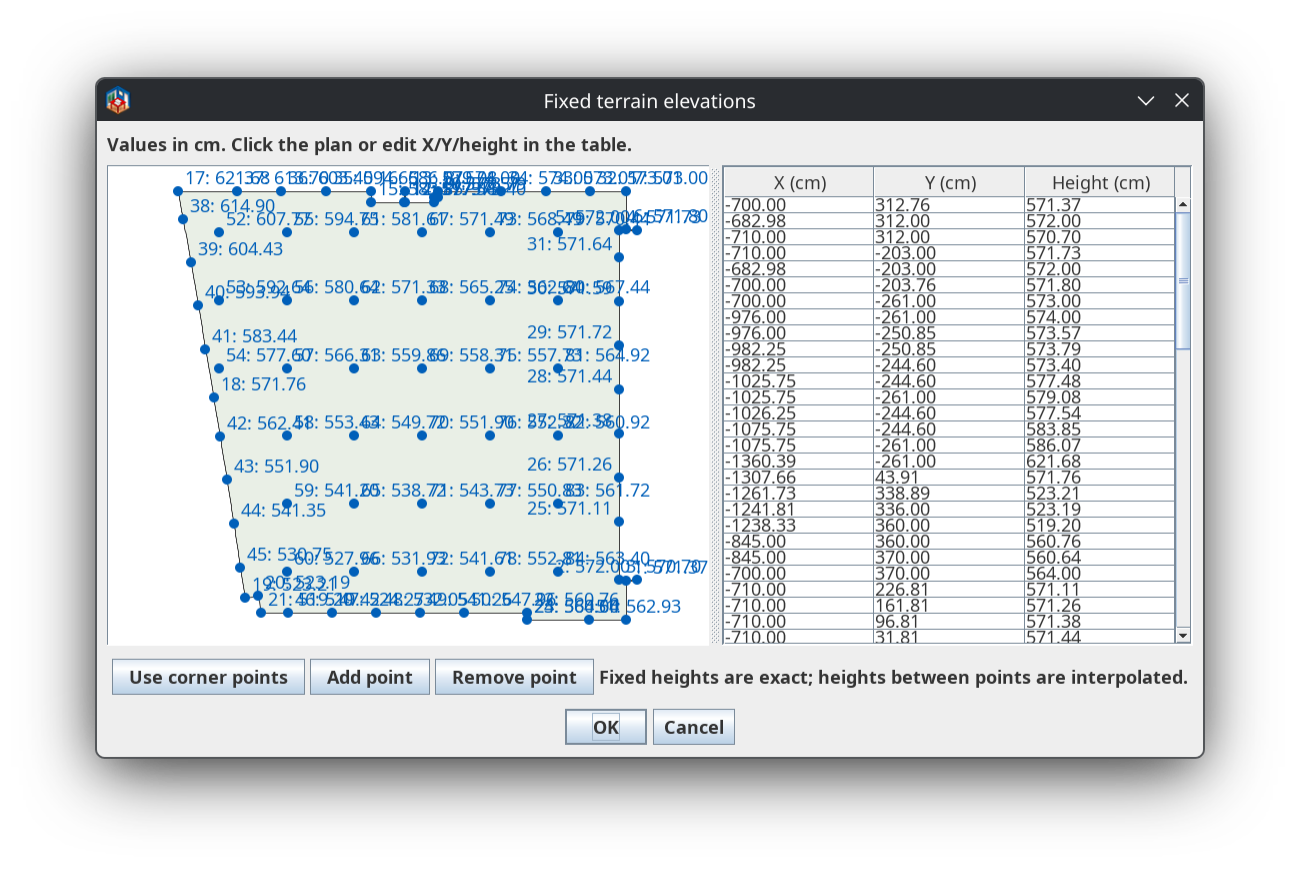
Open Fixed points / corner heights… to:
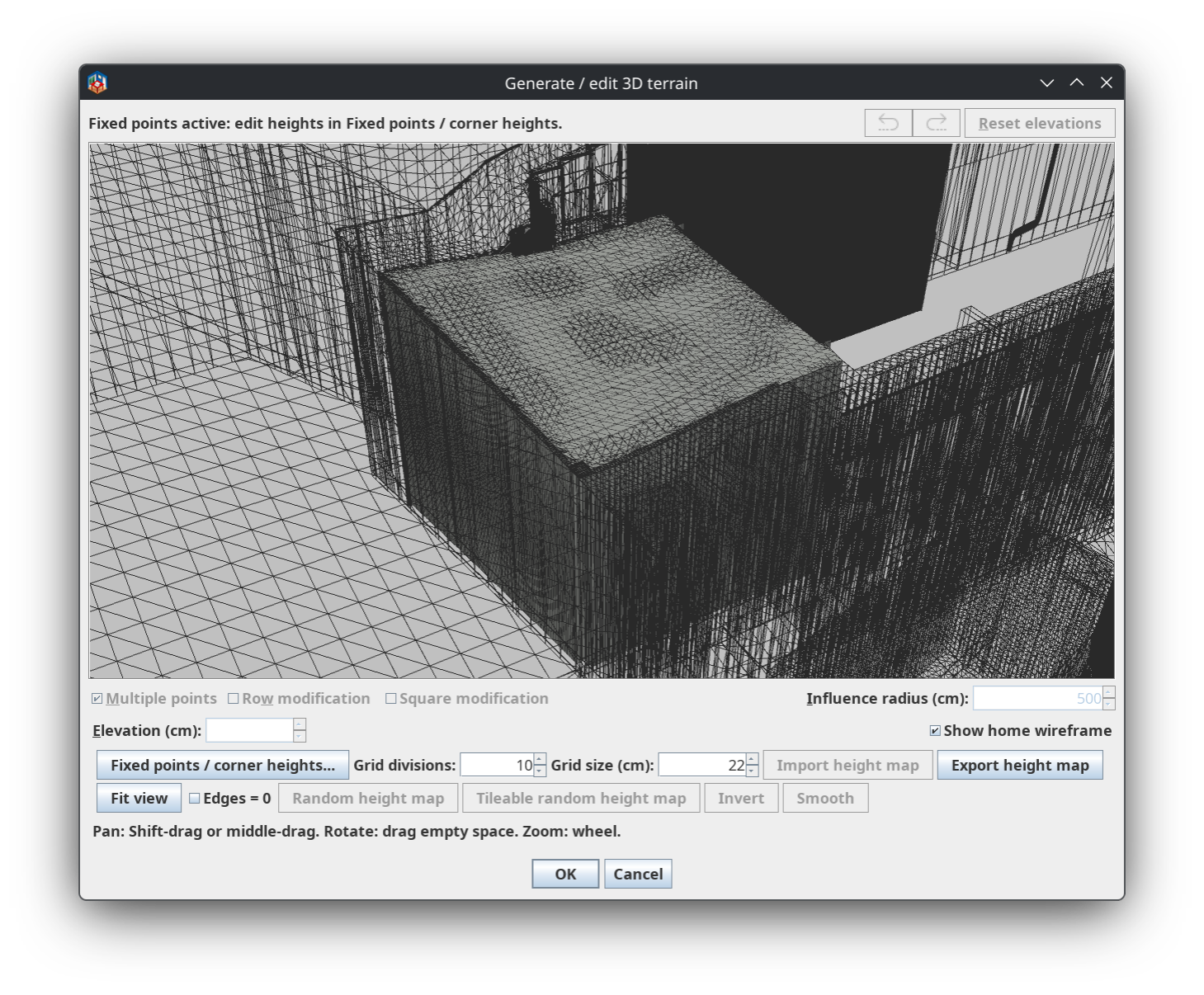
Move around the 3D editing view
The preview is no longer restricted to rotating around the terrain’s original centre.
Automatic language selection
Sharper images in the 2D plan
Generated terrain objects now use a dedicated plan image with:
Requires Sweet Home 3D 7.4 or later and Java 8 or later.
Keep the filename TerrainGenerator.sh3p for future updates. Sweet Home 3D replaces plugins by filename; differently named files can remain installed alongside one another.
Tested with Sweet Home 3D 7.5 on Linux, including English, German and Arabic editor workflows, fixed-point editing, both panning gestures, object replacement, saving/reopening and undo/redo.
Windows and macOS have not been tested. Modified source code, test sources and a validation report are included under the existing GNU GPL license.
Feedback and bug reports are welcome! Please include your Sweet Home 3D version, operating system and steps to reproduce the issue.

Terrain Generator 1.6.0
Fixed elevation points, direct object editing, multilingual support and improved navigation.
I used TerrainGenerator-1.4.4.sh3p as a starting point and added several features with the help of ChatGPT 6.1 Medium.
If you’d like to reduce the manual work involved in shaping your terrain, external tools can help too. For example, you can upload your elevation data, .sh3d project and terrain plugin to ChatGPT, then describe how you want the terrain shaped and ask it to make the changes. This approach worked very well for me!
Edit terrain objects directly
- Right-click a generated terrain object and choose Edit terrain elevations… to reopen the editor.
- Applying changes replaces the existing object instead of creating a duplicate.
- New objects store their editing data and remain editable after saving and reopening—even if the original rooms have been removed.
- Older objects may require a one-time selection of their original rooms.
Open Fixed points / corner heights… to:
- Use the room’s corners as elevation control points.
- Add points by clicking the plan or entering coordinates.
- Edit each point’s X, Y and height in a table.
- Remove control points you no longer need.
Move around the 3D editing view
The preview is no longer restricted to rotating around the terrain’s original centre.
- Shift + drag or middle-button drag: pan the view, including directly over the terrain.
- Drag an empty area: rotate around the current viewing target.
- Mouse wheel: zoom in or out.
- Fit view: reset the viewing target, rotation and zoom.
Automatic language selection
- The plugin follows the language selected in Sweet Home 3D Preferences.
- Translations cover all 29 officially supported languages, including those available through additional language libraries.
- Separate resources support European/Brazilian Portuguese and Simplified/Traditional Chinese.
- Numeric input supports decimal commas, decimal points and localized digits.
- The Arabic editor uses a right-to-left layout.
Sharper images in the 2D plan
Generated terrain objects now use a dedicated plan image with:
- Up to 4096 pixels along the longest dimension.
- Transparent cutouts matching the terrain outline.
- No shadows from the 3D preview.
Requires Sweet Home 3D 7.4 or later and Java 8 or later.
Keep the filename TerrainGenerator.sh3p for future updates. Sweet Home 3D replaces plugins by filename; differently named files can remain installed alongside one another.
Testing and source codeIf multiple Terrain Generator versions are already installed, remove the older copies once before installing the new package. Restart Sweet Home 3D afterward.
Tested with Sweet Home 3D 7.5 on Linux, including English, German and Arabic editor workflows, fixed-point editing, both panning gestures, object replacement, saving/reopening and undo/redo.
Windows and macOS have not been tested. Modified source code, test sources and a validation report are included under the existing GNU GPL license.
Feedback and bug reports are welcome! Please include your Sweet Home 3D version, operating system and steps to reproduce the issue.
- Attachments
-
- TerrainGenerator-1.6.0.sh3p
- (268.14 KiB) Downloaded 25 times
Re: Terrain Generator plug-in
Hello everyone,
Terrain Generator 1.6.1
A resizable fixed-point editor, automatic point selection in the table, and live elevation labels in the 3D preview.
This update builds on version 1.6.0 with three improvements:
Resizable fixed-point editor
The new Show heights toggle displays current terrain elevations directly in the regular 3D editing preview.
Updating
Keep the filename TerrainGenerator.sh3p for future updates; its internal version is now 1.6.1.
If older copies with version numbers in their filenames are still installed, remove them once to avoid duplicate installations. Restart Sweet Home 3D after updating.
Feedback and bug reports are welcome!
Terrain Generator 1.6.1
A resizable fixed-point editor, automatic point selection in the table, and live elevation labels in the 3D preview.
This update builds on version 1.6.0 with three improvements:
Resizable fixed-point editor
- The Fixed points / corner heights… window can now be resized.
- The plan and coordinate table expand with the window.
- Drag the divider between them to adjust how much space each receives.
- Click a fixed point in the plan to select its corresponding table row.
- The table automatically scrolls that row into view—especially useful when working with many points.
- Points added or edited through the point dialog are also selected and revealed in the table.
The new Show heights toggle displays current terrain elevations directly in the regular 3D editing preview.
- Heights are shown in centimeters, with up to two decimal places, using the selected language’s number format.
- Labels update when elevations, camera position, zoom or preview size change.
- Font sizes adapt to the local point density, and labels are repositioned to prevent text overlap.
- Connection lines identify the terrain point belonging to each displaced label.
- Fixed control points receive priority and use bold blue labels.
Language support and testingIn dense views, labels that cannot fit legibly are omitted. Zoom in to reveal more values. The labels are an editing aid; they do not change the terrain or appear in the exported terrain object.
- The new button and tooltip are translated into all 29 languages supported by version 1.6.0.
- Tested with Sweet Home 3D 7.5 on Linux, including English, German and Arabic editor workflows and both onscreen and offscreen 3D preview rendering.
- Regression tests cover terrain geometry, saving/reopening, object replacement and undo/redo.
- Updated source code, test sources and a validation report are included.
Updating
Keep the filename TerrainGenerator.sh3p for future updates; its internal version is now 1.6.1.
If older copies with version numbers in their filenames are still installed, remove them once to avoid duplicate installations. Restart Sweet Home 3D after updating.
Feedback and bug reports are welcome!
- Attachments
-
- TerrainGenerator-1.6.1.sh3p
- (284.97 KiB) Downloaded 11 times
Who is online
Users browsing this forum: No registered users