Print at Dec 18, 2025, 12:09:10 AM View all posts in this thread on one page
Posted by ozmike at Oct 19, 2018, 5:30:56 AM
smile   Site Plan and/or Boundary Limitations
Hi All!
I am trying to add a site plan and/or boundary limitations using Sweet Home 3D (which I am finding VERY easy to use and fantastic). DEsigning my house for a difficult battle axe, bushfire-prone block of land means that it must be set back from boundary my 10,000mm and only have a certain footprint. Designing the home is the easy bit, but trying to then draw a wit map and move the home around within that site map is proving a bit of a challenge. Any tips are greatly appreciated.
Best to all from downunder
Posted by okh at Oct 19, 2018, 10:33:03 AM
Re: Site Plan and/or Boundary Limitations
.. draw a wit map and move the home around within that site map is proving a bit of a challenge. Any tips are greatly appreciated.
Maybe I am missing something here, but would it be easier to move the site instead of the home?

Everyone has a different technique, but I prefer always putting the house top left corner at co-ordinates 0,0, then use a different level (same elevation or lower), for site information. Either with a background image on that level, or using the room-tool to outline the property; or poly-lines, low, narrow walls as 'fences' or something. At least that helps me comply with local requirements of 400cm building off-set from neighbour property, just by selecting everything on the 'terrain' level and moving the selection. And hide the level when working on the house itself.
ok

Posted by jfgray at Oct 31, 2018, 2:27:29 PM
Re: Site Plan and/or Boundary Limitations
I'm having the same problem - the dimensions are smaller, but the problem is that while the house has right angles the lot dimensions do NOT. When I try to create an area for the lot itself, the horizontal boundaries lines forced to 15 degree increments. I know there has to be some way to place the lot lines more precisely. BTW, I'm just using PolyLines to mark the boundary and have it on the main level - unless there's a better way to do that.

Posted by alaX at Oct 31, 2018, 5:11:10 PM
Re: Site Plan and/or Boundary Limitations
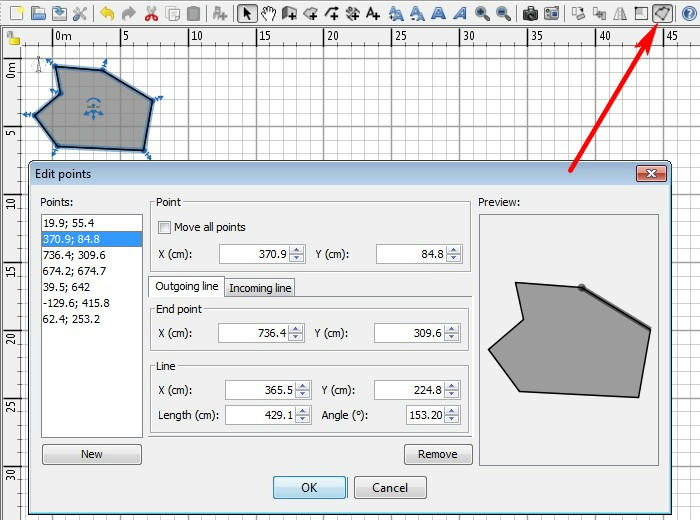
Advanced Editing plug-in


User's guide:
To help you drawing parallel walls, the angle of the walls on the floor is a multiple of 15° by default. You may cancel this magnetism by disabling magnetism in the preferences dialog box or by holding the Alt key pressed during the drawing under Windows, the cmd key under Mac OS X or the Shift + Alt keys under Linux.