Hi friends. Every time, when i use SweetHome3d with lot of items
Please say me, if someone interested in this feature, or may be tell how make it more better.
PS. Sorry for my bad english.
|
Sweet Home 3D Forum » List all forums » » Forum: Wishlist » » » Thread: Group furniture items in category |
|
| Print at Oct 1, 2026, 8:44:13 AM | |
| Posted by Lizard2k1 at Apr 8, 2018, 11:27:28 AM |
|
Group furniture items in category Hi friends. Every time, when i use SweetHome3d with lot of items Please say me, if someone interested in this feature, or may be tell how make it more better. PS. Sorry for my bad english. |
| Posted by Lizard2k1 at Apr 8, 2018, 12:20:51 PM |
|
Re: Group furniture items in category Something wrong with images (( Image pre-view before: 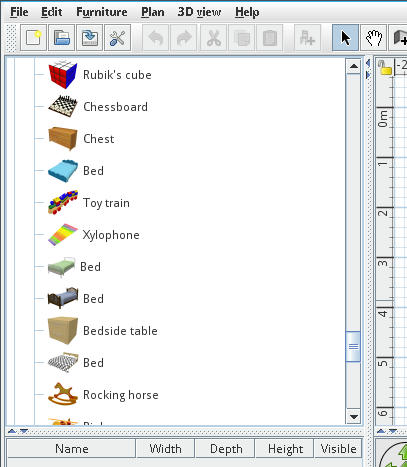 Image pre-view after: 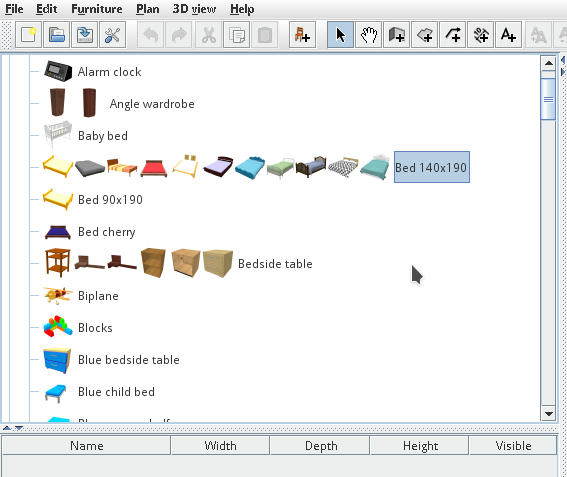 |
| Posted by Puybaret at Apr 8, 2018, 2:24:16 PM |
|
Re: Group furniture items in category Maybe you should try the Searchable list option in the preferences. It will let you type a text and find all the matching furniture (even with keywords in English and French versions). ---------------------------------------- Emmanuel Puybaret, Sweet Home 3D creator |
| Posted by Lizard2k1 at Apr 9, 2018, 2:27:27 PM |
|
Re: Group furniture items in category Here examples for Searchable list view: Before: 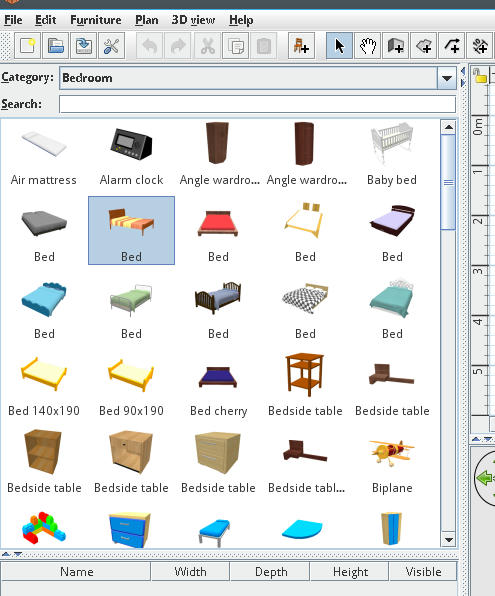 And after groupping: 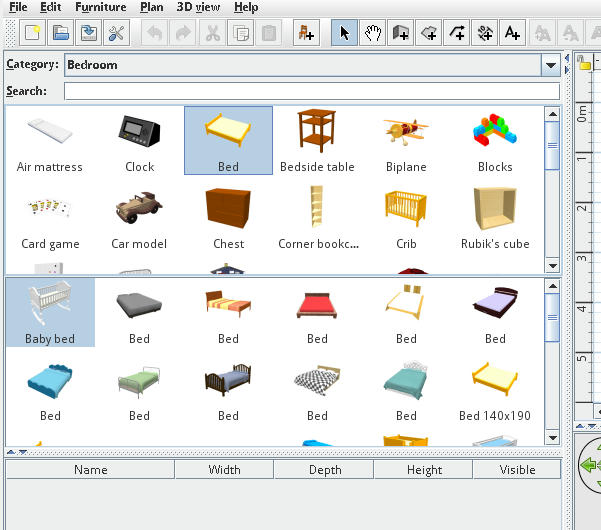 |
| Posted by dorin at Apr 10, 2018, 10:48:56 PM |
|
Re: Group furniture items in category I like this feature at lest because it can be make-it. For long time I want something for bather organize the furniture. Please share with us! Maybe You could make some subcategory and a way to do this by user. But that is for the future. For now I'm satisfy with this. Thanks in advance!!! Dorin ---------------------------------------- A computer program does what you tell it to do, not what you want it to do. Murphy's Law When all else fails, read the instructions. Murphy's Law If you don't like "AS IS", DIY. Dorin's law |
| Posted by Lizard2k1 at Apr 11, 2018, 4:41:06 PM |
|
Re: Group furniture items in category Thank you dorin for answer. About custom sub-categories is in progrees. About sharing my build - i dont know how legal do it. This is question for SH3D developers - how i can it? Can I simply attach link to my build or via forking source? |
| Posted by dorin at Apr 11, 2018, 9:15:37 PM |
|
Re: Group furniture items in category If You rebuild the entire application You must ask SH3D developers. If You make a plugin for this You can share free here and on forum. For me (and others) could be more convenient to have a plugin. If You do this and You have time I have more challenges for You.  ---------------------------------------- A computer program does what you tell it to do, not what you want it to do. Murphy's Law When all else fails, read the instructions. Murphy's Law If you don't like "AS IS", DIY. Dorin's law |
| Posted by Lizard2k1 at Apr 11, 2018, 11:15:57 PM |
|
Re: Group furniture items in category If You rebuild the entire application You must ask SH3D developers. Yes, application was rebuilded. If You make a plugin for this You can share free here and on forum. For me (and others) could be more convenient to have a plugin. Thank your for link and idea. I will try it. |
| Posted by Puybaret at Apr 12, 2018, 1:27:13 AM |
|
Re: Group furniture items in category The GNU GPL license lets you create a derived version as long as you distribute it with its source code including modifications. ---------------------------------------- Emmanuel Puybaret, Sweet Home 3D creator |
| Posted by dorin at Apr 12, 2018, 7:47:44 PM |
|
Re: Group furniture items in category In this case rebuild Your variant and share it under GPL with a different name, let's say "Lizard Sweet Home 3D". Don't forget the source code with modification specified. Maybe somewhere in the future, parts of Your code will became part of official version after pass the tests of users and time. I'm available to test and critic.  ---------------------------------------- A computer program does what you tell it to do, not what you want it to do. Murphy's Law When all else fails, read the instructions. Murphy's Law If you don't like "AS IS", DIY. Dorin's law |
| Posted by Lizard2k1 at Apr 13, 2018, 2:56:39 AM |
|
Re: Group furniture items in category Here first my try in sh3d plugin form: http://www.mediafire.com/file/vlm3wjesgk38pjj/SH3DFurnGrouper.sh3p Issues: Grouping work only in serach list mode. Sorry. Known bugs: 1. After first initializing second frame not grouped. After first click in it - groups will appear. 2. After switching List->Tree->List selected furniture may be freezed. Only application restart solve it. Sorry for this. If anyway your interest will keeped - i will work on it. |
| Posted by Lizard2k1 at Apr 13, 2018, 12:32:53 PM |
|
Re: Group furniture items in category Here link to SourceForge: SourceForgeLink Fixed. |
| Posted by dorin at Apr 13, 2018, 3:04:16 PM |
|
Re: Group furniture items in category Many Thanks! This afternoon I will try it hard. Anyway is first step, next will be bather. ---------------------------------------- A computer program does what you tell it to do, not what you want it to do. Murphy's Law When all else fails, read the instructions. Murphy's Law If you don't like "AS IS", DIY. Dorin's law |
| Posted by dorin at Apr 13, 2018, 11:35:52 PM |
|
Re: Group furniture items in category Like I've promise I've test it. This is the result: 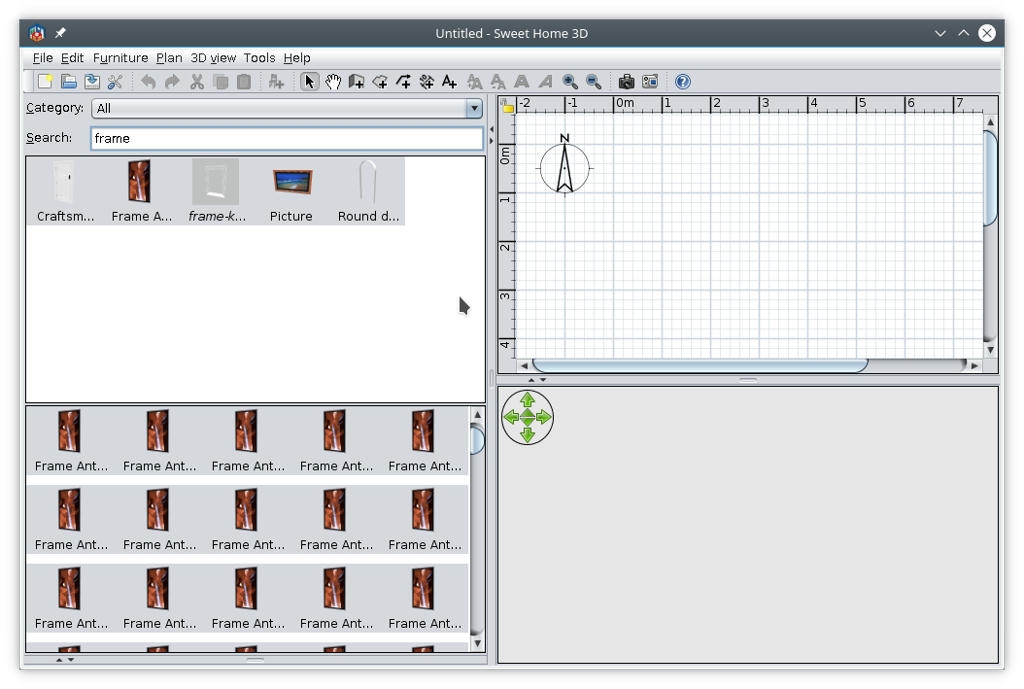 Observations (no offense please) 1.Separate the Compute perimeter from Furniture Grouper plugin. 2.I'am interested in both but is easiest to handle separately. 3.Like You've seen in the picture in the second window the furniture are multiplied and this is useless. 4.The purpose for me is to identify the double / multiple furniture or those pretty similar to cleanup the library. About tree view I have an idea (maybe need more changes in program): 1. In PluginFurnitureCatalog.properties file the entry category#1=Bathroom could be category#1=Bathroom |Bathtube or category#21=Decorations |Wall Frames or category#19=Doors and windows |Windows that mean the word after "|" sign is name of subcategory. Now the program need to know how to handle this. Also when import a piece of furniture to have this option. I luck in Your sources and I catch my ears; is to complicated for me. Anyway Thanks Again! Dorin ---------------------------------------- A computer program does what you tell it to do, not what you want it to do. Murphy's Law When all else fails, read the instructions. Murphy's Law If you don't like "AS IS", DIY. Dorin's law |
| Posted by Lizard2k1 at Apr 14, 2018, 1:31:18 AM |
|
Re: Group furniture items in category Thank you very mush dorin for fast test. In first trouble, that i see, unexpected trouble is furniture is multiplied, Can you tell or show me your collection with that this redistribute. In my case of furniture collection, i can not catch this trouble. In second - code for perimeter not activated now. From what are you get opinion, that it's activated? In third - and it is first problem - (is not it?) is furniture is multiplied - lets me know how i can reproduce it - your system OS, jdk(jre) version, and your collection of furnitures catalogue. An at the last - how correctly dispute about this in the public thread? If it's disturb rules of the forum (how at meny of others forum threads) can me move our conservation to private chatting? |
| Posted by Lizard2k1 at Apr 14, 2018, 11:18:00 AM |
|
Re: Group furniture items in category ... (no offense please) why i can do it?  Like You've seen in the picture in the second window the furniture are multiplied and this is useless. Fixed in version-0.1 I look in Your sources and I catch my ears; is to complicated for me. Sorry for this  |
| Posted by dorin at Apr 14, 2018, 10:20:19 PM |
|
Re: Group furniture items in category I've tested v-0.1. It work correct as You say, only on searchable list. So, my answers: 1.I think is ok to continue on this tread wile we remain focused on this subject; if we break the line the moderator will let us know. 1.1. This or next could be on Developers. 2.I'm on Debian "buster"+KDE desktop. 3.I usually use SH3D the installer version with their java (8). 4 For this tests I use the personalized installation (furniture, plugins, texture) but also the standard installation without furniture,texture and other plugins except Your. It work! Now bake to critics: 1.About Calculate perimeter is deactivated (it don't work) but appear active under Tools wile Re-group pieces are grayed. If we don't have a option to activate/deactivate is pointless to have a entry. 2.I need a bather organize the furniture to find them more quickly from first view without use of search especially when I don't know exactly what I want and also to gain space for drawing. 2.1.Please explain me which are the purpose of second frame? ---------------------------------------- A computer program does what you tell it to do, not what you want it to do. Murphy's Law When all else fails, read the instructions. Murphy's Law If you don't like "AS IS", DIY. Dorin's law |
| Posted by Lizard2k1 at Apr 15, 2018, 12:57:36 AM |
|
Re: Group furniture items in category In first, tell me please: in the second window the furniture are multiplied it's fixed on your collection, or i am again can not catch trouble?In second about critics: 1. If you confuse grayed item in "tool" menu - it's now replaced with "Settings" option (was legacy item) in next version. find them more quickly from first view without use of search especially Really, It is first task for my plugin:First frame can show only one example of each furniture group presents in your collection (based on name): one item of door, one item of window, table, chair, shelf, sofa e.t.c. Second frame show your all items, that's has same name or category as item, that's was selected in first. For example: In first frame you select "Simple Table", the in second will show all items, that contains "table" at it's name or description. Also, please take attention, that's i share version 2.0 on SourceForge |
| Posted by dorin at Apr 15, 2018, 8:55:11 AM |
|
Re: Group furniture items in category Good job! Thanks! No multiplication anymore from v-0.1. Sorry I don't mention explicitly this in my post. It's work correctly in all conditions (at least from my side). That's mean with all my furniture, plugins etc. (and are a lot) The new option with a selection window is good. I'm glad this v-0.2 is working on both kind of catalog. You've made a great work and a bather approach. Now critics (luck more as suggestions): In tree view are show the name of last piece at the end of the icons row which sometime could be confusing (not for me). Anyway I've already observe few duplicates in mine collections which I've have to clean. When I set something in Your plugin I observe a delay for few seconds. I suppose are a lot of consumption. Somme minor cosmetics: in Your settings menu put the same name as is in SH3D settings "Category folders"&"Searchable list". I wait the version with subcategory.  ---------------------------------------- A computer program does what you tell it to do, not what you want it to do. Murphy's Law When all else fails, read the instructions. Murphy's Law If you don't like "AS IS", DIY. Dorin's law |
| Posted by dorin at Apr 15, 2018, 10:22:55 AM |
|
Re: Group furniture items in category I find a bug. In piece preview are show only the first one: 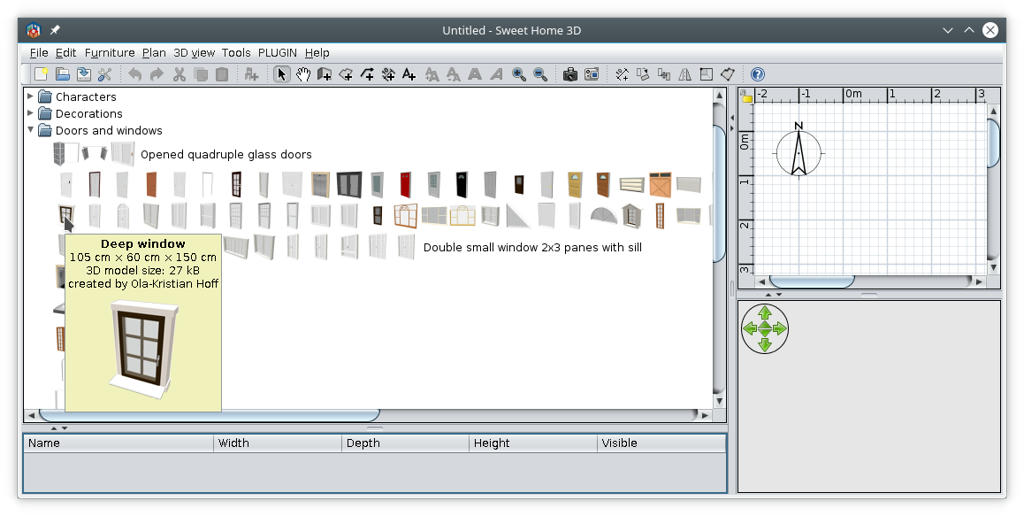 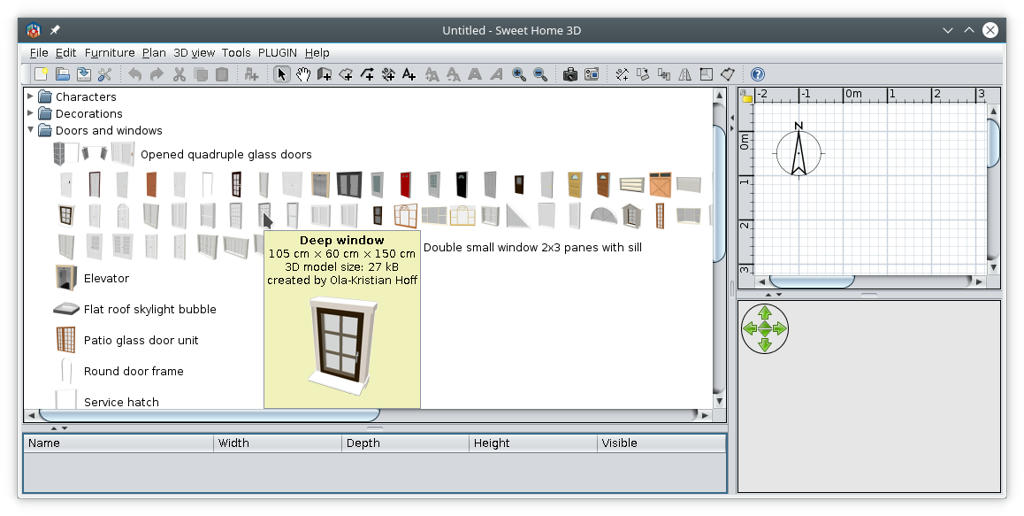 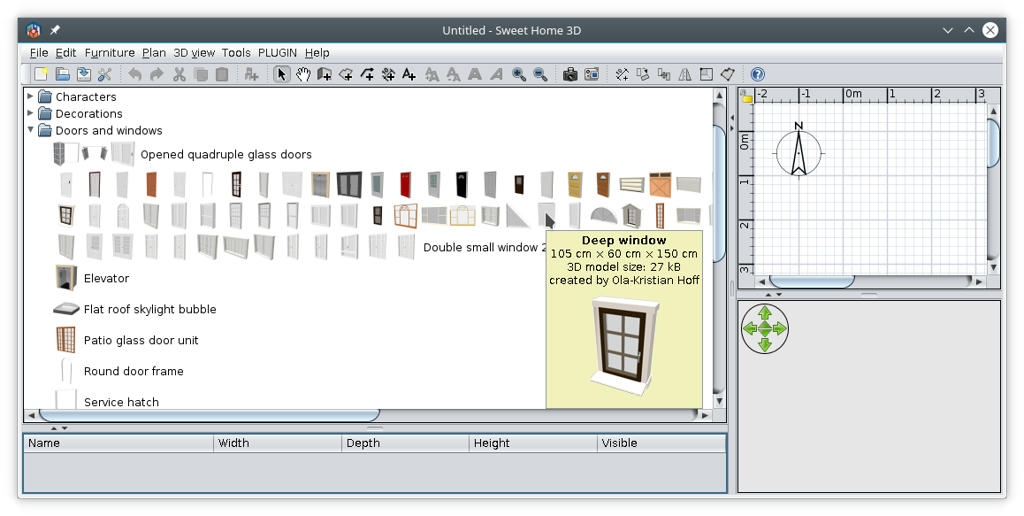 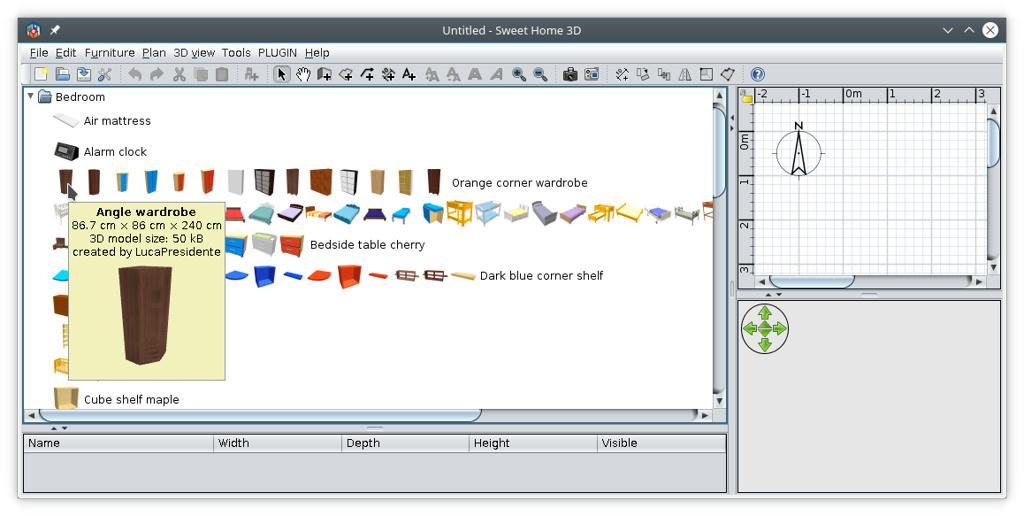 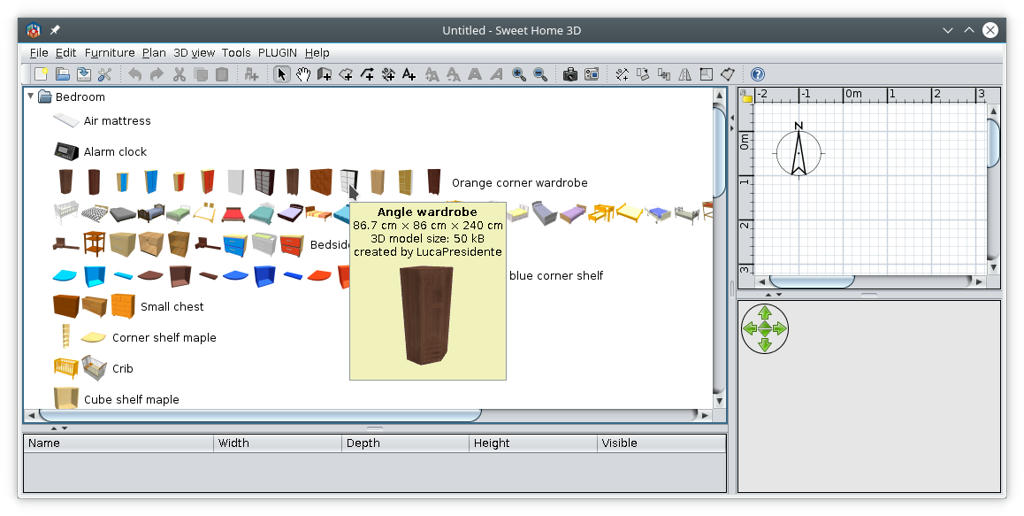 Look at the mouse pointer. ---------------------------------------- A computer program does what you tell it to do, not what you want it to do. Murphy's Law When all else fails, read the instructions. Murphy's Law If you don't like "AS IS", DIY. Dorin's law |
| Posted by Golia at Apr 15, 2018, 6:47:54 PM |
|
Re: Group furniture items in category Hello I really like the project Thanks Lizard2k1 I am Italian and I have difficulties with English, I would like to add myself as a beta tester, I hope to be able to follow you. I'm trying your project, but I do not understand how it filters the elements. If I can suggest I would only filter the first part of the string, which could be a code to filter the categories, for example first class (p = 56) name # 1 = BaseAP56H72 from015 name # 2 = BaseAP56H72 from030 name # 3 = BaseAP56H72 from040 name # 4 = BaseAP56H72 from045 second category (p = 45) name # 9 = BaseAP45H72 from015 name # 10 = BaseAP45H72 from030 name # 11 = BaseAP45H72 from040 I hope I have understood, the categories must be separated only by the first part of the string. This is what I think. Bye thank you!! Great |
| Posted by Lizard2k1 at Apr 16, 2018, 12:09:18 PM |
|
Re: Group furniture items in category no offense please, but: In piece preview are show only the first one: From description of v0.2Known bugs: 5. Grouped tree view show incorrect toolTip. Also please look at others known bug, for not spending time of it's searching and reporting: Known bugs: 3. Changing language disturb filtering catalog combobox (Restart solve it). 4. Parameters from setting dialog not saved between app starts. 5. Grouped tree view show incorrect toolTip. 6. Grouped tree view dragging not worked |
| Posted by Golia at Apr 16, 2018, 12:31:16 PM |
|
Re: Group furniture items in category Thanks for your answer unfortunately due to the language something escapes me. I follow and I keep trying, thanks |
| Posted by Lizard2k1 at Apr 16, 2018, 12:40:43 PM |
|
Re: Group furniture items in category Thank you dorin for your critics | suggestions. In tree view are show the name of last piece at the end of the icons row which sometime could be confusing (not for me). I try do something with it, may be split long row of icons by it's count, by 10-12 items may be?Anyway I've already observe few duplicates in mine collections which I've have to clean. Do not understand this When I set something in Your plugin I observe a delay for few seconds. Yes, that's appear more often than we would like. I try fix or reduce delay for this.in Your settings menu put the same name as is in SH3D settings "Category folders"&"Searchable list" Did you mean move this options to submenu of "Tools" Menu? Or simple rename labels near check-boxes?To Golia: Thank you for interest to my job, i hope you will like it. but I do not understand how it filters the elements. Filtering (Grouping) processing by follow rules:1. Items compared one with other only in same category. 1.1. If names of two items containing more than one word, than comparing follow: 1.1.1 first word of one item with first word of second item. 1.1.2 first word of one item with last word of second item. 1.1.3 last word of one item with first word of second item. 1.1.4 last word of one item with last word of second item. 1.2. If name containing only one word - simple compare name of one with other item in same category For example: Items with follow names will be groupped: Simple chair, Chair, Chair with arms: But next will not: Red chair with arms, Very cool chair. |
| Posted by dorin at Apr 16, 2018, 12:47:35 PM |
|
Re: Group furniture items in category You've right! I was a little superficial; I've read the known bugs after I post in forum. I did'n respect my own rule from the motto. SORRY! Can't promise but I try do not make it again  Meanwhile I have a new suggestion for the place where I think this plugin have to be: 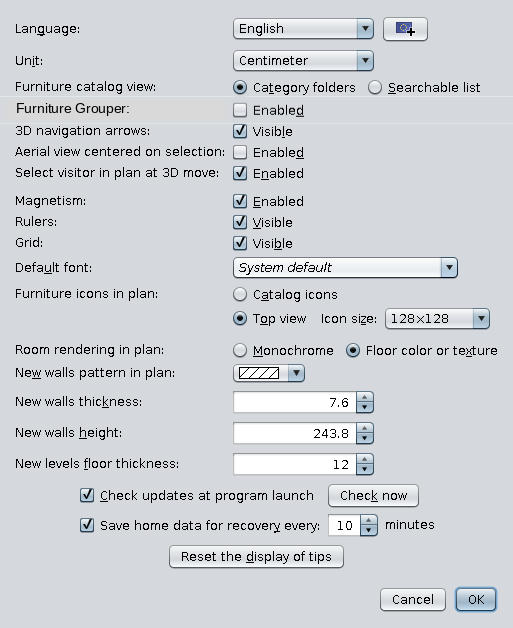 next after "Furniture catalog view:" Note: I only modify a png image; I'm still not capable to program something but I learning. ---------------------------------------- A computer program does what you tell it to do, not what you want it to do. Murphy's Law When all else fails, read the instructions. Murphy's Law If you don't like "AS IS", DIY. Dorin's law |
| Posted by Lizard2k1 at Apr 16, 2018, 12:52:38 PM |
|
Re: Group furniture items in category To dorin About add check-box to main setting window: I think this possible, i try do it in next version. |
| Posted by dorin at Apr 16, 2018, 1:27:59 PM |
|
Re: Group furniture items in category In tree view are show the name of last piece at the end of the icons row which sometime could be confusing (not for me). I try do something with it, may be split long row of icons by it's count, by 10-12 items may be? Maybe this is a bather solution, count the pieces in row. Anyway I've already observe few duplicates in mine collections which I've have to clean. Do not understand this  Is exactly for what I need this plugin. I have more than 1000 pieces from different sources and some of them are duplicate or pretty similar and also are in different category; some of them have only a different texture and so on. So, this plugin aids me to identify and clean the furniture library. According to this for me could be useful if in preview I see the name of furniture library and the id number to easily find and modify/delete. But this is for the future; urgency low. Did you mean move this options to submenu of "Tools" Menu? Or simple rename labels near check-boxes? I want to say to be the same text as is actually in Preferences. Meanwhile I've send You another suggestion to move it completely from "Tools" and add it in "Preferences" as I try to improvise in my picture. ---------------------------------------- A computer program does what you tell it to do, not what you want it to do. Murphy's Law When all else fails, read the instructions. Murphy's Law If you don't like "AS IS", DIY. Dorin's law |
| Posted by Golia at Apr 16, 2018, 8:58:25 PM |
|
Re: Group furniture items in category Ok Lizard2k1 I think I start to understand keep it up, the work you do will bring SH to be very productive, if you need to rename all my library. Thanks I will continue to try the new versions |
| Posted by Lizard2k1 at Apr 17, 2018, 3:36:32 AM |
|
Re: Group furniture items in category v.0.3 release (17 Apr 2018) SH3D Plugin Form. Issues: 1. Add room floor perimeter and sides. Fixes: 1. Grouped tree view dragging now worked! Known bugs: 3. Changing language disturb filtering catalog combobox (Restart solve it). 4. Parameters from setting dialog not saved between app starts. 5. Grouped tree view show incorrect toolTip. 7. Switch between (List<=>Tree)views has a bad delay (dorin) |
| Posted by Lizard2k1 at Apr 17, 2018, 8:07:49 AM |
|
Re: Group furniture items in category Quick Update v.0.4 release (17 Apr 2018) SH3D Plugin Form. Quick Fix: Removed dependence on custom SH3D build. |
| Posted by dorin at Apr 17, 2018, 9:00:00 AM |
|
Re: Group furniture items in category A quick test result in this: 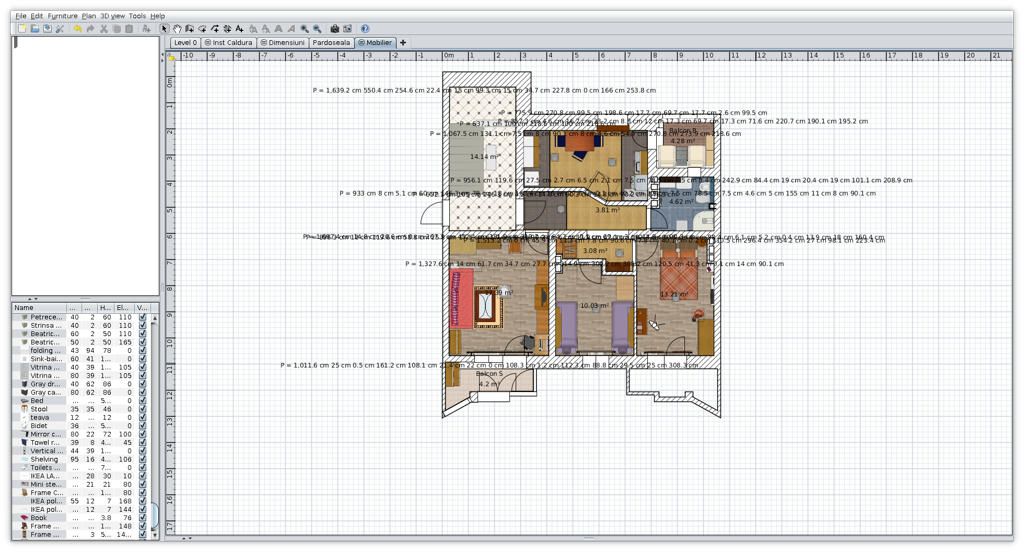 1. The v-0.4 reduce the delay from 30" to 19" 2. In tree view the furniture completely disappear with plugin activated. 3. The perimeter are show like in image with no option to modify. 3.1 I suggest again to split in to different plugins and focus at this moment only on Grouper. After this one will be acceptable could concentrate to other one (perimeter or some more useful and complex). 4. I think is good to remove unnecessary dependencies and use as much You can from SweetHome (I don't know how, You're the programmer  ) . ) .5. Don't forget the principle: Keep'it simple, keep'it free. ---------------------------------------- A computer program does what you tell it to do, not what you want it to do. Murphy's Law When all else fails, read the instructions. Murphy's Law If you don't like "AS IS", DIY. Dorin's law |
| Posted by dorin at Apr 17, 2018, 2:42:23 PM |
|
Re: Group furniture items in category I propose some principles for testers. Could be improved. 1. Use the official installer version from Sweet home 3D site (Windows, Linux32, Linux64) Note: It's necessarily to have the same version of java. In many distributions is the principal reason to don't work properly. 2. A clean install. No other furniture, languages, plugins and textures. - To do this backup Your current installation: Under Linux: -rename the folder ~/.eteks/sweethome3d to ~/.eteks/sweethome3d-1 or -rename similar all the folders to keep the preferences file -restart the SH3D program which will recreate the necessary folders -if You have to test an plugin than make the plugins directory under ~/.eteks/sweethome3d and copy the sh3p file in it. Under Windows: -rename C:\Users\user\AppData\Roaming\eTeks\Sweet Home 3D to C:\Users\user\AppData\Roaming\eTeks\Sweet Home 3D-1 Note: Windows testers know bather if it work or not or how to do this. 3. Make the tests: 3.1 First set of tests - without drawing (if the tests could be made like this, e.g. "FurnGrouper" plugin) - with fresh simple drawing which include most of parts of a plan (rooms, walls, door&windows, furniture etc.) - with an existing more complex already made plan 3.2 Second set of tests - reverse the folders name previously renamed to their originals to have again all personal furniture, languages, plugins and textures - copy the plugin (furniture or texture) in corresponded folder to be available to test again - repeat the tests from 3.1 4. Collect and share the resuls with specify: - the operating sistem and version - few hardware specifications like CPU and graphic card Here I've made on completion of my previous post, this: SH3D clean, no drawing -memory usage: 198.756k SH3D clean, no drawing + SH3DFurnGrouper.sh3p activated -memory usage: 254.388k SH3D clean, no drawing + SH3DFurnGrouper.sh3p deactivated -memory usage: 263.020k SH3D clean, simple drawing + SH3DFurnGrouper.sh3p activated -memory usage: 275.728k OS: Debian "buster"; Kernel 4.15.0-2-amd64; KDE Plasma 5.12.4 Hardware: CPU 2 x Intel Core 2 Duo Video on board RAM: 4G Note: This is one of the desktop computers (from work) ---------------------------------------- A computer program does what you tell it to do, not what you want it to do. Murphy's Law When all else fails, read the instructions. Murphy's Law If you don't like "AS IS", DIY. Dorin's law |
| Posted by Lizard2k1 at Apr 19, 2018, 1:34:16 AM |
|
Re: Group furniture items in category A quick test result in this: Great plane of home - realy.1. The v-0.4 reduce the delay from 30" to 19" I try reduce them more (look next version)2. In tree view the furniture completely disappear with plugin activated. Fixed3.1 I suggest again to split in to different plugins and focus at this moment only on Grouper Sorry for this, but.. not.Because i write this plugin only in my free time, and i have no time to observe many version with many build for separated plugins, and, in future, i believe - builds and versions will be some more.. I propose some principles for testers. It's too seriously way to test my small project. It's must not take so many payloads.Here I've made on completion of my previous post, this: forget SH3D clean, simple drawing without my plugin And at last: v.0.5 |
| Posted by dorin at Apr 19, 2018, 9:40:06 AM |
|
Re: Group furniture items in category I've tested the v-0.5. It's work as You say. 1.In searchable mod all's well, it work correct. 2.In Category list remain previously symptoms and the most important is on popup preview over furniture are show only the first in row. 3.It appear the delay are drastically reduced as I can't mention to see. 4. 9. After enable group view can't return to standard view Indeed but accessing the Settings button and change the view from one to another resolve this (at the moment). While I must go to Settings to switch between mod of view I remain on opinion to be there a check box for enable the Grouper. 5.About perimeter now is OK with short info (only P=xxx.xx cm). In this mod is really useful. The full information are not necessarily to show but for future "Room Walls area" which will be show near or under P=...  PS Because i write this plugin only in my free time I really appreciate this and sorry if some times I demand too much.So, please keep working ONLY You have time and have a good disposition for this. Thanks again for Your work! ---------------------------------------- A computer program does what you tell it to do, not what you want it to do. Murphy's Law When all else fails, read the instructions. Murphy's Law If you don't like "AS IS", DIY. Dorin's law |
| Posted by Golia at Apr 20, 2018, 8:27:46 AM |
|
Re: Group furniture items in category Thank you for your work, tomorrow I will definitely try the new relase.Ciao thank you |

|
Current timezone is GMT Oct 1, 2026, 8:44:13 AM |