|
Sweet Home 3D Forum » List all forums » » Forum: 3D problems » » » Thread: Rendering problem |
|
| Print at Dec 16, 2025, 12:40:59 AM | |
| Posted by devilbliss at Sep 27, 2011, 2:16:55 PM |
|
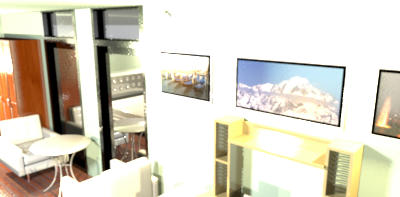
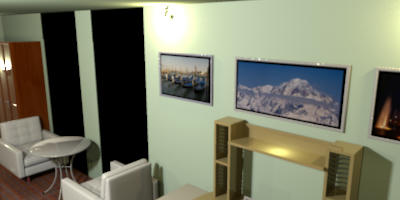
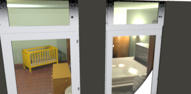
Rendering problem Im having problems rendering my room. Using the in-app photo rendering tool, i get this image: setting: best using the rendering plug-in, i got this image: setting:best This is the sh3d file: http://www.mediafire.com/?s6azsu5z8z946nd My concern is the window it does not appear transparent in the following rendered photos. But if the view is from the outside the room, as shown below, the windows are transparent. ![]() Thank you in advance guys! |
| Posted by hansmex at Sep 27, 2011, 4:09:18 PM |
|
Re: Rendering problem Rex, First, I have the impression that you are using an "old" version of SH3D. Please, check your version using Help --> About , and make sure that you have version 3.3 installed, or that you are using the beta of 3.4. Problems in your file are: - The lights are "old" and cannot be dimmed. That makes the light level far too high. - The windows are not standard, or at least not compatible with version 3.3, becasue they function like mirrors. I changed your windows for different ones, and now they are transparent. The "old" lights that come with the Advanced Rendering plug-in look and function in a different way than the newer lights. Make sure to delete these lights. They may function well in v2.6 in combination with the AdvRend-plug-in, but they don't give the desired results in newer versions. Here's the link to your modified file. Hans ---------------------------------------- Hans new website - under constuction hansdirkse.info |
| Posted by devilbliss at Sep 27, 2011, 4:42:50 PM |
|
Re: Rendering problem hans, Thanks, as always you are very helpful with inquiries of the members. I am currently using the 3.3 version of the program. I think i may have used the window from the multilevel tutorial, but a few days back I was able to render a photo with transparent windows (same as the window used in the file). Thank you for taking time to edit my file. Regarding the 'old" lights that came with the advanced rendering plug-in, how can I tell which lights are not compatible with newer versions of the programs? Are they the the lights under "Lights" category or the lights under the "light bulbs" catergory (I never changed the category of lights in my program nor imported new lights). Rex |
| Posted by hansmex at Sep 27, 2011, 6:37:55 PM |
|
Re: Rendering problem Rex, Glad your problem is solved. The old lights are in a library file (*.sh3f) that came with the AdvRend plug-in. It depends on your operating system where you can find this file, but it should be in a (hidden, if under Linux) directory, close to where the plug-ins are. Hans ---------------------------------------- Hans new website - under constuction hansdirkse.info |
| Posted by Puybaret at Sep 27, 2011, 6:47:53 PM |
|
Re: Rendering problem The old lights must be in Light bulbs category. They work but don't offer the same possibilities depending on the version you use. If you want to remove them, go to the directory where sh3f files are installed and remove BasicPlusExtraLights.sh3f, ExtraLights.sh3f or somethingLights.sh3f file. ---------------------------------------- Emmanuel Puybaret, Sweet Home 3D creator |
| Posted by Puybaret at Sep 27, 2011, 6:57:33 PM |
|
Re: Rendering problem And about the mirror effect on the window, it's simply a reflect of bright objects in the room. Change the location of the observer to face the window, place something behind the window and you'll see that it's transparent. ---------------------------------------- Emmanuel Puybaret, Sweet Home 3D creator |
| Posted by hansmex at Sep 27, 2011, 8:01:20 PM |
|
Re: Rendering problem Emmanuel, Of course that's the first thing I did. Nevertheless the renders showed the windows as mirrors. When I replaced them with "my" windows, they became transparent from the same position. The "simple" preview render shows the windows as transparent. My guess was that the reflection is set higher in the OBJ data, and that, combined with the too-strong internal lighting, causes the mirror effect. Hans ---------------------------------------- Hans new website - under constuction hansdirkse.info |
| Posted by devilbliss at Sep 28, 2011, 5:20:57 AM |
|
Re: Rendering problem Thanks guys for the inputs. I already deleted the "old" lights. They are under the "Light Bulbs" category. I am not an architect or an engineer or a developer but your program is very easy to use (one just have to read the very helpful tutorials first) and it sparked a lot of interest from me. |
| Posted by devilbliss at Sep 29, 2011, 3:31:58 AM |
|
Re: Rendering problem emmanuel and hans, I think there's another problem, I don't know if this is a bug or something. But today, when I try to render the room that hans edited for me, I discovered another problem/issue. There's still a black part of the windows, when I examined it again, the "Black" part of the window is the ground on the background. The sky on the rendered photo is blue but the ground is black. I tried changing the view from inside the room to outside the room and the rendered photo looks like this. I don't know if this is an isolated case or if it is happening to other users. Thank you very much! |
| Posted by devilbliss at Sep 29, 2011, 3:37:36 AM |
|
Re: Rendering problem in addition, I think that's why I still got the desired transparency of the windows in this photo which I originally posted on this thread. Thanks! |
| Posted by Puybaret at Sep 29, 2011, 12:21:02 PM |
|
Re: Rendering problem Your timezone / longitude values aren't homogeneous. At 11 AM in Taipei, it's dawn at a longitude/latitude set in Europe, and the result is correct for these parameters. ---------------------------------------- Emmanuel Puybaret, Sweet Home 3D creator |
| Posted by quickmic at Sep 30, 2011, 4:32:58 PM |
|
Re: Rendering problem I also have render problems. Some pixel-error can be seen... Here: https://rms-systems.homelinux.net/download/Transfer/Pic.jpg |
| Posted by hansmex at Sep 30, 2011, 5:23:21 PM |
|
Re: Rendering problem Quickmic, Can you use a TRUSTED website to host your images? Firefox refuses to open it. Hans ---------------------------------------- Hans new website - under constuction hansdirkse.info |
| Posted by quickmic at Sep 30, 2011, 5:27:51 PM |
|
Re: Rendering problem I don't wanna pay für an official cerificat but you can ignore the warnings... Else use this: http://www.megaupload.com/?d=G05R2AW0 |
| Posted by hansmex at Sep 30, 2011, 6:36:39 PM |
|
Re: Rendering problem You may want to have a look at www.mediafire.com .... But even with the black spots, it's a VERY nice image! ---------------------------------------- Hans new website - under constuction hansdirkse.info |
| Posted by devilbliss at Oct 1, 2011, 4:26:06 AM |
|
Re: Rendering problem Ah ok emmanuel, thanks! Sorry for overlooking the timezone values, im not familiar with those. But its really cool that you've incorporated the timezone values in rendering photos in the program. |
| Posted by devilbliss at Oct 1, 2011, 4:35:38 AM |
|
Re: Rendering problem Nice quickmic! where did you get the wooden planks that you used for your room? thanks! |
| Posted by Puybaret at Oct 1, 2011, 10:33:14 AM |
|
Re: Rendering problem Sorry for overlooking the timezone values, im not familiar with those. It's an other reason why you should choose the default photo rendering dialog of Sweet Home 3D v 3. It uses some code able to best guest your longitude/latitude for your default time zone, but the older Advanced rendering plugin doesn't use it (and I don't think I will update this plug-in).---------------------------------------- Emmanuel Puybaret, Sweet Home 3D creator |
| Posted by quickmic at Oct 1, 2011, 8:41:20 PM |
|
Re: Rendering problem Nice quickmic! where did you get the wooden planks that you used for your room? thanks! Thats just normal textures. I loaded picture templates from the Web and modified them. The Trick is, that you must make sure that the Textures don't have borders if they are merged. -> If you found a nice picture, modify it by mirroring in any directions. Here are some of mine. [Note from moderator: removed link to quickmic's textures library since he's not sure they can be redistributed] |
| Posted by Puybaret at Oct 1, 2011, 8:56:10 PM |
|
Re: Rendering problem quickmic, I don't want to be boring and appreciate your will to share your findings, but did you check you have the right to redistribute these images before posting them? ---------------------------------------- Emmanuel Puybaret, Sweet Home 3D creator |
| Posted by quickmic at Oct 1, 2011, 9:33:36 PM |
|
Re: Rendering problem Hmm, I know it was freeware but don't be sure if redistribution is 100% ok. If you could get problems with this, simply delete the link and I will post it by PM. |
| Posted by Puybaret at Oct 2, 2011, 12:25:43 AM |
|
Re: Rendering problem Sorry quickmic, I had to remove the link you posted. I won't think waiting copyright holders claim is a good way to respect their copyrights. ---------------------------------------- Emmanuel Puybaret, Sweet Home 3D creator |
|
|
Current timezone is GMT Dec 16, 2025, 12:40:59 AM |