|
Sweet Home 3D Forum » List all forums » » Forum: Features use and tips » » » Thread: Door swing in plan |
||
| Print at Jan 22, 2026, 10:01:11 AM |
|
|
| Posted by mitamita at Dec 31, 2010, 2:34:47 PM |
|
Door swing in plan Hi, does someone know how to get the door swing shown in base plan when using imported doors? For "door swing" I mean the arch which shows the space in the plan for opening a door . If I use the default door no problem, but with imported door (included the ones in the 3d models on this website)I can't get it. When imported the door, of course I selected the "door and window" flag. Thanks |
| Posted by hansmex at Dec 31, 2010, 3:09:23 PM |
|
Re: Door swing in plan Mita, Unless you know how to program OBJ files, there's no way to add the doorswing to an imported door. However, there's an easy workaround. Insert a hatch into your wall, then insert the door into the opening of the hatch. Rotate it 45 degrees or so, and you have a custom open door. Hans ---------------------------------------- Hans new website - under constuction hansdirkse.info |
| Posted by Puybaret at Dec 31, 2010, 3:31:48 PM |
|
Re: Door swing in plan Mita, Hans, There's no way to specify a door swing in OBJ format. The OBJ format isn't that clever! If you want to achieve that with your own model, you should create a custom SH3F file containing your door model (use Furniture Library Editor if you want to), and add the following properties in the PluginFurnitureCatalog.properties file contained in the SH3F zipped file (where n is the number of the model): doorOrWindow#n=trueBy example, the default door defined in Sweet Home 3D catalog is defined this way: name#19=DoorI guess it's not so easy to handle but it's the way all doors and windows are defined in Sweet Home 3D. I'll try to add some options about doors in a future version of the Furniture Library Editor. Finally, if you just want to show the swing of doors and windows defined in the 3D models page, please consider downloading the SH3F files that contain all of them with correct definition. ---------------------------------------- Emmanuel Puybaret, Sweet Home 3D creator |
| Posted by mitamita at Jan 1, 2011, 2:56:55 PM |
|
Re: Door swing in plan Thanks both of you. You're always fast and precise! I'll try to follow your suggestion and use the Furniture Library Editor first. Many thanks Mita |
| Posted by connomar at Mar 18, 2013, 2:58:23 AM |
|
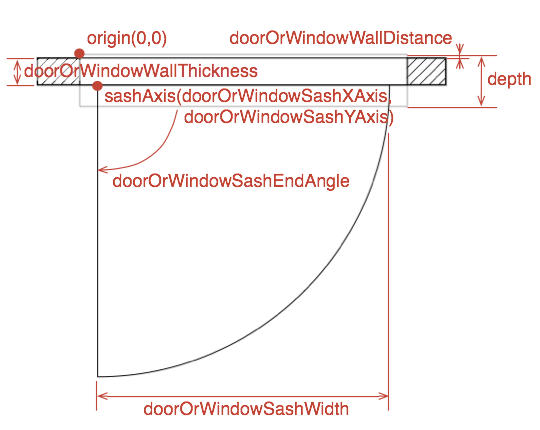
Re: Door swing in plan Please could you explain how the parameters above relate to the way the outlines work? i.e. What is the WallDistance? Does SashXAxis have meaning for a door? My experiment ended up with a door that was much wider than the wall I put it in. Any help would be greatly appreciated. |
| Posted by Puybaret at Mar 18, 2013, 10:19:52 AM |
|
Re: Door swing in plan Please, use the following figure to help you understand the meaning of the properties. ![]() ---------------------------------------- Emmanuel Puybaret, Sweet Home 3D creator |
| Posted by connomar at Mar 18, 2013, 2:35:56 PM |
|
Re: Door swing in plan Many thanks Emmanuel, that's just what I needed. |
| Posted by hal9000 at Jun 29, 2013, 2:56:41 AM |
|
Re: Door swing in plan So the "depth" shown on the figure is not included in the properties? ---------------------------------------- If a long walk every day were healthy, mailmen would be immortal. ![]() |
| Posted by Puybaret at Jun 30, 2013, 4:59:16 PM |
|
Re: Door swing in plan So the "depth" shown on the figure is not included in the properties? depth is one of the mandatory properties.---------------------------------------- Emmanuel Puybaret, Sweet Home 3D creator |
| Posted by hal9000 at Jun 30, 2013, 5:30:11 PM |
|
Re: Door swing in plan Oh, I see. I was only thinking of the properties listed above. ---------------------------------------- If a long walk every day were healthy, mailmen would be immortal. ![]() |
|
|
|
Current timezone is GMT Jan 22, 2026, 10:01:11 AM |