|
Sweet Home 3D Forum » List all forums » » Forum: Features use and tips » » » Thread: Door swing in plan |
|
| Print at Jan 22, 2026, 8:33:33 AM | |
| Posted by mitamita at Dec 31, 2010, 2:34:47 PM |
|
Door swing in plan Hi, does someone know how to get the door swing shown in base plan when using imported doors? For "door swing" I mean the arch which shows the space in the plan for opening a door . If I use the default door no problem, but with imported door (included the ones in the 3d models on this website)I can't get it. When imported the door, of course I selected the "door and window" flag. Thanks |
| Posted by hansmex at Dec 31, 2010, 3:09:23 PM |
|
Re: Door swing in plan Mita, Unless you know how to program OBJ files, there's no way to add the doorswing to an imported door. However, there's an easy workaround. Insert a hatch into your wall, then insert the door into the opening of the hatch. Rotate it 45 degrees or so, and you have a custom open door. Hans ---------------------------------------- Hans new website - under constuction hansdirkse.info |
| Posted by Puybaret at Dec 31, 2010, 3:31:48 PM |
|
Re: Door swing in plan Mita, Hans, There's no way to specify a door swing in OBJ format. The OBJ format isn't that clever! If you want to achieve that with your own model, you should create a custom SH3F file containing your door model (use Furniture Library Editor if you want to), and add the following properties in the PluginFurnitureCatalog.properties file contained in the SH3F zipped file (where n is the number of the model): doorOrWindow#n=trueBy example, the default door defined in Sweet Home 3D catalog is defined this way: name#19=DoorI guess it's not so easy to handle but it's the way all doors and windows are defined in Sweet Home 3D. I'll try to add some options about doors in a future version of the Furniture Library Editor. Finally, if you just want to show the swing of doors and windows defined in the 3D models page, please consider downloading the SH3F files that contain all of them with correct definition. ---------------------------------------- Emmanuel Puybaret, Sweet Home 3D creator |
| Posted by mitamita at Jan 1, 2011, 2:56:55 PM |
|
Re: Door swing in plan Thanks both of you. You're always fast and precise! I'll try to follow your suggestion and use the Furniture Library Editor first. Many thanks Mita |
| Posted by connomar at Mar 18, 2013, 2:58:23 AM |
|
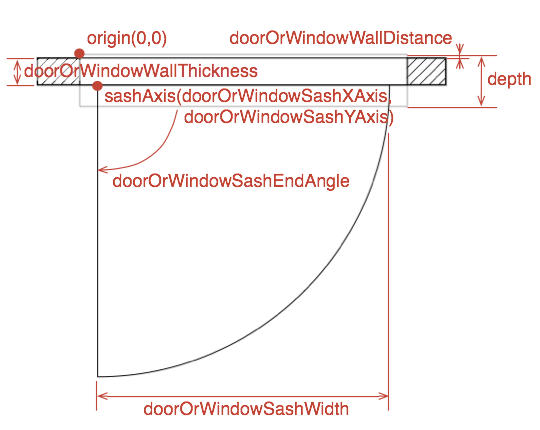
Re: Door swing in plan Please could you explain how the parameters above relate to the way the outlines work? i.e. What is the WallDistance? Does SashXAxis have meaning for a door? My experiment ended up with a door that was much wider than the wall I put it in. Any help would be greatly appreciated. |
| Posted by Puybaret at Mar 18, 2013, 10:19:52 AM |
|
Re: Door swing in plan Please, use the following figure to help you understand the meaning of the properties. ![]() ---------------------------------------- Emmanuel Puybaret, Sweet Home 3D creator |
| Posted by connomar at Mar 18, 2013, 2:35:56 PM |
|
Re: Door swing in plan Many thanks Emmanuel, that's just what I needed. |
| Posted by hal9000 at Jun 29, 2013, 2:56:41 AM |
|
Re: Door swing in plan So the "depth" shown on the figure is not included in the properties? ---------------------------------------- If a long walk every day were healthy, mailmen would be immortal. ![]() |
| Posted by Puybaret at Jun 30, 2013, 4:59:16 PM |
|
Re: Door swing in plan So the "depth" shown on the figure is not included in the properties? depth is one of the mandatory properties.---------------------------------------- Emmanuel Puybaret, Sweet Home 3D creator |
| Posted by hal9000 at Jun 30, 2013, 5:30:11 PM |
|
Re: Door swing in plan Oh, I see. I was only thinking of the properties listed above. ---------------------------------------- If a long walk every day were healthy, mailmen would be immortal. ![]() |
| Posted by okh at Aug 27, 2013, 5:31:59 PM |
|
Re: Door swing in plan This thread is most useful. Just one question. An open door blade appears to become much broader than the door frame when the door is inserted in a thicker wall. I am guessing this is inevitable as SH3D will adjust the (entire) door according to the wall thickness(?) Not a big deal, but I am curious whether I've missed the meaning of a property setting to compensate for this. ok |
| Posted by hansmex at Aug 27, 2013, 6:20:41 PM |
|
Re: Door swing in plan You're correct; this is a longstanding bug in SH3D. You can circumvent this by first inserting a doorframe, then use the arrow keys to slide in the door. The frame will adapt to the wall, the door will not, and thus retain its correct aspect. H ---------------------------------------- Hans new website - under constuction hansdirkse.info |
| Posted by okh at Aug 27, 2013, 7:53:55 PM |
|
Re: Door swing in plan Thanks, Hans. Very good. That means it wasn't just my technical shortcomings :-) Hardly a serious bug. The waterboard, sill, frame, shutters and indication of opening are more important anyway. Also it only becomes a problem when there's a mismatch between the model dimensions and wall thickness anyway. Changing the model properties is a bit cumbersome, so I guess it would be easier if the FurnitureLibraryEditor allowed for editing all properties. But again, not really a priority issue (for me anyway - more vanity...). And as you say, there are workarounds. ok |
| Posted by okh at Sep 17, 2013, 7:59:29 PM |
|
Re: Door swing in plan There's no way to specify a door swing in OBJ format. The OBJ format isn't that clever! Does this mean it is better to submit models of windows/doors/light-sources in sh3f (furniture library) format? And if so, is there a preferred standard for the various properties that would make life easier? ok PS - just realising that for instance my categories is unlikely to be to everyone's taste... - see sourceforge submission of window |
| Posted by Puybaret at Sep 18, 2013, 12:16:58 PM |
|
Re: Door swing in plan You can submit both files (OBJ+MTL in a ZIP file and a SH3F file) if you want! Submitting the .sh3f version like you did for the window with sill and waterboard model is great because it makes it useful for Sweet Home 3D users until I add the model to the contributions library, and it will reduce the time it requires for me to add it to that library. The properties you chose are good. No need to specify the value of the properties that are not mandatory or not necessary for the model you submit. Just adding an ID could be nice to avoid your model to appear twice in the catalog once I'll add it to the contributions library. If you specify an id, please use the same naming convention like I did in contributions PluginFurnitureCatalog.properties file, i.e. yourName#ObjFileName (for example, OKH#window_2x3_frame_sill) just realising that for instance my categories is unlikely to be to everyone's taste As the category of a piece is not editable when it comes from a sh3f file, it's not a bad idea to use a name that will help users to find your model. But avoid creating a different category name for each file you submit! ![]() ---------------------------------------- Emmanuel Puybaret, Sweet Home 3D creator |
| Posted by okh at Sep 18, 2013, 2:18:14 PM |
|
Re: Door swing in plan Very good, thanks. In Sourceforge you insist on LAL licence, but also list GPL, CC-BY and CC-0 in the directory. LAL is ok I guess, but CC-BY is more common (and emphasises acknowledgement which could make it more tempting to produce models). Preference? ok |
| Posted by Puybaret at Sep 18, 2013, 2:52:10 PM |
|
Re: Door swing in plan I don't want to mix license system for a given library. It would be too complicate for the end users. I guess that for those who are not aware about free license, it must be already not that simple. But as CC-BY seems to be more popular than LAL nowadays, I would like to write to all contributors to get their agreement to distribute their models under CC-BY too. But if I don't get the answer or agreement of only one contributor, it will become a mess. Not a very motivating task, but in case of success all the models available in the 3D models page would be available under CC-BY! By the way, the 65 GPL models available in Sweet Home 3D were designed by me, so if ever all contributed models can be available under CC-BY, I won't mind to offer these GPL models under CC-BY license too. PS: Before all that, I have to study in details the difference between LAL and CC-BY. ![]() ---------------------------------------- Emmanuel Puybaret, Sweet Home 3D creator |
| Posted by sjimran at Dec 19, 2014, 8:25:30 AM |
|
Re: Door swing in plan Hi bro, http://sourceforge.net/projects/sweethome3d/f...yEditor-1.15.jar/download Furniture library editor 1.15 was not downloading , kindly help me. |
| Posted by okh at Dec 19, 2014, 10:43:12 AM |
|
Re: Door swing in plan It works from here. Does something prevent the automatic SourceForge download your end? Did you try a direct link on the download page? ok |
| Posted by Hafsteinn at Nov 1, 2016, 10:55:42 PM |
|
Re: Door swing in plan Hi I´m having problem adding a door swing to a door. This is what I do: 1. open a .skp file in SketchUp. Export as 3D model... obj. 2. open furnitureLibrary Editor 1.19. Drag and drop the obj file in there. 3. make changes in the editor and "save library in a different file" 4. In SH3D, Furniture, import furniture library. = THIS WORKS Now changing the PluginFurnitureCatalog.properties... 1. Changing MyFile.sh3f to MyFile.zip 2. open/unzip MyFile.zip (makes a folder) 3. open MyFile folder 4. open PluginFurnitureCatalog.properties in TextEdit 5. making changes: #here is the OLD file... name#1=Doorjulia16a category#1=Doors and windows icon#1=/Doorjulia16a.png model#1=/Doorjulia16a/Doorjulia.obj multiPartModel#1=true width#1=88 depth#1=20 height#1=210 movable#1=false doorOrWindow#1=true creator#1=HHG #here is the EDITED file... name#1=Doorjulia16a category#1=Doors and windows icon#1=/Doorjulia16a.png model#1=/Doorjulia16a/Doorjulia.obj multiPartModel#1=true width#1=88 depth#1=20 height#1=210 movable#1=false doorOrWindow#1=true doorOrWindowWallThickness#1=20.0 doorOrWindowWallDistance#1=3.0 doorOrWindowSashXAxis#1=111.4 doorOrWindowSashYAxis#1=30.0 doorOrWindowSashWidth#1=110.0 doorOrWindowSashStartAngle#1=180 doorOrWindowSashEndAngle#1=270 creator#1=HHG 6. save file 7. zip MyFile folder 8. change name of MyFile.zip to MyFile.sh3d 9. Furniture, import furniture library 10. Program tells me its imported. And the sh3f file is created in "furniture" folder. Nothing shows up in categories. ------- So my guess is that I can not make these name changes, change a zip file to sh3f file. It has to go through FurnitureLibrary Editor. But I don´t know how to do this after editing the PluginFurnitureCatalog.properties What am I doing wrong? Best regards, Haffi |
| Posted by okh at Nov 2, 2016, 10:19:35 AM |
|
Re: Door swing in plan Hi Hafsteinn, Good news is that your property editing looks perfectly valid. Tried them, no problem there, except some odd values, such as the door swing/opening being outside the model, but that should not prevent the file from working. A couple of suggestions based on similar troubles: Is PluginFurnitureCatalog.properties saved in plain text format? In step 6: change name of MyFile.zip to MyFile.sh3d - that should be MyFile.sh3f. I would also suggest a slightly different approach to avoid some problems from zipping. If you send me the file 1. Rename MyFile.sh3f to MyFile.zip. 2. Just open MyFile.zip 3. Copy PluginFurnitureCatalog.properties to another directory. 4.-6. Make changes to the outside file and save. 7. Copy that file back into MyFile.zip (confirm replace). 8. Rename MyFile.zip to MyFile.sh3f. From here on, it should be enough to double-click MyFile.sh3f for the library to be imported - but Furniture, import furniture library should also work - and result in a correct file being placed in the user directory. You could also check if the .sh3f file opens in FurnitureLibraryEditor after it has been edited. Sometimes opening and saving a file with FurnitureLibraryEditor will fix the PluginFurnitureCatalog.properties, I have not quite figured out why, but it could be an invalid linefeed (cr/lf, lf or cr). If you wish, you can send me the edited .zip/sh3f file. A look should reveal what is wrong. ok |
| Posted by okh at Nov 2, 2016, 10:49:29 AM |
|
Re: Door swing in plan By the way - in addition to the above - just for your info - here are the values I used (after testing yours) for a normal door with a doorframe of 10 cm The original values do work, and may be the way you want them, but they could be a bit confusing if someone else tried them on a similar door. So I changed doorOrWindowWallThickness# so the frame protrudes on both sides of the wall, and I moved the door swing to inside the doorframe. I also added a full cut-out to avoid an empty frame being filled: ...ok |
| Posted by Hafsteinn at Nov 2, 2016, 11:06:30 PM |
|
Re: Door swing in plan Hi Thanks for the fast reply :) Is PluginFurnitureCatalog.properties saved in plain text format? I don´t know. I don´t think so. I think it is saved in the same format that it comes, = .properties. I can change it to .txt and then it changes appearance. In step 6: change name of MyFile.zip to MyFile.sh3d - that should be MyFile.sh3f. This was a typo :) it was supposed to be MyFile.sh3f. It now works for me. I´m not sure what the problem is, but it has something to do with saving the PluginFurnitureCatolog.properties again OR manipulating the .sh3f file. Probably the latter. .... - Maybe the problem is that I´m using mac OS X and the zip program that comes with it by default changes the file somehow... So doing what you suggested, but with out copying the file out of the zip file. My solution was to download a zip program, ( https://macitbetter.com/BetterZip-Quick-Look-Generator/ ) . This program enabled me to open the zip file with out extracting it. From there I could open the PluginFurnitureCatalog.properties file, make changes to it and save it. Then just saving the zip file again and changing the extension to .sh3f. Then Furniture... import furniture library. :) The original values do work, and may be the way you want them, but they could be a bit confusing if someone else tried them on a similar door. So I changed doorOrWindowWallThickness# so the frame protrudes on both sides of the wall, and I moved the door swing to inside the doorframe. I also added a full cut-out to avoid an empty frame being filled: Thanks for cleaning up my file. I was going to do it when I had this working, but much better having it done for me :) All the best, Haffi |
| Posted by okh at Nov 3, 2016, 8:48:45 AM |
|
Re: Door swing in plan Good, glad it works and thanks for reporting back. Others may struggle with similar issues. ..cleaning up my file. I was going to do it when I had this working,... Well, it is not difficult, but can involve some trial and error rounds with editing, zipping and importing. ok |
| Posted by tarmiricmi at Jun 20, 2017, 12:02:46 PM |
|
Re: Door swing in plan Hello, sorry for waking the old thread. I'm trying to add door swing to the imported door, actually door sash that should be visible in 2D plan. According to this thread posts, I should edit PluginFurnitureCatalog.properties file which is zipped into .sh3d file. However, when I save my imported door as a .sh3d and unzip it, there is no such file. I get one folder named 1 (and inside it files model.mtl. model.obj, and one png and jpeg file), and four files, 0, contentdigests, home and home.xml. Furniture editor doesn't help in finding PluginFurnitureCatalog.properties file. So what exactly should be edited in order to set properties listed here http://www.sweethome3d.com/support/forum/viewthread_thread,2006_offset,0#17625 ? Thanks in advance. |
| Posted by okh at Jun 20, 2017, 1:47:10 PM |
|
Re: Door swing in plan Hi, you need to edit the door properties zipped in a SH3F file - a furniture library created with the Furniture Library editor. Within the SH3F file, you will see a file called PluginFurnitureCatalog.properties with additional model properties to be used by SH3D. Each item has a list of various properties, including optional properties to define the door swing in the 2D plan. The door properties could look something like this (for a double door, note that #1 must be changed according to model): doorOrWindow#1=trueok |
| Posted by okh at Jun 20, 2017, 2:22:32 PM |
|
Re: Door swing in plan PS Actually, just for the record, it is probably possible to edit these properties in the (new) Home.xml file which is now part of the .sh3d file. Some values, however, are indicated differently: relative / radians. ok |
| Posted by tarmiricmi at Jun 20, 2017, 8:07:32 PM |
|
Re: Door swing in plan Thanks! |
| Posted by greatway at Aug 1, 2024, 2:01:36 PM |
|
Re: Door swing in plan thanks for the info :) |
| Posted by Keet at Aug 1, 2024, 2:10:30 PM |
|
Re: Door swing in plan thanks for the info :) Be aware that you responded to a post from 2017. Many things have changed since then. You don't have to manually edit the sh3f file, you can now edit them in the Furniture Library Editor. The SVG mini manual is still as relevant as before.---------------------------------------- Dodecagon.nl 1300+ 3D models, manuals, and projects |
|
|
Current timezone is GMT Jan 22, 2026, 8:33:33 AM |