|
Sweet Home 3D Forum » List all forums » » Forum: Features use and tips » » » Thread: Color of walls: problem |
||
| Print at Dec 17, 2025, 11:16:26 AM |
|
|
| Posted by hansmex at Sep 8, 2010, 11:19:17 PM |
|
Re: Color of walls: problem Rob: Can you share your design file? The original that you use to make your renders? That way we can see what you are doing. You can use www.mediafire.com (or a similar service) to park your file and then copy the link here. Hans ---------------------------------------- Hans new website - under constuction hansdirkse.info |
| Posted by Rob123 at Sep 8, 2010, 11:40:11 PM |
|
Re: Color of walls: problem Hello Hans, Please have a look at: http://www.mediafire.com/?yzi4fv0pun693sl Thank you in advance for your help. Robert |
| Posted by hansmex at Sep 9, 2010, 1:35:30 AM |
|
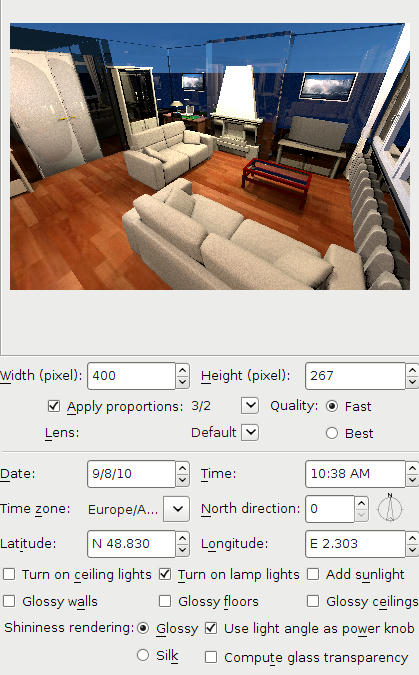
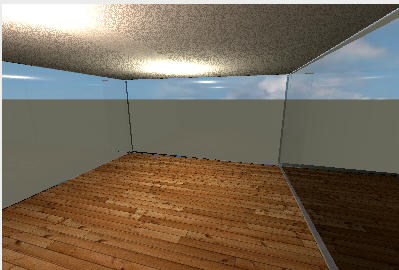
Re: Color of walls: problem Rob: 1 - When I open your file, I see that in your room you only have two small lamps of which I'm not sure if they give any light. 2 - The only light that is active, is the ceiling light. One problem is that 1 ceiling light cannot give sufficient light for a 30 m2 room. 3 - I added five 50x50x50 cm halogen lights (elevation 200 cms, set a 50 degree angles) and I checked Turn on lamp lights in the Advance Render plug-in. The result you can see below. 4 - The walls are all very blue. I checked the ceiling, saw that it was blue, and changed it to white. The walls still remained blue. I then deleted the floor and ceiling and saw that you used a blue sky as texture for the floor. I changed the floor texture and the sky texture, and made a new render. Still the wall remained blue. Investigating further I discovered that the chimney walls are transparent. Strange?! I deleted both walls and drew them again, giving them approx. the same colour. And? Even stranger: they're still transparent. The two colours blue that you see are the ground and sky. Somewhere in between I changed all wall heights, so that now they are 250 cm high, and after that I put new floor and ceiling. 5 - Because I don't like riddles, I decided to deleted almost everything and see what happens when I have an empty room. Here it is. ![]() To make a long story short: it is a riddle, it remains a riddle. I can't solve the transparency of the walls. I suspect <?> that the file is somehow corrupted, but I'm not sure. Maybe db4tech has any ideas? He programmed the advanced render plug-in. ---------------------------------------- Hans new website - under constuction hansdirkse.info |
| Posted by whippetsleek at Sep 9, 2010, 7:45:15 AM |
|
Re: Color of walls: problem Like Hansmex, I don't like a mystery either, so I downloaded your file Rob123, and noticed your wall transparency is slightly moved. If you move the wall transparency slider all the way to the left, You will get a good solid wall. You are getting the glass look because the renderer thinks of the walls as transparent. Here is the render I got... ![]() I see your file is in what I believe is french, so if I haven't explained clearly enough, maybe someone can translate this into french for you... BTW, Very nicely done home, it looks excellent. ---------------------------------------- ![]() |
| Posted by db4tech at Sep 10, 2010, 5:00:02 AM |
|
Re: Color of walls: problem Maybe db4tech has any ideas? He programmed the advanced render plug-in. Aw Hans, as much as I wish that was true, Emmanuel is the programmer! ![]() Thank you though! I wonder why the doors (on the left) are rendering with an unusual shiny patch in the middle? Good work trying to find the walls solution, very thorough! db4tech *** Good catch whippet on finding the solution, not sure I would have noticed the slider since it was only slightly moved! ![]() I never realised the walls rendered as transparent, if the transparency slider was changed, I thought that feature was purely for OpenGL 3D, to assist in positioning difficult items close to walls. db4tech |
|
|
|
Current timezone is GMT Dec 17, 2025, 11:16:26 AM |
