Print at Dec 17, 2025, 2:41:45 PM
Posted by Rob123 at Sep 5, 2010, 10:52:07 PM
Color of walls: problem
Hello all,
2 walls defined with the same color (identical color code / H:40, S:25, B:85) do not appear identical. The color chosen for both walls is brown. However one wall appears as light brown and the other wall appears as dark brown.
How can this be fixed ?
Thanks in advance.
Robert

Posted by db4tech at Sep 6, 2010, 4:18:57 AM
Re: Color of walls: problem
Hi Robert,

Welcome to the Sweet Home forum.

If possible can you show a picture of what you mean?
Do you mean when the scene is rendered, or the 3D view (bottom right)?

If you mean the 3D view, then different shades are used to help represent a 3D environment, when the scene is rendered, all colours should appear as they would in real life, only changing in lightness, depending on how the walls are illuminated, by lights placed in the scene.

db4tech

Posted by Hampi at Sep 6, 2010, 6:00:58 PM
Re: Color of walls: problem
In the begining i also was confused in the 3D view. I put a white wall but it doesn't appear white... but make sense.. Important is only, that in the rendered picture it will have the right color.. and with the advanced picture there is a great option for rendering.

Posted by Puybaret at Sep 6, 2010, 8:27:20 PM
Re: Color of walls: problem
The color of walls is different depending on their orientation towards the default lights set in the 3D view.
----------------------------------------
Emmanuel Puybaret, Sweet Home 3D creator

Posted by Rob123 at Sep 6, 2010, 10:40:46 PM
Re: Color of walls: problem
Hello all,
I would like to display an image to illustrate what I mean.
Can I attach or load an image somewhere ?
Robert

Posted by hansmex at Sep 6, 2010, 11:17:21 PM
Re: Color of walls: problem
Rob123:

You can use www.mediafire.com or a similar service to upload your picture. Copy the URL of the picture and paste it here using the Image button.

Hans
----------------------------------------
Hans

new website - under constuction
hansdirkse.info

Posted by Rob123 at Sep 6, 2010, 11:48:24 PM
Re: Color of walls: problem
Hello all,
Please see the attached picture to illustrate what I mean
(hope I have managed to load the picture - using Mediafire).
2 walls defined with an identical color code appear in a different way (see wall with the door versus wall with desk + tv). Please also see the wall with fire place (H:40, S;25, B75) which however looks very similar to the other walls defined as H:40, S;25, B85.
Does this depend on the lighting, orietation of the wall, .. ?
Thank you in advance for your input.
Robert

Posted by Rob123 at Sep 6, 2010, 11:51:14 PM
Re: Color of walls: problem
<a href="http://www.mediafire.com/imageview.php?quickk...l1kxns1&thumb=5" target="_blank"><img src="http://www.mediafire.com/imgbnc.php/4b8fdf622...72660f3ba92eb4g.jpg" border="0" alt="Unlimited Free Image and File Hosting at MediaFire"></a>

Posted by whippetsleek at Sep 7, 2010, 4:10:18 PM
Re: Color of walls: problem
Maybe it is just my monitor, but that picture looks like a normal 3d view with shadowing to give the view depth. Have you tried taking a photo with the create photo option under the 3dmenu? If you take a picture, and the walls still look an off color, then it might be a problem, but I think from your picture that is just normal shading.
----------------------------------------

Posted by Rob123 at Sep 8, 2010, 10:18:46 PM
Re: Color of walls: problem
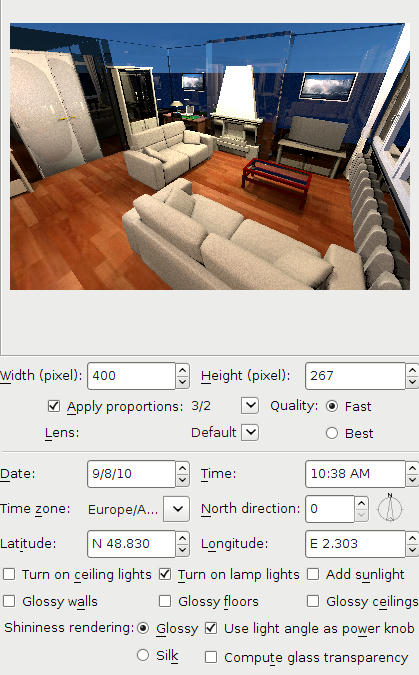
I created 2 pictures using 3D View.

1/ 'High quality'
http://www.mediafire.com/i/?6vi1x12jwccvdpv
The room appears very dark and the walls transparent.
Is this normal ?

2/ 'Fast create'
http://www.mediafire.com/i/?dedjix8aqhw6n3s
In this case 2 walls defined with the same color code appear as light brown or dark brown. The difference in shading is according to me much too big.

Am I doing something wrong, might I have misunderstood something ?

Posted by hansmex at Sep 8, 2010, 11:19:17 PM
Re: Color of walls: problem
Rob:

Can you share your design file? The original that you use to make your renders? That way we can see what you are doing. You can use www.mediafire.com (or a similar service) to park your file and then copy the link here.

Hans
----------------------------------------
Hans

new website - under constuction
hansdirkse.info

Posted by Rob123 at Sep 8, 2010, 11:40:11 PM
Re: Color of walls: problem
Hello Hans,
Please have a look at:
http://www.mediafire.com/?yzi4fv0pun693sl
Thank you in advance for your help.
Robert

Posted by hansmex at Sep 9, 2010, 1:35:30 AM
Re: Color of walls: problem
Rob:

1 - When I open your file, I see that in your room you only have two small lamps of which I'm not sure if they give any light.
2 - The only light that is active, is the ceiling light. One problem is that 1 ceiling light cannot give sufficient light for a 30 m2 room.
3 - I added five 50x50x50 cm halogen lights (elevation 200 cms, set a 50 degree angles) and I checked Turn on lamp lights in the Advance Render plug-in. The result you can see below.


4 - The walls are all very blue. I checked the ceiling, saw that it was blue, and changed it to white. The walls still remained blue. I then deleted the floor and ceiling and saw that you used a blue sky as texture for the floor. I changed the floor texture and the sky texture, and made a new render. Still the wall remained blue. Investigating further I discovered that the chimney walls are transparent. Strange?! I deleted both walls and drew them again, giving them approx. the same colour. And? Even stranger: they're still transparent. The two colours blue that you see are the ground and sky. Somewhere in between I changed all wall heights, so that now they are 250 cm high, and after that I put new floor and ceiling.

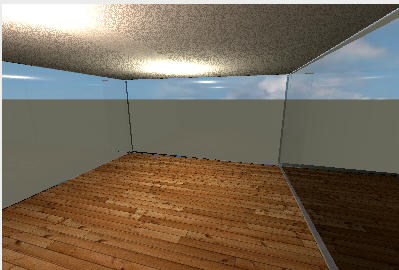
5 - Because I don't like riddles, I decided to deleted almost everything and see what happens when I have an empty room. Here it is.


To make a long story short: it is a riddle, it remains a riddle. I can't solve the transparency of the walls. I suspect <?> that the file is somehow corrupted, but I'm not sure.

Maybe db4tech has any ideas? He programmed the advanced render plug-in.
----------------------------------------
Hans

new website - under constuction
hansdirkse.info

Posted by whippetsleek at Sep 9, 2010, 7:45:15 AM
Re: Color of walls: problem
Like Hansmex, I don't like a mystery either, so I downloaded your file Rob123, and noticed your wall transparency is slightly moved. If you move the wall transparency slider all the way to the left, You will get a good solid wall. You are getting the glass look because the renderer thinks of the walls as transparent. Here is the render I got...


I see your file is in what I believe is french, so if I haven't explained clearly enough, maybe someone can translate this into french for you...

BTW, Very nicely done home, it looks excellent.
----------------------------------------


Posted by db4tech at Sep 10, 2010, 5:00:02 AM
Re: Color of walls: problem
Maybe db4tech has any ideas? He programmed the advanced render plug-in.
Aw Hans, as much as I wish that was true, Emmanuel is the programmer! smile

Thank you though!

I wonder why the doors (on the left) are rendering with an unusual shiny patch in the middle?
Good work trying to find the walls solution, very thorough!

db4tech

***

Good catch whippet on finding the solution, not sure I would have noticed the slider since it was only slightly moved! smile

I never realised the walls rendered as transparent, if the transparency slider was changed, I thought that feature was purely for OpenGL 3D, to assist in positioning difficult items close to walls.

db4tech