Print at Dec 16, 2025, 1:38:43 AM View all posts in this thread on one page
Posted by fhoofman at Aug 26, 2010, 6:50:07 PM
applause   how to make a light like this?
so far SH3D only provide a light at one point
http://fhoofman.multiply.com/photos/album/5/bug#photo=4

how to make render light like this?
http://fhoofman.multiply.com/photos/album/5/bug#photo=5

i'm sorry about my bad english
Posted by hansmex at Aug 27, 2010, 2:07:54 AM
Re: how to make a light like this?
fhoofman,

As far as I know it's not possible to make such a lamp in SH3D. The problem is the way the rendering handles transparency.

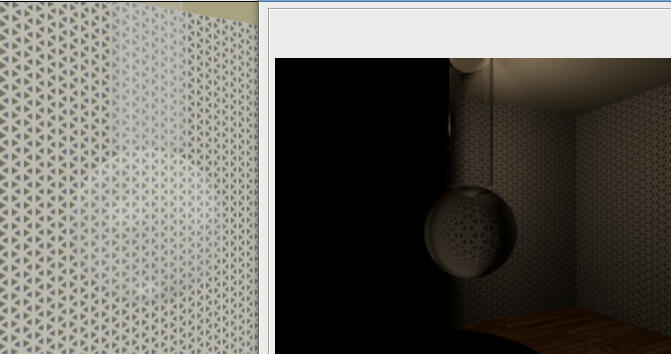
I prepared a transparent cylinder and a transparent sphere and then I put 7 warm lights inside them. In the picture below you can see the 3D window on the left and the rendered image on the right, made with the advanced render plug-in.

The light you can see comes from one of the lights inside the cylinder that sticks through the cylinder wall. I corrected the placement of the lights so that they are all inside the cylinder, and the resulting picture is absolutely, completely dark.

So, if you want lamps similar to what your picture shows, you will have to build your model in SH3D, then export it in OBJ format. You can then import your model in a rendering program that correctly handles transparency, such as (among many others) Blender.


----------------------------------------
Hans

new website - under constuction
hansdirkse.info

Posted by db4tech at Aug 27, 2010, 2:54:24 AM
Re: how to make a light like this?
Hi Hans,

Please have a look at the new Advanced render plugin version 1.6, released this evening, you will also need the new lights.

Tick the checkbox to compute glass transparency! wink


Here's some quick examples, (Please note, your final renders should look even better, as these were produced with slightly lower quality sample settings, while testing various settings to get the best results with caustics, for the plugin) smile


on the second image the light is inside the vase. The glasses in the last image are actually inside a glass door cabinet, so light is coming through the doors, and through the glasses.

You can control the light bulbs light intensity, by ticking the 'Use rotation and power knob' and rotating the bulb from 0 - 359


Enjoy and have fun! smile

db4tech

Posted by fhoofman at Aug 27, 2010, 5:12:53 AM
Re: how to make a light like this?
wow..... it really nice.

but what I mean is, SH3D provide a light at one spot and then spread the light only.

what if I want to make a straight line of light

Posted by maker at Aug 27, 2010, 5:54:09 AM
Re: how to make a light like this?
Very impressive, db4tech (As also hansmex image will be, with the new plugin. :-)

fhoofman: You could make an array of lights -- in this case 3-4 lights in a row.

Alternatively, you could open the xml file created by the plugin - I assume there's one - and change the light to array. But this would mean installing and learning a bit about Sunflow ;-)

Posted by hansmex at Aug 27, 2010, 7:33:16 AM
Re: how to make a light like this?
Emmanuel, tech4lite,

So I was a bit too soon with my answer... hehe

I tried to download the new plug-in, but although the text says version 1.6, the file is called 1.1 and when installed seems to take me back to the old days... I don't see any of the new controls.

Until then I will have to hide my enthusiasm...

Hans
----------------------------------------
Hans

new website - under constuction
hansdirkse.info

Posted by db4tech at Aug 27, 2010, 8:39:36 AM
Re: how to make a light like this?
Ah yes, that is a small snag! biggrin
I'm sure Emmanuel will fix the link as soon as he reads this thread but just in case, I've also fired off a quick e-mail to let him know.

Thanks,

db4light smile

Posted by Puybaret at Aug 27, 2010, 9:10:08 AM
Re: how to make a light like this?
Sorry for the bad link. That's a wrong copy / paste I made.
Here's the right link to the Advanced rendering plug-in 1.6.
----------------------------------------
Emmanuel Puybaret, Sweet Home 3D creator

Posted by hansmex at Aug 27, 2010, 1:01:02 PM
Re: how to make a light like this?
Emmanuel, db4tech,

WOW, I'm seriously impressed!! Easy to use, impressive results!!

Attached my first test result:


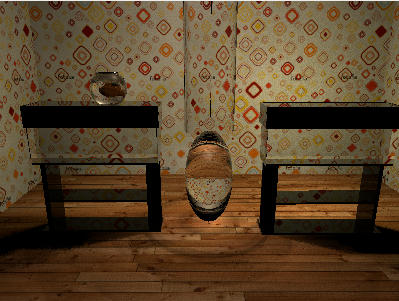
The aquaria have an infill of a transparent green box. Behind the left one a 25% light, at right 50% light. On top of the left aquarium is the fish bowl (the fish seems a little big?). In the middle a transparent sphere and cylinder with 5 20% lights in them.

The result looks very natural.

thoofman: I'll see what I can do to approximate better the result you wanted.

Hans
----------------------------------------
Hans

new website - under constuction
hansdirkse.info