Emmanuel:
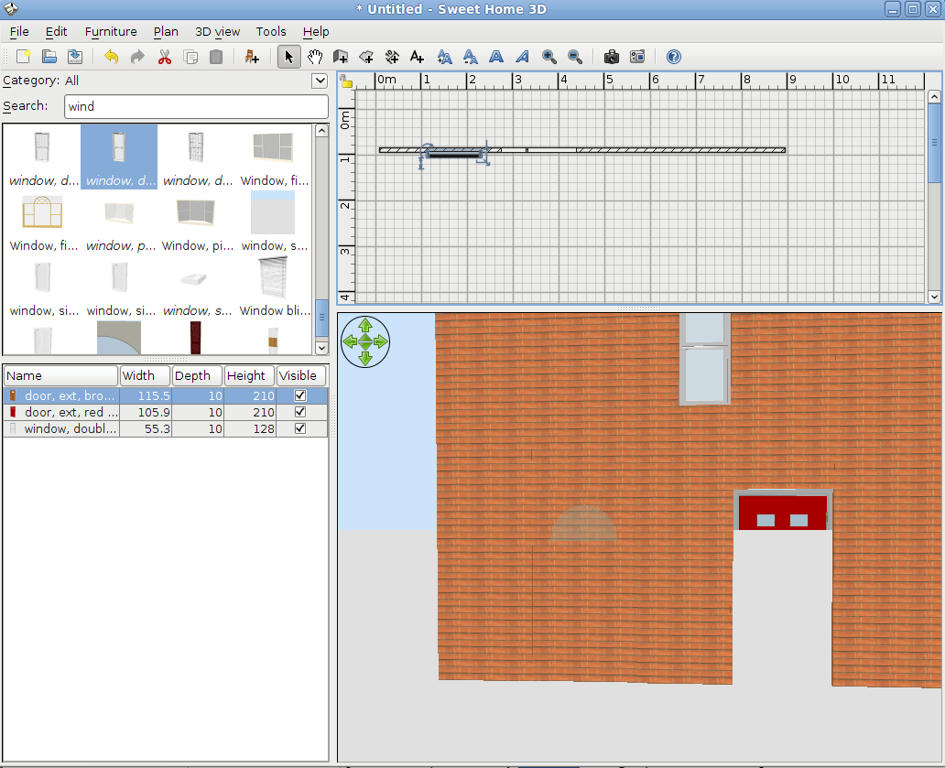
It also happens in v2.5. The Aerial View is correct, only when using Virtual Visitor does the problem occur.
Hans
----------------------------------------
Hans
Ryzen 7-9700X, 32 GB RAM, 500 GB SSD, 2x 2 TB SSD, Geforce GTX 1060 3 GB
|
Sweet Home 3D Forum » List all forums » » Forum: Features use and tips » » » Thread: Objects lose transparency when grouping |
||
| Print at Sep 27, 2026, 1:57:32 AM |
|
|
| Posted by hansmex at Aug 22, 2010, 4:17:09 PM |
|
Re: Objects lose transparency when grouping Emmanuel: It also happens in v2.5. The Aerial View is correct, only when using Virtual Visitor does the problem occur. Hans ---------------------------------------- Hans Ryzen 7-9700X, 32 GB RAM, 500 GB SSD, 2x 2 TB SSD, Geforce GTX 1060 3 GB |
| Posted by db4tech at Aug 22, 2010, 5:12:59 PM |
|
Re: Objects lose transparency when grouping Thank you Emmanuel, I've not had chance to try this yet, this bug fix will be a great help, for my multi level gallery model! I am currently having to use carefully placed boxes, to fill the gaps in-between upper and lower doors, placed inside the invisible wall furniture model.  ***** Hi Hans, Would trying the built in 'Create photo' on the Fast setting, help test to see if the missing door reappears, or if it is a driver problem? I've not looked at the code for built in Create photo yet, so I don't know if it is created using a basic shader, or retrieving an OpenGL 3D render direct the from the GPU (for anyone reading this who might not know. GPU = Graphics Processing Unit) If the Fast render is a retrieved GPU render, then trying the Best setting should help prove whether or not it is a driver issue. ***** By the way, which version of Ubuntu are you using, 10.4.1? I mght download and try it (will be in a virtual machine though) and see how it goes. You will be able to help me then, as I'm not that used to Linux. Hope you're both well and having a nice weekend! db4tech |
| Posted by hansmex at Aug 22, 2010, 8:50:20 PM |
|
Re: Objects lose transparency when grouping Emmanuel, db5tech, QUOTE The other problem has something to do with refreshing the screen. When I drag an inserted door out of the wall, the door disappears and only the glass window in the door remains visible. When I do a right-click and (without selecting anything) a left-click, the screen refreshes correctly. ENDQUOTE Maybe it's a driver problem, I wouldn't know. Just seems that the refreshing isn't as fast or automatic as it should be. The right-click left-click solves the issue. As for Ubuntu: I'm using Lucid 10.04. It recognizes that Windows is already installed and proposes to do a dual install, so that you can choose at start-up. Of course you can also install it on a virtual machine. Hans ---------------------------------------- Hans Ryzen 7-9700X, 32 GB RAM, 500 GB SSD, 2x 2 TB SSD, Geforce GTX 1060 3 GB |
| Posted by db4tech at Aug 22, 2010, 10:55:13 PM |
|
Re: Objects lose transparency when grouping Thanks Han5,  I think I prefer to try it from within a virtual machine first, as don't really want the GRUB (boot loader code) adding to my boot sector. Since posting my previous message I downloaded 10.4.1 Desktop, I guess it shouldn't be that different? Will set it installing! db'-¦tech Edit: Ah, Lucid is the name of version 10.4.1. D'oh!  At first I thought you were using a different flavour of Ubuntu At first I thought you were using a different flavour of Ubuntu  |
| Posted by db4tech at Aug 24, 2010, 12:17:05 AM |
|
Re: Objects lose transparency when grouping Hi Emmanuel, Just download the install version of 2.6 and tried your MultiLevelWindows.sh3d file, it works perfectly! Hans, I tried adding a door with glass, then moving it in and out of the wall, the door still appears correctly. Thank you from one very happy user!! db4tech |
| Posted by Puybaret at Aug 24, 2010, 2:01:14 AM |
|
Re: Objects lose transparency when grouping Here's an image of a multi levels house test I did with version 2.6 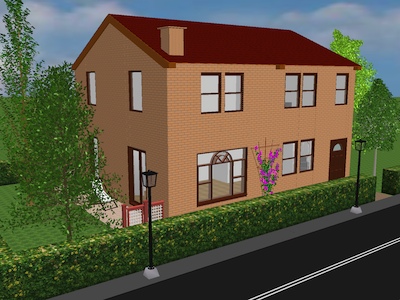 ---------------------------------------- Emmanuel Puybaret, Sweet Home 3D creator |
| Posted by pencilart at Sep 6, 2010, 11:24:03 PM |
|
Re: Objects lose transparency when grouping Nice render Emmanuel! :D :D   |
|

|
Current timezone is GMT Sep 27, 2026, 1:57:32 AM |