Print at Dec 18, 2025, 5:54:54 PM
Posted by hansmex at Aug 13, 2010, 11:46:41 AM
Objects lose transparency when grouping
Emmanuel:

On a brainwave I tried a new way to have two windows on top of each other.

First I imported a box and made it insertable. Then I combined the box with a window below, and a window on top of it. I then combined these three objects in a group, hoping the group would inherit the insertability of all three components. Guess what? It does!

This is a great way to have more flexibility when designing walls with windows over doors, etc etc.

There is just one snag: the windows lose their transparency. Do you think there is a solution for that?

Hans
----------------------------------------
Hans

new website - under constuction
hansdirkse.info

Posted by Puybaret at Aug 13, 2010, 1:36:41 PM
Re: Objects lose transparency when grouping
Hans, I'm sorry to disappoint your hopes, but there's no hidden feature in groups management. A group containing items qualified as a door or a window is considered as a door or a window, that's right, but that miserably doesn't change anything in the 3D view.
I'm going to try to fix this bug for the next version, but it's not an easy one.
----------------------------------------
Emmanuel Puybaret, Sweet Home 3D creator

Posted by hansmex at Aug 13, 2010, 2:29:13 PM
Re: Objects lose transparency when grouping
Emmanuel:

Don't worry too much. There's a very workable workaround, of course: Group the items, Copy as new furniture, copy and paste into a new instance of SH3D (I generally have two open just for that purpose), then Export to OBJ and re-import as door/window.

But just in case you have some time left... it would be nice if the extra steps weren't necessary, because it would be more flexible.

Hans
----------------------------------------
Hans

new website - under constuction
hansdirkse.info

Posted by Puybaret at Aug 21, 2010, 6:02:33 PM
Re: Objects lose transparency when grouping
Hurray, I fixed the multi level windows bug! biggrin
You can test it in the current beta of version 2.6.
I join a test file with 4 holes in a textured wall, but please confirm it works for you too.
----------------------------------------
Attachment MultiLevelWindows.sh3d (11107 bytes) (Download count: 93221) (A textured wall with windows at various levels)

----------------------------------------
Emmanuel Puybaret, Sweet Home 3D creator

Posted by maker at Aug 22, 2010, 12:16:28 PM
Re: Objects lose transparency when grouping
I don't know about him, but it works fine for me :-). Even if I take, say, a door 80in height, and ventilator of elevation 78in,and drag them to the same place
Surprisingly, if I group the objects outside - and insert - only one of the objects will be shown
But if I insert first, then group, there's no change.

What with the improvements in this version, and db4techs lighting improvements, it looks like a very interesting time coming up :-0

Posted by Puybaret at Aug 22, 2010, 12:44:21 PM
Re: Objects lose transparency when grouping
The version 2.6 will be released probably soon but won't integrate advanced rendering plugin yet.
----------------------------------------
Emmanuel Puybaret, Sweet Home 3D creator
Posted by hansmex at Aug 22, 2010, 1:18:52 PM
Re: Objects lose transparency when grouping
Emmanuel:

Thank you VERY VERY much for this new feature. The longer the wait, the sweeter the taste.

It works under Ubuntu as well. However... it seems a bit buggy.
The old bug is back: when I start v2.6 and try to load the file you provided, the program crashes immediately. Every time. I have to insert an object in the first instance of SH3D before I can open the file as a second instance.

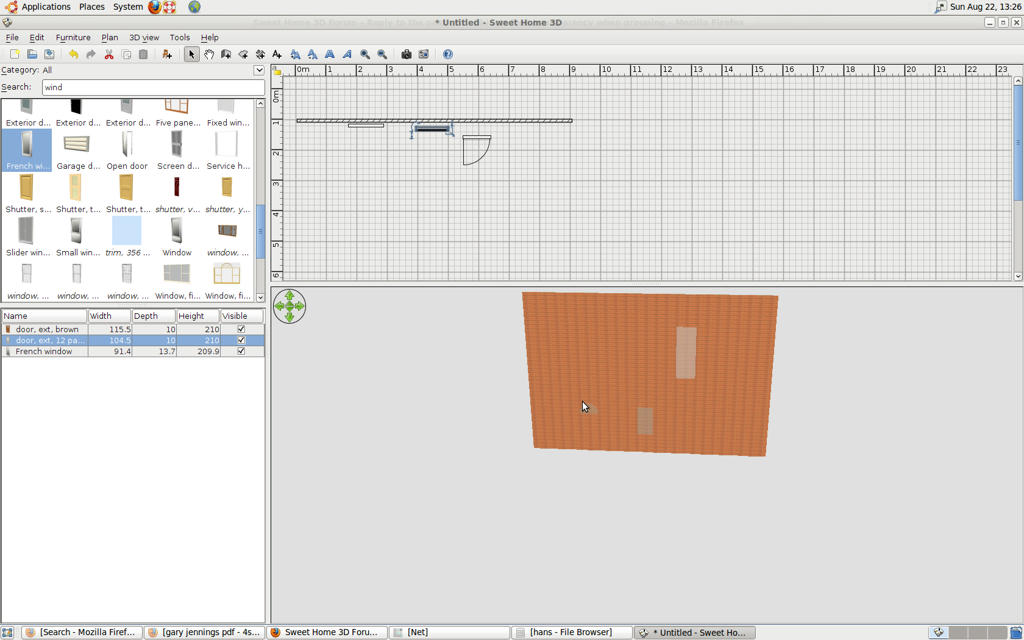
The other problem has something to do with refreshing the screen. When I drag an inserted door out of the wall, the door disappears and only the glass window in the door remains visible. When I do a right-click and (without selecting anything) a left-click, the screen refreshes correctly.

Hans
----------------------------------------
Hans

new website - under constuction
hansdirkse.info

Posted by Puybaret at Aug 22, 2010, 1:36:48 PM
Re: Objects lose transparency when grouping
Thank you for your feedback Hans. smile
I didn't succeed to reproduce the two bugs you mentioned. Could you check if it happens with version 2.5 run with Java Web Start too, please?
Does the second bug happen also when there's only one window in the wall?

[Edited the message to fix the link]
----------------------------------------
Emmanuel Puybaret, Sweet Home 3D creator

Posted by hansmex at Aug 22, 2010, 2:27:43 PM
Re: Objects lose transparency when grouping
Emmanuel:

The link you gave also is for v2.6, so I can't test it.

The problem with the disappearing door can be reproduced even with nothing inserted. See the screenshot.


Edit
I cannot reproduce this behaviour under Windows Vista.

Hans
----------------------------------------
Hans

new website - under constuction
hansdirkse.info

Posted by Puybaret at Aug 22, 2010, 3:12:52 PM
Re: Objects lose transparency when grouping
The link you gave also is for v2.6, so I can't test it.
Sorry, I fixed it.

I cannot reproduce this behaviour under Windows Vista.
Then this still sounds as a driver problem... sad
----------------------------------------
Emmanuel Puybaret, Sweet Home 3D creator
Posted by hansmex at Aug 22, 2010, 4:17:09 PM
Re: Objects lose transparency when grouping
Emmanuel:

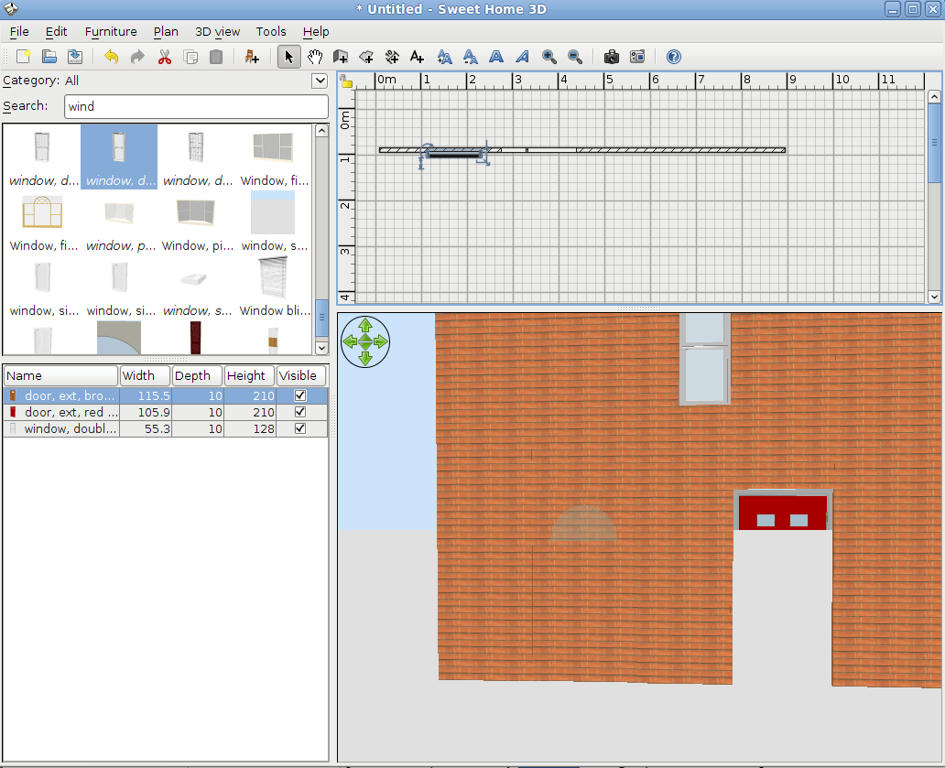
It also happens in v2.5. The Aerial View is correct, only when using Virtual Visitor does the problem occur.


Hans
----------------------------------------
Hans

new website - under constuction
hansdirkse.info

Posted by db4tech at Aug 22, 2010, 5:12:59 PM
Re: Objects lose transparency when grouping
Thank you Emmanuel,

I've not had chance to try this yet, this bug fix will be a great help, for my multi level gallery model! I am currently having to use carefully placed boxes, to fill the gaps in-between upper and lower doors, placed inside the invisible wall furniture model. smile

*****


Hi Hans,

Would trying the built in 'Create photo' on the Fast setting, help test to see if the missing door reappears, or if it is a driver problem?

I've not looked at the code for built in Create photo yet, so I don't know if it is created using a basic shader, or retrieving an OpenGL 3D render direct the from the GPU (for anyone reading this who might not know. GPU = Graphics Processing Unit)

If the Fast render is a retrieved GPU render, then trying the Best setting should help prove whether or not it is a driver issue.

*****

By the way, which version of Ubuntu are you using, 10.4.1? I mght download and try it (will be in a virtual machine though) and see how it goes. You will be able to help me then, as I'm not that used to Linux. smile


Hope you're both well and having a nice weekend!

db4tech

Posted by hansmex at Aug 22, 2010, 8:50:20 PM
Re: Objects lose transparency when grouping
Emmanuel, db5tech,

QUOTE
The other problem has something to do with refreshing the screen. When I drag an inserted door out of the wall, the door disappears and only the glass window in the door remains visible. When I do a right-click and (without selecting anything) a left-click, the screen refreshes correctly.
ENDQUOTE

Maybe it's a driver problem, I wouldn't know. Just seems that the refreshing isn't as fast or automatic as it should be. The right-click left-click solves the issue.

As for Ubuntu: I'm using Lucid 10.04. It recognizes that Windows is already installed and proposes to do a dual install, so that you can choose at start-up. Of course you can also install it on a virtual machine.

Hans
----------------------------------------
Hans

new website - under constuction
hansdirkse.info

Posted by db4tech at Aug 22, 2010, 10:55:13 PM
Re: Objects lose transparency when grouping
Thanks Han5, biggrin

I think I prefer to try it from within a virtual machine first, as don't really want the GRUB (boot loader code) adding to my boot sector.

Since posting my previous message I downloaded 10.4.1 Desktop, I guess it shouldn't be that different?

Will set it installing! smile


db'tech


Edit:
Ah, Lucid is the name of version 10.4.1. D'oh! laughing At first I thought you were using a different flavour of Ubuntu blushing

Posted by db4tech at Aug 24, 2010, 12:17:05 AM
smile   Re: Objects lose transparency when grouping
Hi Emmanuel,

Just download the install version of 2.6 and tried your MultiLevelWindows.sh3d file, it works perfectly! smile

Hans,
I tried adding a door with glass, then moving it in and out of the wall, the door still appears correctly.

Thank you from one very happy user!! smile

db4tech

Posted by Puybaret at Aug 24, 2010, 2:01:14 AM
Re: Objects lose transparency when grouping
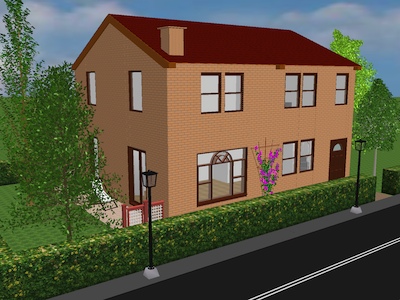
Here's an image of a multi levels house test I did with version 2.6 smile


----------------------------------------
Emmanuel Puybaret, Sweet Home 3D creator

Posted by pencilart at Sep 6, 2010, 11:24:03 PM
biggrin   Re: Objects lose transparency when grouping
Nice render Emmanuel! :D :D dancing peace