|
Sweet Home 3D Forum » List all forums » » Forum: New versions » » » Thread: Terrain Generator plug-in |
|
| Print at Jan 21, 2026, 8:07:22 AM | |
| Posted by Puybaret at Mar 27, 2021, 8:59:24 PM |
|
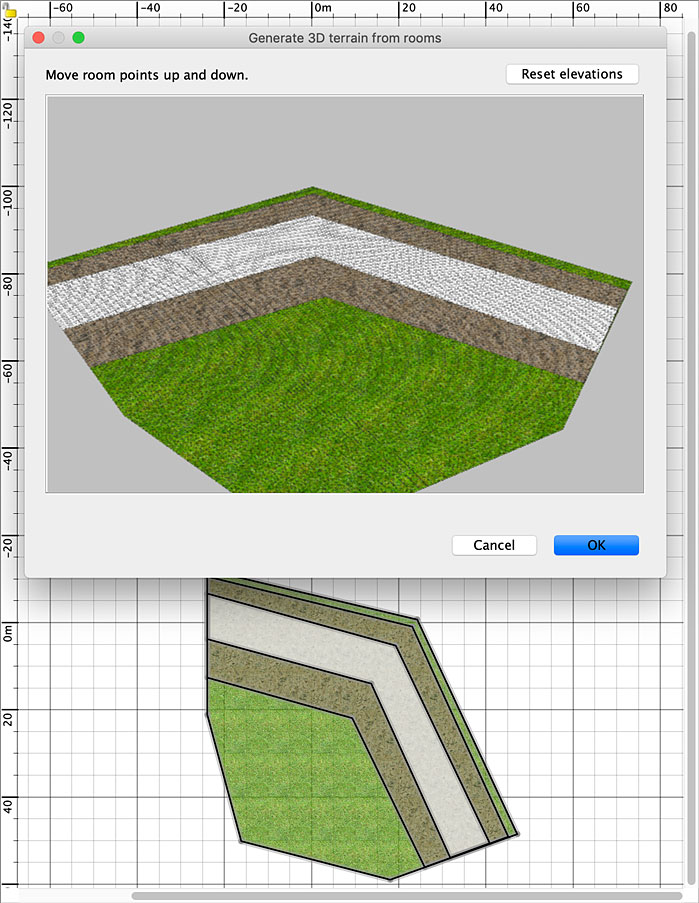
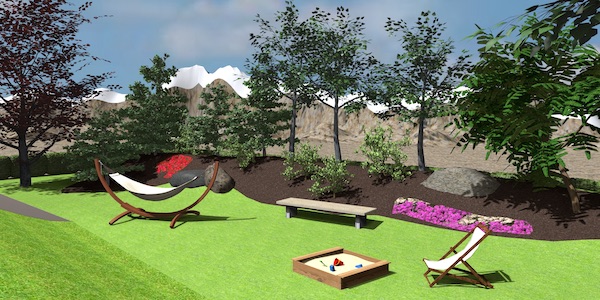
Terrain Generator plug-in Hello, Here's the Terrain Generator plug-in (111 kB) able to generate some terrain shapes from one or more rooms. Once this plug-in is installed, the following dialog box is shown when you choose the additional Tools > Generate 3D terrain from rooms menu item (en français, le menu Outils > Générer terrain 3D à partir des pièces), after selecting some rooms in the plan. It displays a 3D preview of the rooms on a grid where you can move up dans down the grid points with the mouse to generate a shape like the following one. Once you click on OK, a new shape is generated and used as the 3D model of a new piece of furniture added to the edited home and placed over the selected rooms. Here are a few options to help you design a terrain more efficiently: - The dialog box of the plug-in is resizable. - You may turn around the preview of the terrain by dragging and dropping the mouse in the empty zone around the preview. - You may zoom in and out with mouse wheel or with a drag and drop in the empty zone while pressing Alt key. - When magnestism is on, points around the dragged point are also more or less elevated according to their distance to that point. - When magnestism is off (toggling magnetism can be done by pressing Alt key under Windows or command key under macOS), only the elevation of the dragged point is changed. - When alignment is on (activating it can be done by pressing Shift key), points around the dragged point are more or less elevated along all the current horizontal axis. - Pressing the Escape key will escape the current elevation change. - The Reset elevations button will reset all the elevations already set. - The entered elevations are stored in properties of the rooms to be able to edit again a new shape if the resulting one isn't correct, and you may even enlarge the dimensions of these rooms meanwhile. These properties are saved with the SH3D file. Note that if you select more than a room, they must be at the same elevation to be able to use this plug-in. Keep also in mind that the grid step is fixed, so don't try to design giant surfaces for which there might be too many points to handle. Hope you'll like it. I'm looking forward to discovering the landscapes you'll design with this plug-in. Many thanks to Jacques57 for giving me the idea ![]() Download links for Terrain Generator plug-in: Terrain Generator plug-in 1.2.2 was released on 08/28/2024 Terrain Generator plug-in 1.2.1 was released on 06/10/2022 to fix a bug under Linux at plug-in launch Terrain Generator plug-in 1.2 was released on 05/23/2022 with new features explained here Terrain Generator plug-in 1.1 was released on 04/29/2021 with new features explained here Terrain Generator plug-in 1.0.1 was released on 03/29/2021 to fix missing borders when terrain smallest coordinates are negative Terrain Generator plug-in 1.0 was released on 03/28/2021 ---------------------------------------- Emmanuel Puybaret, Sweet Home 3D creator |
| Posted by Mike53 at Mar 27, 2021, 10:48:07 PM |
|
Re: Terrain Generator plug-in Like the sound of this, look forward to trying it |
| Posted by hansmex at Mar 28, 2021, 11:32:52 AM |
|
Re: Terrain Generator plug-in Thank you for this terrain generator, it's a start for something very useful. After playing around a bit, I think this plug-in needs a bit of fine-tuning. - The interface is a bit crude. A mouse is not precise enough to do precise editing. - Results show mainly a series of sharp spikes, or peaks, in the landscape. It's very hard to make something nice. A few suggestions: - Add a numerical control for the radius of the "spikes". By making the radius larger, the slope will be more gradual. - Add a numerical control for the desired height of the spikes. Now you have to guess at the result. - Connect adjacent walls of the rooms. If one elevates a room, the adjacent room should also be elevated. A hilly terrain is often made more usable by making banks, or terraces (think rice terraces in China). The rooms follow the contours of the landscape. Maybe the interface of the AdvancedEdit "edit points" could be used to elevate certain lines of a room. Even if adjacent lines wouldn't follow, this would allow easy editing of heights. Can't wait to see version 2 :-) ---------------------------------------- Hans new website - under constuction hansdirkse.info |
| Posted by Puybaret at Mar 28, 2021, 4:23:57 PM |
|
Re: Terrain Generator plug-in Thanks for your feedback ![]() I released a version 1.0.1 to fix missing borders when terrain smallest coordinates are negative. The grid step is 50cm for the moment. It may be quite a large value but it seemed to be a good value for mid-size gardens to much larger terrains used for landscape purpose. I may add some numerical fields in the future but sorry, don't hope that the elevation of other objects around the generated shape will be automatically adjusted. I think that it would too often lead to unsatisfying results along slopes. Anyway, as rooms and walls don't have any elevation parameter, this is not even possible to program such a feature in a plug-in (Advanced Editing plug-in included). ---------------------------------------- Emmanuel Puybaret, Sweet Home 3D creator |
| Posted by hansmex at Mar 28, 2021, 5:02:33 PM |
|
Re: Terrain Generator plug-in The numerical fields would be a great feature. Can't wait to see that happen. H ---------------------------------------- Hans new website - under constuction hansdirkse.info |
| Posted by Gildaniel at Mar 29, 2021, 10:57:32 AM |
Re: Terrain Generator plug-in![]() |
| Posted by Gildaniel at Mar 29, 2021, 1:22:11 PM |
|
Re: Terrain Generator plug-in Dear Puybaret! This is great tool, thank you! Now it's nice to make hills, but hard to make pits, so base thickness of room is needed. It could be taken from current level thickness. Or it may be option to elevate all points of the upper surface to specified distance. For example: I know that my lowest local terrain point (pit) is -500мм, so I elevate all upper points to 500 and lowering few local point to ziro level |
| Posted by Puybaret at Mar 29, 2021, 5:11:23 PM |
|
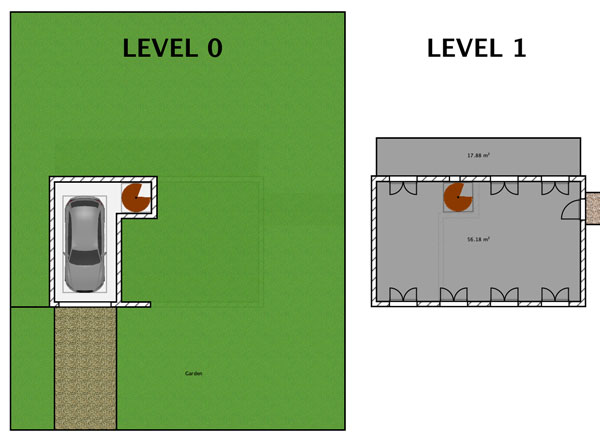
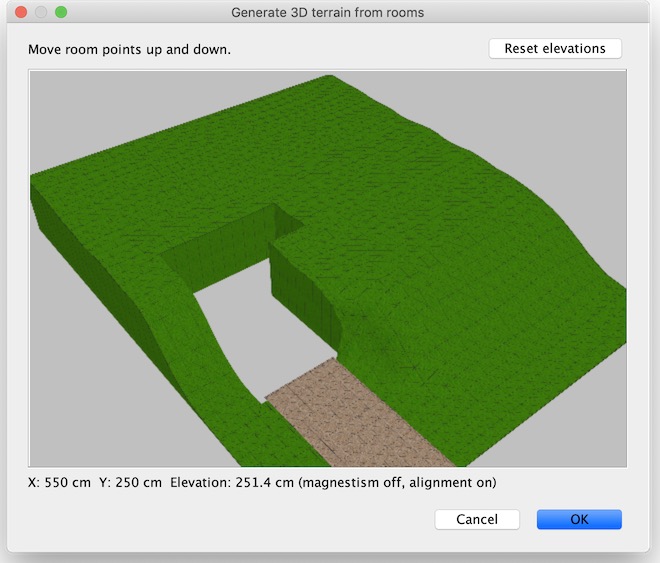
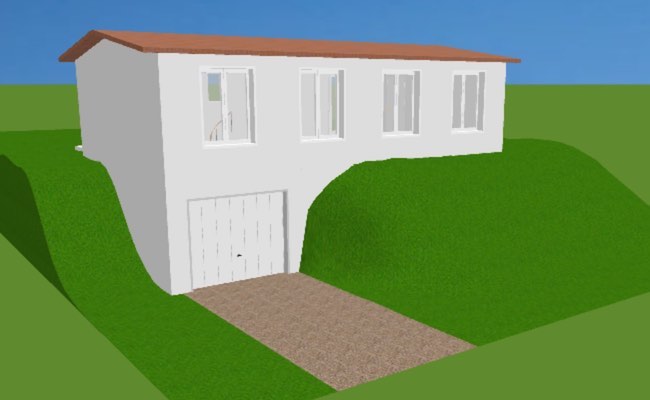
Re: Terrain Generator plug-in Any hole you'll draw in your room(s) will appear in the plug-in dialog box too. For example, if you want to draw a two level house on a slope like the one attached to this post, you could draw a room that surrounds the garage like the green room in the following image. ![]() If you don't know how to draw a room with a hole, look at this video or draw two rooms which won't include the house surface. Then, if you select this room and the path to the garage to build a terrain from them with the plug-in, you can design a slope which will show the hole of the garage. ![]() After a few tries, you'll get the following nice little house that you may visit in 3D here. ![]() ---------------------------------------- ---------------------------------------- Emmanuel Puybaret, Sweet Home 3D creator |
| Posted by Gildaniel at Mar 30, 2021, 2:18:05 PM |
|
Re: Terrain Generator plug-in Hello! I spoke about the case of creating a predominantly flat relief with local underestimations (pits); not about cutting vertical holes. Like flat terra with pond |
| Posted by YGYL at Apr 5, 2021, 10:13:42 AM |
|
Re: Terrain Generator plug-in Wish for many years of function. Thank you very much. It's tested. It works |
| Posted by EricThomas at Apr 11, 2021, 7:02:29 PM |
|
Re: Terrain Generator plug-in Bonjour, Merci pour l'outil. je ne peux pas corriger le terrain ,le menu n'est accessible qu'une seule fois. |
| Posted by Puybaret at Apr 11, 2021, 8:02:52 PM |
|
Re: Terrain Generator plug-in If you want to modify the generated shape, you have to select the room(s) like the first time. ---------------------------------------- Emmanuel Puybaret, Sweet Home 3D creator |
| Posted by crackwood01 at Apr 14, 2021, 5:20:55 AM |
|
Re: Terrain Generator plug-in Super!!! Question: i am trying to dram landscape around house, maybe in a future version of plugin, it would be AWESOME if we could have the whole house or at least objects at the same elevation level in the preview window, does'nt even know if it's possible "code saying". Congratulations for terrain AND side view plugin sooooo helpful |
| Posted by EricThomas at Apr 14, 2021, 7:14:44 PM |
|
Re: Terrain Generator plug-in When I select the room, the menu is grayed. |
| Posted by EricThomas at Apr 14, 2021, 7:33:04 PM |
|
Re: Terrain Generator plug-in OK, I finnaly found how it works. I must first delete the "Terrain", the room is under the "Terrain" and memorized the deformation. ![]() |
| Posted by cactuskid02 at Apr 15, 2021, 2:54:11 PM |
|
Re: Terrain Generator plug-in This plugin is a great idea. However, for LARGE properties, it is not good. The property I am trying to replicate is 150' wide by 300' deep. It has a 16' rise along the diagonal from back right to front left. Amongst that slope are some drainage valleys. For me to go point to point, or even using the magnetism or the alignment functions, would take an enormous amount of time. In my case, I would think being able to input the corner elevations, and perhaps some halfway points, would get a beginning slope to work with. Then modify the terrain up or down in specific areas as needed. |
| Posted by Puybaret at Apr 29, 2021, 6:07:03 PM |
|
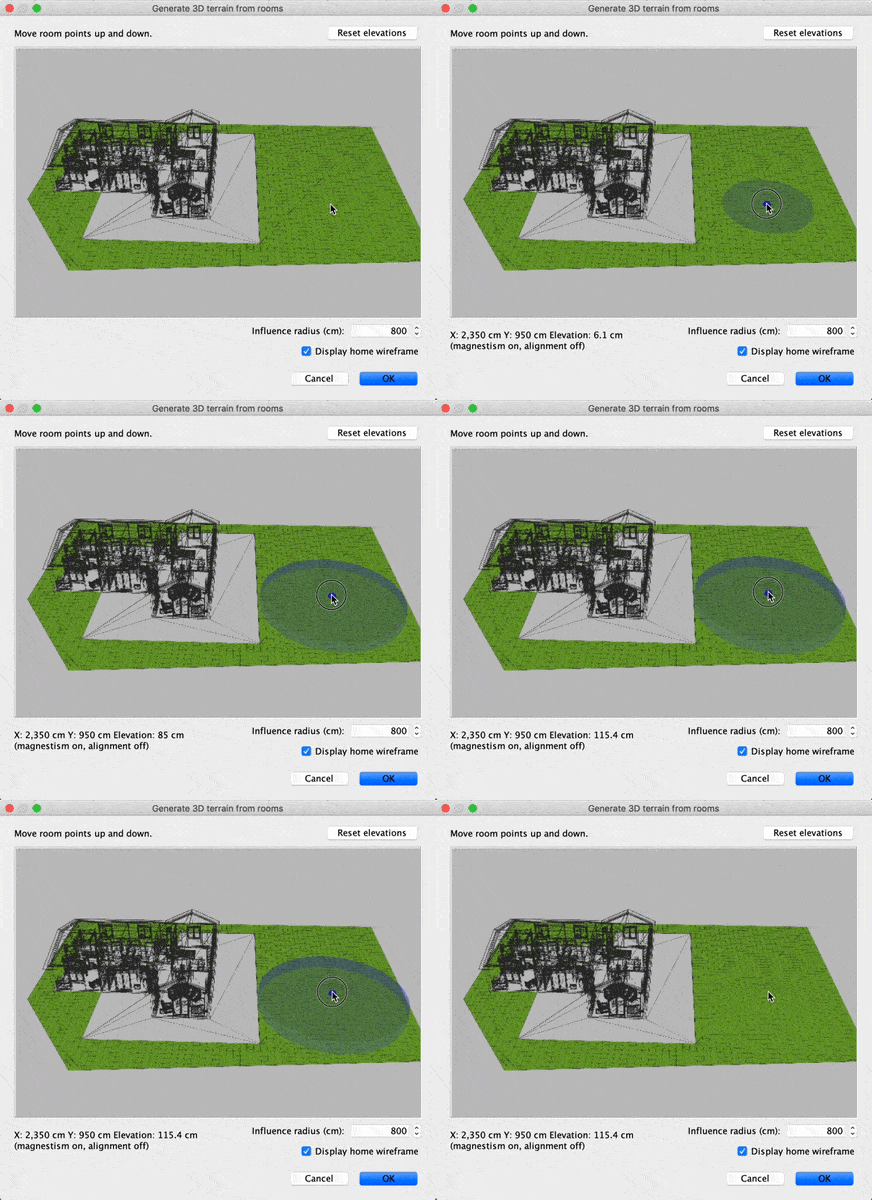
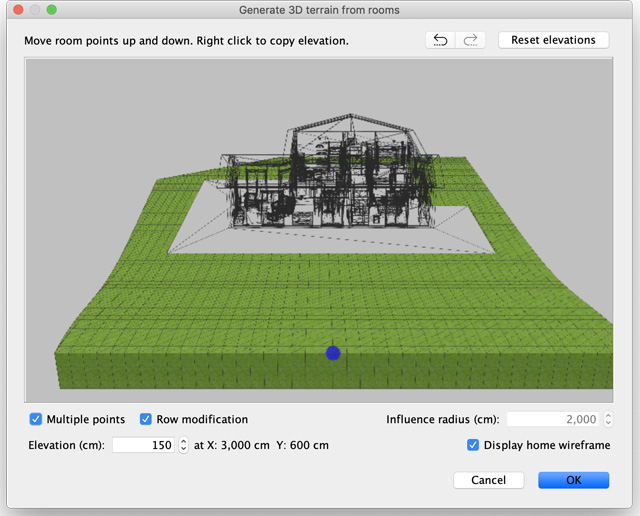
Re: Terrain Generator plug-in Here's the version 1.1 of the Terrain Generator plug-in which provides some small bug fixes and the following improvements: - A wireframe view of walls, rooms and furniture visible in the 3D view will now be displayed in the preview of the plug-in dialog box, unless you unselect the new Display home wireframe check box. This should be helpful when you need to adjust the elevation of some points according to the elevation of some windows or upper floors. - The new Influence radius field will let you enter the value of the maximum radius of the disk centered on the elevated point where other points will be elevated too, or when alignment is activated, the half value of the maximum width of the band around the elevated point. - Some feedback was added to show the elevated point and the influence disk or band where points will be elevated while dragging the mouse, as shown in the following videos. ![]() ![]() Hope you'll like these new features ![]() ---------------------------------------- Emmanuel Puybaret, Sweet Home 3D creator |
| Posted by hansmex at Apr 30, 2021, 10:13:52 AM |
|
Re: Terrain Generator plug-in Emmanuel, Thank you for this update. It's getting better, but not yet perfect. 1 - Once I draw a room and click OK, I cannot edit the room anymore. After some experimentation, I found that if I move the room (now terrain) to the side, the original room is still present underneath the terrain. When I select the original room, the terrain appears and I can edit it. 2 - The difference between Magnetism ON and OFF is that we get the old spikes, or the new more gradual elevations. 3 - It is not clear to me what Alignment does, or how to switch it on/off. 4 - I cannot reproduce the action in the second image, where it seems the whole width of the terrain is raised. 5 - Maybe it's a nice idea to generate the terrain in a new level at the same height. (Yes, I can make the terrain invisible, but then still need the original room underneath it if I want to edit the terrain. 6 - Maybe it's a nice idea to include switches for Magnetism and Alignment in the interface. (Yes, you can use ALT for Magnetism) Hans ---------------------------------------- Hans new website - under constuction hansdirkse.info |
| Posted by Puybaret at Apr 30, 2021, 11:31:11 AM |
|
Re: Terrain Generator plug-in Thanks for your feedback. I'm not sure this plug-in will be perfect one day 1 - Once I draw a room and click OK, I cannot edit the room anymore. After some experimentation, I found that if I move the room (now terrain) to the side, the original room is still present underneath the terrain. When I select the original room, the terrain appears and I can edit it. The idea is that if the terrain is incorrect, you wouldn't want to keep it and probably delete it. Therefore, the data about elevated points is stored in the room(s) which were used to generate the terrain and should be selected to generate a modified terrain.2 - The difference between Magnetism ON and OFF is that we get the old spikes, or the new more gradual elevations. When magnetism is off, only the elevation of the dragged point is changed. It's useful if you want to adjust the elevation of one point. With this idea in mind, I'm not sure to understand your issue with spikes, even if "magnetism" should be maybe renamed as "smooth".3 - It is not clear to me what Alignment does, or how to switch it on/off. Alignment is activated with the Shift key and makes the points around the dragged point more or less elevated along all the current horizontal axis.4 - I cannot reproduce the action in the second image, where it seems the whole width of the terrain is raised. 5 - Maybe it's a nice idea to generate the terrain in a new level at the same height. Create a level at same elevation first before using the plug-in. The terrain object will be added to the selected level.---------------------------------------- Emmanuel Puybaret, Sweet Home 3D creator |
| Posted by hansmex at Apr 30, 2021, 11:45:17 AM |
|
Re: Terrain Generator plug-in Emmanuel, Thanks for your reply. #2 Magnetism was mentioned only because I missed the explanation of its use. #4 Alignment using SHIFT is extremely useful. Thanks. The word "current" in your reply is important. Horizontal refers to the on-screen image you see. But, if you rotate the terrain, you also change the "horizontal" plane, allowing a far more flexible editing of the terrain. #5 I'm soooo lazy... :-) H ---------------------------------------- Hans new website - under constuction hansdirkse.info |
| Posted by jpcr at May 22, 2021, 1:30:37 PM |
|
Re: Terrain Generator plug-in hello, I have installed the plug-in but i dont see the same screen than the latest version. also , would you consider having negative elevation to make holes? I do not see the wireframe option, is it because i am using the French version? thank you for all your work!! JP |
| Posted by Puybaret at May 22, 2021, 5:07:55 PM |
|
Re: Terrain Generator plug-in I have installed the plug-in but i dont see the same screen than the latest version. Check what version is running in the Librairies in use dialog box shown when you click on the Libraries button in About dialog box. If it's not the good version, install the version 1.1 of the plug-in and don't forget to restart Sweet Home 3D.Would you consider having negative elevation to make holes? I don't think this will happen, but you can create a room at a lower level (including levels with a negative elevation), elevate all the points in the plug-in and finally dig a hole in this terrain.See this video for more details. I do not see the wireframe option, is it because i am using the French version? The wireframe option is available only from version 1.1 of the plug-in and when there are some walls, rooms and furniture to display.---------------------------------------- Emmanuel Puybaret, Sweet Home 3D creator |
| Posted by jpcr at May 23, 2021, 10:15:01 AM |
|
Re: Terrain Generator plug-in thank you Emmanuel ! the video helped a lot. JP |
| Posted by BLGPHIL at Sep 16, 2021, 10:00:57 AM |
|
Re: Terrain Generator plug-in Thank you for this great plugin which allowed me to create the altimetry of a very steep terrain to successfully lay out the house. A small improvement would be to offer a possibility to undo the last changes without having to reset all. Thank you again and well done for this plugin. |
| Posted by Leo_Santisteban at Apr 18, 2022, 5:54:04 AM |
|
Re: Terrain Generator plug-in Hi. I know the post is very old so I'm not sure if the plug-in still works, but when I go on "tools", the "Generate 3D terrain from rooms" option is gray, so it doesn't let me click it. I already tried using version 1.1 and 1.01, and none of them work. |
| Posted by Puybaret at Apr 18, 2022, 12:21:51 PM |
|
Re: Terrain Generator plug-in Did you select one or more rooms first? ---------------------------------------- Emmanuel Puybaret, Sweet Home 3D creator |
| Posted by Keet at May 2, 2022, 8:27:42 PM |
|
Re: Terrain Generator plug-in Emmanuel, a nice and very welcome addition to the Terrain Generator would be an option to start with an overall elevation at a set height. I'll explain why: Besides creating elevations like hills and mountains the Terrain Generator is also used to create depressions for ponds or lakes. This is of course done by elevating everything that is not a depression in the terrain. And that's a tedious and always inaccurate process. It also seems like working backward. If you can start with a clean elevated terrain at a set height it allows you to immediately start with lowering the places where you want depressions and still raise where you want hills. The result is that (placed at a level -<max height>) you still can have your mostly original flat surface except now with the depression for the pond or lake without having to go through the process of raising most of the surface. Such an option shouldn't be too difficult to implement because it's basically what you do with your mouse except now it's set with a predefined height for the full room instead of raising a point with magnetism. Of course once the filled height is set you can freely adjust up and down, it's just a much more convenient start position than everything at level 0. Any possibility this can be implemented? Keet ---------------------------------------- Dodecagon.nl 1300+ 3D models, manuals, and projects |
| Posted by Puybaret at May 2, 2022, 9:53:55 PM |
|
Re: Terrain Generator plug-in You should set a very large influence radius to elevate all the points at the same elevation as shown in this video. ---------------------------------------- Emmanuel Puybaret, Sweet Home 3D creator |
| Posted by Keet at May 2, 2022, 10:21:03 PM |
|
Re: Terrain Generator plug-in Thank you Emmanuel for the fast reply. I know and I have seen the video but that still doesn't set the elevation at a flat height and it's very difficult to get a specific height, for example a specific wall height. I tried it with a scale 100000 and in some spaces it still wasn't flat enough for a building. Terrains almost by definition are large (i.e. terrain size, not house size). That makes it very slow. Splitting in multiple rooms also makes no difference because you have to see them together. I currently have a terrain the size of 294mx194m and wanted to have a (partial) lake in a corner of the terrain. It's mostly flat (because of multiple buildings) but does have a few elevations scattered around. Trying to get what I explained proved to be virtually impossible to do. As usual I found ways around the problem. Not as nice as a full terrain would be but it is what it is.I still think it would be a useful and (I think) fairly easy addition to the Terrain Generator. Keet ---------------------------------------- Dodecagon.nl 1300+ 3D models, manuals, and projects |
| Posted by Puybaret at May 2, 2022, 11:28:36 PM |
|
Re: Terrain Generator plug-in You’ll see that I don’t like to add some fields everywhere. It’s not the problem of whether it’s simple to program or not. In your case, I prefer to increase the max value of influence radius if that’s enough. And about entering precise elevations, be patient, it should be available sooner that you think. But shh! I don’t like to announce coming features… ---------------------------------------- Emmanuel Puybaret, Sweet Home 3D creator |
| Posted by Keet at May 3, 2022, 3:02:45 PM |
|
Re: Terrain Generator plug-in Well, you can't say I'm not persistent, so I cheated. For those who want to start with an equal elevation like I explained: 1. Create the room. 2. Switch off ceiling. 3. Optionally set a color or texture. 4. Select the room and start the Terrain Generator. 5. Set the expansion scale to 100000. 6. With the Shift key raise everything to a level >0. 7. Generate the terrain (OK button). 8. Save your Plan. So far just like creating a normal terrain. Now the 'cheating': 1. Unzip the SH3D file (you might need to add a zip extension first). 2. Make a copy of the Home.xml file in the unzipped directory to a working directory. 3. Open the the copied file and replace the value part on every line with "terrainElevationAt" with a value "250.000". 250 is the height, set it to the height you want. Since this can be a lot of lines (300000+ for me) I wrote a little Python routine to do this. 4. Save the file and copy it to the previously unzipped directory (overwriting the original file). 5. Zip all the files in your unzipped directory and remove the .zip extension from the resulting zip file. This should leave you with the original .sh3d file but with the changed Home.xml file. 6. Open the updated .sh3d file with SH3D and remove the terrain object (NOT the room!). 7. Select the room and start the Terrain Generator again. 8. You now have a terrain set at the height 250 and you can depress or raise parts to create a new terrain. 9. Save the terrain with OK button and you get a new terrain object. Keet ---------------------------------------- Dodecagon.nl 1300+ 3D models, manuals, and projects |
| Posted by Keet at May 7, 2022, 5:08:17 PM |
|
Re: Terrain Generator plug-in Emmanuel, when you get to adding features to the Terrain Generator please consider these: 1. A highlighted point where the mouse is on the terrain. Currently it's a huge guess where elevation will occur on large terrains. Sometimes far from where you thought you clicked. 2. At least a single level of undo (if that doesn't cause memory problems) 3. Pan left/right and up/down This makes it easier to zoom into where you want, especially with larger terrains. 4. Keyboard keys to rotate/tilt and pan. If you zoom in to far you can no longer place the mouse at the side to do that. I would suggest the arrow keys for rotate/tilt and ctrl+arrow keys for panning. 5. Elevation accuracy: if you can't zoom in far enough you have very little control over how much elevation a mouse movement will trigger. 6. Set a max height: this so you can limit elevation to, for example, a wall height from where it slopes down. Without reasonable accuracy this is currently very difficult. This would also solve 'starting with a set elevation': set the max and lift everything to that height. I'm looking forward to see any or all in a next version! Keet ---------------------------------------- Dodecagon.nl 1300+ 3D models, manuals, and projects |
| Posted by Puybaret at May 23, 2022, 4:25:53 PM |
|
Re: Terrain Generator plug-in Here's the version 1.2 of the Terrain Generator plug-in which provides the following improvements: - Magnetism was renamed as Multiple points and Alignment as Row modification - Multiple points and Row modification states can also be toggled with check boxes (keyboard shortcuts still available) - Undo / Redo buttons lets you undo / redo local changes (with 100 possible undo operations) - The elevated grid point remains selected at screen after mouse button is released - Elevation is editable to fine tune values - It's possible to copy the current elevation on other points with a right click (or ctrl + click under macOS) - When you draw a closed space with the right mouse button pressed (finishing on the point where you started), a dialog box is displayed to confirm whether all points within this space should be elevated (see demo video – 5 MB) - Performances while elevating points were greatly improved - The rotation around the vertical axis is done at the closest degree - The length unit used in Influence radius spinner was fixed. ![]() Hope this will satisfy most requests ![]() ---------------------------------------- Emmanuel Puybaret, Sweet Home 3D creator |
| Posted by Keet at May 23, 2022, 4:42:46 PM |
|
Re: Terrain Generator plug-in Thank you! I'll be experimenting with this quite a lot the coming days. ---------------------------------------- Dodecagon.nl 1300+ 3D models, manuals, and projects |
| Posted by Daniels118 at May 24, 2022, 11:03:25 AM |
|
Re: Terrain Generator plug-in Hi Emmanuel, thank you for this new version! I have added it to the Plugin manager too. A small bug (at least on Windows): when using the Alt and Shift keys to toggle the options, the checkbox is toggled on musedown, but it is toggled again on mouseup. Holding the key does not work (the checkbox blinks crazly). Few suggestion for future improvements:
|
| Posted by Keet at May 24, 2022, 2:52:57 PM |
|
Re: Terrain Generator plug-in (It should be allowed to set negative values too to dig the terrain). Negative values are impossible since the terrain is generated from a room which is by default at elevation 0 on a level. Just like walls can't have a negative elevation. That's why I requested the option to first raise the whole room to a single height after which you can lower parts. Just create a level below your ground floor, lets say -250 and with a height of 250. Create the room and start the Terrain Generator. With a large scale and row modification lift everything above a 250 height. While you still see the blue point change the elevation value to 250 and you have a terrain evenly raised at 250 and level with your original ground level. Now you can both lower and raise the parts you want. One 'bug' I noticed: After creating the terrain, walls that should show above the terrain (i.e. are higher than the terrain elevation) don't show in the 2D view but do in the 3D view. Not showing in the 2D view forces you to make the Terrain object invisible before you can do anything else simply because everything is otherwise hidden below the terrain. In my example with a 250 high terrain I had walls of 350 high for testing purposes that should have broken through the surface of the terrain and be visible but they don't. I understand that is the way with all objects, maybe something like a 'Move to back' like in other programs that have overlapping objects is possible. I'm thinking about when you group objects: put a vase on a table and sometimes the vase doesn't show in the 2D view. Cut the vase and paste again and after regrouping it does show. So it depends on the order in which the objects are 'stacked'. Something should be possible with that knowledge but the same 'trick' doesn't work with the walls. ---------------------------------------- Dodecagon.nl 1300+ 3D models, manuals, and projects |
| Posted by Puybaret at May 25, 2022, 9:25:08 PM |
|
Re: Terrain Generator plug-in Thanks for your feedback Smoothing afterwards might be quite complicated to program to get nice results. Maybe one day… And reordering the way things are drawn in the plan is a big development, and I’m not sure I want to change the current simple logic. You can also draw a room for your terrain which doesn’t include the walls or the house of the walls. ---------------------------------------- Emmanuel Puybaret, Sweet Home 3D creator |
| Posted by Keet at May 26, 2022, 1:04:33 AM |
|
Re: Terrain Generator plug-in First of all: the new Terrain Generator is a huge improvement, great work! And reordering the way things are drawn in the plan is a big development, and I’m not sure I want to change the current simple logic. You can also draw a room for your terrain which doesn’t include the walls or the house of the walls. I have a path through my terrain that swings all around so I use walls to create those. Manually drawing them would be a nightmare. That a room can exist without walls is a good thing for terrain building: after creating the paths with 0.1 thick walls and creating the rooms (including the 'path room') I remove the walls and create the terrain using all rooms. The result is that I have a path with a different texture that nicely follows the terrain elevation up and down, looks great! If walls were a requirement for a room to exist that would not be possible.A test showed that a 350cm high wall hides under a 90cm high table I never realized it worked that way but it does explain why walls don't show through the terrain. It's based on elevation but doesn't take the height of the object into account for display in 2D. As a workaround I'm thinking about a way to create a top view image of the terrain and set that as the texture of the room after hiding the terrain object. It ruins the 3D view but it is a way to see the terrain contours in the 2D view while designing without hiding the walls. Or maybe an extra level 1cm higher while designing and when finished lower it to the same level. I'll have to experiment with that. ---------------------------------------- Dodecagon.nl 1300+ 3D models, manuals, and projects |
| Posted by Daniels118 at May 26, 2022, 10:35:32 AM |
|
Re: Terrain Generator plug-in @keet Negative values are impossible since the terrain is generated from a room which is by default at elevation 0 on a level. Just like walls can't have a negative elevation. Just for clarity: I didn't mean negative elevation, but negative increment (i.e. decrement) when using such new feature "incremental mode". This would be intended to lower down points which already have a positive elevation; they would never go below zero anyway. |
| Posted by ankostis at May 31, 2022, 2:25:00 PM |
|
Re: Terrain Generator plug-in Hello, thank you for your efforts. Should i report here issues? I'm receiving a NPE error when clicking the "Generate 3D teraain from rooms..." (i launched SH3D from console to see them): Exception in thread "AWT-EventQueue-0" java.lang.NullPointerException
|
| Posted by ivan.daudt at Jun 3, 2022, 10:44:17 PM |
|
Re: Terrain Generator plug-in Same thing here. OS: Linux, Elementary OS 6.1 on ubuntu 20,04 SH3D: 6.6a Java: openjdk version "11.0.15" 2022-04-19 Java 3D: v1.5.2 - NATIVE OGL |
| Posted by ivan.daudt at Jun 3, 2022, 11:05:02 PM |
|
Re: Terrain Generator plug-in In reply to my own post: downgraded to version 1.1 of the plugin and its working just fine. The error happens only on ver 1.2 |
| Posted by captaincook at Jun 8, 2022, 6:37:54 PM |
|
Re: Terrain Generator plug-in Merci beaucoup Puybaret pour cette nouvelle version du générateur de terrain. Il apporte pas mal de nouvelles fonctions avec notamment la possibilité de faire des retours arrières sans revenir à 0. Et celle de créer des points multiples. Néanmoins, je pense qu'il faut beaucoup le pratiquer avant de bien le maitriser. Je sens que je vais y passer du temps. Bonne journée à vous. |
| Posted by Puybaret at Jun 10, 2022, 10:09:02 PM |
|
Re: Terrain Generator plug-in Thanks Kostis and Ivan for your feedback, the bug you reported is fixed in version 1.2.1. And good luck Alain alias captaincook! ---------------------------------------- Emmanuel Puybaret, Sweet Home 3D creator |
| Posted by Weevoir at Oct 15, 2022, 6:32:28 PM |
|
Re: Terrain Generator plug-in Thanks Kostis and Ivan for your feedback, the bug you reported is fixed in version 1.2.1. And good luck Alain alias captaincook! I am unable to enable the terraine generator - it is greyed out in my installation (11.0.10) I have rebooted my PC |
| Posted by Keet at Oct 15, 2022, 9:01:15 PM |
|
Re: Terrain Generator plug-in Just must have a room selected to enable the Terrain Generator. Read the information in this thread: https://sweethome3d.com/support/forum/viewthread_thread,10995 to help you on your way. Basically, a generated terrain is on object created using a room. The terrain elevations are stored with the room data. As long as you don't delete that room you can go back to that room, select it, start the terrain generator, and make further changes to the terrain. If you want to keep the room with the terrain elevations safe but not visible use a separate level for the room which you can make invisible. Once the terrain is generated you can move the generated terrain to a different level using cut-and-paste. You can set a texture using the rooms floor or set a texture after the object is generated. Experimenting will show which gives you the best results. A handy trick is to use multiple adjacent rooms with different textures. Select multiple rooms before starting the terrain generator and all will be included for elevating. You can use very thin walls to create a room with curves so you are not stuck with square rooms. Try this trick to create a path that slopes with the rest of the terrain: Use thin walls to craw the path. Give the rooms on both sides a grass texture and the path itself a pavement. Now select both the grass and the pavement rooms and start the terrain generator. Where you lift the terrain touching the path it will elevate along with the grass slopes on the sides. ---------------------------------------- Dodecagon.nl 1300+ 3D models, manuals, and projects |
| Posted by [email protected] at Feb 18, 2023, 6:31:54 AM |
|
Re: Terrain Generator plug-in Hello, Trying to run the Terrain Generator under windows 11 and it keeps crashing. The scenario is that I have a large block of land and I've created a room to represent the block of land. when I try to run the plug-in, The pop-up window appears for a short period and then crashes the whole program Tried version 1.2.1, 1.2, 1.1 and same issue. Any suggestions? Thanks |
| Posted by Keet at Feb 18, 2023, 1:34:16 PM |
|
Re: Terrain Generator plug-in Hello, How large is 'large'? The maximum size I managed to reasonably generate is approximately 300mx300m. Anything bigger and it either takes many hours to just start or it just stops, i.e. it crashes back to the plan. Too big also has the disadvantage that any movement takes again a very long time to complete, making it virtually unworkable.Trying to run the Terrain Generator under windows 11 and it keeps crashing. The scenario is that I have a large block of land and I've created a room to represent the block of land. when I try to run the plug-in, The pop-up window appears for a short period and then crashes the whole program Tried version 1.2.1, 1.2, 1.1 and same issue. Any suggestions? Thanks Try dividing your large block into a grid of smaller rooms and generate just a few parts leaving the borders untouched. Select the next set of rooms overlapping the previous set of blocks to generate the next part. I tried it with sets of 3x3 rooms of 100mx100, resulting in a 300x300 square. Very slow but it worked. You will need a LOT of patience. A very fast computer might stretch your options to a slightly bigger size. Also make sure to give SH3D/Java more memory if you haven't done that yet: https://www.sweethome3d.com/support/forum/vie...BBBA35690A13356E54D7#5802 ---------------------------------------- Dodecagon.nl 1300+ 3D models, manuals, and projects |
| Posted by Keet at Feb 18, 2023, 1:38:58 PM |
|
Re: Terrain Generator plug-in To add to my previous post: After you have generated a set of rooms just delete the generated terrain object. The data itself is stored in the room so it's not lost. After you have completed elevating all grid blocks you can generate each single grid block or sets of consecutive 3x3 blocks to regenerate terrain objects that fill you total terrain. ---------------------------------------- Dodecagon.nl 1300+ 3D models, manuals, and projects |
| Posted by cactuskid02 at Aug 24, 2023, 2:44:37 PM |
|
Re: Terrain Generator plug-in Has anybody tried creating a function to read a topology map and generate terrain from that, inputting the gradient scale and direction of slope? |
| Posted by Keet at Aug 24, 2023, 3:30:00 PM |
|
Re: Terrain Generator plug-in It's outside of the capabilities of Sweet Home 3D and I'm investigating the possibilities too. Mainly because the size of the terrain I want to create is many times bigger than the Terrain Editor can handle. Here are some links to start your research: https://gamedevelopment.tutsplus.com/creating...es-with-webgl--cms-24539t https://polycount.com/discussion/88933/how-to-make-terrains-for-games https://touchterrain.geol.iastate.edu/ To create a height map: https://tangrams.github.io/heightmapper/ The biggest problem is not creating the terrain but to create a good looking texture. The easiest way is to heightmap an existing terrain and start with a screenshot for editing in GIMP. Warning: it's a LOT of work. ---------------------------------------- Dodecagon.nl 1300+ 3D models, manuals, and projects |
| Posted by hansmex at Aug 24, 2023, 4:04:11 PM |
|
Re: Terrain Generator plug-in You may want to read this thread... H ---------------------------------------- Hans new website - under constuction hansdirkse.info |
| Posted by Daniels118 at Aug 24, 2023, 4:13:15 PM |
|
Re: Terrain Generator plug-in This could be of some interest: https://www.youtube.com/watch?v=5EV1elNFNSM Once you have done, just export it in OBJ format and import it in SweetHome3D. There is this too: https://touchterrain.geol.iastate.edu/ It allows to export to OBJ format, but SH3D fails to open it, maybe it's just matter of adjusting some lines in the file (missing material?). |
| Posted by Keet at Aug 24, 2023, 4:27:07 PM |
|
Re: Terrain Generator plug-in It allows to export to OBJ format, but SH3D fails to open it, maybe it's just matter of adjusting some lines in the file (missing material?). No, you have to fix the number format but there seems to something else wrong too. I haven't figured it out yet.Edit: Correction, just remove all comma's and you can import it in Sweet Home 3D. I don't remember where I encountered the wrong number format. ---------------------------------------- Dodecagon.nl 1300+ 3D models, manuals, and projects |
| Posted by Keet at Aug 24, 2023, 5:30:15 PM |
|
Re: Terrain Generator plug-in Concerning a terrain created with touchterrain: Sweet Home 3D doesn't allow a size beyond 100000cm (1km). For a sizable terrain that is of course insufficient but there is a trick to circumvent this: After import save and close the project. Now edit the Home.xml file where you can increase the size. I managed to get a terrain of 100kmx100km by increasing every size of the terrain object. > The 3Dview might have a few problems (black background when you zoom out). > Export and import from Sweet Home 3D will reduce the obj file size significantly without loosing the increased size. > Strangely, that same export/import increases the reported model size in Sweet Home 3D > The 2Dview becomes a little useless because you can't zoom out far enough to see the whole terrain after you increased the size. > Resizing will make parts a little blocky so first import the model in blender to smooth it. > If you need a terrain just a little over the 1km limit this method is very useful. Maybe up to 5kmx5km. I abandoned this type of terrain because I don't necessarily need the terrain in Sweet Home 3D itself. I'm investigating html terrains as used in web-games and will try to add multiple Sweet Home 3D projects to that terrain. ---------------------------------------- Dodecagon.nl 1300+ 3D models, manuals, and projects |
| Posted by cactuskid02 at Aug 24, 2023, 5:47:28 PM |
|
Re: Terrain Generator plug-in I am trying to replicate my home property to plan out my home modifications. Honestly, this idea worked great. Replicated the slope and direction perfect. My land drops 16' over 200' (front to back). I look down on the top of my RV from the road, it is that drastic. Doing this any other way was a pain in the backside. |
| Posted by JayOH at Feb 27, 2024, 7:23:47 PM |
|
Re:
Terrain Generator plug-in A slope angle would be very useful. Or have I missed it? |
| Posted by Keet at Feb 27, 2024, 8:39:31 PM |
|
Re: Terrain Generator plug-in You can't enter a slope angle but you can combine the 'Row modification' with the 'Influence radius' to get different angles. For those searching for a terrain generator that also creates a texture and is usable for large terrains: https://prof-yaffle.itch.io/terrain-generator. The obj/mtl export imports perfectly in Sweet Home 3D although it's very small when imported. Just increase its size a thousand times for a great terrain. It also has options for water and sky. And most amazingly it includes a good manual! Available for Linux, Windows, OSX. (And C#/Unity source code is also available.) ---------------------------------------- Dodecagon.nl 1300+ 3D models, manuals, and projects |
| Posted by c0d3z3r0 at Dec 18, 2024, 6:42:28 PM |
|
Re: Terrain Generator plug-in Hi, thanks for this great plugin! Is there anyone else having problems with levels below 0, where the terrain will be shown higher than it should be? I tried to fix this in the code but miserably failed :D To me it looks like negative elevation is being ignored / set to 0. |
| Posted by c0d3z3r0 at Dec 30, 2024, 4:39:21 PM |
|
Re: Terrain Generator plug-in Hi, thanks for this great plugin! Is there anyone else having problems with levels below 0, where the terrain will be shown higher than it should be? I tried to fix this in the code but miserably failed :D To me it looks like negative elevation is being ignored / set to 0. Oops, the problem is also present in higher levels and the reason is that the plugin always uses 0 as base instead of the current level's elevation. |
| Posted by Keet at Dec 30, 2024, 5:12:39 PM |
|
Re: Terrain Generator plug-in where the terrain will be shown higher than it should be I bet the difference is the thickness of the floor.Read the manual "Levels explained" which you can find on the manuals section on dodecagon.nl. This will explain the relation between level height and floor thickness. Understand that a generated terrain is an object, the same as any other piece of furniture. Which also means you can not 'elevate' it downwards (negative elevation). You can place it on a lower level and elevate it to the elevation you need. This (very old) tip&trick explains creating a pool but it also reveals how to work on a lower level without a floor above it. ---------------------------------------- Dodecagon.nl 1300+ 3D models, manuals, and projects |
| Posted by c0d3z3r0 at Dec 30, 2024, 8:04:54 PM |
|
Re: Terrain Generator plug-in I never said I want to elevate downwards :-) Try this: 1) Create a new SH3D file, add another level 2) Add a room at both levels 3) Create a Terrain on the upper room You'll see that the plugin creates the terrain on the lower level. When pressing OK, it still gets put to the upper level (which is correct). |
| Posted by Keet at Dec 30, 2024, 9:54:48 PM |
|
Re: Terrain Generator plug-in You'll see that the plugin creates the terrain on the lower level. When pressing OK, it still gets put to the upper level (which is correct). Ah, you mean while in the generator dialog. I never noticed that before but you are right. I'm not sure if that could be considered a bug, terrain usually resides at the 0 level and the plugin is probably designed with that in mind. What do you do with a terrain floating on a higher level? I also tried it with a level below ground. While in the generator dialog the display is still from the 0 level. Then I elevated all three levels 100cm, resulting in none of the levels having a 0 elevation. The generator still displays at elevation 0. So that is consistent: it always displays at elevation 0. The only downside I can see is that the outline of the walls in the generator dialog is from the 0 level and not the level where you selected the room to create the terrain from. I do see the outlines of the other levels too (in the generator dialog). Considering that, the walls shown should have been those from the selected room level. If you know this you can work around it by copying your room and walls in a new file and use that to generate the terrain, then copy the generated object back to your original file. Some extra knowledge: The information for the terrain is stored in the room section in the Home.xml file in your .sh3d file. You can delete the generated terrain object, select the room you used and start the generator again. It will read from the room the elevations and create a new object with OK. Nice if you want to make little changes without starting all over again. After you generated the terrain you can move the room to a separate level and make that level invisible. Or even better, move it to a separate file. That way you keep a backup of the terrain data without the room itself showing in your project. Keep in mind that a large terrain with a fine grid will make your .sh3d file grow considerably: each point in the grid is a line in the Home.xml file. A large terrain easily spans hundreds of lines. That's why moving the room object to a separate file is a good idea. Your original project will only have the generated terrain object and not all the room overhead that is used to create the object. ---------------------------------------- Dodecagon.nl 1300+ 3D models, manuals, and projects |
| Posted by c0d3z3r0 at Dec 31, 2024, 2:16:05 PM |
|
Re: Terrain Generator plug-in > So that is consistent: it always displays at elevation 0. Exactly, I hadn't realized that before as well. > terrain usually resides at the 0 level and the plugin is probably designed with that in mind. What do you do with a terrain floating on a higher level? Usually yes, but there are exceptions as always, e.g. when you want to model the terrain based on an architect's plan where zero is the top of your base plate, without having to do a lot of calculations. It *shouln't* be a huge code change and in the mean time at least I managed to get the grid at the right elevation, but didn't get the rest working. At least I tried... I'm confident it'd be an easy task for @Puybaret |
| Posted by c0d3z3r0 at Dec 31, 2024, 2:18:19 PM |
|
Re: Terrain Generator plug-in Clarification on my example above: the idea is to model the terrain on a lower level in this case |
| Posted by MuskatNuss at Jan 16, 2025, 3:04:08 PM |
|
Re: Terrain Generator plug-in I have created a building with several foor my 0 is along with the main entrance. but I also created a celar. It difficult to create a terrain that goes down because the editor shows it one floor above. Is it somehow possible to edit a created Terrain? At moment I have to remove it and re create it if I play around with the terrain. |
| Posted by BitterHouse at Jan 31, 2025, 7:38:40 PM |
Re: Terrain Generator plug-injava.lang.RuntimeException: Waited 5000ms for: <196b916f, 7592cc78>[count 1, qsz 0, owner <J3D-Renderer-2>] - <J3D-Renderer-1>Crashes on Linux (fedora 40) after I create the terrain and click OK to apply. |
| Posted by goldenjet50 at Mar 6, 2025, 4:46:55 PM |
|
Re: Terrain Generator plug-in First of all a caveat or admission: I am very much a novice in SH3D and more especially with the Terrain Generator, nor do I have Java programming experience so please forgive me if I ask dumb or otherwise impossible questions. (I'm also pretty verbose so I apologize in advance.) I am finding the lack of manipulation controls within the terrain generator quite frustrating but am as least somewhat willing to admit that some of that may come from lack of understanding. Now that the caveats are out of the way ..... (and btw, thanks for the tip I read about the terrain being stored with the room parameters, and as long as the room isn't deleted, the last iteration of the terrain will remain in tact ... that saved me from a potential 'oh sh@t' moment) The lack of ability for directional control when setting elevation/de-elevation points makes the generator very time-consuming to use. Would it be possible to control the direction of the influence radius? e.g. After you have elevated a series of points you want to do it again (or de-elevate) some of those points but ONLY in one direction. i.e. you do NOT want to change everything within the new influence radius, just in say one direction from the centre point. I wonder if it would be possible to set X0, X1 and Y0, Y1 values so that the changes apply only within that trapezium (trapezoid)? In fact, if you used those parameters, could you have the ability to disable the influence radius entirely but rather the area of influence is every point within the trapezium? Is it possible to have Column modification in addition to row modification (either/or or both active at a time)? Another option is to have the influence radius set the same elevation for ALL points within the radius instead of it increasing or decreasing every point radiating out from the centre point. I was becoming so frustrated when trying to create and manipulate the terrain within SH3D that I looked at other software. I found that Cedreo worked better with terrain, BUT it has other severe limitations that made that a non-starter. Such as: you can't 'move' some objects once they have been created (a sidewalk for example) which made alignment a very big issue. I even tried importing a SH3D image but that would have required much too much work to re-draw the plan and then probably still have the limitations. (It's also not terribly mouse friendly and I don't know how their magnetism is supposed to work, but it doesn't seem to ... at least not like SH3D). (Cedreo uses elevation points where you can set an elevation for each point but the points do not have to be at every grid point nor do they even have to be on a grid point ... just on an intersection line. They also use elevation lines that you free-hand draw which all have the same elevation value. It makes it easier to "draw" a contour line like a bank with an irregular wall. But, as I said ..... ) How could you accomplish "stair steps" on an terrain such as a sidewalk with steps. I can make a stair-step like feature, but not an actual step with a vertical riser. I know I could ACTUALLY use a stairs object from the furniture library, but since the terrain hides anything in the 2D room for which you are creating the terrain, it makes it very difficult .... and that coupled with the fact that you cannot edit the elevation points in the terrain once it is generated (short of deleting and recreating). There is a issue that once the terrain is generated, in the 2D view, it overlays parts of other adjacent rooms that were not part of the room used to generate the terrain. (I would have included two screen shots but I'm not smart enough ☺) That is: it is not displayed as constrained within the area of just that one room. The work around is to create the terrain at a different level and then make that level unviewable (or rather toggle between viewable and unviewable depending if you are working within the 2D or 3D view.) Instead of my next set of questions about making the terrain easier to manipulate, I will just ask: I presume that having the ability to have the base of floors and walls slope would require significant reprograming of SH3D? If that were possible then all of the controls that are available for walls and floors could potentially be available when designing the terrain. I must conclude with a huge THANK YOU for SH3D in the first place. I tried other software but it was either: not robust enough; too time consuming; had a huge learning curve, and/or was too expensive for a DIY design project. I have used SH3D for our new home for pre-architect drawings and for what-ifs furnishings placements etc. The place is now built and occupied and now we are tackling the landscaping. |
| Posted by jeromehej at May 3, 2025, 7:16:24 PM |
|
Re: Terrain Generator plug-in Bonjour, Peut-être n'ais je pas l'option mais si elle n'existe pas, je pense qu'il serait utile de pouvoir définir la hauteur de deux points et que le terrain fasse la pente entre des deux points. En effet, l'option "Modification linéaire" ne le permet pas apparemment. En tout cas, braco pour ce plugin ! |
| Posted by Grouigroui at May 11, 2025, 10:30:02 PM |
|
Re: Terrain Generator plug-in Je découvre justement ce magnifique plugin. Au besoin, voici comment je m'y suis pris pour créer une pente qui passe par deux points précis : Pour matérialiser les deux points sur mon plan, j'ai placé temporairement deux objets avec une hauteur un poil inférieure à celle que je cherchais atteindre sur ces emplacements particuliers. Ces deux points auraient pu tout aussi bien être remplacés par un mur incliné. L'idée est ensuite d'activer le magnétisme, puis, à partir d'un point plus ou moins éloigné, de jouer avec le périmètre d'influence, afin de recouvrir les deux points d'un coup. Ainsi, tu obtiens facilement la pente désirée. |
| Posted by T_R at Sep 28, 2025, 10:28:11 PM |
|
Re: Terrain Generator plug-in someone has a video about the how to do? ---------------------------------------- Laptop :ThinkPad 490, WIN11Pro, 64Bit, 8GBRam, 6T Harddrive Never give Up! |
| Posted by Keet at Sep 28, 2025, 11:04:56 PM |
|
Re: Terrain Generator plug-in https://www.sweethome3d.com/support/forum/vie...ead,10995_offset,10#51605 http://www.sweethome3d.com/images/forum/DigingInGround.mp4 http://www.sweethome3d.com/images/forum/TerrainWithLevelLines.mp4 ---------------------------------------- Dodecagon.nl 1300+ 3D models, manuals, and projects |
| Posted by T_R at Sep 29, 2025, 7:24:38 PM |
|
Re: Terrain Generator plug-in wow Keet! You are the best. just the Video explains all. Many thanks! ---------------------------------------- Laptop :ThinkPad 490, WIN11Pro, 64Bit, 8GBRam, 6T Harddrive Never give Up! |
| Posted by Keet at Sep 29, 2025, 8:24:51 PM |
|
Re: Terrain Generator plug-in wow Keet! You are the best. just the Video explains all. Many thanks! You should read this thread from the beginning. All these videos are listed in posts in this thread ![]() ---------------------------------------- Dodecagon.nl 1300+ 3D models, manuals, and projects |
| Posted by dinbtechit at Oct 7, 2025, 4:07:27 PM |
|
Re: Terrain Generator plug-in Is there any way I can super impose a background image for a terrain? I would like to design based on an image. Please advice. |
| Posted by Keet at Oct 8, 2025, 6:19:20 PM |
|
Re: Terrain Generator plug-in Is there any way I can super impose a background image for a terrain? I would like to design based on an image. Please advice. Not a background image but you can set your image as the floor texture for the room you are using for the Terrain Generator. Set the texture on the room, then adjust the scale and position of the image so it nicely fits the room. Then start The Terrain Generator and it will show the room with the texture. ---------------------------------------- Dodecagon.nl 1300+ 3D models, manuals, and projects |
| Posted by Swelst at Nov 1, 2025, 6:11:44 PM |
|
Re: Terrain Generator plug-in I don't know if this behavior is intentional, or what sense it makes, but... When I create a level with a space for terrain around my house, e.g., with a depth of -200, and then activate the generator, the generator's preview window always shows the terrain mesh to be edited only at level 0, without the actual room depth. As a result, the ratio of terrain to house doesn't match, and terraforming can only be done by feel and in "blind flight." Only after completing the generator does the terrain appear at the correct level. This makes it practically impossible to orient the terrain to the house. Am I doing something wrong? |
| Posted by Keet at Nov 1, 2025, 6:47:46 PM |
|
Re: Terrain Generator plug-in I don't know if this behavior is intentional, or what sense it makes, but... That is the default (and fixed) behavior. The floor thickness is not a data point for the generator, only the room circumference. The generator creates 'depth', i.e. raises selected points of the terrain grid. At the bottom right you can select to display a wire frame of the house.When I create a level with a space for terrain around my house, e.g., with a depth of -200, and then activate the generator, the generator's preview window always shows the terrain mesh to be edited only at level 0, without the actual room depth. As a result, the ratio of terrain to house doesn't match, and terraforming can only be done by feel and in "blind flight." Only after completing the generator does the terrain appear at the correct level. This makes it practically impossible to orient the terrain to the house. Am I doing something wrong? The fact that the generator always uses level 0 was discussed some time ago, until then I didn't even realize that was the default behavior and I experimented a lot! You state that the ratio of terrain to house doesn't match but I assume you mean the (start-)height of the terrain that you want at a level with elevation -200. I depends on what you want to achieve but since you want the terrain object at a level -200 I assume you want parts of the terrain below the 0 elevation. There are tricks but it depends on what what result you want. Explain it a little more and I can give better advise. ---------------------------------------- Dodecagon.nl 1300+ 3D models, manuals, and projects |
| Posted by Swelst at Nov 1, 2025, 11:18:54 PM |
|
Re: Terrain Generator plug-in I'll try to explain this and hope it comes across reasonably clearly: I have a house that's built on a slope (Level 0). The house has a platform in the rear (north) section that's used as a parking area and also serves as the flat roof for the back part of the house (one level above... about 2.8 m). From there, an outdoor staircase leads to the entrance area (Level 0). In front of the house, there's a terrace spanning the entire west-east length (Level 0); this flows into a lower terrace via a staircase (Level -1, about 1.5 m lower). This lower terrace is bordered by a stone wall that stabilizes the rest of the slope, since the ground level drops about 6 m afterward.That means the terrain ranges from about -700 cm to about +280 cm.I'd now like to model the surrounding slope terrainâfrom the -700 up to the first terrace at -150, to the house level, the upper terrace at Level 0, the parking platform at +280, and beyond that (the mountainside)âas well as the surrounding slope structures. To do that, I'd need to build the terrain from the bottom up, and in the preview window, I'd have to be able to see the existing house/terrace construction so I can properly "mold" the terrain to fit against the structures. If I can't see the terrain I'm building in relation to the house while I'm doing it, it just won't work.If the terrain always starts at Level 0, I'd have to begin with the deepest point as Level 0, which would be a massive undertaking given the already constructed house and its internal levels. So, I hope that's somehow understandable... |
| Posted by Keet at Nov 2, 2025, 8:18:43 AM |
|
Re: Terrain Generator plug-in That's quite a complex set of elevations to manage. First a little lesson on how terrains are stored. Terrain elevations are stored in the Home.xml file in your .sh3d project file (The .sh3d file is a zip file). The generator adds a line for each point of the terrain grid in the section for the room it belongs to. It looks something like this: <room id='room-685d80aa-8e39-45e6-a27b-9c45518c6380' level='level-ad73e953-a01a-4048-9863-2966fdbd9e8e' areaVisible='true' ceilingVisible='false' ceilingFlat='true'>It is not uncommon that the number of lines for a terrain grows to tens of thousands of lines which makes the file size of your project a lot bigger, really a lot bigger. Since you only need the room object(s) to generate the terrain object(s) it is common sense to use a copy of your project just for generating the terrain objects. You can then copy the generated terrain object to your original project without having the burden of the huge room object stored in the project file. You can always use the copied project if you want to change the terrain. When you select a room that already has terrain points the generator will read them and display the terrain. This makes is easy to edit an existing terrain. It's just that those thousands of lines are never used again, only by the terrain generator. The copy project also allows you to use additional objects for reference as you will see next. The real problem is that the terrain generator shows both the room and the house on the same level. (Discussed before here .)As you found out that makes it difficult to relate the terrain elevations to the elevation of the house. What I do in such cases is to copy only the outside walls of the house to the copy 'terrain project'. Assume the shown terrain in the generator to start at the bottom, no matter what elevation that is. Calculate the height from the bottom of the lowest level to the bottom of your house level, in your case 700 if I read it correct. Set the height of the walls to that number. Select the walls and export them to 'walls.obj'. Import the walls.obj and set its height to the original height of your house walls and elevate it to the top of the existing walls (place it on top of those walls). This construction will show the house outline in the terrain generator by displaying the walls to the bottom of the house and the "house" itself as the walls.obj model on top of it. Of course you can only use the elevated model but the walls give you an extra reference. Since you now have a reference to the elevation and outline of your house it's much easier to create the terrain. And of course you can use multiple object for reference. Just elevate them to the correct position in relation to the room. You can use multiple rooms for your terrain and of course they will all show on the same level. When you select multiple rooms and start the Terrain Generator it will show all selected rooms and you can edit them at the same time. This is useful for several reasons: smaller rooms are faster to handle in the generator and you can have separate textures for the terrain parts. The connecting rooms will elevate at the same time to ensure a prefect flow from one to the other. Although the generator will generate a single object for all selected rooms the data is stored per room. That allows you to delete the combined terrain object, select a single room and use that to generate a terrain only for that room. Repeat for all rooms and you have a terrain objects that you can give its own texture. Now with multiple rooms you can do some really neat things! First read this post . It's an easy way to create rivers or paths since you can set a different texture for each room. it allows you to create a path or river that goes along with the flow of the terrain. Since then I found that there's an easier way to create a room-between-rooms: make sure the walls are enclosed and don't click inside the walls to create a room but click ON the wall. It will create a room using the outside outline of the walls instead of inside the walls. That will nicely fit against the room(s) you create on the outside of the walls. If the terrain always starts at Level 0, I'd have to begin with the deepest point as Level 0, which would be a massive undertaking given the already constructed house and its internal levels. There is a hack to easily edit the elevations of all levels but you will have to edit the Home.xml file in the .sh3d project file. When you open the Home.xml file with an editor it shows the levels like this: <level id='level-e5153832-2b86-4ea2-ac28-f83d3e6a4b9a' name='Level 0' elevation='0.0' floorThickness='20.0' height='300.0' elevationIndex='5' visible='false' viewable='false'/>As you can see the elevation is listed as "elevation='0.0'" in each level line. It's much easier to edit the elevation numbers this way if you have a lot of levels. Of course make sure you have a backup copy of your project before you try this! ---------------------------------------- Dodecagon.nl 1300+ 3D models, manuals, and projects |
|
|
Current timezone is GMT Jan 21, 2026, 8:07:22 AM |