Straw bale...
Very interesting, please keep sharing. Projects like yours and thread,5643 provide very useful information. ..draw the architectural drawing to AU standards and then print them for submission. I am hoping I can do that in SW3d... ..do the final 2d plans in an auto cad...
I see no reason why you should not be able to do almost everything with SH3D. At least here, I have yet to find legal requirements that cannot be satisfied with an accurate SH3D drawing (with the possible exception of facade drawings ). For finalising the 2D plan, SVG export and Inkscape will get you a long way...the best way to learn how to model...
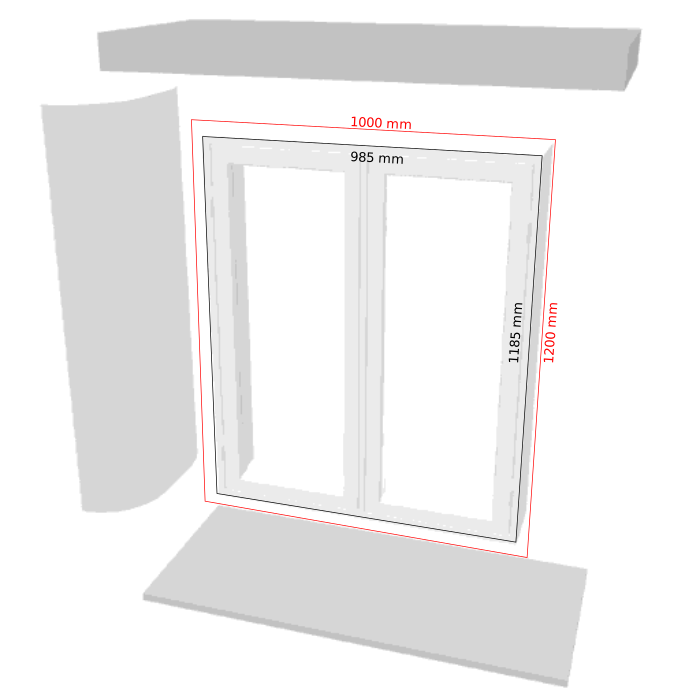
Model itself is quite simple, mostly squares and can be done with pretty much any software. Even SH3D. Guess the most commonly used free sw would be Sketchup and Blender. The latter a bit daunting but very powerful. Both have instruction videos online that proved very helpful. Art of Illusion and Wings are other alternatives (and 3D builder / Paint 3D in new Win 10 updates), but I never really really put any effort into learning them.The window model posted is true to standard sizes here. Window sold as 1000×1200mm is actually 985×1185mm to allow for adjustments and insulation. This can be important when using SH3D for actual construction and submission of drawings. The other elements are literally window dressing - like your curved walls (or weatherboards/windowsills and other stuff in the original sent by e-mail). All these elements can be set to invisible (or changed) in the Modify furniture / Modify colours dialogue.
Long and short of it is that creating basic models need not be difficult or take long (with a bit of practice). And the basics will work directly, like SH3D aligning model to wall and create the cutout. But it is also possible to put some extra post production into a model to optimise for SH3D. And not least, shrink the model to reduce file size and increase SH3D speed.
- Unnecessary surfaces removed.
- Surfaces grouped according to colour.
- Colours renamed for easier SH3D edit (or remove elements by setting invisible).
- The .obj file cleaned.(SF 3D Models 261), smoothing off (s off) for all elements but wall/hinge/handle (s 1).
- The .mtl file uses wall colour similar what SH3D uses as default to blend in with default SH3D wall:
newmtl Wall
illum 1
Ka 0.2 0.2 0.2
Kd 1.0 1.0 1.0
Ks 0.0 0.0 0.0
Ns 1.0
Ni 1
d 1.0
Additional properties in the Furniture Library file for use with SH3D. Cutout can be set in FurnitureLibraryEditor, additional window properties edited into PluginFurnitureCatalog.properties in the library file:
id#39=okh#newin_curve
name#39=Newin curve
information#39=Window with rounded walls
tags#39=thick wall rounded bale house
category#39=Doors and windows
icon#39=/Newin curve.png
model#39=/Newin curve/newin_curve.obj
multiPartModel#39=true
width#39=138.5
depth#39=60
height#39=131
movable#39=true
doorOrWindow#39=true
doorOrWindowCutOutShape#39=M0.1444,0.0763 h0.7112 v 0.946 h-0.7112 z
doorOrWindowWallThickness#39=59.9
doorOrWindowWallDistance#39=0.05
doorOrWindowSashXAxis#39=22 116.2
doorOrWindowSashYAxis#39=42 42
doorOrWindowSashWidth#39=45.7 45.7
doorOrWindowSashStartAngle#39=270 270
doorOrWindowSashEndAngle#39=360 180
elevation#39=80
