France
Joined: Nov 7, 2005
Post Count: 9432
Status:
Offline
Textures Library Editor released
Hi,
Here's the Textures Library Editor, a tool that will help Sweet Home 3D users create and manage SH3T files.
The program is available as a 1 MB JAR executable file (see the end of this post for updated links) and requires you installed Java on your machine (or reuse the Java version embedded with Sweet Home 3D installer when available). The easiest way to launch it is to double-click on the file. If this method fails, choose open or launch with Java in its contextual menu, or open a Terminal window and run the command:
java -jar TexturesLibraryEditor-2.1.jar
Supported systems are Windows, Mac OS X 10.4 to 14, Linux and probably any system that supports Java 1.5. If you look for an icon for it, take the following one based on a texture of mine:
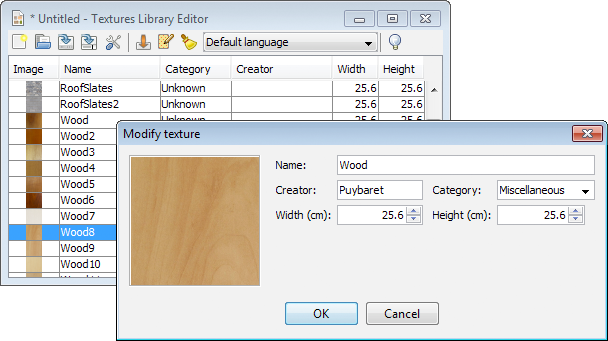
Very similar to the Furniture Library Editor, this tool will let you import more than a texture image at a time either with a classic file dialog displayed by the Import textures tool, or by dropping the files in the window of the tool if your system supports this feature. Once they are imported, you may modify each texture, or by group after selecting them. As the screen capture shows, the modification dialog displays the attributes of a texture (for those interested it's even possible to edit the ID attribute after a small modification in the program).
This tool is also a translation tool that will help translators to localize more easily SH3T files: the name and the category entered in the modification dialog depends on the language chosen in the tool bar, and when you select a new language in this drop down list, all the categories belonging to 4 default categories are automatically translated into the selected language, if the language belongs to the ones supported by Sweet Home 3D at this time.
Caution, there's no undo/redo feature. As always create backups to ensure you won't loose your work. This editor should be stable, but I release it as a beta version to fix easily bugs that may appear. Note also that during its development, I discovered a bug in Sweet Home 3D 3.6 and previous versions, that will save all the images of a SH3T library in a SH3D file as soon as you use only one of them. So, upgrade to a newer version, or if you can't, choose to create small SH3T files rather than a big one if you don't want your SH3D files to grow too fast.
For interested programmers, source code is committed in the TexturesLibraryEditor SVN module separated from SweetHome3D one. Project contains a README.TXT file with compilation directions.
I hope this tool will be useful and that you'll like it (and even more, once the bug fix in Seeet Home 3D will be released).
south africa
Joined: Aug 22, 2012
Post Count: 18
Status:
Offline
Re: Textures Library Editor released
hi emmanuel used new textures library ed now that 3.7 is out, please tell me how to delete a new texture once placed in textures library, as no option to modify or delete is available to use, once imported. using jar ex version. cheers shaun
France
Joined: Nov 7, 2005
Post Count: 9432
Status:
Offline
Re: Textures Library Editor released
You can't delete a texture image coming from a SH3T file from Sweet Home 3D. Simply edit the SH3T file with the Textures Library Editor and delete it from there, then reimport the SH3T file in Sweet Home 3D (don't need to restart it).
----------------------------------------
Emmanuel Puybaret, Sweet Home 3D creator
Joined: Apr 29, 2014
Post Count: 1
Status:
Offline
Re: Textures Library Editor released
Good days, working with the publisher(editor) of textures I meet the following problem: On having imported a texture with transparency "texture.png" when the file to guard as texture sh3t the textures with transparency they do not guard. Some solution? Thank you very much.
France
Joined: Nov 7, 2005
Post Count: 9432
Status:
Offline
Re: Textures Library Editor released
Brakat, you're not at the good place to get more textures. Go there to download more textures, and if it's not enough, visit web sites cited in textures import page.
----------------------------------------
Emmanuel Puybaret, Sweet Home 3D creator
France
Joined: Sep 3, 2015
Post Count: 1
Status:
Offline
Re: Textures Library Editor released
Bonjour,
Merci pour votre excellent logiciel.
Serait-il possible, dans une future version de l’éditeur de textures (ou dans une future version de Sweet home 3D lui-même), de prévoir une rotation plus précise des textures.
En effet, il n'est proposé généralement que 0° ou 45° ou 90°.
J'ai modélisé ma (très) vielle maison, aucune pièce n'est carrée et/ou parallèle et/ou perpendiculaire à la grilles et j'ai donc un rendu de l'orientation du parquet non réaliste.
USA
Joined: Nov 22, 2017
Post Count: 5
Status:
Offline
Re: Textures Library Editor released
Hi all, First post here. I seem to be missing a step or something. I've downloaded both the texture and the furniture library editors and I got a compressed file when opened, I get a folder with a bunch of meta files and a zipped jnlp.jar file
I'm running OS X 10.11.6 and the java site verified I am running Java 9.0.1