RUSSIA
Joined: Feb 8, 2010
Post Count: 12
Status:
Offline
Feature: Show/hide dimensions
Hello.
It would be nice to have a feature of show/hide dimension on plan in one click (or one hotkey). Coz, sometime they are neccessary, but sometime a lot of dimension looks like a garbage on a plan.
Netherlands
Joined: Sep 26, 2009
Post Count: 4029
Status:
Offline
Re: Feature: Show/hide dimensions
Mr. Rostov:
It's logical that if you add many dimensions using Plan --> Create dimensions your screen will look very full and cluttered.
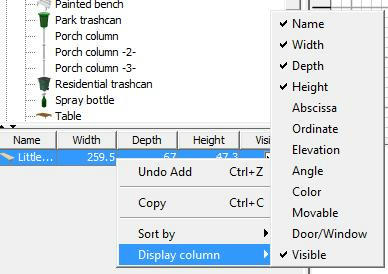
There is a different way to get a lot of information about an object. If you look at the bottom-left part of the screen you will see a list of all objects used. Right-click there and a pop-up menu opens. Now choose Display column and you will see a list of fields that you can display in this window. Select the items you want to see and those columns will be visible
Back to the project you are designing. Select an object that you have inserted. Now look at the list at the bottom-left: your object will be highlighted and you can easily see all the data of the object that you have selected.
Hans
----------------------------------------
Hans
RUSSIA
Joined: Feb 8, 2010
Post Count: 12
Status:
Offline
Re: Feature: Show/hide dimensions
Mr. Rostov:
Rostov is a city, where I live :) My name is Max. Hello.
It's logical that if you add many dimensions using Plan --> Create dimensions your screen will look very full and cluttered.
I've talked not about dimensions of objects (like sofa and so on). I've talked about dimension of room, walls, part of walls and so on. It's important to see them, when you plan where to place a furniture and so on. But if you want to, for example, print variant of plan to show it to somebody, dimensions are spoil the picture.
But it's impossible to delete dimensions before print, because you could return and re-plan some furnutire placement after printing and so on.
So, it would be nice to have feature of "show/hide dimensions".
Netherlands
Joined: Sep 26, 2009
Post Count: 4029
Status:
Offline
Re: Feature: Show/hide dimensions
Max:
Sorry for not understanding you correctly the first time. And, yes, I know that Rostov is a city :-)
Some ago I put almost the same request in the wish list. In my view it would be ideal if walls and rooms also appeared in the furniture list (bottom left of screen). Maybe in a way that you can switch between a furniture list and a walls list.
As far as I know there are currently no plans to implement this feature, so I think you have to keep adding your own dimensions.
Hans
----------------------------------------
Hans
France
Joined: Aug 12, 2010
Post Count: 4
Status:
Offline
Re: Feature: Show/hide dimensions
Hello, I'm quite new here and I really miss the show/hide dimension feature I fully support this feature request, and indeed, considering walls as objects would simply do the trick.