Print at Dec 19, 2025, 12:06:37 PM
Posted by Gildaniel at Aug 14, 2019, 3:36:20 PM
Two level with the same elevation: some rooms on upper level are transparent
Hello!
I often use two levels with the same elevation, first as ground (grass on the picture), second is house first floor, to show house placing.

When both levels are on, somehow some of rooms of floor level became transparent on the plan. If I cut and paste rooms I have more "solid" rooms, but couple of them are still transparent.

How to avoid transparent rooms?

Before cut and place:


After cut and place some room still transparent:


Posted by Puybaret at Aug 16, 2019, 11:54:05 AM
Re: Two level with the same elevation: some rooms on upper level are transparent
Difficult to say from your screen captures. It could be a bug or simply a misunderstanding of rooms and levels. Could you post a simpler example?
----------------------------------------
Emmanuel Puybaret, Sweet Home 3D creator

Posted by Gildaniel at Aug 20, 2019, 1:21:59 PM
Re: Two level with the same elevation: some rooms on upper level are transparent
Difficult to say from your screen captures. It could be a bug or simply a misunderstanding of rooms and levels. Could you post a simpler example?


Of course, here you are http://regard-house.ru/3dplan/fv/transpareny.sh3d

Thank you for your help!

Daniel

Posted by Gildaniel at Sep 10, 2019, 4:29:50 PM
Re: Two level with the same elevation: some rooms on upper level are transparent
There is an exapmle attached, could you please check?

Posted by Gildaniel at Oct 11, 2019, 1:10:03 PM
Re: Two level with the same elevation: some rooms on upper level are transparent
Please confused

Posted by hansmex at Oct 11, 2019, 4:20:46 PM
Re: Two level with the same elevation: some rooms on upper level are transparent
When I click the link to download the file, I get a 404 message. I can't read it, but it should mean the file/page doesn't exist (anymore).

H
----------------------------------------
Hans

new website - under constuction
hansdirkse.info

Posted by alaX at Oct 11, 2019, 6:08:15 PM
Re: Two level with the same elevation: some rooms on upper level are transparent
Without downloading your file i can suggest: either draw "grass" room AROUND the house (NOT UNDER it), or raise the house level a little bit so it's no longer at the same elevation as grass level.

Posted by Gildaniel at Oct 15, 2019, 5:32:50 PM
Re: Two level with the same elevation: some rooms on upper level are transparent
When I click the link to download the file, I get a 404 message. I can't read it, but it should mean the file/page doesn't exist (anymore).

Sorry, there was a mistake in the link
http://regard-house.ru/3dplan/fv/transparency.sh3d
is correct one

Posted by Gildaniel at Oct 15, 2019, 5:42:51 PM
Re: Two level with the same elevation: some rooms on upper level are transparent
Without downloading your file i can suggest: either draw "grass" room AROUND the house (NOT UNDER it), or raise the house level a little bit so it's no longer at the same elevation as grass level.


Usually I use sattelite or cadastre map to find needed land area, screenshot and import this picture as a background image, scale it to real dimension and draw "grassed" room over it, to discuss where to place building, moving it around.
It's possible to draw room around house, as a last resort, thank you.

If house elevation will be hier then ground level, no grass will be seen on the plan at all.

Posted by Gildaniel at Oct 15, 2019, 6:22:53 PM
Re: Two level with the same elevation: some rooms on upper level are transparent
I found some regularity in this bug.
If you draw room in closed wall area - it is transparent. If you draw in non-closed area - it normal


Posted by Puybaret at Oct 15, 2019, 7:25:35 PM
Re: Two level with the same elevation: some rooms on upper level are transparent
I think I understand what you mean.
Actually, all rooms are half transparent, but when you draw a room (like the 4.27 m² one, the 1.77 m² one and the other small ones) superimposed on another larger one (like the large green one), the small rooms get less transparent.
----------------------------------------
Emmanuel Puybaret, Sweet Home 3D creator

Posted by Gildaniel at Oct 16, 2019, 1:23:05 PM
Re: Two level with the same elevation: some rooms on upper level are transparent
I think I understand what you mean.
Actually, all rooms are half transparent, but when you draw a room (like the 4.27 m² one, the 1.77 m² one and the other small ones) superimposed on another larger one (like the large green one), the small rooms get less transparent.


Sorry, I haven't understood your explanation, what the logic is here, why one room transparent, another not? How to get superimposed rooms always nontransparent?

I see there is a trick to get nontransparent room, superimposed on lager one - at least one corner of the room should be drown outside wall contour - now room became nontransparent, then you can correct it as you wish and it retain colour. It works, but then I cannot use doubleclick for fast creation room inside walls, it was very comfortable, rapid drawing is important for me :(


Posted by alaX at Oct 16, 2019, 2:07:31 PM
Re: Two level with the same elevation: some rooms on upper level are transparent
I tested your case and this is my solution:

  • Select "Create walls" - double click on the grass,
  • delete grass,
  • select "Create rooms" - double click somewhere inside these new walls,
  • delete walls (if you don't need a fence)
  • cut and paste the house ( in order to select the house covered now by the new grass make level 0 unviewable or move aside the grass or select all and deselect the grass )


Posted by Gildaniel at Oct 16, 2019, 4:18:06 PM
Re: Two level with the same elevation: some rooms on upper level are transparent
I tested your case and this is my solution:

  • Select "Create walls" - double click on the grass,
  • delete grass,
  • select "Create rooms" - double click somewhere inside these new walls,
  • delete walls (if you don't need a fence)
  • cut and paste the house ( in order to select the house covered now by the new grass make level 0 unviewable or move aside the grass or select all and deselect the grass )


Thank you, it works! Good idea to redraw grass using walls!

Posted by alaX at Oct 16, 2019, 5:26:21 PM
Re: Two level with the same elevation: some rooms on upper level are transparent
still, it doesn't look good on rendered photo

Posted by Gildaniel at Oct 18, 2019, 2:46:09 PM
Re: Two level with the same elevation: some rooms on upper level are transparent
still, it doesn't look good on rendered photo

Yes, same problem on 3d.
May there is some other solutions?


Posted by Gildaniel at Oct 28, 2019, 8:35:54 AM
Re: Two level with the same elevation: some rooms on upper level are transparent
Difficult to say from your screen captures. It could be a bug or simply a misunderstanding of rooms and levels. Could you post a simpler example?


Dear Emmanuel, could you please check this problem? It steel exist, and there is no good solution to avoid

Posted by Puybaret at Oct 28, 2019, 10:39:47 AM
Re: Two level with the same elevation: some rooms on upper level are transparent
I tried to fix the problem shown in the 3D view of your last image many times, and unfortunately there are still a few cases where it doesn't work. It's a problem about cutting the ground with rooms to avoid them to overlap the ground. Moving the corners of the rooms may resolve the issue.
----------------------------------------
Emmanuel Puybaret, Sweet Home 3D creator

Posted by alaX at Oct 28, 2019, 11:18:07 AM
Re: Two level with the same elevation: some rooms on upper level are transparent
Use background image with grass texture and make sure you have selected "Background image visible in 3D view"

Posted by Bubblobill at Dec 4, 2019, 4:23:05 AM
Re: Two level with the same elevation: some rooms on upper level are transparent
This seems to be a case of two planes fighting over the z-index. Would changing the floor thickness of the grass level to be lower than the house level floor thickness result in the room's floor being drawn above the grass?

Posted by bdfd at Dec 4, 2019, 7:28:38 AM
Re: Two level with the same elevation: some rooms on upper level are transparent
Hi,

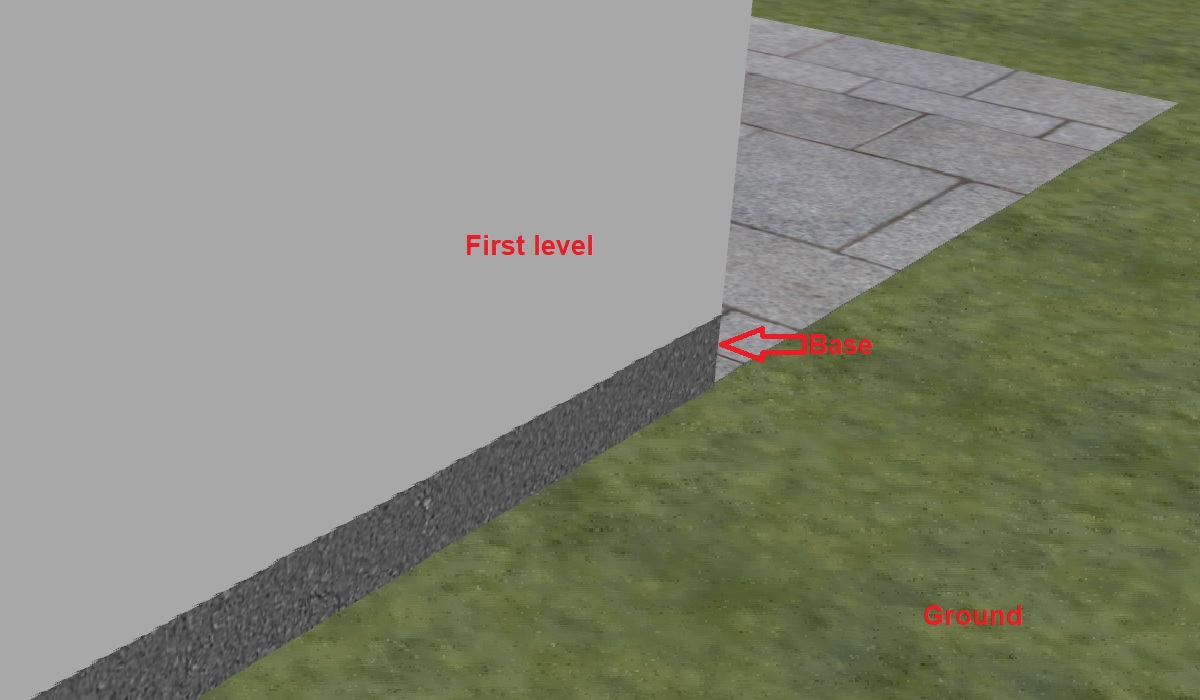
Each house is always above the ground and it's one of the good practices.
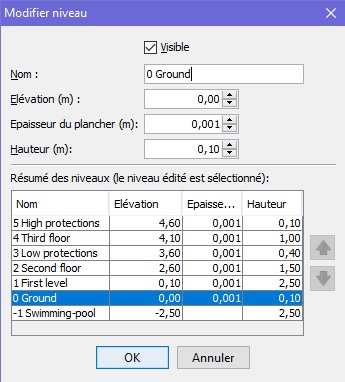
For each construction you must have a base floor or screed and then just above and to simplify the first level.


If you look at all my recent projects (after 2016) the base is in gray and is between 10 and 15 cm thick.
The first level with the furniture therefore starts with a rise of 0.10 (or 0.15).

E.G. for a house with ONE floor :


wink
.
----------------------------------------
Evil progresses when good people do nothing!
---
SH3D 7.1 and nothing else - W11 64b in 4K

Posted by Gildaniel at Dec 5, 2019, 12:06:21 PM
Re: Two level with the same elevation: some rooms on upper level are transparent
This seems to be a case of two planes fighting over the z-index. Would changing the floor thickness of the grass level to be lower than the house level floor thickness result in the room's floor being drawn above the grass?


Unfortunately, no. Thikness of level goes in the downward direction; so upper Z-s are still fighting.


Each house is always above the ground and it's one of the good practices.


If second (building) level is higher then grass even on 0,001m you cannot see on the one plan both levels, only the top one (building without grass).
But in my case both level are needed on the plane, like here

Now I draw every room by hand, like here, but it takes a lot of time:


Posted by Gildaniel at Mar 17, 2020, 7:12:50 AM
Re: Two level with the same elevation: some rooms on upper level are transparent
May be to solve this problem it's easier to make holes in rooms, like staircases do?