 Unable to start Sweet Home 3D v6.2 in Ubuntu 18.04
I am trying to start SweetHome3D-6.2 in Ubuntu 18.04 LTS, but I am getting this error message
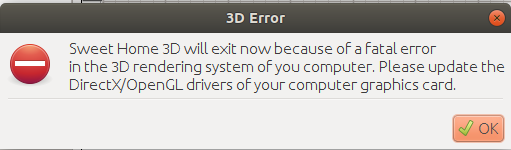
My system has NVIDIA GTX 1050ti GPU with NVIDIA Driver Version: 390.116.
|
Sweet Home 3D Forum » List all forums » » Forum: Installation » » » Thread: Unable to start Sweet Home 3D v6.2 in Ubuntu 18.04 |
|
| Print at Aug 16, 2026, 1:29:09 PM | View all posts in this thread on one page |
| Posted by atinesh at Aug 13, 2019, 10:43:16 AM |
|
Unable to start Sweet Home 3D v6.2 in Ubuntu 18.04 I am trying to start SweetHome3D-6.2 in Ubuntu 18.04 LTS, but I am getting this error message My system has NVIDIA GTX 1050ti GPU with NVIDIA Driver Version: 390.116. |
| Posted by UbuntuBirdy at Aug 13, 2019, 6:26:34 PM |
|
Re: Unable to start Sweet Home 3D v6.2 in Ubuntu 18.04 Your driver is not the latest, but not sure if this is the problem. You can try to install the 390.129 driver following this guide. !!! AT YOUR OWN RISK !!! And without warranty! ---------------------------------------- Pascal SH3D 6.6 / Ubuntu 22.04 (Mainline-Kernel) / Radeon RX580 / Ryzen 7 5800x |
| Posted by atinesh at Aug 14, 2019, 10:18:49 AM |
|
Re: Unable to start Sweet Home 3D v6.2 in Ubuntu 18.04 Your driver is not the latest, but not sure if this is the problem. You can try to install the 390.129 driver following this guide. !!! AT YOUR OWN RISK !!! And without warranty! Hello UbuntuBirdy, I have updated drivers as you instructed  But problem still persists, same error is coming. |
| Posted by atinesh at Aug 14, 2019, 10:23:55 AM |
|
Re: Unable to start Sweet Home 3D v6.2 in Ubuntu 18.04 I tried even older version SweetHome3D-5.5.2 but still same error persists |
| Posted by dorin at Aug 14, 2019, 12:29:02 PM |
|
Re: Unable to start Sweet Home 3D v6.2 in Ubuntu 18.04 From me it look more a java problem. 1. IF You try to use the repository version==> FORGET IT! -java provided by distributions are modified and almost incompatible with SH3D. 2. Download it from this site, follow the instructions and try again. - If the problem persist, launch it from terminal and post the output. ---------------------------------------- A computer program does what you tell it to do, not what you want it to do. Murphy's Law When all else fails, read the instructions. Murphy's Law If you don't like "AS IS", DIY. Dorin's law |

|
Current timezone is GMT Aug 16, 2026, 1:29:09 PM |