|
Sweet Home 3D Forum » List all forums » » Forum: Sweet Home 3D bar » » » Thread: Different floor heights in a house |
|
| Print at Jan 27, 2026, 1:56:24 PM | |
| Posted by Sandra36 at May 4, 2019, 4:50:29 PM |
|
Different floor heights in a house I would like to have a lower floor height in the basement, an overheight in the ground floor and a normal height in the other floors. I've tried a lot, but whenever I change the height of a floor, i.e. the height of the walls, I have a distance to the next floor or overlap the floors. I also tried to change the height of the standard wall without success. How do I create different floor heights correctly or how can I change them afterwards? |
| Posted by hansmex at May 4, 2019, 5:45:06 PM |
|
Re: Different floor heights in a house Study how you can create levels. Each level can be set to a different height above (or below) the ground, and the height of the level can be set as well. H ---------------------------------------- Hans new website - under constuction hansdirkse.info |
| Posted by Mike53 at May 4, 2019, 6:55:22 PM |
|
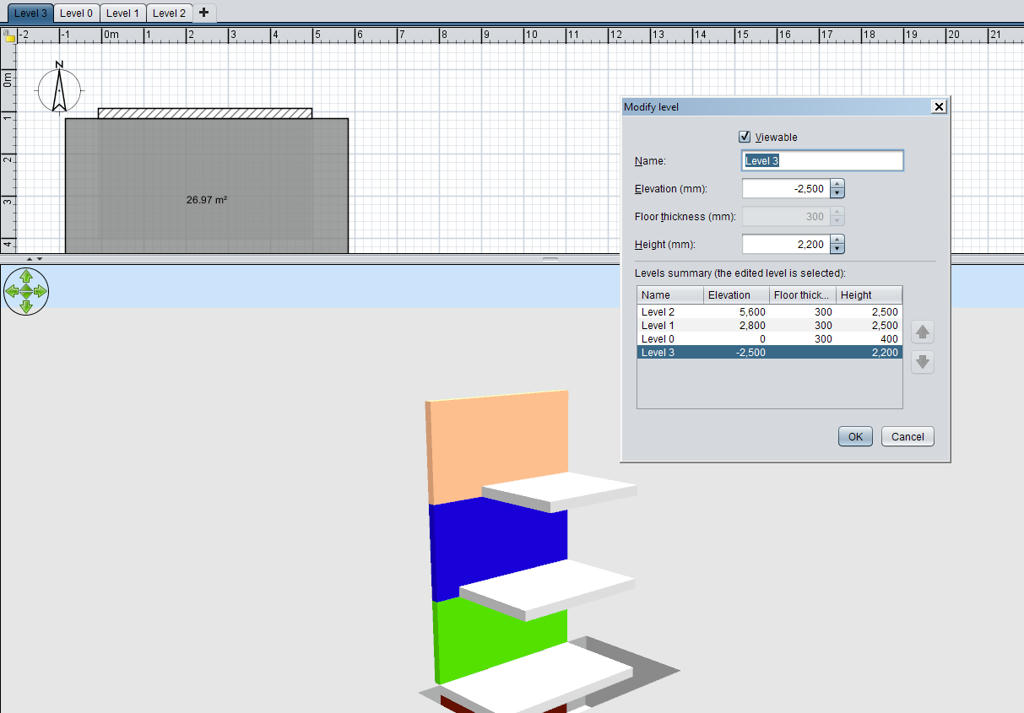
Re: Different floor heights in a house Hi Sandra What you need to understand is that the elevation of each levels consists of the wall height plus the floor thickness of the level above. Here is an example To access the window to modify the levels right click on the level tab, top left, you can only modify the level you choose. In the example i chose a basement wall height of 2200 mm just to show a difference, you can see the wall height + floor thickness = elevation. Another item to note is that by default level 0 has a floor thickness of 0, if you add a level below it, its thickness will change to the thickness determined in "preferences". Here are 2 youtube links that may also help. https://www.youtube.com/watch?v=-Jlk_4luBJs https://www.youtube.com/watch?v=VFZSl7LMOKY Good luck and welcome to the forum. Mike |
|
|
Current timezone is GMT Jan 27, 2026, 1:56:24 PM |