Print at Dec 29, 2025, 4:34:46 AM
Posted by svedel77 at Jan 27, 2019, 12:46:15 PM
PhotoVideoRendering-1.6 installation in Linux
Hi,

I'm fairly new to Linux. I'm running Linux Mint. After installing SH3D via Synaptic, I can't find the plugins folder, to copy plugins to.
What am I missing?

Posted by UbuntuBirdy at Jan 27, 2019, 2:21:39 PM
Re: PhotoVideoRendering-1.6 installation in Linux
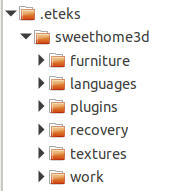
I guess that Mint handles the same as Ubuntu (especially if you have the Ubuntu-based version). Then in your home directory there is a hidden folder called ".eteks". In this folder you will find another called "sweethome3d" and in it you will find the directory you are looking for: "plugins".
----------------------------------------
Pascal

SH3D 6.6 / Ubuntu 22.04 (Mainline-Kernel) / Radeon RX580 / Ryzen 7 5800x

Posted by svedel77 at Jan 27, 2019, 2:55:33 PM
Re: PhotoVideoRendering-1.6 installation in Linux
Hi,
I've been looking, and turned on "Show hidden files". No .eteks folder though.

Posted by hansmex at Jan 27, 2019, 3:24:04 PM
Re: PhotoVideoRendering-1.6 installation in Linux
If the folder "plugins" doesn't exist, create it yourself in ./eteks/sweethome3d.
Then copy your plugins into that folder.
When you start SH3D it will load the plugins it finds in that folder.


Hans
----------------------------------------
Hans

new website - under constuction
hansdirkse.info

Posted by svedel77 at Jan 27, 2019, 4:34:54 PM
Re: PhotoVideoRendering-1.6 installation in Linux
Thank you, that did the trick. But now SH3D tells me, that the plugin is not compatible with this version of SH3D. I went on, and downloaded the 32 bit version instead. But... Running the terminal script, in the SH3D folder does nothing. A terminal window flashes, and closes. No more.
What can I do?

Posted by svedel77 at Jan 27, 2019, 4:56:01 PM
Re: PhotoVideoRendering-1.6 installation in Linux
OK, i now have the right x64 bit version. I can click the "PhotoVideoRendering" meny item in SH3D, but nothing happens, when I click it.

Posted by hansmex at Jan 27, 2019, 5:29:24 PM
Re: PhotoVideoRendering-1.6 installation in Linux
From the top menu choose Photo-video rendering -> Simple photo rendering (v1.6) and a pop-up window appears that's slightly different from the "normal" rendering window.
Check your settings, and GO. (Normally that should work)
----------------------------------------
Hans

new website - under constuction
hansdirkse.info

Posted by svedel77 at Jan 27, 2019, 5:53:34 PM
Re: PhotoVideoRendering-1.6 installation in Linux
From the top menu choose Photo-video rendering -> Simple photo rendering (v1.6) and a pop-up window appears that's slightly different from the "normal" rendering window.
Check your settings, and GO. (Normally that should work)


Oh yes, I understand. But when I click the "photo video rendering" menu-item, the window doesn't pop up. Nothing happens.

Posted by svedel77 at Jan 31, 2019, 2:23:58 PM
Re: PhotoVideoRendering-1.6 installation in Linux
Now I have made an Ubuntu USB stick, instead of Linux Mint. Exact same thing. Clicking the Video rendering menu-item, then nothing happens, at all.

Posted by Puybaret at Jan 31, 2019, 2:41:49 PM
Re: PhotoVideoRendering-1.6 installation in Linux
Run Sweet Home 3D from a Terminal window. If the plug-in is incompatible some way, an error should appear in the Terminal window when you select one of its menu items.
----------------------------------------
Emmanuel Puybaret, Sweet Home 3D creator

Posted by svedel77 at Feb 2, 2019, 8:10:44 AM
Re: PhotoVideoRendering-1.6 installation in Linux
Run Sweet Home 3D from a Terminal window. If the plug-in is incompatible some way, an error should appear in the Terminal window when you select one of its menu items.


OK, I'll try it.