Let me start with mine...

|
Sweet Home 3D Forum » List all forums » » Forum: Gallery » » » Thread: Showcase your glassblocks |
|
| Print at Sep 21, 2026, 9:14:39 PM | |
| Posted by rontant at Jul 14, 2018, 1:38:35 PM |
|
Showcase your glassblocks Let me start with mine... |
| Posted by AdeleAlli at Jul 21, 2018, 9:57:11 PM |
|
Re: Showcase your glassblocks Hi, where did you find such windows? I tried to use glass boxes and a blurred window to realize it but without success. |
| Posted by rontant at Jul 22, 2018, 3:01:11 AM |
|
Re: Showcase your glassblocks You can get the glassblocks here: http://www.sweethome3d.com/support/forum/viewthread_thread,8727#39746 |
| Posted by AdeleAlli at Jul 22, 2018, 6:53:09 PM |
|
Re: Showcase your glassblocks Thank you for the link. And here is mine, a bathroom. Let me know what you think about it; I will be happy if you can give me some suggestions to resize the glass blocks in such a way to obtain a good result in rendering it because I do not like it very much. I tried many times but without success. Bye Natural day lights (rendering 4 PM)  Internal lights (rendering 10 PM)  |
| Posted by AdeleAlli at Jul 23, 2018, 11:07:15 AM |
|
Re: Showcase your glassblocks Hi rontant, I think that the problem was that I rescaled the glassblocks without the "keep proportions" option selected while modifying them. I was able to create this living room:  Later I will repost the bathroom with the right proportions of the glassblocks. Thank you for this post, I like creating rooms with this kind of glassblock. Have a nice day |
| Posted by rontant at Jul 23, 2018, 4:10:52 PM |
|
Re: Showcase your glassblocks Glad you figured out the resizing things. I noticed you hang a picture frame on the glass blocks. How are you going to do that in real life? :) |
| Posted by AdeleAlli at Jul 23, 2018, 5:58:06 PM |
|
Re: Showcase your glassblocks Hi rontant, I adjusted the glassblock of the bathroom, here it is:  Regarding your question about the painting, I was inspired by this living room found on the web, so if they have succeeded, it means that it could be done :).  In real life I would do it, for example, leaving the wall behind the painting so that it could be placed, and therefore not using the glass blocks on that point. I think that it should not be evident that they are not present because of the presence of the painting. In the project that I have posted, I have not used this technique because it is quite complex to do it with Sweethome3D. In case of the picture of the living room I found in the web, I think that they used some kind of scotch tape to do that :). Bye |
| Posted by AdeleAlli at Jul 23, 2018, 6:56:51 PM |
|
Re: Showcase your glassblocks To have a better idea, this is what I tried to explain before:  |
| Posted by rontant at Jul 25, 2018, 2:50:27 AM |
Re: Showcase your glassblocks My version of bathroom with glass blocks |
| Posted by bdfd at Jul 25, 2018, 8:25:57 AM |
|
Re: Showcase your glassblocks My version of bathroom with glass blocks The ground in marble is awesome. Is it a new texture ?  ---------------------------------------- Evil progresses when good people do nothing! --- SH3D 7.1 and nothing else - W11 64b in 4K |
| Posted by AdeleAlli at Jul 25, 2018, 11:30:34 AM |
|
Re: Showcase your glassblocks Good work :). May I ask you what texture is that on the wall and on the floor and where I can find them? Later I will post some attempts to realize good lights and reflection, but can you give me some suggestions on how you made them in your case? For example, how you made the glassblocks so shiny? Thanks |
| Posted by rontant at Jul 25, 2018, 3:43:36 PM |
|
Re: Showcase your glassblocks The textures for the wall and floor are marbles. There are some inside the texture library but you can always import your own marble textures found on the web, I put a light panel created by Enko Nyito outside behind the glass blocks. Of course I resized the light panel to cover the entire glass blocks. Pewrsonally I find the sunlight of SH3D is too weak. I also set the shininessShader in the photo rendering properties from default to glossy. |
| Posted by rontant at Jul 25, 2018, 3:46:23 PM |
|
Re: Showcase your glassblocks This is another rendering with shininessShader set to glossy. 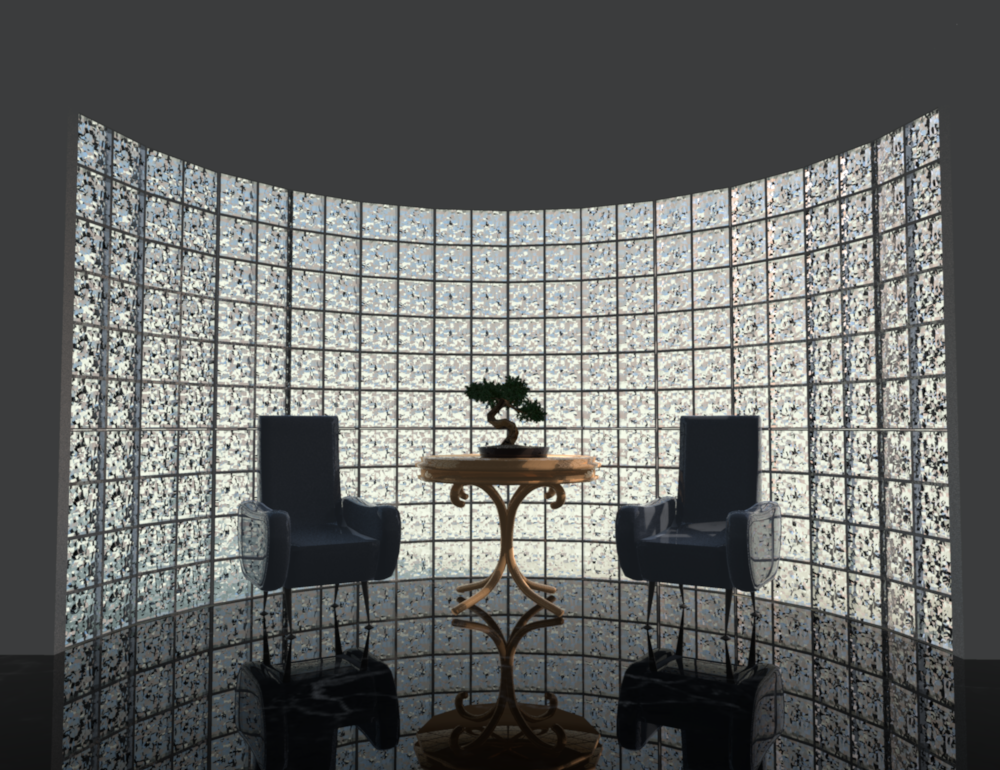 |
| Posted by AdeleAlli at Jul 25, 2018, 6:44:35 PM |
|
Re: Showcase your glassblocks I know, I created also my personal texture library some weeks ago :). I was making the wrong question. Sometimes I want to have a texture for example of tiles which is not quadratic, which is covering instead the entire wall, without seeing the borders of the tiles, I don't want if I am clear. Anyway, I tried using the scaling factor of the tile in order to do that. Here is what I realized:  Do you notice the defects located for example near the mixer faucet? I don't know how to solve them, any suggestion? :) Later I will try to use the light panel as you suggested and also the glossy shader, thanks. The result you posted with the shininessShader set to glossy is wonderful!!! |
| Posted by AdeleAlli at Jul 25, 2018, 8:48:41 PM |
|
Re: Showcase your glassblocks The textures for the wall and floor are marbles. There are some inside the texture library but you can always import your own marble textures found on the web, I put a light panel created by Enko Nyito outside behind the glass blocks. Of course I resized the light panel to cover the entire glass blocks. Pewrsonally I find the sunlight of SH3D is too weak. I also set the shininessShader in the photo rendering properties from default to glossy. I have the same idea, the SH3D sunlight is too weak. Is there a way to disable it, without the need to set a time after midnight for example? Can you tell me Where I can find the light panel created by Enko Nyito? |
| Posted by rontant at Jul 26, 2018, 2:48:06 PM |
|
Re: Showcase your glassblocks Do you notice the defects located for example near the mixer faucet? I don't know how to solve them, any suggestion? :) Yes, I notice. I don't exactly know how to eliminate such annoying artefact completely. I see they typically occur when we render in silky mode of shininessShader. If you want to render in Silky mode, maybe you can try reducing the shininess of the texture for the object (faucet). I also find that rendering at higher resolution helps. If you have the time and patience, you can try rendering at 3000-5000dpi. It may take 6-7 hours but you can let the computer do the job while you sleep. Can you tell me Where I can find the light panel created by Enko Nyito? I don't recall which page or which forum thread I got it from, but it is somewhere in this site. Perhaps someone can help point out the exact location? |
| Posted by AdeleAlli at Jul 26, 2018, 6:30:28 PM |
|
Re: Showcase your glassblocks If you want to render in Silky mode, maybe you can try reducing the shininess of the texture for the object (faucet). I also find that rendering at higher resolution helps. If you have the time and patience, you can try rendering at 3000-5000dpi. It may take 6-7 hours but you can let the computer do the job while you sleep. What is the Silky mode and where I can change it? Is it in the script of sh3d (under linux)? Thank you, I usually render at 3000 x "something" (I use the auto-adapt option) pixels. Usually it takes 20/30 minutes, more or less, with an octa core processor. How I can change the dpi resolution of the rendering? |
| Posted by Ceciliabr at Jul 28, 2018, 10:46:26 PM |
|
Re: Showcase your glassblocks Come to think of it, I made an illustration of glass blocks for this discussion about glass earlier this year. But I never got around to posting it. So I'll post it here: 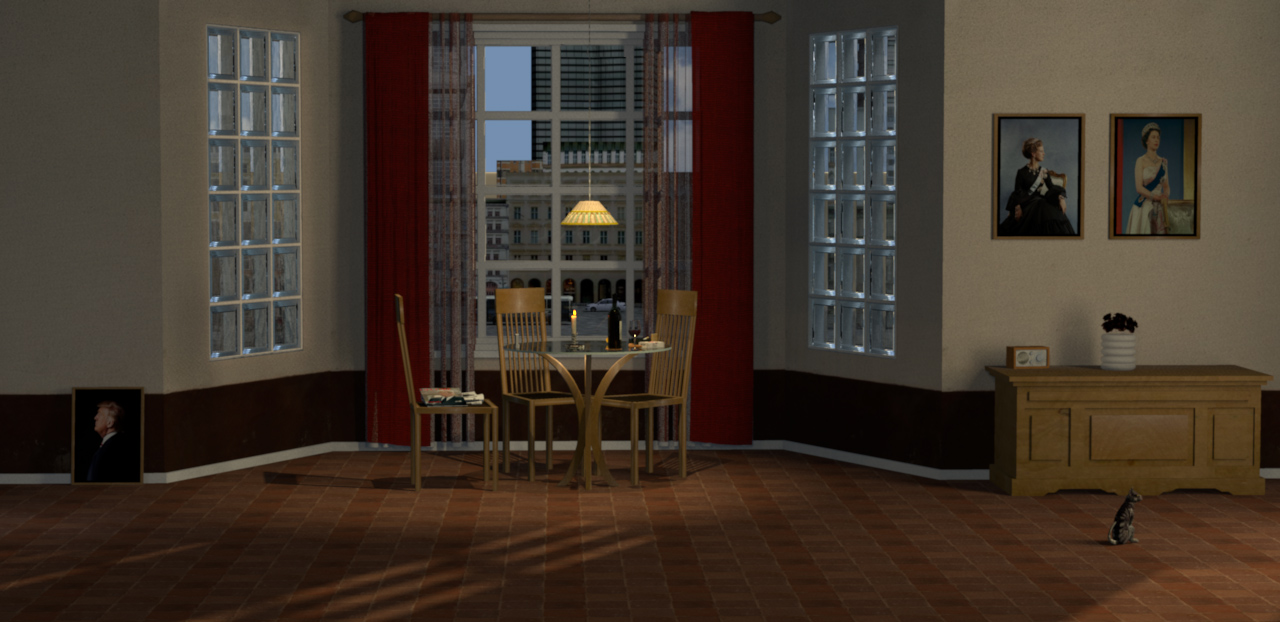 It's a bit dark, which I think has something to do with the death of Henrik, Prince Consort of Denmark. I remember hearing the news on the radio while I was working on the illustration. The magazine lying on the chair, originally had a front page about Kim Jung Un. I remember exchanging it with a mock-up magazine front page about our dearly loved and highly missed Prince Consort, Henri Marie Jean André de Laborde de Monpezat. It was traditions and laws that prevented him from being our king – it was not the will of his people. This image doesn't have any glass blocks in it, but I'll take my chances and post it here anyway.  Cec |
| Posted by rontant at Jul 29, 2018, 3:36:16 AM |
|
Re: Showcase your glassblocks Thanks Cec for sharing your work here. Very photo realistic, as elegant as ever, they are. The scenery outside, the city view, is nice. I wonder if this scenery is actually the view from one of the houses in your mini town or a picture pasted as texture of a wall outside? |
| Posted by Ceciliabr at Jul 29, 2018, 3:50:36 PM |
|
Re: Showcase your glassblocks I wonder if this scenery is actually the view from one of the houses in your mini town Yes, that’s exactly what it is. (Well observed )(…) or a picture pasted as texture of a wall outside? I’m not at all comfortable with using background images glued to a wall. I prefer to use models to design my backgrounds.The way I work, there are some heavy drawbacks with fixed background images: When using photographs harvested on the net, the light and shadows are already set, so my lighting options and my focal perspective become very limited. I'm stuck with the atmospheric mood as well as the angle and focal length of the background image. If I should want to change the time of day, or change the photographic angle, I would have to change the image. It would appear a bit awkward to have different backgrounds in a series of shots taken at the same location. Well... My mini town (fake city) consists of a mixture of real houses and textured boxes. The boxes are textured with transparent png’s, where some of the windows have been cut out. This enable me to create an illusion of evening/night by placing a light source inside the box. The light will then shine thru the openings of the transparent png's. Anyway, here is a daytime shot of the building- It's taken from across the street at a later date than the interior shots, so there are some minor differences in the layout. The apartment where the shot was made is located at the 1st floor ( US=2nd) over the entrance. 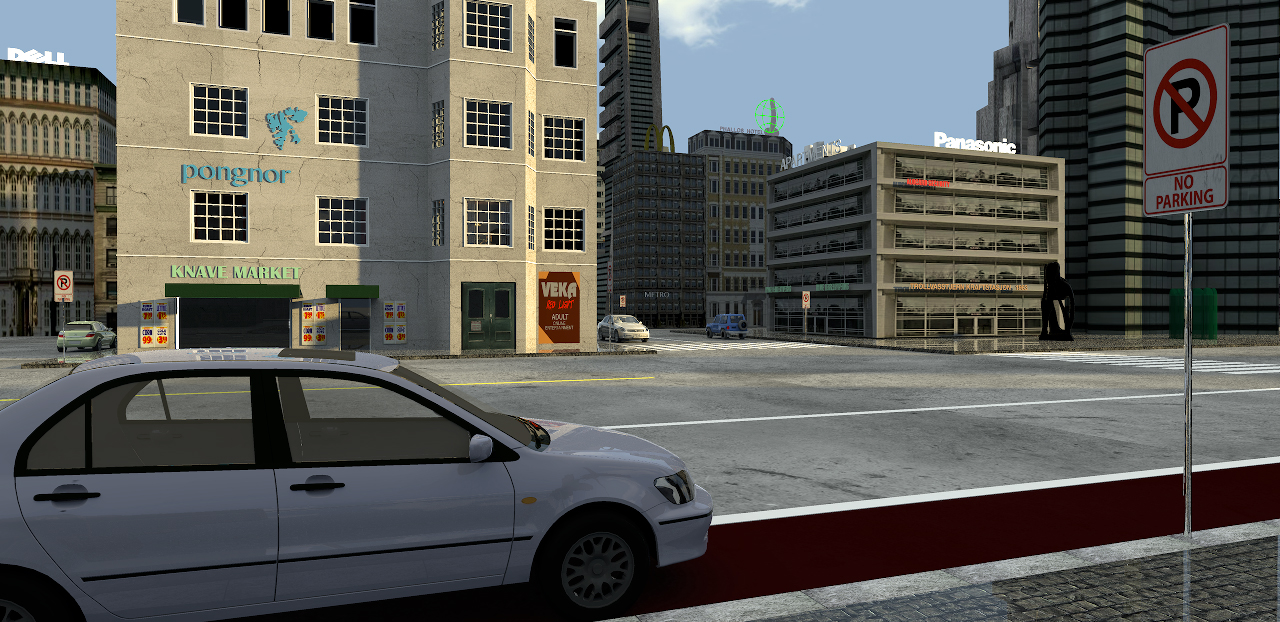 Cec |
| Posted by AdeleAlli at Jul 29, 2018, 9:41:36 PM |
|
Re: Showcase your glassblocks My mini town (fake city) consists of a mixture of real houses and textured boxes. The boxes are textured with transparent png’s, where some of the windows have been cut out. This enable me to create an illusion of evening/night by placing a light source inside the box. The light will then shine thru the openings of the transparent png's. Hi Cecilia, nice rendering! It seems so realistic. I love the road sign that is saying "No parking" and the car leaved in that area. :) I want to ask you, because I do not think that I understood exactly your way of realizing the background: for example, does the building with the sign "Panasonic" has a wall texture of a building that you found in the web? And also the building with the sign "Dell" is made in the same way? The building in the foreground with the sign "Knave Market" is also realized in the same way? If it is, how did you put the transparent area exactly where the windows are? :) |
| Posted by rontant at Jul 30, 2018, 2:56:17 PM |
|
Re: Showcase your glassblocks What is the Silky mode and where I can change it? Is it in the script of sh3d (under linux)? It's one of the shininessShader options under the photo rendering properties. How I can change the dpi resolution of the rendering? Sorry , my mistake. I meant 3000 pixels, not dpi. |
| Posted by Ceciliabr at Jul 31, 2018, 4:08:12 PM |
|
Re: Showcase your glassblocks @AdeleAlli I love the road sign that is saying "No parking" and the car leaved in that area. :) Thank you! I like it when a picture tells a story.does the building with the sign "Panasonic" has a wall texture of a building that you found in the web? And also the building with the sign "Dell" is made in the same way? Not quite sure where these textures come from. I have a huge library of textures, mostly bought/home-made, but these might well come from some free download site in the net. This tiny town is not entirely my construction. I have just modified it a bit in order for it to function as temporary surroundings for preview purposes. It will be replaced by my own construction – in a style I would call "Urban pseudo-futuristic Eastern-European post-functionalism", dated sometime around the 1980's The building in the foreground with the sign "Knave Market" is also realized in the same way? No, the Knave Market building is a “real“ building, constructed in SH3D, the building where i shot the glass box illustration. If it is, how did you put the transparent area exactly where the windows are? :) I have made a quick illustration to show you what I mean: 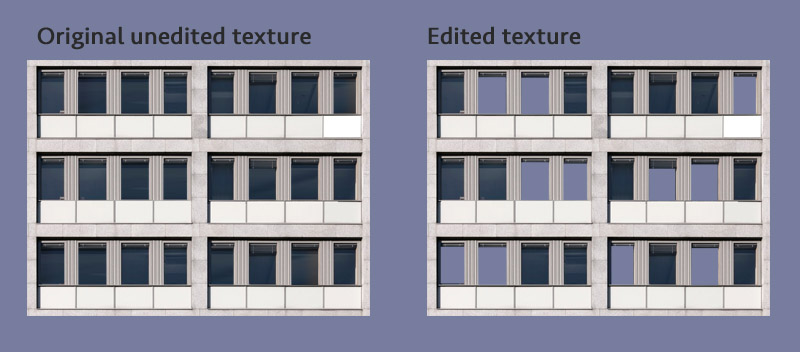 As you can see, all the windows are there on the original, so what I do is to cut out some of the windows from the texture – making them transparent, so that a light source placed inside will shine through the opening – creating an illusion of a lighted room behind the window. In a city at night, there are some windows with light, and some windows without. I could of course create this in SH3D, and end up with an even better illusion, but it would take a lot more time, it would create a bigger file-size, and it would be more difficult to handle than just textured boxes. What I prefer to do, is to make what can best be described as "sections", where a "section" consists of seven - eight boxes and one or two textures. Then I use these "sections" as building blocks for a whole city. The buildings in this fake city are made from only one section with two textures. It illustrates my impression of revitalized Urban pseudo-futuristic Eastern-European post-functionalism – anno 2010: 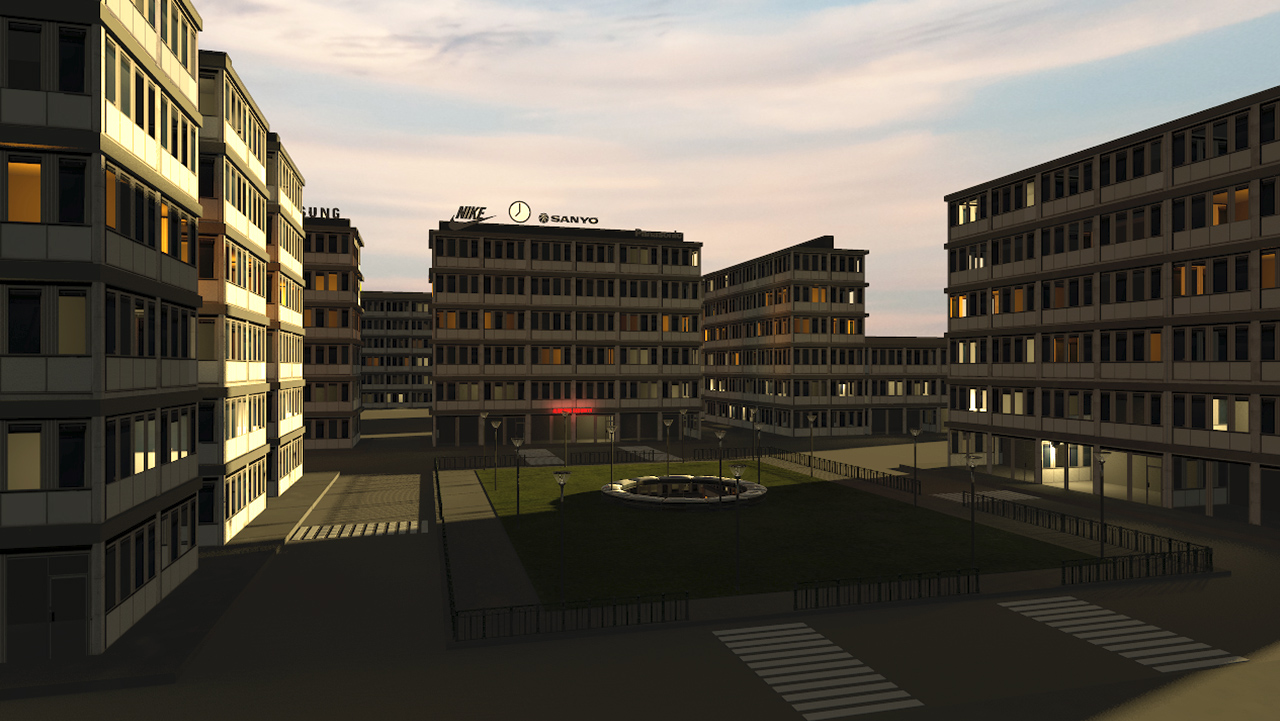 Here is a zip-file that you ( or anyone interested) can download. It includes a project file with a textured and lighted "section", plus a small assembly, exactly the same section and assembly that I used to create the above illustration. In the zip-file you will find two quite usable sky textures: One is a nice rural morning texture with clouds and a hazy horizon ( do not downsize), that works best with early morning or late evening sun positions, but also works for rendering a shadowless exterior, using moon symbol and external brightness. The other is a dark night texture with an upper level of light blue. This texture works okay for rendering night shots using the external brightness option (IBL), and will give a sort of moonlight atmosphere. Darkness can be added by setting the global illumination to zero. PS, I’m using SH3D only for illustrational purposes, so accurate dimensions are quite irrelevant in my work. You might notice that the section is only 60 - 70% of “normal” size, and that is intentional. Distant objects don’t have to be placed far away on the plan to appear distant. Since any known object already has it’s size recorded in the inventory of our consciousness, it’s the perceived size – the way an object appears in there perspective of our viewpoint – that creates the sensation of near or far. So a small object , like a downsized city, placed close to the camera, can appear to be just as far away as a bigger sized city placed “ realistically” far away from the camera. Cec |
| Posted by rontant at Aug 1, 2018, 3:05:05 AM |
|
Re: Showcase your glassblocks @Ceciliabr, Absolutely brilliant! Thank you for sharing the file. I will download it tonight. |
| Posted by VeroniQ at Aug 1, 2018, 10:22:45 AM |
|
Re: Showcase your glassblocks Yes thank you, Cecilia! The file is so clever, very simple while the rendering is excellent. Thanks again. |
| Posted by rontant at Aug 1, 2018, 5:01:42 PM |
|
Re: Showcase your glassblocks Cecilia opened the door to her town and now.... someone from a far away land came and opened a coffee shop.  Took 1.5hr to render this 1200x600 image. Thanks again, Cec. |
| Posted by Ceciliabr at Aug 1, 2018, 11:22:22 PM |
|
Re: Showcase your glassblocks Yes thank you, Cecilia! The file is so clever, very simple while the rendering is excellent. Thanks again. |
| Posted by Ceciliabr at Aug 1, 2018, 11:31:07 PM |
|
Re: Showcase your glassblocks @rontant Cool! This is exactly why I made this. Very nice, indeed! Be sure to try the sky-textures as well. They are not very hi-res, but for FOW-settings from 63 and upwards, I think they can work ok. Cecilia |
| Posted by Xiste at Aug 23, 2018, 12:56:35 AM |
|
Re: Showcase your glassblocks Cecilia opened the door to her town and now.... someone from a far away land came and opened a coffee shop. Great work! A very nice rendering. |

|
Current timezone is GMT Sep 21, 2026, 9:14:39 PM |