Depending on what you want to achieve, some earlier discussions could be of help:
thread 6997, SF 3d models 399 and the blog post on displaying interiors.
ok
|
Sweet Home 3D Forum » List all forums » » Forum: Features use and tips » » » Thread: Windows half height cut / Display only half of a window. |
|
| Print at Sep 6, 2026, 3:45:06 AM | View all posts in this thread on one page |
| Posted by jdab at Oct 20, 2017, 2:12:41 PM |
|
Windows half height cut / Display only half of a window. Hi, Is it possible to "cut" / Display only a section of a furniture, i.e. windows, at a certain heigh, to align it with a lowered wall / display only the half lower part ? Being at your disposal. Regards |
| Posted by okh at Oct 20, 2017, 2:23:27 PM |
|
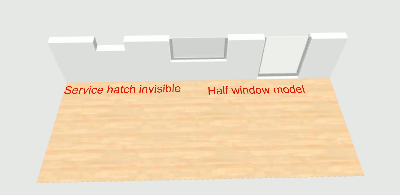
Re: Windows half height cut / Display only half of a window. Depending on what you want to achieve, some earlier discussions could be of help: thread 6997, SF 3d models 399 and the blog post on displaying interiors. ok |
| Posted by jdab at Oct 20, 2017, 4:49:23 PM |
|
Re: Windows half height cut / Display only half of a window. Thanks @Okh ! Helps a lot ! One step further, is it doable with a double doors windows ? (like Scopia's ones http://www.sweethome3d.com/models/scopia/window_2x3_regular.zip) |
| Posted by okh at Oct 20, 2017, 5:31:38 PM |
|
Re: Windows half height cut / Display only half of a window. Not without editing or creating the door/window in 3D modelling software. But to get an approximation, use the half window in the example above, place two side by side and change colour of Frame1 to invisible, lower elevation and increase height. While it does not look exactly the same, it gives a rough impression of a double glass door cut in half. ok |

|
Current timezone is GMT Sep 6, 2026, 3:45:06 AM |