Print at Dec 17, 2025, 4:58:32 AM View all posts in this thread on one page
Posted by harders at Mar 21, 2017, 10:04:49 PM
Better symbols in 2d view
While interior (furniture, stairs, shower) etc. are displayed quite nicely in the 3d view, the 2d view does not use meaningful symbols in many cases.
Usually in 2d, stairs are shown as steps with an arrow showing in the upstairs direction, cupboards are shown as rectangle with diagonal lines between the corners etc.
I believe it would be helpful to update the visualization of interior in 2d view accordingly. This would help a lot in being able to read the 2d drawings more easily.

Posted by okh at Mar 23, 2017, 8:12:51 AM
Re: Better symbols in 2d view
Just in case you missed it - you are aware that you can use File->Preferences->Furniture icons in plan to toggle between Catalog icons and Top View ?

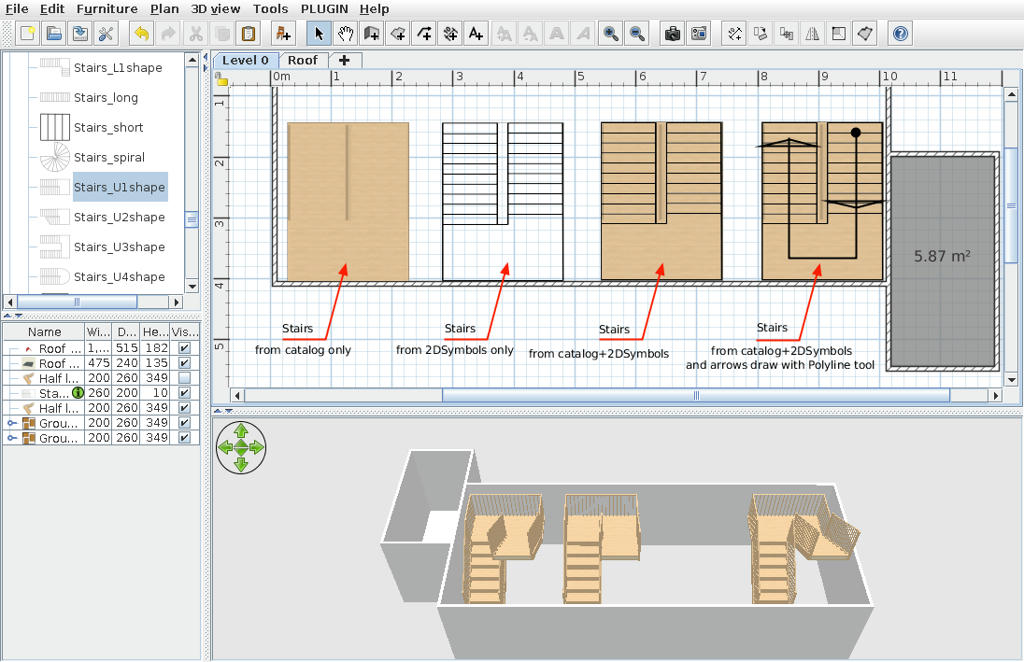
But there is also the possibility of using custom planIcons. A good example is the collection made by Dorin (thread 5531) - see also recent script by alberich in thread 7428. And if you edit a furniture library, it is possible to create custom plainicons for any model.

Using Top View, however, is plenty good for me except a few cases. One is for staircases and the other for objects where I want semi-transparent icons.

ok


Posted by dorin at Mar 23, 2017, 8:38:44 AM
Re: Better symbols in 2d view
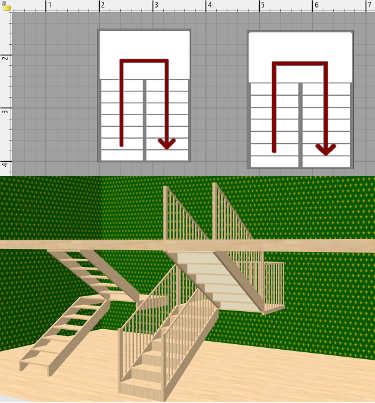
An other example of use:

Is not so simple as most of us wish but...
Thanks God, FOS and Mst. Puybaret for this software exist especially under linux.
----------------------------------------
A computer program does what you tell it to do, not what you want it to do. Murphy's Law
When all else fails, read the instructions. Murphy's Law
If you don't like "AS IS", DIY. Dorin's law