|
Sweet Home 3D Forum » List all forums » » Forum: Features use and tips » » » Thread: Remove flooring from enclosed areas |
|
| Print at Dec 18, 2025, 8:31:35 AM | View all posts in this thread on one page |
| Posted by temp89 at Feb 28, 2017, 1:54:41 PM |
|
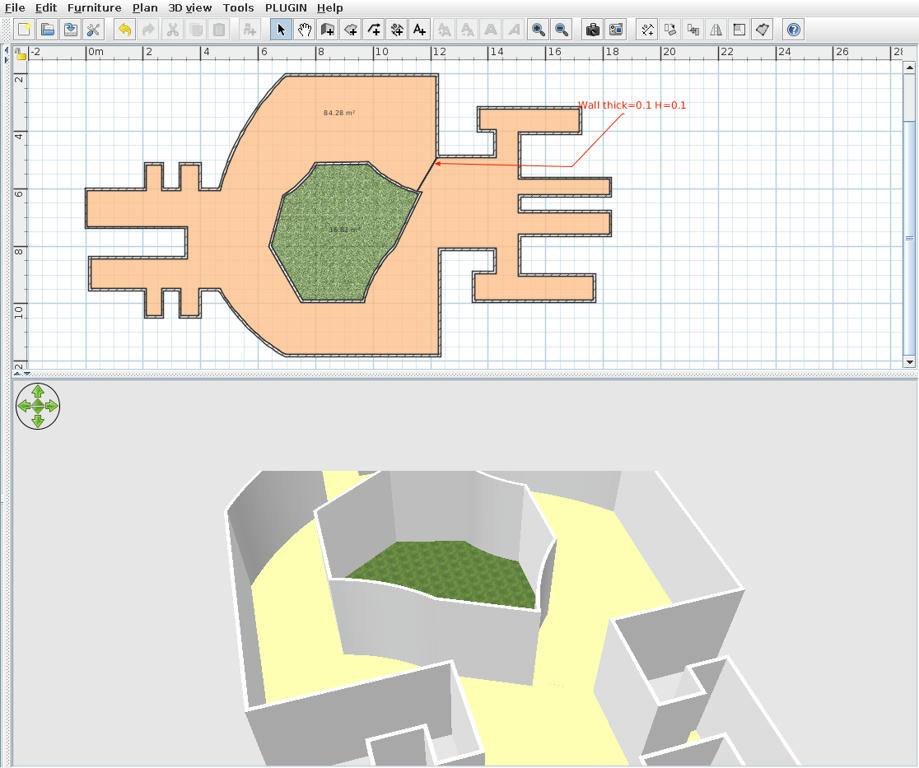
Remove flooring from enclosed areas Say you have an enclosed courtyard. When I double click the 2nd floor corridor that snakes round it, Sweethome automatically adds flooring over the courtyard even though the corridor is a seamless polygon. Is there a way to "fill" only the shape I'm clicking in? |
| Posted by hansmex at Feb 28, 2017, 5:46:05 PM |
|
Re: Remove flooring from enclosed areas It's hard to give an answer without seeing the actual model... ---------------------------------------- Hans new website - under constuction hansdirkse.info |
| Posted by temp89 at Mar 1, 2017, 12:25:27 AM |
|
Re: Remove flooring from enclosed areas https://s2.postimg.org/hdodzbq5l/SSS.png Double clicking inside the corridor created a floor that goes through anything that's enclosed, even if it's meant to be open air. |
| Posted by bdfd at Mar 1, 2017, 6:40:04 AM |
|
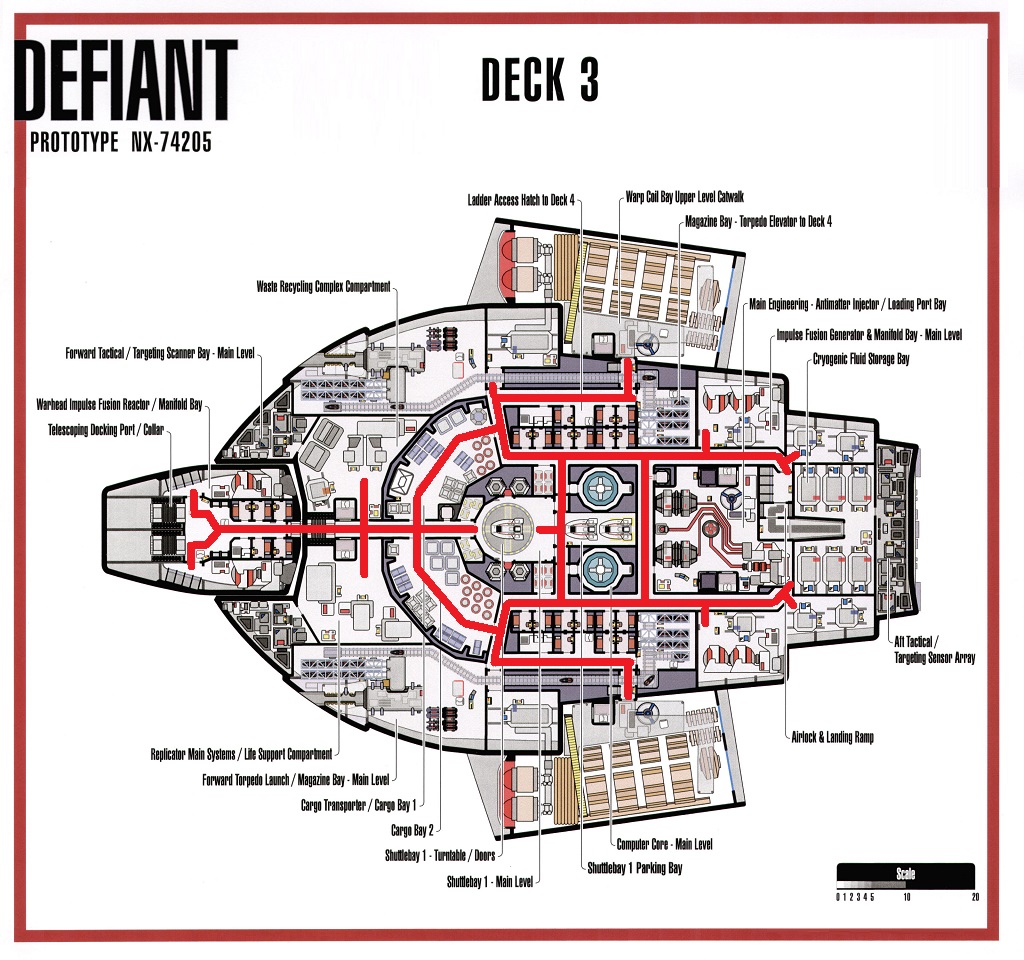
Re: Remove flooring from enclosed areas https://s2.postimg.org/hdodzbq5l/SSS.png It reminds me the third deck of the USS Defiant (form, rooms, main accesses (in red lines), ...) Double clicking inside the corridor created a floor that goes through anything that's enclosed, even if it's meant to be open air. More seriously, did you verify all heights for each wall of courtyard ? And the parameters of each level ? => little tip : in first time, I give a different color for each nearer walls to see an eventual error. ![]() ---------------------------------------- Evil progresses when good people do nothing! --- SH3D 7.1 and nothing else - W11 64b in 4K |
| Posted by dorin at Mar 3, 2017, 8:25:09 PM |
|
Re: Remove flooring from enclosed areas Unfortunately the SH3D don't handle yet the hols in surfaces. You must use some aids(tricks). Example: In 3D is not visible and in 2D You can delete the wall(s) after the rooms are created. ---------------------------------------- A computer program does what you tell it to do, not what you want it to do. Murphy's Law When all else fails, read the instructions. Murphy's Law If you don't like "AS IS", DIY. Dorin's law |
| Posted by okh at Mar 5, 2017, 11:29:51 AM |
|
Re: Remove flooring from enclosed areas Is there a way to "fill" only the shape I'm clicking in? Dorin's suggestion is elegant, clever and probably the easiest - note that you may need several thin/low walls (thresholds) to join the different corridor walls, i.e. splitting the corridor into several rooms.Just for the record, what Dorin says about holes in surfaces is true in the sense that it cannot be done automatically. However, if the courtyard were rectangular, you could import an invisible object as a staircase to punch a hole in the ceiling/floor above. For a non-rectangular courtyard, you would need to create an 'invisible staircase SVG path' cutout with the Furniture Library Editor to punch out a custom hole. While the latter is possible, in your case it is probably much less elegant and not straightforward unless you are very comfortable with SVG cutouts. But, try Dorin's suggestion. Should work without too much trouble. ok |
|
|
Current timezone is GMT Dec 18, 2025, 8:31:35 AM |