|
Sweet Home 3D Forum » List all forums » » Forum: Features use and tips » » » Thread: How to change existing dimension precisely from keyboard |
|
| Print at Dec 19, 2025, 7:54:38 PM | View all posts in this thread on one page |
| Posted by John37 at Sep 4, 2016, 1:55:31 PM |
|
How to change existing dimension precisely from keyboard Hello I need to be change the length of existing dimensions precisely from the keyboard. Please can someone advise how to do this? |
| Posted by dorin at Sep 5, 2016, 9:20:12 AM |
|
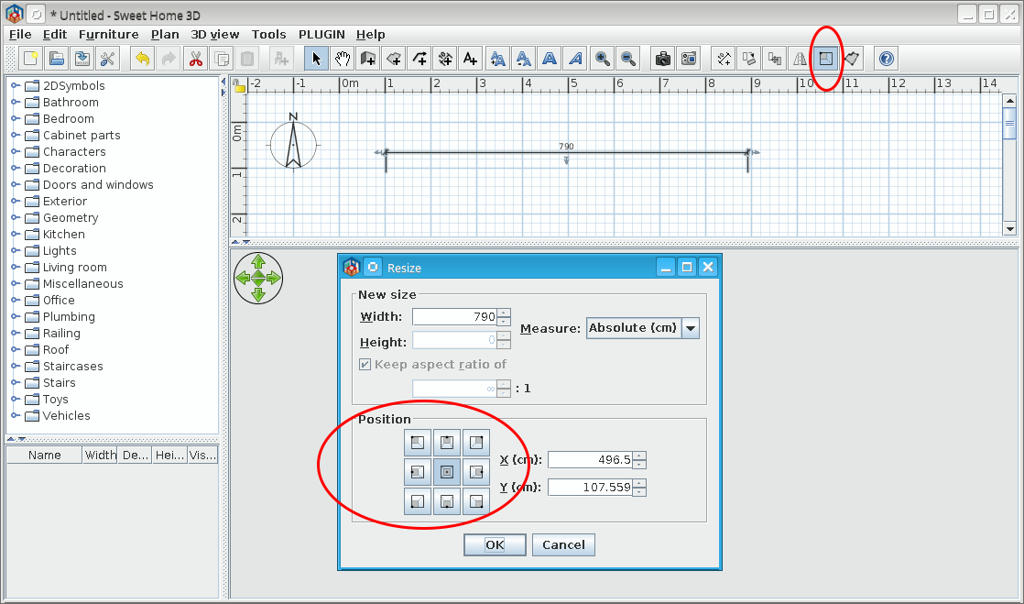
Re: How to change existing dimension precisely from keyboard 1. Install AdvancedEditing plug-in. 2. Use the Resize... icon or Menu Edit -> Resize... ![]() ---------------------------------------- A computer program does what you tell it to do, not what you want it to do. Murphy's Law When all else fails, read the instructions. Murphy's Law If you don't like "AS IS", DIY. Dorin's law |
| Posted by John37 at Sep 5, 2016, 10:17:28 AM |
|
Re: How to change existing dimension precisely from keyboard Wonderful, thank you very much |
|
|
Current timezone is GMT Dec 19, 2025, 7:54:38 PM |