|
Sweet Home 3D Forum » List all forums » » Forum: Installation » » » Thread: Has the renderingprosess been altered i 5.2? |
|
| Print at Dec 27, 2025, 8:33:36 AM | |
| Posted by Ceciliabr at Feb 25, 2016, 6:38:42 PM |
|
Has the renderingprosess been altered i 5.2? My renderings no longer match the preview-window. Far-away objects appears to be shifted, and are not rendered in the right position. Anyone else have the same experience? |
| Posted by hansmex at Feb 26, 2016, 9:04:40 AM |
|
Re: Has the renderingprosess been altered i 5.2? All old versions of SH3D are available on Sourceforge. It would be easy enough to make a comparison. Personally I don't think anything has changed, because no changes were reported with the newest version. H ---------------------------------------- Hans new website - under constuction hansdirkse.info |
| Posted by Ceciliabr at Feb 26, 2016, 1:08:21 PM |
|
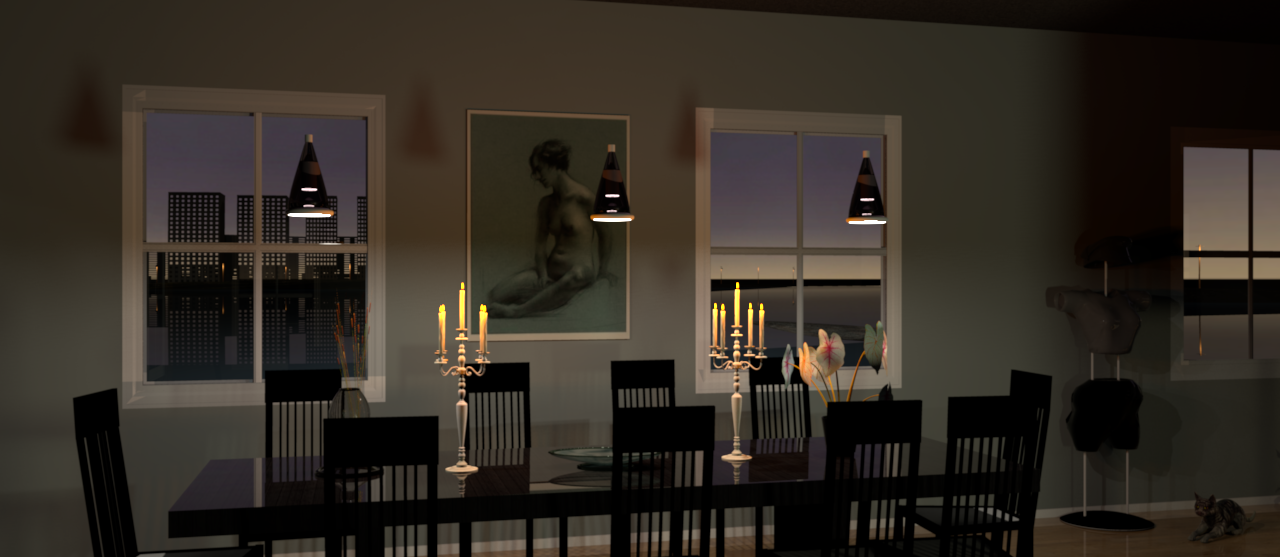
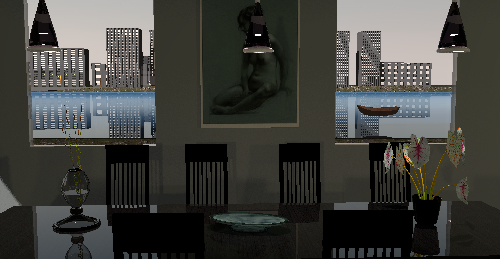
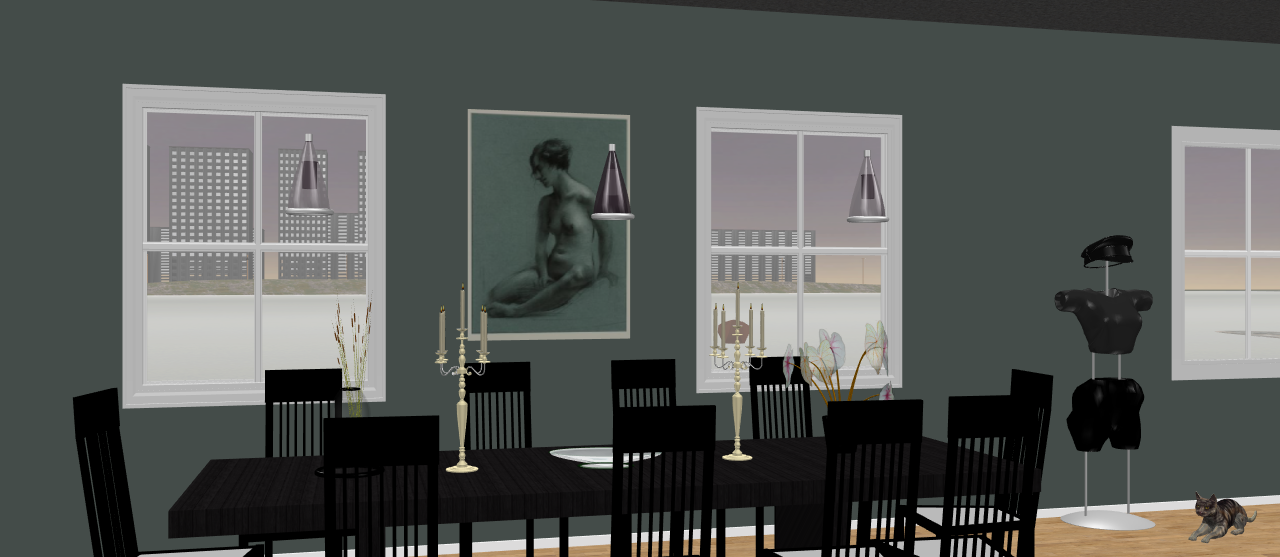
Re: Has the renderingprosess been altered i 5.2? Hi, yes I changed back to 5.1, of course, so that's not the problem. The reason I'm suspecting the rendering routine, is that it the render window seems to have changed slightly with 5.2, and that the problem does not exists in 5.1. But, of course, there might be another explanation. Here is what I mean: If you look closely, you can see that the background has shifted quite a bit. |
| Posted by mazoola at Feb 26, 2016, 1:14:54 PM |
|
Re: Has the renderingprosess been altered i 5.2? You've probably already done this, but if not, make sure your camera (depth-of-field) and Virtual Visitor (angle of vision) settings are at the default. I've not poked around to see what defaults Emmanuel uses in rendering the 3D view window, but I'd assume a mismatch between them and the ones used to create the final 'photo' render might cause the apparent anomaly you demonstrate. |
| Posted by Puybaret at Feb 26, 2016, 1:36:18 PM |
|
Re: Has the renderingprosess been altered i 5.2? Strange... The small differences between 5.1 and 5.2 in the renderer source code shouldn't lead to these lighting differences. ---------------------------------------- Emmanuel Puybaret, Sweet Home 3D creator |
| Posted by Ceciliabr at Feb 26, 2016, 2:26:31 PM |
|
Re: Has the renderingprosess been altered i 5.2? There are no lighting differences. It's the placement of far away objects that shifts. On the top picture, made in the lowest quality, the outside scenery is at the intended position. But in the bottom picture, you will notice that the outside scenery has shifted a lot to the left. The buildings that appears in the middle window in the top picture, is appearing in the left window after rendering. This does not happen with 5.1. Another thing: When I opened the 5.2 file in 5.1, the far away buildings were not there at all. |
| Posted by Ceciliabr at Feb 26, 2016, 3:18:32 PM |
|
Re: Has the renderingprosess been altered i 5.2? @ mazoola: What exactly is "the angle of vision"? I don't seem to have that option. I'm on Mac,so maybe angle of vision it's only an option in the Windows-version? C |
| Posted by mazoola at Feb 26, 2016, 4:04:06 PM |
|
Re: Has the renderingprosess been altered i 5.2? @Ceciliabr What exactly is "the angle of vision"? I'm sorry; I had some sort of brain freeze while writing that comment. What I meant to say was "field of view," as this Virtual Visitor help page shows. maz |
| Posted by Ceciliabr at Feb 26, 2016, 4:25:36 PM |
|
Re: Has the renderingprosess been altered i 5.2? I see. :) The field of view was, if I remember correctly, set to 47, which equals a 50 mm lens on a full-frame camera, at least according to this table: http://kmp.bdimitrov.de/technology/fov.html, a link which Mr. Puybaret kindly gave me, and which I find most useful for matching perspectives with both my camera and with programs like Poser and Vue. I really don't think this displacement has anything to do with the field of view settings. |
| Posted by Ceciliabr at Feb 26, 2016, 7:25:50 PM |
|
Re: Has the renderingprosess been altered i 5.2? @Puybaret I see you have changed the bucket size to 64. Of course that should not make any diference in the way objects are being placed. BTW, I did the opposite in Poser, changing the bucket size from 64 to 16, mainly because the program sometimes were stuck on very complex parts, like human hair, but also because with a lower bucket size I could reduce the time I had to wait for a "cancel" to take effect. What is the gain of increasing the bucket size to 64? |
| Posted by mazoola at Feb 26, 2016, 7:59:28 PM |
|
Re: Has the renderingprosess been altered i 5.2? The only similar issue I've seen has had to do with SH3D/SunFlow handling of refraction -- but that at least in part had to do with, once again, Sketchup-to-SH3D issues. Still early in my use of these two programs, I modeled a custom glass-walled shower in Sketchup and exported it for use in SH3D. When rendered with Visitor line-of-sight at an obtuse angle to the shower wall, objects on the other side of the glass would show unrealistic amounts of refraction, often displacing them significantly. The problem seemed to stem from the way Sketchup handles the surfaces of solids. If I defined each pane of glass as a three-dimensional object -- say, as a rectangular solid 7 feet high by 3 feet wide by 1/4 inch deep -- instead of simply as a face object, dimensionless along the third dimension, the resulting object is actually more like a Thermopane glazing unit (imagine a hollow glass box) than sheet glass. I've yet to look at SunFlow's refraction handling, but it appears refraction is calculated whenever a shot ray crosses a boundary between two objects with different indices of refraction. Depending on how conscientious I was about eliminating all 'default' surface textures, there could be as many as four such boundaries to cross. As best I recall, my fix was simply to avoid generating renders with the shower front aligned at too great an angle from the Visitor line of sight. (There seemed to be a possible SunFlow issue beyond the unintentionally cumulative effects of refraction, though; at the furthest edges of the glass, the transmitted image was displaced so severely, the shower wall began to look like a fisheye lens.) Given your windows appear to be stock SH3D models, none of this should apply -- but it might be interesting to replace the windows with service hatches (or set the glass panes to 'invisible') and re-render, just to see if refraction plays a role here. |
| Posted by Ceciliabr at Feb 26, 2016, 8:39:19 PM |
|
Re: Has the renderingprosess been altered i 5.2? Interesting thought, that it could be the windows. The windows are actually imported. Normally I would make my own windows, but I took a shortcut and downloaded these the from the Kolbe-collection. Hmm... |
| Posted by Ceciliabr at Feb 26, 2016, 8:57:23 PM |
|
Re: Has the renderingprosess been altered i 5.2? Well... with Kolbe windows: and with service hatch and transparent glass: seems you have solved the puzzle. Yuhooo! Thanks a million ![]() |
| Posted by mazoola at Feb 26, 2016, 9:54:51 PM |
|
Re: Has the renderingprosess been altered i 5.2? @Ceciliabr That's great - it's nice to get one right every now and then. I've actually used a lot of Kolbe windows in my current project -- but for the most part they look different from yours because I only recently (as in two days ago) realized many of their models in 3DWarehouse are actually composites incorporating a core window design along with a number of casing options, each with its own layer. Unthinkingly, I'd exported my furniture objects with all layers visible -- and then wondered why the models were so needlessly complex. I'm currently in the process of re-exporting all my windows and doors -- correctly, this time. Most (all?) Kolbe models are double-glazed, so you might want to try hiding or deleting one of the panes before export; if that doesn't fix things, you could eliminate one pane and replace the other with a single face. This should correct the refraction problem while still supporting reflections. |
| Posted by mazoola at Feb 26, 2016, 11:16:19 PM |
|
Re: Has the renderingprosess been altered i 5.2? Based on the handful of Kolbe models I have on this PC, it appears they use dimensionless panes in the first place. |
| Posted by okh at Feb 27, 2016, 1:13:15 PM |
|
Re: Has the renderingprosess been altered i 5.2? ..the way Sketchup handles the surfaces of solids... Yes, this bothers me as well. For all the limitations of Sketchup, it is still the quickest way of creating basic objects, like terrains, staircases and windows. (for me, anyway, by the time I have created a model in Blender, I cannot remember what I needed it for).So, as a total amateur (and non-techie) with limited grasp of the issue, my preliminary solution for quick Sketchup stuff, is to make sure the surfaces are oriented correctly and use one texture for all reverse sides (usually bright pink to check that the orientation of the surfaces are correct). Then I import the .dae to SH3D, and set the reverse sides (pink) to invisible with 5.2 and export to .obj. The SH3D export will then have removed the reverse sides, and the model should be reasonably well behaved. At least I think. But, I hasten to add that even if the double sided surfaces exported from Sketchup may create some errors in the model (wrong orientation of normals), these models have always behaved perfectly in SH3D with no rendering issues at all. So as long as I make sure to apply the same texture to both sides of Sketchup surfaces, I am not sure I can be bothered to go the extra laps. ok @Ceciliabr, ser du har flyttet på Juliette Aristides . |
| Posted by Ceciliabr at Feb 27, 2016, 4:11:16 PM |
|
Re: Has the renderingprosess been altered i 5.2? @okh She's a movable object, and had no objections to a temporary vacation by the Shuangtuozi-bay. Dette projekt var kun tænkt som en tutorial for min nabo. Han ville ha en gennemgang av hvordan at bruge atmosfærer, dvs stående transparenter, og så havde han helt glemt hvordan man placerer en sol på himlen. Jepp! |
|
|
Current timezone is GMT Dec 27, 2025, 8:33:36 AM |