|
Sweet Home 3D Forum » List all forums » » Forum: Features use and tips » » » Thread: Problems importing doors and windows |
|
| Print at Dec 17, 2025, 8:14:23 PM | View all posts in this thread on one page |
| Posted by MAJ_Speirs at Jun 12, 2015, 9:28:28 PM |
|
Problems importing doors and windows Hi everyone, I need help. I try importing doors or windows (picture window), but everytime I put the door/window the object stays as thick as the wall. The "open door" that comes with the software works very well, but any other object that is not as thick as the wall has problems. I already tried to open a hole and then putting the desired object as moble but it doesn't fit or it doesn't stay how I want. The option set as "moble" can't be chosen together with the "door or window". Maybe that's the problem Thanks |
| Posted by Puybaret at Jun 13, 2015, 11:07:06 AM |
|
Re: Problems importing doors and windows Doors and windows coming with Sweet Home 3D or from furniture libraries have generally some additional properties that define how they should be resized when placed on a wall. If you don't want to investigate how to use these properties, you could simply deactivate magnetism when you move the picture window on the wall. This is will avoid the window automatic resizing, but the hole of the window will still be computed. You could also change the size of the window once placed in the wall. ---------------------------------------- Emmanuel Puybaret, Sweet Home 3D creator |
| Posted by okh at Jun 13, 2015, 11:43:30 AM |
|
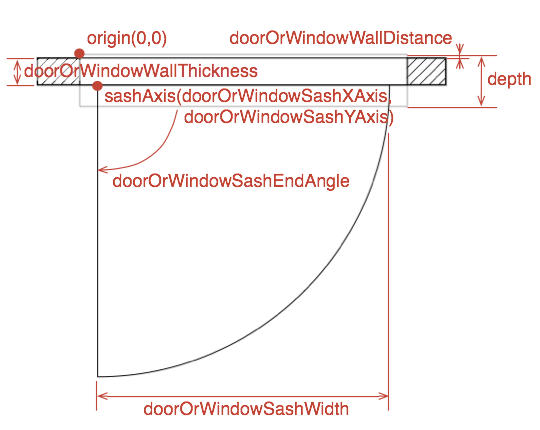
Re: Problems importing doors and windows Imported models may not have all properties needed to work smoothly in SH3D - door openings, lights, cut-outs etc. A couple of options: 1) Place the door window in the wall. Then increase the depth of the window. 2) Disable magnetism (ALT) when placing the door/window. 3) Putting the door/window in a hole/opening - what I think you tried - should work too. First insert the hole, and then import the model (but without Door/Window checked). Then place the door carefully in the opening. Use the settings manually to get the hole and door to match. The 1)-3) options have the disadvantage that moving the door becomes a bit cumbersome later. 4) Look for a SH3D furniture library that has a suitable model where the values for how far the door/window should protrude are already set. 5) If you feel comfortable editing advanced properties in library text files: Import your door/window to a library and find out how you can edit the advanced properties of library items (DefaultFurnitureCatealog.properties in the library - see thread 2006 and some additional info in the SVG guide on p 9-10). The values you are looking for are: doorOrWindowWallThickness#n=x (compare to depth#) doorOrWindowWallDistance#n=y (protrusion one side). ![]() ok |
| Posted by MAJ_Speirs at Jun 13, 2015, 2:32:47 PM |
|
Re: Problems importing doors and windows Thanks Puybaret for the information. But thank you very much okh for the good explanation. I finally got it placing it as forniture in the hole turning off magnetism for the specific door (glassdooropen) here is a link of how it stayed: http://prntscr.com/7gfvh5 |
| Posted by okh at Jun 13, 2015, 4:14:52 PM |
|
Re: Problems importing doors and windows Good. Nice house ok |
|
|
Current timezone is GMT Dec 17, 2025, 8:14:23 PM |