Print at Dec 17, 2025, 2:40:30 PM
Posts: 21   Pages: 3   [ Previous Page | 1 2 3 | Next Page ]
View all posts in this thread on one page
Posted by rdorsch at May 2, 2015, 3:53:22 PM
Re: 3D Artefact
Hi Hans,

thank you for your quick response.

Hmm, my software is new, my hardware is indeed older....I run SH3D 4.5 on a Debian Linux 8.0 system. The graphics hardware is Intel based, which is typically well supported on Linux systems

00:02.0 VGA compatible controller: Intel Corporation 82G35 Express Integrated Graphics Controller (rev 03) (prog-if 00 [VGA controller])

I.e. I would expect may slow behavior, but not wrong rendering. The artefacts are perfectly reproducible, they are also static, i.e. when an artefact is visible and I stop moving the artefact stays. The artefacts slowly become bigger and smaller when I change the angle of view in the room.

Can sweethome3d generate logs, which might be helpful in understanding what is going on?

Kind regards
Rainer

Posted by hansmex at May 2, 2015, 4:13:26 PM
Re: 3D Artefact
Rainer,

I'm not familiar with Debian, nor with hardware. So, I don't have specific recommendations for you. I'm using Ubuntu for close to 10 years now, and I know SH3D works well. In Ubuntu there can be a conflict of Java; my solution was to uninstall all Java lookalikes and install Oracle Sun Java.

Most other problems I've seen here over the years have something to do with incompatible hardware or drivers. So, that's where I would look first. Did you read the suggestions in the FAQ?

Another suggestion: try to render a photo in Q3 or Q4. Probably the artefacts will disappear, as these renders depend on software, not hardware (like Q1 and Q2).

I also suggest upgrading to SH3D v4.6, it's easy enough.

Here are the results I get with quality setting 3. Also, perfectly reproducible. Q1 and Q2 also look as expected with closed ceilings.

kitchen
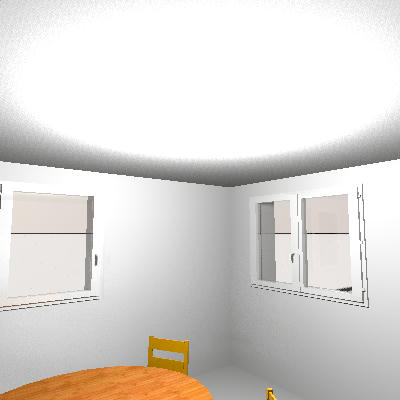

living
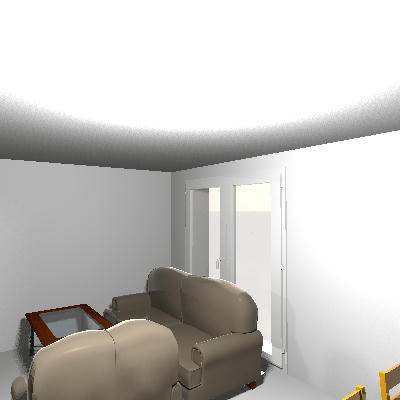
----------------------------------------
Hans

new website - under constuction
hansdirkse.info

Posted by rdorsch at May 2, 2015, 5:58:59 PM
Re: 3D Artefact
Hans,

many thanks again for the immediate feedback. Indeed, I can confirm that rendering a photo with Q3 or Q4 produces a correct output, whereas Q1 or Q2 produce the ceilings with gaps.

See e.g. http://netcup.bokomoko.de/~rd/sweethome3D/sh3d-artefact4.png

Are Q3 and Q4 using sunflow? Do you know through which mechanisms or libraries the HW is accessed in Q1 or Q2? Java 3D?

Are you using java6 ? I have here

I read now through the FAQ, but did not find anything I could relate to my issue....did you have anything specific in mind?

Thanks
Rainer

Posted by hansmex at May 2, 2015, 6:23:24 PM
Re: 3D Artefact
Rainer,

Q1 and Q2 depend on the hardware of your computer, especially the 3D capabilities of your video card and driver.
Q3 and Q4 are hardware-independent; they use the SH3D software, including Sunflow for rendering.

The installed version comes with its own Java. That's the version I always use. You could try the webstart version and/or the online version to see if there is a difference.
For more technical info, ask Puybaret.

And, no, I didn't have anything specific in mind when referring to the FAQ. Just hoping that one of the suggestions there might be helpful.

H
----------------------------------------
Hans

new website - under constuction
hansdirkse.info

Posted by rdorsch at May 2, 2015, 7:08:37 PM
Re: 3D Artefact
Hans,

I have now a case where I see an artefact in Q3 and Q4 but not Q1 and Q2:

http://netcup.bokomoko.de/~rd/sweethome3D/sh3d-artefact5.png

I would have expected the outer wall to be flat, but it seems to have a strange step on the right half.

The rendering is taken with Q4 on the same sh3d file as before.

Do you have any idea what goes wrong?

Thanks
Rainer

PS: I am downloading 4.6 to install it on the side.

Posted by rdorsch at May 2, 2015, 8:12:55 PM
Re: 3D Artefact

I also suggest upgrading to SH3D v4.6, it's easy enough.


I did that, but that did not resolve any artefact issue. The software artefact become rather somewhat worse (rendered with Q3, not clear where the structure between the second and thrid floor comes from):

http://netcup.bokomoko.de/~rd/sweethome3D/sh3d-artefact6.png

It uses the included java version.

Rainer

Posted by hansmex at May 2, 2015, 11:37:39 PM
Re: 3D Artefact
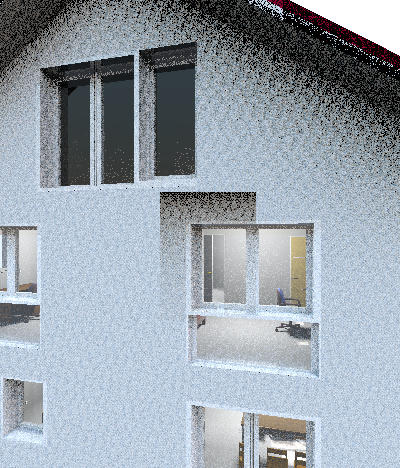
Once again I opened your file and was able to reproduce an artefact. Not exactly the same as yours, but similar, and not easily explained.

This is what I did:
- open file
- switch to Aerial View
- select Create Photo
- set quality to Q3
- render image --> there is a small artefact above the window

Then I did the following
- zoom in on the house using the scroll wheel on my mouse
- make another photo --> there is a small artefact above the window

Both images were made WITHOUT changing the view by rotating the image
After slightly rotating the 3D image, the artefact persists. It's the same in all pictures. (Q3 - 400x400 pixels)

NOTE
I checked wall heights (okay), level heights (okay), wall textures (none), etc. I couldn't find anything out of the ordinary.
NOTE 2
When I delete the two windows under the roof and insert them again, the artefact has disappeared.


----------------------------------------
Hans

new website - under constuction
hansdirkse.info

Posted by rdorsch at May 3, 2015, 12:32:00 AM
Re: 3D Artefact
Hans,

thank you for looking into that and I am glad that you were able to repro the issue.

I made these windows invisible and later visible again. Then also the issue disappeared. But after rotating the building somewhat forth and back, it came back.... not in exactly the same for though

http://netcup.bokomoko.de/~rd/sweethome3D/sh3d-artefact7.png

To me it seems that sh3d breaks the computation down into grid elements....and some of the grid elements, the computation goes wrong.

Also I noticed that I changed the model somewhat, for completeness I uploaded the latest model

http://netcup.bokomoko.de/~rd/sweethome3D/treppeNO2.sh3d

Kind regards
Rainer

Posted by hansmex at May 3, 2015, 2:22:12 AM
Re: 3D Artefact
When rendering a photo of your new file, I get the same artefact.
Just a different size and in a different place, but VERY similar, consisting of two parts.

It almost looks like an X-ray shadow of two windows.

H
----------------------------------------
Hans

new website - under constuction
hansdirkse.info

Posted by okh at May 3, 2015, 2:07:03 PM
Re: 3D Artefact
Could this possibly be related to SF Bugs 582? Sometimes several SVG cut-outs on one surface (wall or floor/ceiling) appear to be interfering with each other. ok

Posts: 21   Pages: 3   [ Previous Page | 1 2 3 | Next Page ]