|
Sweet Home 3D Forum » List all forums » » Forum: Features use and tips » » » Thread: Invisible triangle as window |
|
| Print at Dec 16, 2025, 10:54:31 PM | View all posts in this thread on one page |
| Posted by Thierry785 at May 9, 2014, 4:50:06 PM |
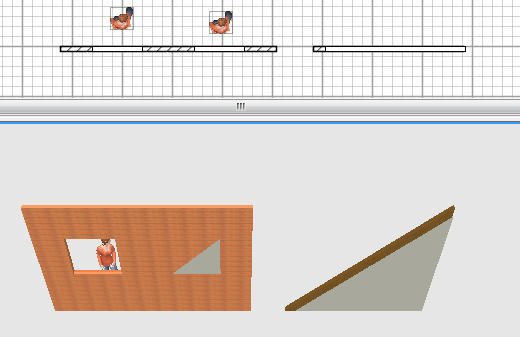
Invisible triangle as windowDear All, I've checked through the thread to find an answer to my question, but I couldn't find an helpfull one. Therefore I come back to you with the question. Inserting an invisible box from the file box_invisible.zip works fine for rectangular windows, but when I use a triangle from the file triangle-invisible.zip, the hole remains opaque, not allowing to see through the wall as expected (see picture hereafter). I want to use this to represent a wood beam under the roof starting from a wall. Could you please show me a way to realize this. Thanks a lot for your help and congratulations for your remarkable program. ![]() |
| Posted by Puybaret at May 9, 2014, 7:53:52 PM |
|
Re: Invisible triangle as window I just updated the triangle-invisible.zip file that Hans proposed. Still very small but really transparent now! ![]() ---------------------------------------- Emmanuel Puybaret, Sweet Home 3D creator |
| Posted by Thierry785 at Jun 1, 2014, 2:03:31 PM |
|
Re: Invisible triangle as window Thanks a lot, it's now orking fine. Thierry |
|
|
Current timezone is GMT Dec 16, 2025, 10:54:31 PM |