|
Sweet Home 3D Forum » List all forums » » Forum: Features use and tips » » » Thread: Lampshade transparency |
|
| Print at Dec 19, 2025, 6:18:53 PM | |
| Posted by Tic at Sep 28, 2011, 4:36:07 PM |
|
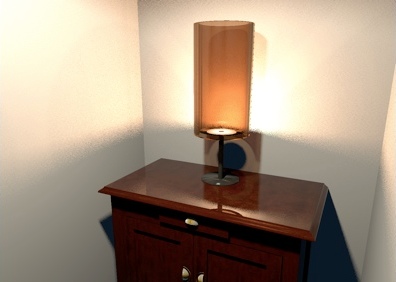
Lampshade transparency Hi everybody, I’m an enthusiastic recent SH3D user. First of all let me congratulate the developers team on sharing this excellent tool. I’m practicing with models and light and I’m trying to obtain a realistic rendering of a translucent lampshade. I made some tests modifying Ni parameter in .mtl file, but I had no satisfying result. Here an example of the effect I’d like to obtain. Can anyone give suggestions? Thanks |
| Posted by Puybaret at Sep 28, 2011, 6:55:21 PM |
|
Re: Lampshade transparency From the MTL specifications, the Ni value is for optical density or index of refraction and not transparency. You should better play with the d value which is the transparency factor from 0 (fully transparent) to 1 (fully opaque and default value). I'll be happy to see the results of your tests. ![]() ---------------------------------------- Emmanuel Puybaret, Sweet Home 3D creator |
| Posted by Tic at Sep 28, 2011, 9:56:23 PM |
|
Re: Lampshade transparency Emmanuel, thank you for your prompt reply! Ok, I tried with d = 0.32 on a 20x20cm empty box (with 1mm thick walls) that I put in upside-down position on the floor of a dark room. Inside the box I put a 10x10cm light source hanging at 10cm elevation. Unfortuntely the resulting Q4 photo is still far from my targert: there are black shimmers on the box surfaces and some light escapes from the bottom of the box I would have sent you an image, but sorry, I just cannot find the proper "attach file" or "upload image" option.... |
| Posted by Puybaret at Sep 28, 2011, 10:38:19 PM |
|
Re: Lampshade transparency Here's an example I built from partially transparent round walls exported then reimported. I put this shade on on a small floor uplight to make it look like a small lamp. ![]() ---------------------------------------- ---------------------------------------- Emmanuel Puybaret, Sweet Home 3D creator |
| Posted by Tic at Sep 28, 2011, 11:29:13 PM |
|
Re: Lampshade transparency Wow, that's quite similar to what I mean... I'll let you know my further steps.. In the meantime you can have a look at my poor result... ![]() Thank you! ---------------------------------------- |
| Posted by Puybaret at Sep 29, 2011, 12:36:51 AM |
|
Re: Lampshade transparency Be sure to give the lampshade a color darker than white otherwise it will be rendered completely transparent. You can test also with textures but it might be buggy like here. ---------------------------------------- Emmanuel Puybaret, Sweet Home 3D creator |
| Posted by Tic at Sep 29, 2011, 10:29:14 AM |
|
Re: Lampshade transparency Emmanuel, could you please post the mtl assignments of your cylindrical lampshade? I'd like to compare it to mine. |
| Posted by Puybaret at Sep 29, 2011, 12:22:30 PM |
|
Re: Lampshade transparency Tic if you want to know these values, just create an empty document in which you copy/paste only the lampshade and then export it to OBJ format. ---------------------------------------- Emmanuel Puybaret, Sweet Home 3D creator |
| Posted by Tic at Sep 29, 2011, 12:49:47 PM |
|
Re: Lampshade transparency Great! Thank you so much.. sorry..I'm sitll learning.. ![]() |
| Posted by Tic at Sep 30, 2011, 9:45:03 PM |
|
Re: Lampshade transparency Emmanuel, I'm back after more tests: I think that the bad rendering is due to the Obj export method of the modelling software I use (Wings3D). On the left you can see your original lampshade and on the right the same object imported in wings3d and then re-exported as .obj. I manteined the same mtl file for both. ![]() |
| Posted by Puybaret at Oct 1, 2011, 2:47:25 AM |
|
Re: Lampshade transparency If the mtl file is the same in both cases, it's probably due to some normals that were changed in Wings3D. ---------------------------------------- Emmanuel Puybaret, Sweet Home 3D creator |
| Posted by Tic at Oct 1, 2011, 2:36:40 PM |
|
Re: Lampshade transparency You're right, I find out that SH3D and wings3d generate different normal directions: while in SH3D vertex normals are orthogonal to faces, in wings3d they spread out radially; Also the amount of normals and faces is different. This affercts somehow surface reflection and material refraction. I tried to export form wings3d to 3DS and then import in SH3D but unfortunately the resutl is quite the same. So I think there's no way to solve the problem if I want to keep on modelling in wings3d ![]() |
| Posted by hansmex at Oct 1, 2011, 4:20:30 PM |
|
Re: Lampshade transparency Tic, Instead of Wings3D, you could try Art of Illusion , or Misfit Model 3D . Hans ---------------------------------------- Hans new website - under constuction hansdirkse.info |
| Posted by Puybaret at Oct 1, 2011, 5:54:35 PM |
|
Re: Lampshade transparency Or maybe find the way to configure normals computation in Wings3D. ---------------------------------------- Emmanuel Puybaret, Sweet Home 3D creator |
| Posted by Tic at Oct 1, 2011, 7:07:50 PM |
|
Re: Lampshade transparency Thank you guys for your suuport and suggestions! Even though I am not as much familiar with AoI or MM3D as I am with Wings3D, I'll try them. At the moment there is no other choice for me since I have no knoledge in processinig data files... but it could be a challange for the future, never say never... Thanks again |
| Posted by BLAlley at Nov 21, 2011, 2:19:03 AM |
Re: Lampshade transparencyInstead of being cryptic, can't you guys just clearly explain a solution? I want to do the same thing, and even after reading every post in the thread, I still have no idea how to make something more transparent. |
| Posted by hansmex at Nov 21, 2011, 6:47:14 AM |
|
Re: Lampshade transparency Bkalley, Instead of being rude, could you ask in a friendly and polite manner what you want to know? We might be tempted to answer you... Transparency can be obtained in several manners in SH3D. 1 - By modifying the OBJ file. This is described earlier in this thread. It's not the easiest way, but gives you rather fine control of the results. You will have to experiment and be patient to get good results. 2 - By applying a transparent texture. You can make a transparent texture from a PNG or GIF file, and then apply it to a part of your model. I've used these images to make several textures that I sometimes use. When using walls, you may want to coat one side of your wall with a completely transparent texture. 3 - By using an external program. SH3D is meant for interior decorating, not as a 3D design program. You may want to use Blender, Art of Illusion or some similar program to get the desired results. Hans ---------------------------------------- Hans new website - under constuction hansdirkse.info |
| Posted by okh at Sep 11, 2013, 8:41:45 PM |
|
Re: Lampshade transparency Just so I understand. Transparent GIFs/PNGs are supported for furniture materials, but not for (walls or) floors? Just trying a (semi-)transparent floor (for a swimming-pool). ok PS - trying with hansmex' texture above, walls and floors render in opaque black and furniture/objects in semi-transparent black PPS Quite obviously not an important issue as there are easy workarounds. |
| Posted by hansmex at Sep 11, 2013, 10:02:22 PM |
|
Re: Lampshade transparency Transparent GIFs and PNGs can be used on objects and walls. Remember that a wall has two sides, so you need to apply two (different?) transparent textures to make a wall transparent. I've never tried it, but floors and ceilings should also become transparent with transparent textures. Note that transparency is only correctly shown when you make a photo or video of quality level 3 or 4. Hans ---------------------------------------- Hans new website - under constuction hansdirkse.info |
| Posted by okh at Sep 12, 2013, 12:40:03 AM |
|
Re: Lampshade transparency Ah so. Thanks. Back to the drawing board. Must have messed up the transparency levels in my png. ok PS BTW, quality rendering on the celron processor I'm using right now is NOT recommended.... :-) |
|
|
Current timezone is GMT Dec 19, 2025, 6:18:53 PM |