|
Sweet Home 3D Forum » List all forums » » Forum: Features use and tips » » » Thread: Overlay an image on preview imae |
|
| Print at Dec 15, 2025, 5:29:12 PM | View all posts in this thread on one page |
| Posted by alexan at Aug 4, 2011, 1:08:21 PM |
|
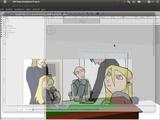
Overlay an image on preview imae AS: Sorry for my bad english I would like to use Sweet Home 3D to help myself in drawing the background for my comic (basically I hand trace with gimp over the image rendered image in background ).The most logical way would had be just take a shot of the rendered room image and then sketch over it. But I also need to work on the old pages, and find the right matching prospective it's quite hard without having an overlay preview of it. In short: I need to know how put on overlay image while I am in 3d view. The image is a png with transparency Here's an example. ![]() (I need to have a 3d view of a basic room with desk+window behind) Probably I can do something alike exporting and then importing through blender... but this would be a lot of mess for each page x every panel ![]() |
| Posted by Puybaret at Aug 4, 2011, 7:32:53 PM |
|
Re: Overlay an image on preview imae Sorry there isn't such a feature. Nevertheless if you're a programmer, you could modify HomeComponent3D to set the navigation panel background image with your image and remove navigation buttons. Otherwise, you should look at some application that lets you view through transparent images and windows, maybe this one. Will we be able to view your Comic one day? ---------------------------------------- Emmanuel Puybaret, Sweet Home 3D creator |
| Posted by alexan at Aug 5, 2011, 12:37:11 PM |
|
Re: Overlay an image on preview imae Thanks! With Compiz opacity feature everything went smooth: ![]() Currently I hadn't left much space for the background.. but this will be a lot useful in future. Thanks again for your wonderful tool! Btw: this is the comic Note from moderator: updated [img] tags (they must be written with lowercase letters) |
|
|
Current timezone is GMT Dec 15, 2025, 5:29:12 PM |