|
Sweet Home 3D Forum » List all forums » » Forum: 3D problems » » » Thread: Unexpected rendering... |
|
| Print at Dec 17, 2025, 10:20:43 PM | |
| Posted by hansmex at Sep 24, 2010, 6:16:14 AM |
|
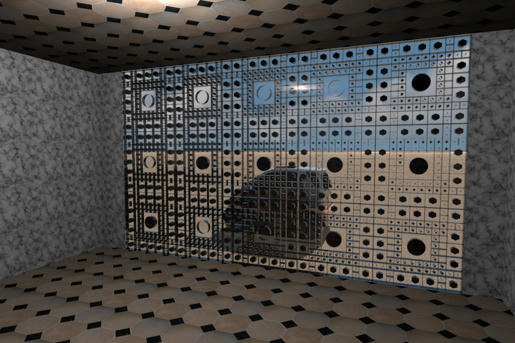
Unexpected rendering... Emmanuel, db4tech, Playing around I came across some unexpected behaviour in one of my renders. What you see is a wall made of transparent building blocks. Although all blocks are the same, the central cylinder in some of the blocks is rendered transparent. Maybe there is an explanation for this? Or is it an undocumented feature? ;-) I also include: - the large picture (1200x800 pixels) - the building block file (bouwsteen.sh3d) - the 3d model file (bouwsteen test2.sh3d) Inspiration came from this building by Jean Nouvel. EDIT After posting this thread, I noticed that I hadn't checked "glass transparency". I made new renders with glass transparency checked. The inside-out view is approx. the same, although different cylinders are transparent. When seen from the outside all cylinders are correctly rendered. Changing ceiling light to light bulbs has no effect on this strange behaviour. END EDIT Hans ---------------------------------------- Hans new website - under constuction hansdirkse.info |
| Posted by whippetsleek at Sep 24, 2010, 3:29:00 PM |
|
Re: Unexpected rendering... This is the result I got. All I did was ungroup all the blocks, and reinsert them into the wall. I would suspect (and guessing) the grouping was causing some faces to cause a conflict with the wall surface? The blocks though in my render are now the same thickness of the wall, so this probably wouldn't work for if you had a specific reason for a thicker wall block. ![]() ---------------------------------------- ![]() |
| Posted by hansmex at Sep 24, 2010, 4:32:27 PM |
|
Re: Unexpected rendering... Chris, Thank you very much. Indeed, I made the blocks slightly thicker than the wall, because they didn't show properly after inserting. About half the blocks were visible, the other half wasn't, even though I positioned and aligned the blocks very carefully using absolute coordinates. Thanks again. Hans ---------------------------------------- Hans new website - under constuction hansdirkse.info |
| Posted by whippetsleek at Sep 24, 2010, 5:21:30 PM |
|
Re: Unexpected rendering... I experimented with the grouping and leaving the thickness alone, and this is my result. It does look alot like yours... ![]() But then I noticed you had the Sunlight button ticked. I think I remember db4tech saying that the compute glass transparency won't have an effect if the sunlight button is ticked, so I unticked it, and moved the group of blocks to just pass the inner surface of the wall. I made the blocks slightly thicker so that no surface could conflict with each other, and this is my second result.... ![]() I think most of the trouble is coming from the surface of the wall face, and the block faces being directionally on the same plane. The engine has to decide which face is "dominant", and where the light will pass through. Of course, db4tech and puybaret will likely know more about this, and my attempts are only guesses. ---------------------------------------- ![]() |
|
|
Current timezone is GMT Dec 17, 2025, 10:20:43 PM |
