|
Sweet Home 3D Forum » List all forums » » Forum: Sweet Home 3D bar » » » Thread: Easy 3D light bulb positioning |
|
| Print at Dec 15, 2025, 7:38:28 PM | View all posts in this thread on one page |
| Posted by db4tech at Sep 6, 2010, 11:34:32 PM |
Easy 3D light bulb positioningHi All, Some of my original goals while working on 'full user lamp control'.
As an extra: I've also further tweaked the caustics "Compute glass transparency" which should help lights placed slightly further away to still travel through thick glass objects, this is only a slight improvement! The cross-hair idea (which can be improved) is just a simple workaround for now, to help users position their lights in 3D until we have a more permanent solution. Here are a couple of screen captures: Firstly the interface showing the cross-hairs in the 3D view. ![]() Next a render of the scene, to show that the cross-hairs don't render. ![]() Keen eyed users, will probably also noticed the simplified light bulb list, plus one extra addition. ![]() I've tried to also do all the new light bulb translations, there are a couple I couldn't manage. For users not wanting to use 'User lamp control' ("Use angle as power knob") the BasicLights.sh3f or BasicPlusExtraLights.sh3f will still be available! Do hope this will be helpful for users! db4tech |
| Posted by Puybaret at Sep 8, 2010, 9:11:21 AM |
|
Re: Easy 3D light bulb positioning Go forward db4tech. You can submit your own plug-ins and sh3f files as long as your releases are clearly named differently. AdvancedRenderingMini-1.6.1.sh3p sounds ok, but I would name the SH3F file as AdvancedRenderingLights-1.6.1.sh3f for the sake of homogeneity. Thank you again for your great contribution. ![]() ---------------------------------------- Emmanuel Puybaret, Sweet Home 3D creator |
| Posted by db4tech at Sep 9, 2010, 5:51:58 AM |
|
Re: Easy 3D light bulb positioning Thank you! I'm sorry to say I've got a bit stuck though. My original idea worked but found out it did cause another problem. So after undoing those changes, and having a rethink, I'm trying to add a new exception rule. Just to test my new exception rule idea works, I temporarily disabled the 2 lines below, I haven't learned enough yet, to know how to let shapeName.startsWith("sweethome3d_light") have it's own exception rule. The idea does work, I just need help on how to proceed, to give sweethome3d_light, its own exception rule.// Build a unique object name String uuid = UUID.randomUUID().toString(); String appearanceName = null; TexCoordGeneration texCoordGeneration = null; if (appearance != null) { if (ignoreWindowPanes && shapeName != null // && shapeName.startsWith(ModelManager.WINDOW_PANE_SHAPE_PREFIX) // && isDoorOrWindowChild(shape) && shapeName.startsWith("sweethome3d_light") ) { return; } texCoordGeneration = appearance.getTexCoordGeneration(); appearanceName = "shader" + uuid; boolean mirror = shapeName != null && shapeName.startsWith(ModelManager.MIRROR_SHAPE_PREFIX); exportAppearance(appearance, appearanceName, mirror, defaultShininess, silkRendering); } I have tried several things, to let sweethome3d_light have its own exception rule but I'm soon starting my next course semester and hoped to get this finished before then. So rather than struggle by myself, I thought maybe it's best to ask for help.Thank you in advance! Good idea about also using 1.6.1 extension for the lights. db4tech |
| Posted by Puybaret at Sep 9, 2010, 11:18:02 PM |
|
Re: Easy 3D light bulb positioning db4tech, you should use the || (or) operator. Thus, the condition you want to change: if (ignoreWindowPaneswill become: if (shapeName != nullGood luck! ![]() ---------------------------------------- Emmanuel Puybaret, Sweet Home 3D creator |
| Posted by db4tech at Sep 10, 2010, 4:30:17 AM |
|
Re: Easy 3D light bulb positioning Aw wow that works a treat! I was trying to add the new exception as a separate 'if' statement. Rather than just copy and paste your solution, I typed it in as thought that might help me learn the interactions between the various elements. Thank you so much for your quick helpful reply! ![]() db4tech |
| Posted by db4tech at Sep 12, 2010, 8:10:04 PM |
|
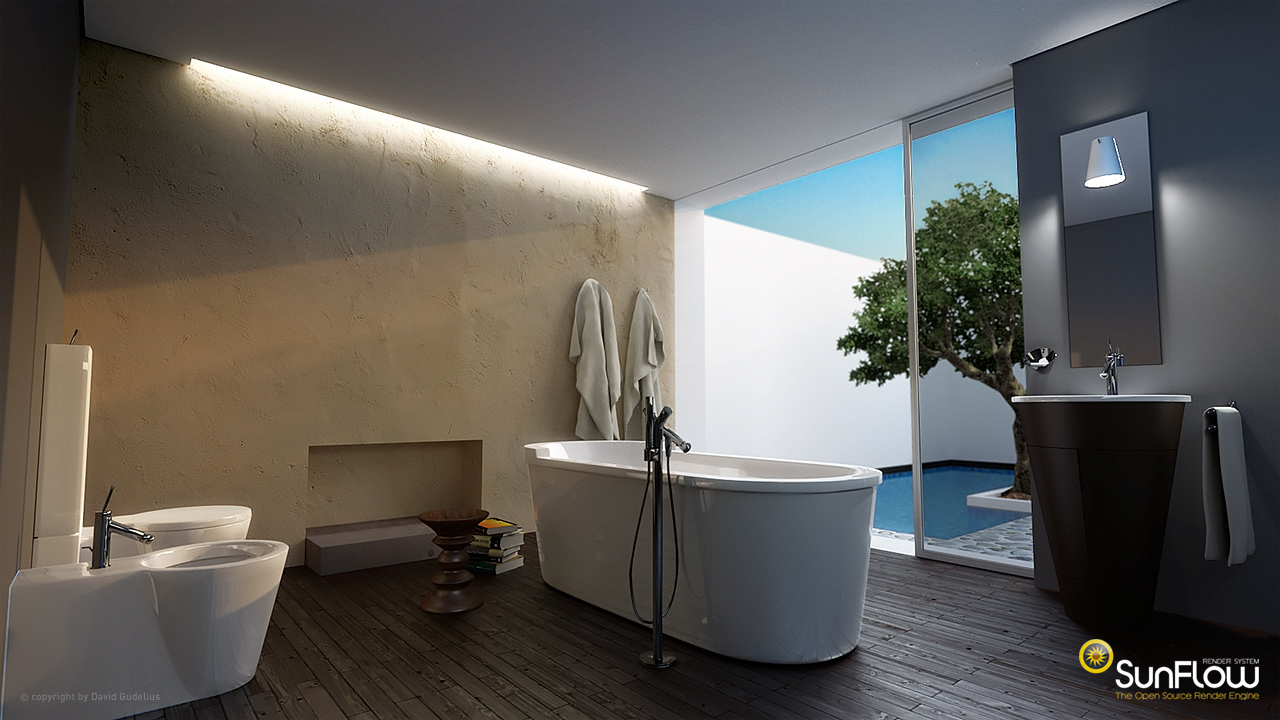
Re: Easy 3D light bulb positioning After seeing this brilliant Sunflow render by a user called zeitmeister, (it has had some post processing done but) for this post I'm mainly looking at how amazingly realistic the back wall looks! ![]() With that in mind I've been desperately trying to get bump mapping to work for the next release of the Advanced rendering plugin, so people could use it for their scenes and of course not forgetting Emmanuel's image competition! Sadly, so far, I haven't been able to manage it! Original source for the above image. db4tech |
| Posted by Puybaret at Sep 12, 2010, 11:23:06 PM |
|
Re: Easy 3D light bulb positioning db4tech, I don't know how you tried bump mapping in the advanced rendering plugin, but each time you want to try a new feature of SunFlow, you should try this: - Search the SunFlow feature you want in SunFlow wiki. For example, bump mapping is explained here. - Look at its SunFlow syntax, for example: modifier {- View SCParser class, which contains all the Java calls matching a SunFlow feature. - In this class, look for the syntax words found in the Wiki. Looking for "bump" will bring you to the line 613 in the parseModifier method. - Reproduce the Java syntax in your program from the calls made on the api object. For bump mapping it seems to be this: this.sunflow.parameter("texture", filePath);I hope this will help you. ---------------------------------------- Emmanuel Puybaret, Sweet Home 3D creator |
| Posted by db4tech at Sep 12, 2010, 11:33:53 PM |
|
Re: Easy 3D light bulb positioning Thank you for your quick reply! That is where I looked (I mean the SunFlow wiki) and you can see where I was going wrong, this is what I typed in as a test. this.sunflow.parameter("bump.texture", imagePath); this.sunflow.parameter("modifier", "bump_mapping"); this.sunflow.parameter("scale", 1); I got close! db4tech Edit: Well okay after looking again, maybe I wasn't so close! Thanks again! |
| Posted by db4tech at Sep 14, 2010, 8:09:40 PM |
|
Re: Easy 3D light bulb positioning Hi Emmanuel, Originally I decided to use "bump_mapping" after looking through the SunFlow scr modifiers section, I then used your shader command structure (compared to the shader commands in the SunFlow scr) as a point of reference. Sadly I've still not managed to get bump mapping to work, so rather than keep people waiting (I'll have to stop because of my course work) for the improved light positioning, I will release 1.6.1 now, then bump mapping can hopefully be added at a later stage. After helping a couple of users who struggled with the new lighting, because they didn't understand or know how to rotate the lights, I thought a slight reword might help? Use light angle as power knob. Becomes Light bulb angle controls brightness. It's slightly longer but still fits well in the mini interface. Hopefully this will then help users know that, it is just the light bulbs that need rotating (not all lamps) and that rotating the light bulb affects just its brightness. Please can you let me know what "Light bulb angle controls brightness" would be in French. Thank you in advance for your help. db4tech |
| Posted by Puybaret at Sep 15, 2010, 11:13:04 AM |
|
Re: Easy 3D light bulb positioning I think the few words of the label will never be clear enough to explain a bizarre idea (using "angle" for "power" !?!), that anyway will be programmed better and differently once integrated in Sweet Home 3D photo creation dialog. So I won't change the French version "Utiliser angle des lumières comme variateur". ---------------------------------------- Emmanuel Puybaret, Sweet Home 3D creator |
|
|
Current timezone is GMT Dec 15, 2025, 7:38:28 PM |