|
Sweet Home 3D Forum » List all forums » » Forum: Features use and tips » » » Thread: advanced photo stop renderring |
|
| Print at Dec 17, 2025, 1:23:12 PM | |
| Posted by fhoofman at Aug 11, 2010, 8:52:20 PM |
|
advanced photo stop renderring i'm using create advanced photo and the render always stops at light I put. here's the image: http://www.4shared.com/photo/TYRDZCHh/2_online.html I also attach the file http://www.4shared.com/file/_BKWgpwS/3_online.html is there anybody can help me why the render is stop? |
| Posted by hansmex at Aug 11, 2010, 11:06:37 PM |
|
Re: advanced photo stop renderring Yudi: I had a look at your model and noticed a few things. 1 - When rendering "fast" there was no problem, only when using "best". 2 - The "Schneider" sign doesn't render correctly on my computer (Ubuntu with SH3D 2.5): The sign is black and the lettering is black as well. The letters are visible because they have a speckled edge. This suggests to me that you used a GIF as texture and that there is a (slight?) problem with the transparency. 3 - When making all walls and all furniture white, your model rendered without a problem using the "best" setting. There have been some reports that there is a problem using large size textures. I also read that it is preferable to have textures with sizes that are a multiple of 2, e.g. 512x512 or 128x256 pixels. You may try to change some of your textures and see if this solves your problem. Hans ---------------------------------------- Hans new website - under constuction hansdirkse.info |
| Posted by Puybaret at Aug 12, 2010, 11:21:58 AM |
|
Re: advanced photo stop renderring There's still a problem in version 2.5 with some furniture models when they contain huge texture coordinates. I fixed it in the current beta. As the beta version can't run the advanced photo plug-in, please check if the bug is fixed by creating a photo with the best quality option. ---------------------------------------- Emmanuel Puybaret, Sweet Home 3D creator |
| Posted by fhoofman at Aug 12, 2010, 2:09:43 PM |
|
Re: advanced photo stop renderring I don't think it's just the texture. This also happens when I render a high resolution take a look at http://www.4shared.com/photo/HnKqWT9w/5_online.html http://www.4shared.com/file/cmNZJzMt/4_online.html |
| Posted by hansmex at Aug 12, 2010, 10:51:27 PM |
|
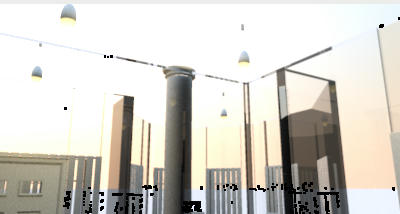
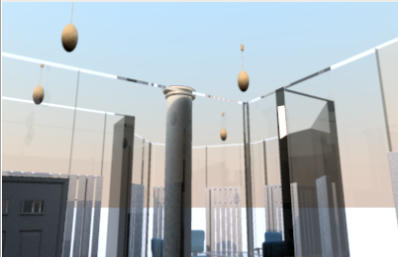
Re: advanced photo stop renderring Yudi: I did a few more tests on your design. Here are the results: 1 - I started with version 2.5 and used the "normal" advanced plug-in (not Phong or Uber). Picture size reduced to 400x212 pixels. All renders with view set to "virtual visitor". 1a - First I tried your file as downloaded, setting "fast". Result is that the render did NOT finish. Therefor, I did not try with setting "best". 1b - I changed all walls and all furniture to white, so I can see whether the problem lies with a texture or with a model. With everything set to white, the model rendered without problem, as you can see below. 1c - There are a lot of small black spots in the render. I'm not sure what causes these spots, but I think there has been a post about this "unwanted feature". 25-adv-best 2 - Reading Emmanuel's comment, I also did a few renders with version 2.6, the standard "create photo" setting, size 400x212 pixels, virtual visitor. 2a - Without changing walls or furniture the render completed without any problem, as you can see below. 26-best ![]() Conclusion: a - Indeed, version 2.6 seems to solve a few problems with textures. As soon as there will be a "real" 2.6 (or 2.7 or 2.8) you can use that version to make high quality renders using the plug-ins. b - As long as you have to use version 2.5 you will have to investigate which texture(s) is(are) causing the problem(s). Hans ---------------------------------------- Hans new website - under constuction hansdirkse.info |
| Posted by fhoofman at Aug 12, 2010, 11:13:11 PM |
|
Re: advanced photo stop renderring thank you Hans, you do me a great favor i'll wait for the final version of 2.6 :) |
|
|
Current timezone is GMT Dec 17, 2025, 1:23:12 PM |